


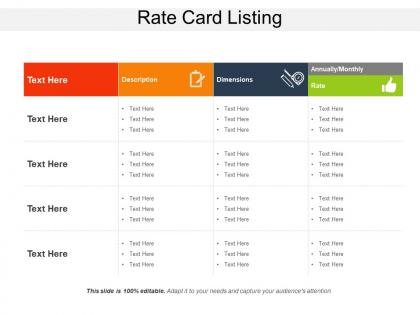
Rate card listing




Try Before you Buy Download Free Sample Product
 Impress Your
 Audience
 100%
100% Editable
 Save Hours
 of Time


Set the estimated value of a product and provide benefits to your customers by using the Rate Card Listing PowerPoint slide. Use this pricing strategy presentation template to acquire the goods, manufacturing cost, the marketplace, competition, market condition, brand, and the quality of a product. With the help of a value-based pricing PowerPoint graphic, you can maximize the profitability of products and measure the benefit provided by them to the customers. Take the assistance of value optimized pricing PPT slideshow to generate a buyer’s persona on the basis of demographic, mindset, language, and customer journey. Employ the premium pricing PowerPoint layout to decrease the price elasticity and increase the revenue and other profits related to the business. Included here are various high-quality icons with which you can make your presentation attractive and knowledgable. Hence, support the market positioning of the product and enhance the performance skills of your organization by downloading our ready-to-use demand-based pricing PPT theme.
People who downloaded this PowerPoint presentation also viewed the following :
Rate card listing with all 5 slides:
Turn the corner with our Rate Card Listing. They will point you in the right direction.

FAQs for
Honestly, it comes down to how complex the template is and what your client's budget looks like. Custom graphics and animations? Charge way more than basic layouts. Timeline matters too - rush jobs cost extra. I always factor in revisions because clients will ask for "one tiny change" like five times, I swear. You can price per template, per slide, or do package deals. Check what others are charging but don't sell yourself short. Start with your hourly rate, then bump it up if the template's gonna save them tons of time or make them look really polished.
So here's the thing - you can't price the same for everyone because budgets are totally different. Fortune 500 companies? They'll drop serious cash on slick executive templates. But a broke startup founder or college student needs something way cheaper. I learned this the hard way honestly. What works is making like 3 different pricing levels that match who you're selling to. Corporate tier gets the premium stuff, small business gets mid-range, and students get basic options. You'll capture way more sales this way instead of missing out on whole chunks of customers.
So premium templates should have way more design complexity - advanced animations, custom graphics, multiple layouts, that kind of stuff. Basic ones are just clean and straightforward with standard fonts. Honestly though, sometimes the simple ones convert better lol. For premium, throw in interactive elements, video integration, maybe some data visualization features. Custom fonts and branded color schemes are solid upgrades too. Oh and definitely make a feature comparison chart - clients love seeing exactly what they get for their money. Makes the pricing way less awkward to explain.
Check your rates monthly if you can swing it - quarterly at bare minimum. I learned this the hard way when I waited too long and realized I was way undercharging. Track your win/loss ratio because it tells you everything. Winning every single bid? You're probably too cheap. Losing most of them? Time to rethink your numbers. Set up some Google alerts for competitor pricing and block out 30 minutes monthly to review everything. Small tweaks beat massive overhauls that confuse your clients. The construction industry moves so fast now, you can't afford to just wing it anymore.
Honestly, pitch decks are where the money is - you're looking at $150-300 per template compared to maybe $50-100 for basic stuff. Sales presentations pay well too, especially if you're targeting SaaS companies since they're obsessed with conversion rates. Don't sleep on conference templates either. Speakers will pay good money to not look like amateurs on stage. Here's the thing - focus on high-stakes situations. When someone's about to lose a deal because their slides look terrible, that's when they'll actually pay premium prices. It's all about timing and desperation, really.
Dude, seasonal demand totally changes your pricing game. Back-to-school and Q4 planning seasons? That's when you jack up prices 15-25%. Holiday templates obviously blow up in Nov/Dec, corporate stuff peaks Q1 and Q3. I'd dig into your past sales data first - like actually sit down and map out those patterns. Then build the multipliers right into your rate card so you're not constantly tweaking prices. Honestly, most people forget about the slower months too. Drop prices a bit during dead periods. Way easier than scrambling to reprice everything when demand hits.
Honestly, bundling templates is a game changer. You'll save so much time not digging through different rate cards every time you need web design, mobile, and UX stuff. Everything's right there together. Way easier to catch when your pricing is all over the place too - like when you see them side by side, the gaps become super obvious. Clients love it because they can actually compare services without getting confused. Oh, and it makes you look more legit when they see your full range in one spot. I'd start with whatever services you're always combining anyway and work from there.
Definitely do a separate discount section instead of mixing it into your main rates. Show your standard pricing first, then add volume discounts, seasonal stuff, packages - whatever you've got. Way easier to update when things change (and they always do). I learned this the hard way after redoing my whole rate card like three times last year. Include the terms for each discount and any minimums. Oh, and don't forget expiration dates - clients need to know what's actually still valid. Keeps everything clean and you won't hate yourself later.
Customer feedback is your best friend for pricing reality checks. When clients keep pushing back or look shocked at your quotes, time to pivot. I'd track the patterns - are they saying templates seem overpriced? Comparing you to competitors? That's gold right there. Honestly, I've watched teams completely ignore this feedback then act surprised when deals tank. Set up something simple to log those pricing objections. You'll start seeing trends fast. Then you can tweak your tiers or bundle things differently. Short version: listen to what they're actually telling you about your rates.
So there's basically three ways they price this stuff. You can buy individual templates for like $15-50 each, which is fine if you only need one or two. Monthly subscriptions are way better value though - you get their whole library for one fee. Then some places do custom quotes if you want something totally specific. Most offer bulk discounts too, which is nice. Honestly? I'd grab a subscription first to see if their designs actually work for what you're doing. Once you figure out which companies don't suck, then maybe switch to buying individual ones. Way less risky that way.
Honestly, I'd just add a separate "Additional Services" section to your rate card. Way cleaner that way. List out flat fees or hourly rates for each customization you do. Some people build percentage markups into their base rates instead - like 15-30% extra for custom stuff - but that gets confusing fast. The separate section is more transparent, which clients actually appreciate. Just be super clear about what's included in your base rate vs what costs extra. Nobody likes surprise charges, you know? Oh, and define what counts as "customization" so there's no weird back-and-forth later.
Ugh, licensing stuff is such a pain - it can totally double your template costs, sometimes even triple them. Premium stock photos are the worst offenders, plus any fancy fonts or music/video elements. Each license stacks more fees on top. What makes it super annoying is some are per-use charges while others are flat rates, so your pricing gets all over the place. I learned this the hard way last year when I didn't check what was actually licensed beforehand. Now I always build in buffer costs because there's always some surprise fee hiding somewhere. Trust me, check everything upfront.
Definitely spell out ownership and who can modify what. Your clients need to know if they can customize templates or have to use them exactly as-is. The branding thing is huge - can they remove your logo or does it stay? I've seen so many fights over this lol. Also think about usage scope... is it one campaign only or can they keep using it forever? Oh and super important - add something about not reselling your templates to other people. That's where things get messy fast. Just be really specific about the do's and don'ts upfront so nobody gets confused later.
Multi-format templates can bump your pricing up or down - really depends how you set them up. Package deals might lower per-unit costs but boost your total project value. Separate pricing for each format? That gives you way more control, though honestly most people just get lost in all the options. Templates help you quote faster since everything's standardized across different deliverables. Start with maybe 3-4 format combos that clients actually ask for - I mean, why overcomplicate it? Build your rates around those and you're golden.
Dude, you gotta play up the fact that you're not just some random designer. Break down all that extra research time you're putting in - the industry jargon, compliance stuff, technical concepts that would make most people's heads spin. Honestly, generic designers can't even touch that level of expertise. When clients see examples of how your specialized templates actually solve their weird niche problems, they totally get why it costs more. Track those research hours too so you can back up your rates with real numbers. Position yourself as the expert who speaks their language.
-
Innovative and attractive designs.
-
Informative presentations that are easily editable.