

Security Dashboard To Manage User Access




Try Before you Buy Download Free Sample Product
 Impress Your
 Audience
 100%
100% Editable
 Save Hours
 of Time


Our Security Dashboard To Manage User Access are topically designed to provide an attractive backdrop to any subject. Use them to look like a presentation pro.
People who downloaded this PowerPoint presentation also viewed the following :
Security Dashboard To Manage User Access with all 7 slides:
Use our Security Dashboard To Manage User Access to effectively help you save your valuable time. They are readymade to fit into any presentation structure.





FAQs for Security Dashboard To
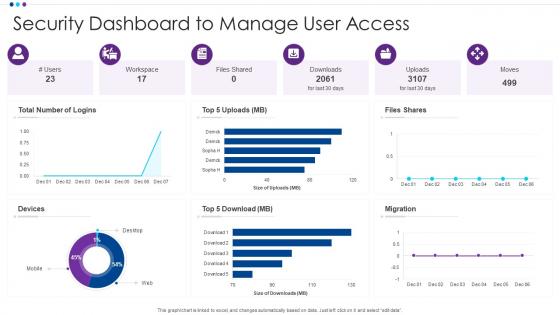
A User Access Security Dashboard should display failed login attempts, privileged account activities, access pattern anomalies, permission changes, and real-time threat alerts. These metrics enable organizations to streamline security monitoring by identifying suspicious behaviors, tracking compliance violations, and accelerating incident response, with many financial institutions and healthcare providers finding that comprehensive dashboards ultimately deliver enhanced threat detection and significantly reduced security breach response times.
Visual analytics enhance user access patterns understanding by transforming complex security data into intuitive charts, heatmaps, and trend visualizations that reveal anomalies, peak usage times, and potential threats. Through interactive dashboards, security teams can quickly identify suspicious login attempts, unauthorized access patterns, and compliance gaps across departments, ultimately enabling faster threat detection and more strategic security resource allocation.
Real-time monitoring serves as the backbone of User Access Security Dashboards by providing continuous visibility into user activities, access patterns, and potential security threats as they occur. This enables security teams to detect suspicious login attempts, unauthorized access requests, and anomalous user behavior instantly, ultimately delivering faster incident response and enhanced organizational security posture.
Organizations balance accessibility and security by implementing role-based access controls, multi-factor authentication, and adaptive security measures that adjust based on user behavior and risk levels. Through zero-trust frameworks and regular access reviews, companies in banking, healthcare, and retail streamline user experiences while maintaining robust protection, ultimately delivering seamless workflows and enhanced security compliance.
**INPUT**: What are the best practices for incorporating role-based access control (RBAC) into a dashboard? **OUTPUT**: Best practices for incorporating RBAC into dashboards include defining granular permission levels, implementing hierarchical user roles, establishing audit trails, creating dynamic content filtering, and ensuring seamless single sign-on integration. These approaches streamline security management by automating access controls, minimizing data exposure risks, and enabling scalable user management, with many organizations finding that strategic RBAC implementation ultimately delivers enhanced compliance and operational efficiency. [Word count: 58 words]
A dashboard helps identify insider threats by monitoring user behavior patterns, tracking access anomalies, flagging unusual data transfers, and analyzing login irregularities in real-time. Through automated alerts and comprehensive activity tracking, security teams can detect suspicious employee activities, implement immediate access restrictions, and prevent data breaches, ultimately enabling organizations to protect sensitive information while maintaining operational efficiency.
User access security dashboards should include failed login attempt alerts, unusual access pattern notifications, privilege escalation warnings, dormant account activations, and geographic anomaly alerts. These proactive monitoring tools enable organizations to detect potential breaches through real-time threat identification, automated response triggers, and behavioral analytics, ultimately delivering faster incident response and enhanced security posture.
Historical data analysis enhances user access security strategies by identifying patterns in breach attempts, tracking user behavior anomalies, and revealing recurring vulnerabilities across systems. Organizations leverage these insights to predict potential threats, optimize access controls, and strengthen authentication protocols, with many financial institutions and healthcare systems finding that data-driven security approaches reduce incidents by implementing proactive measures rather than reactive responses.
Integration challenges include compatibility issues with legacy systems, data synchronization complexities, potential security gaps during transition periods, and staff training requirements for new workflows. While these obstacles require careful planning, organizations across sectors like banking and healthcare find that strategic integration ultimately delivers enhanced visibility, streamlined access management, and stronger overall security posture.
User behavior analytics can be effectively presented through risk scoring visualizations, anomaly detection alerts, behavioral trend charts, activity timeline displays, and peer comparison metrics. These dashboard elements enable security teams to quickly identify suspicious patterns, investigate potential threats, and prioritize incident response efforts, with many organizations finding that intuitive UBA presentations significantly reduce investigation time and enhance overall security posture.
Essential dashboard features for GDPR and HIPAA compliance include audit trails, access logs, data breach notifications, consent management tracking, and automated compliance reporting capabilities. These features enable organizations to monitor user permissions, track data processing activities, and generate required documentation, with healthcare institutions and financial services finding that real-time compliance monitoring significantly reduces regulatory risks while streamlining audit processes.
Stakeholders can leverage dashboard insights to identify access pattern anomalies, assess compliance gaps, optimize resource allocation, and prioritize security investments based on real-time risk data. Through comprehensive analytics, organizations streamline policy enforcement, enhance audit readiness, and accelerate incident response times, with many financial institutions and healthcare providers finding that data-driven access governance delivers stronger regulatory compliance and operational efficiency.
Integration options for a comprehensive User Access Security Dashboard include identity providers like Active Directory and LDAP, SIEM platforms, cloud service APIs, HR systems, and compliance management tools. These integrations streamline user provisioning, enhance threat detection, and automate access reviews across multiple environments, with many organizations finding that consolidated visibility significantly reduces security gaps while improving operational efficiency.
Mobile-friendly design significantly enhances security dashboard usability for remote teams by enabling real-time threat monitoring, streamlined incident response, and seamless multi-device accessibility across locations. Through responsive interfaces and touch-optimized controls, distributed teams can quickly assess security metrics, coordinate responses, and maintain operational visibility, ultimately delivering faster threat resolution and improved security posture in increasingly mobile work environments.
Common pitfalls include overcomplicating the interface with excessive data points, neglecting real-time monitoring capabilities, failing to customize access levels for different user roles, and inadequate integration with existing security systems. These challenges can significantly impact operational efficiency, with many organizations finding that streamlined dashboards focusing on actionable insights, automated alerts, and role-based visibility deliver better security outcomes and faster incident response times.
-
Informative and engaging! I really like the design and quality of the slides.
-
Qualitative and comprehensive slides.