

Sprint timeline introduction powerpoint slides design




Try Before you Buy Download Free Sample Product
 Impress Your
 Audience
 100%
100% Editable
 Save Hours
 of Time


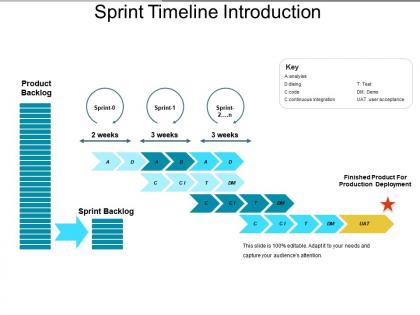
Display remaining and completed work done with this Sprint Timeline Introduction PowerPoint Slides Design. Anticipate practically whether the committed work will be delivered by the iteration end date. Sprint planning will help you with a proper analysis of your product development. Make it easy for your employees with sprint product management. See detailed figures on current and past progress. Incorporate the sprint product backlog template to let your people have a clear visual representation of the product backlog. Mention the stepwise linear process of product development without any hassle. Outline all the steps from analysis coding, continuous integration, testing, to presenting the demo. Encourage your team to confront any difficulties sooner and more decisively using agile sprint planning. Predict your work progress effortlessly. Project an up-to-date status of your work using our agile product PPT roadmap. This PowerPoint template is simple and precise. Make an easy to read and comprehensive presentation for your audience.
People who downloaded this PowerPoint presentation also viewed the following :
Sprint timeline introduction powerpoint slides design with all 5 slides:
Take the call with our Sprint Timeline Introduction Powerpoint Slides Design. Be certain to have the best answers in hand.


FAQs for Sprint timeline introduction
So basically you've got five main parts to work through. Sprint Planning kicks things off - that's where everyone commits to what they'll tackle. Then you've got those daily standups (honestly, they're way more helpful than they sound). Sprint Review is demo time, which is actually pretty satisfying when you get to show off what you built. After that comes Sprint Retrospective - just reflecting on what worked and what was a mess. Oh, and Sprint Refinement happens throughout to keep your backlog ready. Most teams run 1-4 week cycles depending on what feels right. I'd map out your first couple sprints on a calendar so nobody's confused about timing.
Honestly, just look at what your team's done before - that's your best bet. Break stuff down into smaller pieces so you're not guessing on huge chunks. Some teams do story points first then convert to hours, others skip straight to time estimates. Whatever works, you know? Don't forget about code reviews and testing time though - plus all those random interruptions that always happen. Get everyone involved when you're estimating since they actually know the work better than you do. Oh and start conservative! You can always speed up once you figure out your team's actual pace. I learned that one the hard way.
Definitely grab a sprint tracking tool - Jira and Azure DevOps are solid, but honestly Trello works fine if you're a smaller team. Set up your user stories and story points, then those burndown charts will show you if you're actually hitting your targets or just pretending everything's fine. Daily standups get so much better when people can see real data instead of everyone just saying "yeah, making progress." Oh and seriously, pick whatever tool your team will consistently use. I've seen too many fancy dashboards that just sit there collecting digital dust because half the team can't be bothered to update them.
Hit your biggest tasks first - the ones tied to your sprint goal or stuff that's blocking teammates. I rank by business value, then think about how complex or risky each one is. Don't just knock out easy wins (though tbh I totally do this sometimes when I'm feeling overwhelmed). Finish entire user stories instead of bouncing around between half-done work. Here's what works for me: save your hardest work for when you've got the most energy, then do the small fixes later when your brain's fried. Way better than the other way around.
Honestly, scope creep will be your worst enemy - stakeholders always want "one tiny change" halfway through. Tasks you think are simple? They'll turn into total nightmares. Then there's all the dependency drama when someone's work gets stuck waiting on another person's stuff. Sarah can't finish the frontend because the API isn't ready, you know? Oh, and random bugs from old sprints love popping up at the worst times. External teams will definitely mess with your timeline too. Pro tip: always pad your estimates and master the art of "sounds great for next sprint!"
Oh man, retros are game-changers for sprint planning. They show you what's actually dragging your team down or helping you crush it. Like, you might realize those random "quick sync" meetings are destroying your dev time (seriously, why do they multiply like rabbits?). Or maybe certain story types always blow past your estimates. Take those insights and tweak your capacity planning. Adjust your story points. Build in better time buffers. The trick is actually doing something with what you discover instead of just nodding along and forgetting about it by next week.
Dude, you gotta get stakeholder input during sprint planning - like, actually listen to what they're saying about priorities and potential issues. I learned this the hard way when I kept getting blindsided by dependencies nobody mentioned. Their feedback helps you estimate way more accurately too. Look, when people feel heard from the start, they're not gonna freak out if timelines shift mid-sprint. Honestly, I think most timeline disasters happen because teams skip this step and just wing it. Get their thoughts early and check in regularly. Don't wait until demo day to find out you built the wrong thing.
Yeah, definitely push back on scope creep mid-sprint. The whole point is protecting your team's focus, right? When stakeholders try adding new stuff, remind them the sprint scope was already agreed on during planning. Changing it halfway through just derails everything - I've watched teams get completely burned out trying to fit in every "quick addition" that pops up. If it's genuinely urgent, talk to your product owner about maybe swapping it for existing work. But don't just pile more on top. Write those requests down for next sprint planning instead.
Honestly, most sprint failures come down to terrible planning upfront. Don't pack your sprints like you're playing Tetris - give your team breathing room. Break big stories into bite-sized chunks so nobody's staring at some massive task all week. Daily standups aren't optional, even when (especially when) things get chaotic. Burndown charts will save your ass - watch them like a hawk and cut scope early if needed. Way better to ship three solid features than half-finish six. Oh, and actually stick to your definition of done instead of just having it collect dust on the wall.
So Agile breaks everything into short sprints - usually 1-4 weeks. Start each one with sprint planning, do daily standups (yeah, they're actually useful), then wrap up with retrospectives. The whole idea is shipping working stuff regularly instead of planning forever and delivering nothing. Build in extra time for testing and fixes since things will change - that's literally the point. Oh, and don't let people skip or reschedule those ceremonies. I know they seem like meetings for the sake of meetings, but they're what keeps everyone on the same page and prevents sprints from turning into chaos.
Time zones are gonna be your biggest headache - trust me on this one. Map out when everyone's actually online together first. You'll need way more buffer time since you can't just tap someone on the shoulder anymore. Some folks might have crappy wifi or distractions at home, so think about that when dividing up tasks. Finding overlap hours for standups is weirdly harder than you'd expect! Everything needs to be written down now since you can't peek at screens. Oh, and async communication becomes your best friend - people respond when they can, not instantly.
Ugh, sprint timeline issues are the worst! Two main options though - extend the current sprint or dump unfinished stuff into the next one. Personally, I lean toward extending a few days if it's some major blocker hitting everyone. Way less stressful than that last-minute scramble. For smaller hiccups? Just move those stories back to your backlog and tackle them next time. Oh, and definitely don't be that person who waits until the final day to mention problems. Get your team together for a quick chat once you see trouble brewing - making timeline calls solo never ends well.
Honestly, burndown charts are your best friend here - they show progress instantly. Kanban boards work great too since you can actually see what's moving vs what's totally stuck. Daily standups help, but focus on blockers and timeline risks instead of boring status updates. I always color-code everything by priority (maybe overkill but whatever, it works). Put your timeline somewhere central like Confluence so stakeholders can check without constantly messaging you. Oh, and update it regularly or people will stop trusting your timelines completely. That's probably the most important part tbh.
Honestly, it depends on what you're working on. Most software teams do 2-week sprints - that's like the default everyone goes with. But hardware teams? They need way more time, maybe 4-6 weeks, because you can't just code your way out of waiting for a physical prototype to arrive. Marketing moves crazy fast so they might do 1-week sprints. Manufacturing and big enterprise stuff usually takes 3-4 weeks since their testing cycles drag on forever. Just start with 2 weeks and see how it feels. If your team's constantly rushing or sitting around waiting, adjust from there.
You know how sprint timelines mess with everyone's heads? Tight deadlines stress people out and they rush everything. But make sprints too long and your team loses steam - nobody cares anymore. I've watched so many teams just burn out from constant crunch mode. It's brutal. Quality goes down the drain because people start cutting corners to hit those impossible dates. Technical debt piles up fast. Most teams do best with 1-2 week sprints. Challenging but not insane. Oh, and definitely get your team involved in setting those timelines - they'll actually care about hitting dates they helped pick.
-
Use of different colors is good. It's simple and attractive.
-
Great designs, really helpful.