


Weekly calendar for logistics and supply chain division infographic template




Try Before you Buy Download Free Sample Product
 Impress Your
 Audience
 100%
100% Editable
 Save Hours
 of Time


Derive factual results using this Weekly Calendar For Logistics And Supply Chain Division Infographic Template. Deploy this PowerPoint template to make and display prospective strategies using impressive graphics that enhance the visual quotient of the presentation. This infographic template also helps in elevating the aesthetic appeal of the presentation, making it useful for every organization. Apart from this, things and projects can be visualized from the onset using this PPT design. As this PowerPoint visual provides an abundance of information in a single layout, it can impress any viewer or higher managerial staff. It also boosts business actions by presenting flawless presentations. The biggest advantage of this slide is that it can be reproduced in various formats, including Google Slides. Therefore, download it now to present a unique presentation every time.
People who downloaded this PowerPoint presentation also viewed the following :
Content of this Powerpoint Presentation
Description:
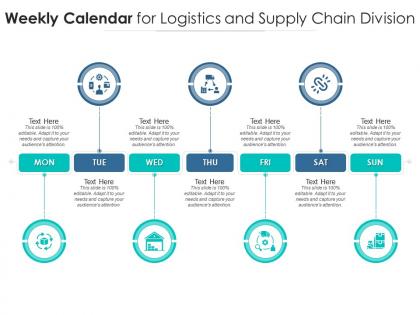
This image shows a slide titled 'Weekly Calendar for Logistics and Supply Chain Division,' designed as a seven-day planner for business purposes. Each day of the week, from Monday to Sunday, is represented with a circular icon and an accompanying space for text. The user is encouraged to modify the content to suit their specific requirements.
The icons within the circles represent different aspects of logistics and supply chain activities: Monday's icon features a globe with boxes, implying international shipping; Tuesday shows a factory, suggesting manufacturing; Wednesday has a truck, implying distribution; Thursday's icon appears to be a barcode, relating to inventory management; Friday has a customer service headset, indicating customer relations or support; Saturday shows a hand with a dollar sign, hinting at financial transactions or sales; Sunday's icon illustrates a box with arrows, which may signify returns or reverse logistics. Each icon relates to a key component of the logistics and supply chain industry.
Use Cases:
The seven industries where these slides can be applied include:
1. Manufacturing:
Use: Scheduling production and logistics activities
Presenter: Operations Manager
Audience: Production Team
2. Retail:
Use: Organizing delivery and inventory restocking
Presenter: Supply Chain Coordinator
Audience: Store Managers
3. E-Commerce:
Use: Planning for order fulfillment and customer service operations
Presenter: E-commerce Operations Lead
Audience: Customer Support and Fulfillment Teams
4. Transportation Services:
Use: Assigning vehicle routes and maintenance schedules
Presenter: Fleet Manager
Audience: Drivers and Maintenance Crew
5. Warehousing:
Use: Mapping out weekly inventory audits and shipment processing
Presenter: Warehouse Supervisor
Audience: Warehouse Staff
6. Pharmaceutical:
Use: Tracking drug manufacturing and distribution timelines
Presenter: Supply Chain Analyst
Audience: Pharmaceutical Logistics Team
7. Agriculture:
Use: Aligning harvest, processing, and distribution windows
Presenter: Logistics Planner
Audience: Farmers and Distributors
Weekly calendar for logistics and supply chain division infographic template with all 2 slides:
Use our Weekly Calendar For Logistics And Supply Chain Division Infographic Template to effectively help you save your valuable time. They are readymade to fit into any presentation structure.
FAQs for Weekly calendar for logistics and supply chain
Honestly, you need four main things for a solid weekly logistics calendar. First - shipment schedules with all your pickup and delivery dates. Track your inventory levels regularly too, or you'll get caught with empty shelves (been there). Make sure everyone knows what they're doing with clear team assignments. Buffer time is huge - stuff always goes sideways when you least expect it. Also throw in vendor communication windows and any seasonal weirdness that might mess with your operations. Don't overthink it though. Keep it detailed enough to actually help but not so crazy detailed that updating it becomes a whole job. Start basic, then build from there.
Start by checking if your weekly logistics tasks actually connect to your bigger supply chain goals. I do a monthly calendar review to catch when I'm scheduling stuff that doesn't match what I'm supposed to prioritize. Honestly, it's wild how often teams get stuck doing the same weekly routine that barely impacts their main objectives. Your weekly priorities should reflect seasonal patterns, what suppliers can actually deliver, and customer commitments. Oh and quarterly audits help too - just block some time to see if your weekly rhythm supports your strategic stuff.
Check out Monday.com or Asana - both are solid for tracking your weekly shipments and team stuff visually. Slack's a lifesaver for real-time updates, just set up dedicated channels so you're not buried in random messages. If you've got actual fleet deliveries, Route4Me handles route optimization pretty well (though I've only used the free trial). Honestly, Google Calendar works fine for basic scheduling, but these other tools will cut down your coordination time big time. Oh, and don't go overboard picking features right away. Start simple and add complexity as you figure out what you actually need.
Check it weekly at minimum, but daily is way better if you're busy. I do a quick morning scan - takes like 2 minutes to spot carrier delays or inventory issues that cropped up overnight. Weekly deep dives help you catch bottlenecks before they blow up into real problems. Honestly, the trick is just making it automatic. Set a phone reminder and actually follow it, because waiting until stuff hits the fan is the worst time to realize your schedule's completely screwed.
Don't jam pack your calendar with every tiny detail - learned that the hard way. Buffer time is huge because stuff always takes longer than expected. Keep it flexible too since logistics gets messy fast. One master calendar beats having separate ones scattered everywhere, trust me. Getting input from warehouse and transport people upfront saves you from headaches later. I'd say start basic first - you can always make it fancier once you've got the hang of it. Missing stakeholder feedback will definitely come back to haunt you.
Seasonal stuff totally changes how you plan your weekly schedule - demand goes nuts throughout the year. Q4 is honestly the worst time for trying to map anything out. You can't just use your normal weekly templates when winter weather screws up deliveries or summer shipping volume explodes. I'd suggest creating different calendar versions for each season way ahead of time. Map out which weeks are gonna be disasters and tweak your planning cycles early. That way you're not losing your mind when things inevitably go sideways during peak times.
So technology just takes care of all that boring repetitive crap you'd usually waste hours on. Like your scheduling software will automatically map delivery routes, update inventory, send deadline alerts - the whole deal. Honestly such a lifesaver compared to when we tracked everything in those messy spreadsheets (what a nightmare that was). Modern systems play nice with whatever tools you're already using too. You can set up workflows that auto-adjust schedules when stuff goes sideways or priorities change. I'd start by figuring out what tasks you do exactly the same every week, then find automation tools for those first.
Oh man, holidays totally screw up delivery schedules. Traffic gets insane, carriers have limited capacity, and your usual time windows shrink big time. I got burned during March Madness once - completely forgot about the chaos it creates! Now I always check both national holidays and local stuff like festivals or big games when mapping routes. Honestly, sports events are sometimes worse than actual holidays. Start planning at least a month out and have backup carriers lined up. Those peak disruption periods will bite you if you're not ready.
Honestly, just block out time slots in your calendar for other departments and stick to it. I do 30 minutes with procurement Mondays, sales Wednesdays, warehouse Fridays - whatever works for your setup. Don't let these get bumped when stuff gets hectic (which it always does). Also throw in some shared deadlines that multiple teams actually care about, like when marketing needs shipping confirmations. Communication has to be scheduled, not something you remember at 5pm on Friday. Figure out which departments you talk to most and start there. Makes a huge difference once it becomes routine.
Honestly, I'd focus on the basics first - on-time delivery rates and cost per shipment are huge. Those pickup/delivery windows matter more than you think. Driver utilization is another big one, plus customer complaints (nobody wants angry customers blowing up your phone). Weekly tracking works best, then compare month-over-month to spot trends. Don't go crazy with metrics right away though - pick maybe 3 or 4 to start. You can always add more once you've got a handle on things. Schedule adherence is key too since it shows whether your planning actually works in real life or just looks pretty on a spreadsheet.
Pull your last 6 months of shipping data and dig into it - there's gold in there, I promise. Weekly patterns will jump out once you start looking. Set up some basic dashboards that ping you when deliveries are running behind. Transit times, carrier performance, seasonal rushes - track all that stuff because it helps you see bottlenecks coming. Honestly, predicting demand spikes gets way easier when you've got the historical data mapped out. Then you can actually plan for extra capacity or backup routes instead of scrambling last minute. The pattern recognition thing really works once you get into it.
Honestly, that Eisenhower matrix thing everyone talks about? It actually works. Sort your stuff into urgent vs important first. Hit the time-sensitive deliveries right away, then knock out anything that'll create bottlenecks later. I'm weirdly obsessed with blocking Monday mornings for weekly planning - catches problems before they explode. Batch similar tasks together too, like doing all vendor calls at once or planning routes in one go. Color-coding by priority sounds nerdy but you'll thank me when you can instantly see what's on fire versus what can wait till Thursday.
Honestly, a weekly logistics calendar is a lifesaver for tracking your inventory cycles. You'll start seeing patterns way before you actually run out of stuff. Map out when deliveries are coming against what you've got in stock right now - that shows you exactly when to reorder and your real buffer time. Suppliers love it when you can give them a heads-up weeks in advance too. But here's the thing that really clicked for me: once everything's visual, those "random" shortages suddenly make total sense. Just start with a basic weekly grid, plot your delivery dates and current stock levels, then hunt for gaps.
Honestly, you gotta build buffer time into everything and have backup plans ready. Figure out which shipments are absolutely critical and focus on those when shit hits the fan - holidays, bad weather, whatever. I got burned hard during those port strikes last year, never again! Don't put all your eggs in one carrier basket either. Map out alternative routes beforehand so you're not scrambling later. Weekly calendar reviews are clutch - stay ahead of problems instead of just putting out fires. Oh, and keep your suppliers in the loop about delays. Real-time communication saves your ass every time.
Honestly, just block out time slots each week for the green stuff - treat it like any other must-do task. Monday mornings are perfect for route planning to cut fuel waste and bundle shipments. I'd also schedule regular carrier check-ins about their sustainability game, plus weekly carbon tracking (boring but necessary). Don't forget packaging reviews - there's always some eco-friendly option you haven't tried yet. Oh, and definitely carve out time for damage control on returned goods since that waste adds up fast. Once it becomes routine instead of something you squeeze in randomly, you'll actually see results.
-
Commendable slides with attractive designs. Extremely pleased with the fact that they are easy to modify. Great work!
-
Top Quality presentations that are easily editable.
-
Best Representation of topics, really appreciable.
-
Easily Understandable slides.
-
Wonderful templates design to use in business meetings.