

Account payable dashboard with total income and expense




Try Before you Buy Download Free Sample Product
 Impress Your
Audience
 100%
Editable
 Save Hours
of Time


Our Account Payable Dashboard With Total Income And Expense are topically designed to provide an attractive backdrop to any subject. Use them to look like a presentation pro.
People who downloaded this PowerPoint presentation also viewed the following :
Content of this Powerpoint Presentation
Description:
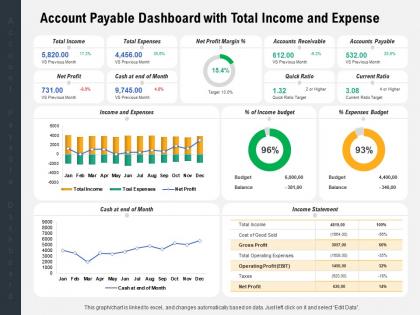
The image shows a comprehensive Account Payable Dashboard with Total Income and Expense metrics, detailing various financial aspects of an organization. It is divided into sections including Total Income, Total Expenses, Net Profit Margin %, Accounts Receivable, Accounts Payable, and Quick and Current Ratios. It features graphs and charts, such as a bar graph indicating monthly Income and Expenses, a line graph for Cash at the end of Month, a donut chart for the percentage of Income Budget and Expenses Budget, and an Income Statement with percentage comparisons to highlight financial efficiencies or inefficiencies.
Use Cases:
This slide can be effectively used in various industries for different purposes, as you've outlined:
1. Financial Services:
Use: Visual presentation of financial health for internal analysis or stakeholder reports.
Presenter: Financial Analyst or CFO.
Audience: Shareholders or management team.
2. Retail:
Use: Understanding fiscal performance, including income, expenses, and net profit trends.
Presenter: Store Manager or Finance Department Head.
Audience: Regional managers or executive board members.
3. Healthcare:
Use: Monitoring hospital or clinic's financial operations, budget adherence, and cash flow.
Presenter: Hospital Administrator or Financial Officer.
Audience: Healthcare administration and department heads.
4. Manufacturing:
Use: Tracking production costs, revenue, and financial KPIs for manufacturing processes.
Presenter: Operations Manager or Finance Controller.
Audience: Executive management and operational teams.
5. Education:
Use: Managing income and expenses for educational institutions, budget implementation, and financial planning.
Presenter: Finance Director or Administration Head.
Audience: School board members or university trustees.
6. Real Estate:
Use: Analysis of property portfolio profits, expenses, and budget forecasting.
Presenter: Real Estate Financial Analyst or Portfolio Manager.
Audience: Investors and company leadership.
7. Technology:
Use: Assessing the financial status of tech projects, development costs, and revenue generated.
Presenter: Tech Company CFO or Finance Team Lead.
Audience: Project stakeholders and executive leadership.
Account payable dashboard with total income and expense with all 2 slides:
Use our Account Payable Dashboard With Total Income And Expense to effectively help you save your valuable time. They are readymade to fit into any presentation structure.

FAQs for Account payable dashboard with total
Honestly, start with days payable outstanding (DPO) and aging buckets - those'll show you what's overdue. Cash flow forecasting is clutch too. Track how long invoices take to process because trust me, vendors get real cranky about late payments. I'd also watch early payment discounts - it's annoying how much money gets left on the table there. Oh, and definitely flag duplicate payments and exceptions needing manual review. The whole point is seeing what's due when in real-time. Vendor payment terms compliance matters obviously. Start simple, then add whatever metrics your team actually looks at daily.
So basically an AP dashboard shows you everything happening with your invoices in real time. You can see what's stuck waiting for approval, what's due soon, all that stuff. Way better than scrolling through a million emails trying to figure out where things stand. It catches problems faster and lets you set up rules so the boring stuff gets approved automatically. All your vendor info lives in one spot too - honestly saves so much time when you're not digging around for payment history. Oh, and definitely set up those due date alerts or you'll forget something important.
Honestly, manual data entry is where everything goes wrong with AP dashboards. You're constantly dealing with typos when someone's entering invoice amounts or vendor details by hand - it's such a pain. Automated systems just pull everything straight from your invoices and ERP, so no more duplicate entries or missed payments messing up your data. The auto-matching between POs and invoices is actually pretty smart too, catches stuff you'd probably overlook. I mean, if you want your dashboard numbers to be remotely accurate, you really need automation. Otherwise you're just looking at garbage data half the time.
Dude, real-time dashboards are a game changer for AP. You'll catch payment delays and cash crunches right when they happen instead of finding out weeks later through some boring monthly report. I swear it's like finally being able to see what's actually going on. When you've got good cash flow, you can jump on early payment discounts. Tight week? Prioritize the critical stuff and dodge those annoying late fees. Monday morning coffee + quick dashboard check = you know exactly what fires need putting out first. Way better than flying blind, trust me.
Figure out what's actually breaking first - which numbers does your team check every morning? Cash flow, aging reports, vendor stuff, whatever drives real decisions. Don't dump everything on one screen (I made that mistake once and it was useless). Different people need different views anyway. Your AP team wants details while executives just want the summary. Real-time updates are crucial if you're connecting to your ERP. Oh, and definitely test it with the people who'll actually use it before you launch - saves so much headache later.
Look at your AP data to spot spending patterns and seasonal trends - that stuff will save you when cash gets tight. Track average payment times and monthly variations. Which vendors are always late with invoices? Super useful for forecasting. I'd set up alerts for when current spending looks way different from your usual patterns. Honestly, catching those weird spikes early has saved my butt more times than I can count. Use all that historical data to build better budgets and figure out realistic payment schedules. Your future self will thank you.
Honestly, the cash flow visibility alone makes it worth it. You'll actually see when payments are due instead of getting surprised by vendor calls. Those early payment discounts? You're probably leaving money on the table there - I know I was before I started tracking them properly. The forecasting piece is huge too, like you can plan weeks ahead rather than panic-paying everything last minute. Start with your biggest vendors first and set up alerts for their payment dates. Oh, and it'll catch duplicate invoices which happens more than you'd think.
So these AI dashboards are pretty sweet for vendor relationships. They catch early payment discounts you'd normally miss and predict your cash flow way better. The cool part? They actually tell you which vendors are rock solid (your favorites) versus the ones causing headaches. Honestly, vendors notice when you're not screwing up payments constantly. Fewer errors, faster processing - they remember that stuff. Oh, and disputes get flagged early instead of becoming major drama later. Start with automated scheduling though. Vendors love knowing exactly when they'll get paid, and you'll probably score better terms because of it.
Role-based access is huge - people should only see what they need for their specific job. MFA is non-negotiable at this point, passwords by themselves are basically useless now. Encrypt everything in transit and at rest, and definitely mask sensitive stuff like vendor bank details. Oh and do regular access reviews since people switch roles constantly (or leave and somehow still have access lol). Activity logs are clutch for tracking who's poking around where. Start there and you'll be way ahead of most companies.
Your AP dashboard is basically fraud detection on autopilot. It flags weird stuff - duplicate payments, invoices that don't match POs, vendors billing suspiciously round amounts (fraudsters are obsessed with clean numbers like $5,000, I swear). Watch for payments to random new vendors or invoices processed crazy fast compared to your usual timeline. Set alerts for anything over your comfort threshold and actually check those aging reports for inconsistencies. Pro tip: don't just let exception reports rot in your inbox - that defeats the whole purpose.
Real-time data connection is huge - your dashboard showing yesterday's numbers defeats the whole point. Make sure whatever you pick plays nice with your current ERP and accounting stuff without needing an IT genius to hook it up. Customizable reports are key since every team tracks different metrics. Drill-down features let you dig into specific invoices when the numbers look weird. Interface really matters too (learned this the hard way) - if it's a pain to use, nobody will touch it. Oh, and demo a few options with your actual data first. Way better than guessing.
Honestly, being able to handle AP stuff on your phone is pretty clutch. You can approve invoices while you're stuck in traffic or check vendor payments when you're traveling for work. The push notifications are what really save you though - no more missing payment deadlines because you forgot to check your email. I love that you can just snap a photo of paper invoices and upload them right from the app. My advice? Turn on mobile notifications for the high-priority stuff first. Trust me, catching problems early beats dealing with angry vendors later. It's way better than being glued to your desk all day.
Start with invoice processing time and cost per invoice - those are your bread and butter metrics. On-time payment percentage is huge too. Don't sleep on DPO (days payable outstanding) since cash flow timing can make or break you. Early payment discount capture rate shows if you're actually saving money or just leaving it on the table. Invoice accuracy and how many need manual fixes tell you where your process is breaking down. Vendor satisfaction scores are worth tracking if you can swing it - angry vendors become your problem real quick. Build your dashboard around these basics first, then you can get fancy with other stuff once you figure out what's actually causing headaches.
Okay so basically an AP dashboard shows you everything happening with your payments in real-time, which auditors absolutely love. You can track who approved what invoices and when payments went out - all that documentation stuff they're always asking for. It automatically catches weird things like duplicate payments or missing approvals before they blow up into bigger issues. During audit season (ugh), you can just generate reports instantly instead of digging through a million spreadsheets like some kind of data archaeologist. Set up alerts for the important compliance stuff and you won't be staying up at night wondering if you missed something.
Don't cram everything onto one screen - it's like information overload and people just ignore it. Skip the vanity metrics too (seriously, who cares about total invoice count?). Your data needs to be real-time or at least labeled clearly, because old AP info will screw up cash flow planning. Different teams need different views - what finance wants isn't what procurement cares about. I'd start with maybe 3-5 metrics your team actually asks about every day. You can always add more later once you see what's working.
-
Topic best represented with attractive design.
-
Professional and unique presentations.
-
Very unique and reliable designs.
-
Innovative and Colorful designs.
-
Top Quality presentations that are easily editable.
-
Qualitative and comprehensive slides.
-
Appreciate the research and its presentable format.
-
Content of slide is easy to understand and edit.