


Slides de apresentação em powerpoint de modelos de metodologia ágil




Try Before you Buy Download Free Sample Product
 Impress Your
 Audience
 100%
100% Editable
 Save Hours
 of Time


Gestão de software ágil refere-se a metodologias de desenvolvimento de software que são baseadas no conceito de desenvolvimento iterativo. Aqui está um modelo de metodologia ágil projetado com competência que mostra uma maneira de gerenciamento de projetos que divide um projeto em etapas. O template abrange a colaboração de equipes multifuncionais auto-organizadas, o que leva à evolução de critérios e soluções. Scrum e Kanban são duas das metodologias ágeis mais comuns usadas neste modelo. Além disso, o modelo fornece informações sobre as fases e objetivos das Metodologias Ágeis. Além disso, nosso modelo abrange detalhes sobre técnicas ágeis e dimensionamento do modelo de transformação ágil e Diagrama Ágil - Software Design Thinking e Fases de Inicialização Enxuta, etc. Nosso modelo de TI também abrange informações sobre a abordagem ágil para desenvolvimento de software. Além disso, este módulo fornece detalhes sobre o ciclo de vida Agile, o papel da equipe Agile e técnicas orientadas ao aprendizado para a equipe Agile. Ele também destaca as métricas de avaliação de desempenho Agile e os atributos de pós-implementação da arquitetura desenvolvida pela empresa Agile. Fazer alterações no modelo é tão fácil quanto um pedaço de bolo. Personalize agora este modelo 100% editável com base nos requisitos.
People who downloaded this PowerPoint presentation also viewed the following :
Conteúdo desta apresentação em PowerPoint
Slide 1 : Este slide apresenta os Modelos de Metodologia Ágil. Indique o nome da sua empresa e comece.
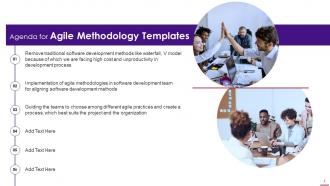
Slide 2 : Este slide apresenta a Agenda para Modelos de Metodologia Ágil.
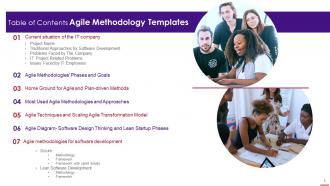
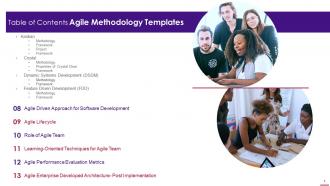
Slide 3 : Este slide apresenta o Índice da apresentação.
Slide 4 : Este é outro slide que continua o Índice da apresentação.
Slide 5 : Este slide destaca o título dos tópicos que serão abordados a seguir no modelo.
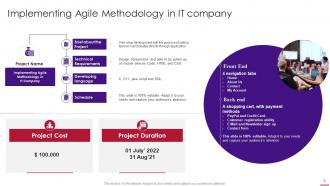
Slide 6 : Este slide mostra a implementação da metodologia ágil em uma empresa de TI.
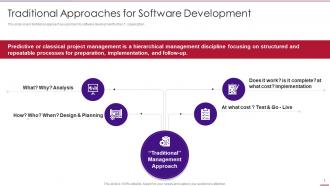
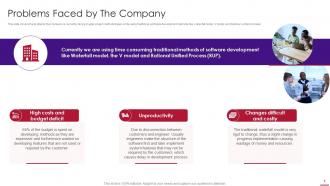
Slide 7 : Este slide aborda a abordagem tradicional como um problema para o desenvolvimento de software para a organização de TI
Slide 8 : Este slide aborda os problemas que a empresa enfrenta atualmente em metodologias ágeis de projetos.
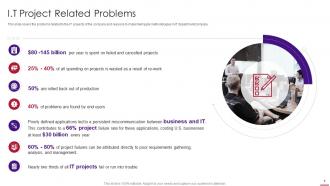
Slide 9 : Este slide aborda os problemas relacionados aos projetos de TI da empresa e os motivos para implementar metodologias ágeis no departamento/empresa de TI.
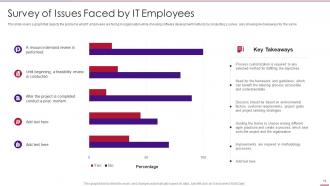
Slide 10 : Este slide cobre um gráfico que mostra os problemas que os funcionários de TI estão enfrentando na organização.
Slide 11 : Este slide mostra o título de 'Fases e metas das Metodologias Ágeis'.
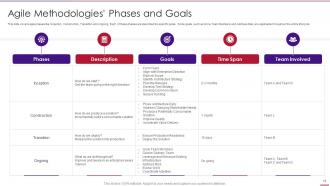
Slide 12 : Este slide abrange fases ágeis como Iniciação, Construção, Transição e em andamento.
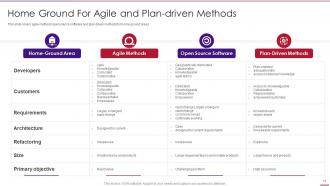
Slide 13 : Este slide cobre métodos ágeis de software de código aberto e métodos orientados a planos para áreas domésticas.
Slide 14 : Este slide exibe o título de 'Metodologias e abordagens ágeis mais usadas.
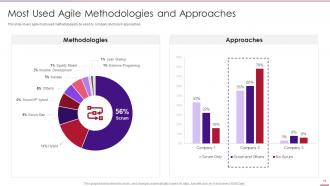
Slide 15 : Este slide aborda as metodologias ágeis mais utilizadas pelas abordagens de empresa e scrum.
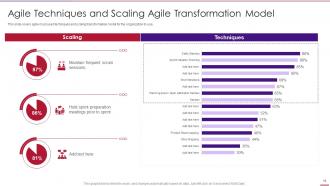
Slide 16 : Este slide aborda as técnicas ágeis mais usadas e o modelo de transformação de escala para a organização usar.
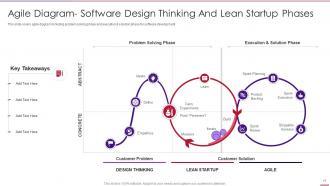
Slide 17 : Este slide abrange o diagrama ágil, incluindo a fase de solução de problemas e a fase de execução e solução para o desenvolvimento de software.
Slide 18 : Este slide apresenta o título de 'Metodologias ágeis em TI para desenvolvimento de software'.
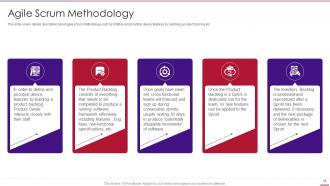
Slide 19 : Este slide cobre a descrição detalhada sobre a metodologia ágil scrum.
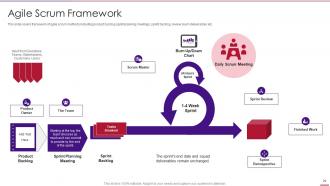
Slide 20 : Este slide cobre a estrutura de métodos ágeis de Scrum, incluindo reuniões de planejamento de sprint de backlog de produto, etc.
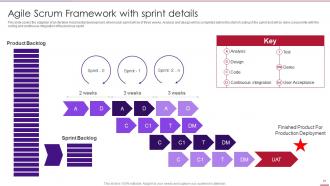
Slide 21 : Este slide aborda a adaptação de um desenvolvimento Iterativo-Incremental, onde cada sprint será de três semanas.
Slide 22 : Este slide exibe o título de 'Desenvolvimento de software Lean'.
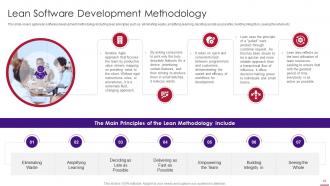
Slide 23 : Este slide aborda a metodologia ágil de desenvolvimento de software lean, incluindo princípios lean.
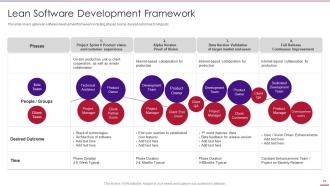
Slide 24 : Este slide abrange a estrutura de desenvolvimento de software lean ágil, incluindo fases, equipes, resultados desejados, prazos, etc.
Slide 25 : Este slide mostra o título da 'estrutura de desenvolvimento de software enxuta'.
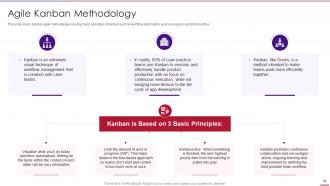
Slide 26 : Este slide cobre a metodologia ágil Kanban, incluindo os princípios básicos do Kanban.
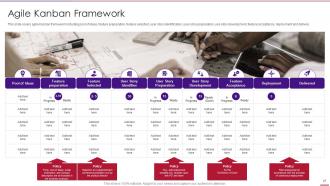
Slide 27 : Este slide abrange a estrutura Kanban ágil, incluindo conjunto de ideias, preparação de recursos, etc.
Slide 28 : Este slide mostra o título de 'Programação Extrema'.
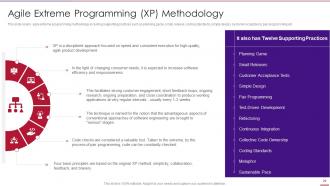
Slide 29 : Este slide aborda a metodologia ágil de programação extrema, incluindo práticas de suporte.
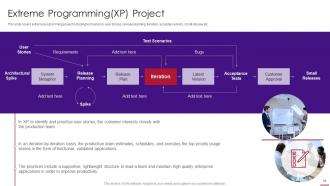
Slide 30 : Este slide cobre o projeto de programação extrema, incluindo sensores de teste, histórias de usuários, etc.
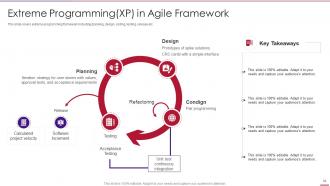
Slide 31 : Este slide cobre a estrutura de programação extrema, incluindo planejamento, design, codificação, teste, lançamento, etc.
Slide 32 : Este slide exibe o título de 'Crystal'.
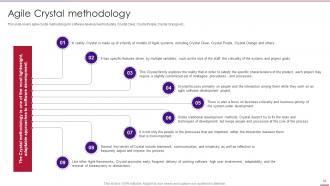
Slide 33 : Este slide aborda a metodologia Agile Crystal para desenvolvimento de software.
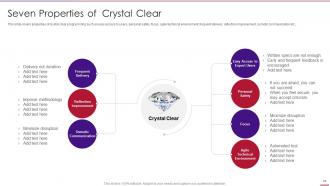
Slide 34 : Este slide cobre as propriedades da programação cristalina.
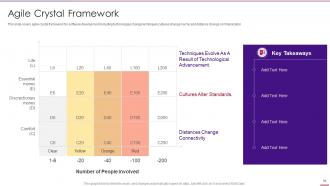
Slide 35 : Este slide cobre o framework Agile Crystal para desenvolvimento de software.
Slide 36 : Este slide apresenta o título de 'Desenvolvimento de sistemas dinâmicos'.
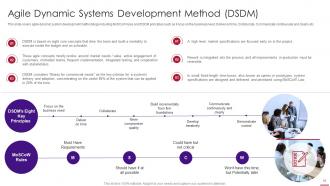
Slide 37 : Este slide aborda a metodologia de desenvolvimento ágil de sistemas dinâmicos.
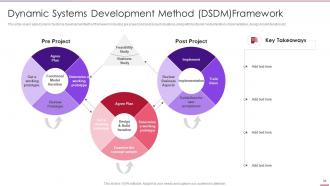
Slide 38 : Este slide abrange a estrutura do Método de Desenvolvimento de Sistemas Dinâmicos ágil.
Slide 39 : Este slide exibe o título de 'Desenvolvimento orientado a recursos'.
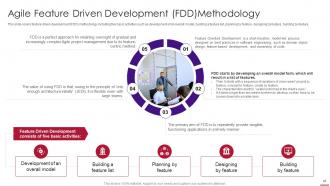
Slide 40 : Este slide aborda a metodologia de desenvolvimento orientado a recursos (FDD).
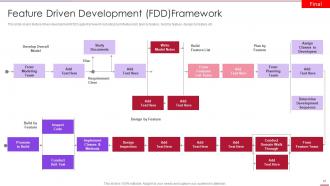
Slide 41 : Este slide abrange a estrutura ágil de desenvolvimento orientado a recursos (FDD).
Slide 42 : Este slide mostra o título de 'Ciclo de vida ágil'.
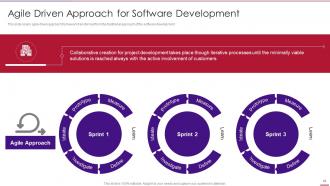
Slide 43 : Este slide cobre a estrutura de abordagem orientada à agilidade transformada da abordagem tradicional de desenvolvimento de software.
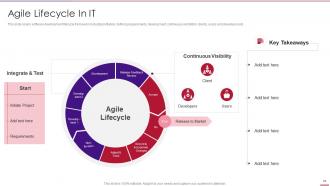
Slide 44 : Este slide cobre a estrutura do ciclo de vida de desenvolvimento de software.
Slide 45 : Este slide mostra o título de 'Função da equipe ágil'.
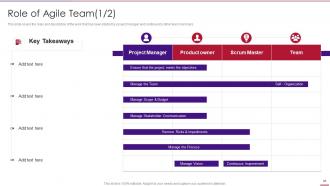
Slide 46 : Este slide cobre as funções e a descrição do trabalho que foi iniciado pelo gerente de projeto e continuado por outros membros da equipe.
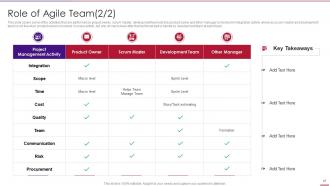
Slide 47 : Este slide cobre algumas das atividades realizadas pelo proprietário do projeto.
Slide 48 : Este slide cobre as técnicas orientadas ao aprendizado.
Slide 49 : Este slide exibe o título de 'Métricas de avaliação de desempenho ágil'.
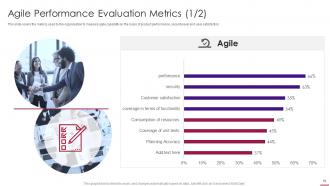
Slide 50 : Este slide cobre as métricas usadas pela organização para medir a capacidade ágil.
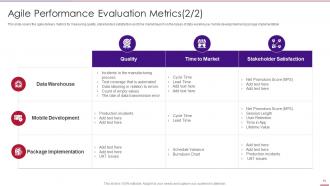
Slide 51 : Este slide aborda as métricas de entrega ágil para medir a qualidade.
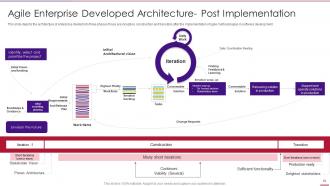
Slide 52 : Este slide mostra a arquitetura da empresa dividida em três fases.
Slide 53 : Este slide exibe ícones para modelos de metodologia ágil.
Slide 54 : Este slide é intitulado como Slides Adicionais para avançar.
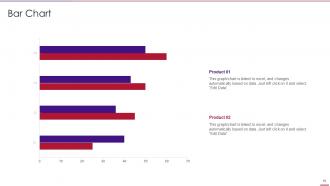
Slide 55 : Este slide apresenta o gráfico de barras com a comparação de dois produtos.
Slide 56 : Este é o slide Nossa Missão com imagens e textos relacionados.
Slide 57 : Este é um slide sobre nós para mostrar as especificações da empresa etc.
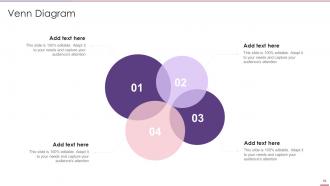
Slide 58 : Este slide mostra o diagrama de Venn com caixas de texto.
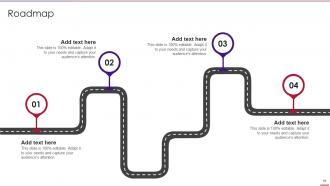
Slide 59 : Este slide apresenta o Roteiro com caixas de texto adicionais.
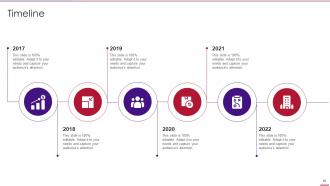
Slide 60 : Este é um slide de linha do tempo. Mostrar dados relacionados a intervalos de tempo aqui.
Slide 61 : Este é um slide de Geração de Ideias para apresentar uma nova ideia ou destacar informações, especificações, etc.
Slide 62 : Este é um slide de agradecimento com endereço, números de contato e endereço de e-mail.
Slides de apresentação em powerpoint de modelos de metodologia ágil com todos os 67 slides:
Use nossos slides de apresentação em Powerpoint de modelos de metodologia ágil para ajudá-lo a economizar seu valioso tempo. Eles são readymade para caber em qualquer estrutura de apresentação.






FAQs for Agile methodology templates
So most Agile templates have user stories, sprint boards, retrospectives, and burndown charts. Product backlogs and definition of done checklists too. Daily standup stuff. Honestly, there's way too many variations out there - kind of annoying when you're starting out. But everything basically comes down to breaking work into smaller pieces, tracking it visually, and getting feedback to improve. I'd just start with a simple Kanban board and basic user story format. Don't overthink it. You can always pile on more components once your team gets the hang of things.
Templates basically give your whole team the same playbook, which is huge for staying on the same page. Nobody's confused about where stuff goes or how to write user stories. Meetings move way faster too since everyone knows what's coming. Honestly, I'd start simple - just grab basic sprint planning and retro templates. You can tweak them later once you figure out what works. The best part? Eventually your team stops overthinking the process and just gets shit done. It's like... once the structure becomes automatic, you can focus on actual work instead of wondering if you're doing everything right.
Look, first figure out your team size and how complex your projects actually are. Those cookie-cutter Scrum templates? They're basically useless out of the box. Adjust sprint lengths based on what makes sense for your team's speed and expertise. Story point scales too - some teams love fibonacci, others think it's overcomplicated nonsense. Strip out ceremony formats that waste everyone's time. Maybe add custom fields if your industry needs weird tracking stuff. Honestly, just test whatever you build on something small first. Then tweak it until it actually works instead of fighting against it constantly.
Honestly, templates are a game changer for sprint planning. You get pre-built frameworks for backlog grooming, story estimates, capacity planning - all that tedious setup work is already done. Your team will actually document user stories and acceptance criteria the same way instead of everyone doing their own thing. They're clutch for tracking standups and burndowns too. The best part? No more staring at a blank board wondering how to start your planning session. Find templates in whatever tool you're using and tweak them for your team's quirks. You'll probably save like 2 hours every sprint, which honestly adds up fast.
Honestly, agile templates are game-changers for team reflection. You know those retrospective boards and sprint review sheets? They basically give your discussions actual structure instead of just random complaining (which let's be real, happens way too often). What I love is they help you spot patterns - like what keeps breaking vs what's actually working well. Short sentences work. Longer ones help you track improvements over time, which feels pretty great when you realize how much you've grown. Oh, and they prevent that thing where someone brings up a good point but it gets totally forgotten by next week. Try a basic retrospective template first - you'll see the difference immediately.
Honestly, most Agile templates already have the good stuff built in, which is clutch. Velocity tracks how much your team actually gets done each sprint. Burndown charts show if you're gonna hit your goals or crash and burn. Then there's lead time and cycle time - basically how fast stuff moves from "hey, what if we..." to actually shipping. Oh, and don't sleep on sprint completion rates and defect tracking. Team satisfaction scores matter too, though some folks forget about those. My advice? Pick like 3-4 metrics your stakeholders actually care about and stick with those. Otherwise you'll drown in data.
Dude, visual stuff in Agile templates is a total game-changer. Color coding for sprint statuses, icons for story types, progress bars - all that makes things so much clearer. I swear, half the teams I've worked with just sit there squinting at walls of text during standups. What a waste of time. When you've got good visual hierarchy and status indicators, people know what's up immediately. No decoding required. Oh, and flowcharts help too if you're into that. Just throw some simple visual cues into whatever templates you're using now. Your meetings will fly by.
So user stories are basically how Agile teams capture what users actually need. The format's super simple - "As a [user], I want [goal] so that [benefit]." Way better than those 50-page requirement docs nobody reads anyway! Sprint planning templates, backlog stuff, release planning - they all use these. Most include spots for acceptance criteria and story points too. Jira and Azure DevOps have templates built right in, which is pretty handy. Oh, and priority levels obviously. Try writing a few for your next sprint - you'll be surprised how much clearer everything gets when you think from the user's angle instead of just listing features.
Oh totally! Mixing Scrum and Kanban works great. Take Scrum's sprints and ceremonies, then throw in Kanban's visual boards and WIP limits. Most teams I know swear by this approach - honestly it just makes sense. Your templates need sprint planning stuff plus the continuous flow boards. Daily standups with visual tracking. Retros that look at both sprint goals and how smoothly things actually flowed. The trick is tweaking it for your specific team rather than following some textbook version. Nobody has time for rigid frameworks anyway!
Honestly, the worst thing you can do is treat templates like they're set in stone. Your team will hate you for it. I've watched people spend forever just filling out boxes instead of actually getting stuff done - which is so backwards when you think about it. Don't just steal what another team uses either. Their setup probably won't work for you anyway. Keep things simple and actually ask your team if the template helps or just creates busywork. If it's not making life easier, scrap it. Templates should work for you, not the other way around.
Templates are honestly lifesavers for remote agile teams. They give everyone the same playbook to follow, which matters way more when you can't just tap someone on the shoulder. Sprint planning templates keep distributed teams on the same page. Daily standup templates maintain that connection virtually. Retrospectives help you capture what worked across different time zones. Without that structure, remote work gets messy fast - I've seen it happen. Start simple with a basic sprint board and add stuff as you figure out what your team actually needs. Way better than winging it every time.
Jira and Azure DevOps are your best options if you want all the fancy project management stuff built in. For simpler setups, Trello's amazing - I'm literally obsessed with how clean it is for personal projects. Asana works well too. Miro or Mural are great for visual boards when your team likes collaborating that way. Notion's solid if you're into that wiki vibe, though honestly it can get messy fast. Don't sleep on Google Sheets either - works surprisingly well for basic sprint planning. My advice? Start with whatever tool your team's already comfortable with, then upgrade later if you need more features.
Honestly, agile templates are way more flexible than people think. You can totally scale them up or down depending on what you're working on. Small projects? Just use the basic stuff - simple sprint boards and user story templates. But if you've got something massive and complex, then yeah, break out the detailed epics, multiple backlogs, stakeholder maps, all that jazz. What I love is you don't have to commit to anything upfront. Start small and add pieces as things get bigger. Or take those heavy enterprise templates and strip them down for quick projects. Just match it to your team size and scope, then tweak from there.
Honestly, just bake the feedback right into your templates from the start instead of scrambling for it later. Add specific spots in your user stories for stakeholder sign-off and build feedback checkpoints into sprint reviews. Your retros should ask about stakeholder happiness too, not just whether the team's getting along. The balance is key though - you want consistent feedback without creating some bureaucratic nightmare that kills momentum. I'd probably start small, like adding one stakeholder checkpoint to what you're already doing. See how that feels before you go crazy redesigning everything.
So basically, agile templates force you to connect every feature back to actual business value in each sprint. User story formats make you spell out the "why" behind tasks - yeah, it's a pain initially but pays off. Regular checkpoints help you reassess priorities when business needs shift. Backlog templates are clutch because they make you rank by business impact instead of just what's technically easier. Oh, and definitely try an epic-to-business-goal mapping template for your next planning session. Trust me, it'll save you from building cool stuff nobody actually wants.
-
Excellent template with unique design.
-
Very well designed and informative templates.