

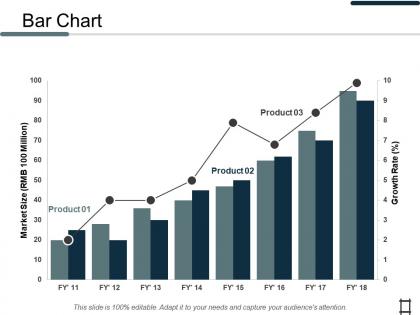
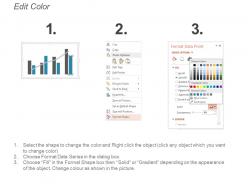
Bar chart business marketing ppt professional design inspiration




Try Before you Buy Download Free Sample Product
 Impress Your
 Audience
 100%
100% Editable
 Save Hours
 of Time


Assuage inflamed emotions with our Bar Chart Business Marketing Ppt Professional Design Inspiration. Bring down the degree of ire.
People who downloaded this PowerPoint presentation also viewed the following :
Bar chart business marketing ppt professional design inspiration with all 5 slides:
Get everybody immediately aware of the facts with our Bar Chart Business Marketing Ppt Professional Design Inspiration. It acts as an effective circular.
FAQs for Bar chart business marketing ppt
Honestly, bar charts are clutch for marketing presentations. Stakeholders can instantly see what's happening - whether you're comparing campaigns, quarters, or different market segments. No squinting at messy spreadsheets required. They're basically bulletproof, which is perfect when you're in front of executives who just want the highlights fast. Clean, professional look that actually tells a story about your growth or ROI. Oh, and definitely label everything clearly and stick to consistent colors. Trust me, you don't want people spending half the meeting trying to decode what they're looking at instead of focusing on your actual results.
Bar charts are perfect for this! You can put competitors side-by-side and compare stuff like market share, pricing, social followers - whatever matters most. Grouped bar charts are honestly my favorite when you need to show multiple things at once, like revenue vs profit margins. Just don't go crazy with too many competitors or it gets messy. I'd stick to 3-5 max. Oh, and make sure you're using the same data sources for everyone - otherwise you're comparing completely different things. Pick distinct colors for each company so it's easy to read at a glance.
For bar charts, simplicity wins every time. Start your y-axis at zero so you're not accidentally misleading people. I'd stick with consistent brand colors but throw in some contrast when you want to highlight specific data points. Order your bars logically - biggest to smallest usually works, or go chronological if that makes sense. Honestly, I've seen way too many overly complicated charts that just confuse everyone. Give your data breathing room with white space. Oh, and your title should explain why anyone should care about this data - don't make them work for it!
So regular bar charts just show one thing per bar, right? But stacked ones let you break that down into pieces. Like say you're looking at leads by channel - a normal bar shows total leads, but stacked shows the breakdown of email vs social vs PPC within each channel. Honestly they can get messy to read if you have too many segments (learned that the hard way). But they're perfect when you need to see both the big picture AND what's driving it. Use them when you want to show how different parts add up to make the whole.
Honestly, bar charts are a lifesaver for tracking campaigns. You'll spot trends immediately instead of getting lost in spreadsheet hell (been there too many times). Compare your click-through rates or conversions week-to-week and it's obvious which campaigns are crushing it vs. the duds. I always notice seasonal stuff or weird drops way faster with the visual bars. Quick tangent - I used to overthink this, but a simple dashboard updated weekly does the trick. ROI comparisons become super clear when you can actually see the differences instead of just staring at numbers.
Honestly, just start with whatever you already have - Excel or Google Sheets work great for basic bar charts. Canva's my go-to when I need something that looks more polished without being a design expert. PowerPoint actually makes decent charts too (weird, I know). Tableau and Power BI are total overkill unless you're drowning in complex data. I'd say stick with the simple stuff first, then move up if you need fancier features later.
Bar charts are your best bet for comparing different customer groups - age, income, location, whatever. Way easier to scan than endless spreadsheet rows that nobody wants to read through. Sort them biggest to smallest so the important stuff jumps out right away. Keep colors consistent for each group too. The whole point is making it dead simple for people to see which segments matter most and where you should throw your marketing budget. Honestly, I've seen too many presentations tank because the data looked like homework instead of actionable insights.
Ugh, the worst thing is cramming way too much data into one chart - nobody can read that mess. Also hate when people mess with the scale to make tiny changes look huge, that's just dishonest. Random colors drive me nuts too... like why is March suddenly neon green? Pick colors that actually make sense for your data. Oh and please skip the cheesy 3D effects, they're so 2005. Start your y-axis at zero unless there's a legit reason not to. Clear labels are everything. Honestly just focus on one main point you want people to remember.
Dude, colors totally mess with how people read your data - it's crazy. Red makes everything look like bad news, even when it's actually good (like lower costs). Green screams "success!" while gray just gets ignored. Here's the thing though - like 8% of guys can't tell red from green apart, so you gotta think about that. I always stick with the same color scheme that matches our brand. Oh and definitely test your charts on different people first. Trust me on this one - what looks clear to you might be confusing as hell to everyone else.
Dude, interactive charts totally change the game. People can click around and dig into the data instead of just sitting there glazing over. Way better than those boring static slides everyone's used to. Your audience actually remembers stuff when they're hands-on with it. You can cram way more info without making people's brains explode since they pick what to focus on. Honestly, I think it just keeps people awake during presentations. Best part? When someone asks those annoying "but what about..." questions, they can just filter the data themselves and find out. Start with just one next time and see what happens.
Bar charts are perfect for this! Plot your conversion rates, cost per acquisition, and revenue by channel - social media, email, PPC, whatever you're using. The visual difference between bars makes it so obvious which channels are killing it versus which ones are just eating your budget. Way better than staring at endless spreadsheet rows, honestly. Short bars = time to cut spending. Tall bars = pump more money there. Pull your last quarter's numbers and you'll probably find some weird surprises. I always discover at least one channel that looks way worse (or better) than I thought.
Honestly, bar charts are a lifesaver for ROI stuff. You can throw all your campaigns - email, social ads, PPC, whatever - into one chart and boom, it's obvious which ones are crushing it. Way better than scrolling through endless spreadsheet rows (learned that the hard way). Your boss will get it immediately without you having to explain every number. Short bars = bad investment. Tall bars = keep doing that. When you're fighting for budget next quarter, start with a solid ROI bar chart. It's basically your mic drop moment.
Bar charts are clutch for showing growth in your marketing stuff. People get them instantly - way better than just saying "we grew 40%" in boring text. Show your revenue jumps, new customers, whatever numbers actually matter. Before/after comparisons work great, or do quarter-to-quarter if that tells a better story. Just make sure your bars are actually proportional (you'd be surprised how many people mess this up). Keep your brand colors consistent and throw the real numbers on top of each bar. That way people see both the trend and exact figures. Visual impact hits different than plain text, trust me.
Bar charts are clutch when you're dealing with categories - like comparing sales across different regions or monthly revenue trends. Perfect for that "this vs that" stuff where people need to quickly see what's winning. They're honestly pretty foolproof for most situations. Just don't use them for continuous data (messy) or when you have like 15+ categories because nobody wants to squint at that chaos. If your boss needs to spot the top performers in 2 seconds, go with bars every time.
Bar charts are perfect for this - way better than staring at endless spreadsheet rows. Set up each region as a bar and group them by whatever metrics matter (revenue, conversion rates, etc). Your teams can instantly see who's killing it and who needs help. Color-coding by continent makes it even clearer, though honestly I'd avoid too many colors or it gets messy. The side-by-side comparison is clutch for spotting patterns. Trust me, your next global meeting will actually be engaging instead of everyone zoning out over numbers.
No Reviews