


Close the gap outlet




Try Before you Buy Download Free Sample Product
 Impress Your
 Audience
 100%
100% Editable
 Save Hours
 of Time


Get bitten by the bug with our Close The Gap Outlet. You will definitely crave for more.
People who downloaded this PowerPoint presentation also viewed the following :
Content of this Powerpoint Presentation
Description:
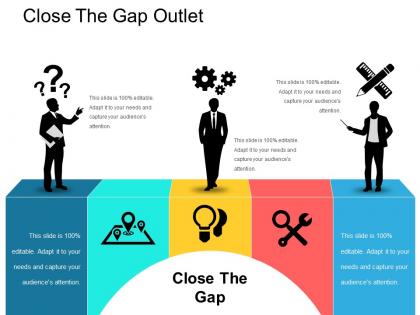
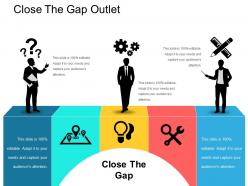
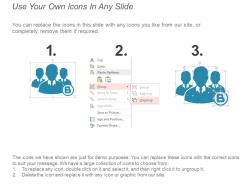
This image portrays a presentation slide titled "Close The Gap Outlet," designed to discuss strategies, challenges, and solutions within a business or operational context. The slide contains several text elements and icons, each paired with a silhouette of a person engaging with the concept represented by the icon.
At the top, we have the main title "Close The Gap Outlet," indicating the theme of the presentation, which is about addressing discrepancies or differences in a process, system, or business.
The shape of people on the edges of the slide are associated with question marks, gears, and writing tools, symbolizing inquiry, processing/operations, and planning/documentation, respectively.
In the middle of the slide, across a colorful four-panel design, are additional icons representing location, ideas, collaboration, and repair/optimization. These panels seem to represent different areas to address when closing the gap: identifying the exact issues (location), generating solutions (lightbulb for ideas), working together (collaboration), and fixing issues (tools for repair/optimization).
Use Cases:
Industries where these slides can be applied include:
1. Management Consulting:
Use: To convey strategies for bridging performance gaps in organizations
Presenter: Management Consultant
Audience: Corporate Executives
2. Marketing:
Use: To illustrate ways to close the gap between market positioning and consumer perception
Presenter: Marketing Strategist
Audience: Marketing Team
3. Education:
Use: To discuss educational disparities and solutions
Presenter: Education Specialist
Audience: Educational Administrators
4. Technology:
Use: To showcase methods for addressing the digital divide and enhancing system integrations
Presenter: Technology Expert
Audience: IT Professionals
5. Healthcare:
Use: To outline improvements for patient care and health service delivery
Presenter: Healthcare Administrator
Audience: Hospital Staff
6. Finance:
Use: To discuss financial inclusion and addressing the gaps in service offerings
Presenter: Financial Analyst
Audience: Banking Professionals
7. Manufacturing:
Use: To present ways to optimize production and reduce inefficiencies
Presenter: Operations Manager
Audience: Plant Managers and Engineers
Close the gap outlet with all 5 slides:
Elevate the image folks have of you with our Close The Gap Outlet. It will jack up your importance.

FAQs for Close
Honestly, just focus on sales per square foot, conversion rate, average transaction value, and inventory turnover. Those four give you the real picture. Traffic matters too - like, you might get tons of people through the door but if they're not buying anything, your merchandising's probably off. Keep an eye on labor costs as a percentage of sales so you're not overstaffed. Don't track everything though, you'll go crazy. Pick maybe 5-6 things max and check them weekly. That way you can actually fix problems before they tank your numbers.
Honestly, start with whatever's eating up most of your time - probably inventory or scheduling, right? Cloud systems let you track stock across locations in real-time, which is pretty clutch if you've got multiple spots. POS integration cuts down on human error big time. Analytics give you actual data instead of just winging it on peak hours and popular items. Digital ordering speeds everything up too. I'd say pick one thing to automate first rather than trying to do everything at once - that usually backfires. The scheduling stuff alone will probably save you hours each week.
Honestly, I'd start by training your staff properly so they actually know the products - not just pointing customers toward random aisles like lost tourists. Your store layout needs to make sense too. I can't tell you how many places I've been where finding the checkout feels like solving a puzzle! Get feedback from customers regularly, whether through quick surveys or just chatting with them. Here's what I'd do first though - spend a whole day following customers around and watching how they move through your space. You'll spot problems you never noticed before. Smart design plus knowledgeable staff works every time.
Look, proper inventory tracking is honestly a game-changer for your bottom line. You'll cut way down on waste since you won't overorder stuff that just sits there and expires. Stockouts are the worst - nothing kills sales faster than disappointing customers who then go spend their money elsewhere. I learned this the hard way myself. Track your demand patterns so you can order smarter. That way your cash isn't stuck in products gathering dust on shelves. It's all about hitting that balance between having enough stock without going overboard.
Training your staff is huge - seriously can't stress this enough. I've watched businesses completely crash because nobody knew what they were doing when problems hit (which they will). Your team needs to understand the systems and customer service basics, otherwise you're constantly putting out fires. Confident employees make way fewer expensive mistakes too. Document your main processes first, then do short training sessions regularly. Even like 20-30 minutes weekly helps tons. It's honestly one of those things that pays for itself pretty quick once everyone's on the same page.
Look at your sales history first - figure out when each location gets busy and when it's dead. I'd start adjusting orders like 6-8 weeks before seasons change. Better to have too much than run out when everyone's trying to buy, trust me on that one. Make basic seasonal plans but let each outlet tweak them for their area. Weekly calls during busy transitions are huge - you can move inventory around when one place is crushing it and another's slow. Communication between stores is honestly what makes or breaks this whole thing.
Okay so first thing - walk through your store like you're actually shopping. You'll immediately see what's wrong. Put your money-makers at eye level, and seasonal stuff right by the entrance where people can't miss it. I usually group things in threes because it just looks better somehow? Switch up your displays every few weeks or customers zone out. Make sure there's enough space between everything so people aren't bumping into each other - that's annoying. Oh and arrange your prices low to high so it feels natural when they're browsing.
Honestly, start by actually listening to what customers tell you - surveys, reviews, casual chats, whatever. Monthly check-ins work well to see what they're saying about your stock, staff, the whole deal. Here's the thing though: most places collect feedback then... nothing. Total waste. Take that info and tweak your inventory, train your team differently, maybe rearrange the store layout. Oh, and definitely track which changes actually help your satisfaction scores go up. Simple spreadsheet works fine for this stuff. The feedback loop only works if you actually close it, you know?
Honestly, it comes down to three things: foot traffic, whether those people are actually your customers, and what competition looks like. Sure, busy spots seem great but you might pay crazy rent for the wrong crowd. I'd scope out who's walking by - do they fit your vibe? Check what other businesses are around too. Sometimes neighboring shops help each other out, but too many competitors can hurt. Oh and definitely visit at different times during the week. You'd be surprised how dead some "prime" locations get on weekdays or evenings.
Honestly, data analytics is a game changer for this stuff. You'll finally see clear patterns instead of just guessing why certain locations suck or sales dropped. Track customer traffic, peak hours, inventory turnover - the usual suspects. Numbers don't care about your hunches, which is actually pretty helpful when you're wrong. Spot trends before they bite you, fix staffing issues, adjust what you're selling based on what locals actually want. Oh and definitely tackle your top 3-4 metrics first across all locations - don't try to track everything at once or you'll go crazy.
Honestly, the hardest part is keeping quality consistent - each location starts doing their own thing if you're not careful. Communication gets messy fast too. Inventory becomes this whole headache when you've got different suppliers and timelines everywhere. I'd say get a good centralized system first so you can actually see what's happening at each spot in real-time. Nothing beats showing up in person though - weird how much changes when the owner walks through the door, you know? Oh and definitely nail down your main processes before you add fancy tech stuff on top.
Online outlets are basically about getting people to find your stuff digitally - site navigation, product visibility, all that. Physical stores? You're designing layouts and foot traffic flow to create that treasure hunt feeling. Honestly, the data you get from online is so much better for tracking what actually works. Both need good inventory turnover but the tactics are totally different. With brick-and-mortar you're thinking about where to put clearance racks, while online it's more about search filters and marketing funnels. Wait, did I mention the customer journey stuff? Yeah, that's huge for digital but less relevant in physical spaces where people just... walk around.
Honestly, location targeting on social media is your best bet - set those ads to hit people within like 3-4 miles. Flash sales work crazy well for foot traffic. Send "today only" emails too, people eat that exclusive stuff up. Old school window displays still work though, don't overlook that. Maybe team up with other shops nearby for cross-promotion? The whole thing is about creating that "I need to go RIGHT now" feeling instead of letting them put it off. Oh and try a weekend flash sale first - you'll see what actually gets people through your door.
Honestly, just start small with a couple things this quarter - don't try to do everything at once or you'll burn out. LED lighting is an easy win, and customers actually care about the local sourcing thing now. Train your staff on portion control to cut down food waste (that adds up fast). Maybe throw in some recycling bins and push reusable packaging when you can. The HVAC optimization stuff can wait til later. Pick like two things and nail those first, then build from there. Way less overwhelming that way.
Yeah, store layout makes a massive difference in sales. You want to guide people past your high-margin stuff, so put essentials like milk at the back - forces customers to walk by all the tempting displays. Wide aisles help too since people browse more when they're not feeling cramped. Clear sight lines are key, and definitely avoid creating those annoying bottlenecks. Heat mapping is honestly brilliant for this - shows you where people actually walk versus where you think they go. Then you can move things around to boost impulse buys and bigger basket sizes.
-
Easily Editable.
-
Qualitative and comprehensive slides.