


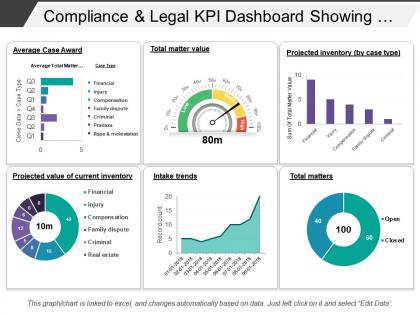
Compliance and legal kpi dashboard showing total matter value




Try Before you Buy Download Free Sample Product
 Impress Your
 Audience
 100%
100% Editable
 Save Hours
 of Time


Explain the basis of your calculations with our Compliance And Legal Kpi Dashboard Showing Total Matter Value. Highlight important facts and figures.
People who downloaded this PowerPoint presentation also viewed the following :
Compliance and legal kpi dashboard showing total matter value with all 6 slides:
We have a comprehensive bank of Compliance And Legal Kpi Dashboard Showing Total Matter Value. Colourful notes to suit every need.

FAQs for Compliance and legal kpi dashboard showing
Track incident volume and resolution times first - those are your bread and butter. Compliance rates and training completion percentages matter too. Honestly, I'd also watch audit findings and risk scores like a hawk. Missing regulatory deadlines is the absolute worst, so track that religiously. Cost per incident shows where you're bleeding money. Repeat violations help spot troublemakers or process gaps. Oh, and start small - maybe 6-8 metrics tops. I've seen too many dashboards that nobody uses because they tried to track everything at once.
Think of it as your compliance early warning system. All your key metrics - audit findings, policy violations, training rates, incident reports - show up in one spot instead of buried in random spreadsheets. Way easier to catch problems before they blow up. The visual format makes it super obvious when something's trending downward or hitting red zones. Honestly, once you see everything laid out like this, you'll wonder how you managed without it. My advice? Start with dashboards for your biggest risk areas first, then build from there.
So I'd go with Power BI or Tableau for compliance dashboards - both handle regulatory data pretty well. Power BI's honestly the easier choice if you're already in the Microsoft ecosystem. Data integration is where it gets tricky though. Alteryx works great, or you could just write some Python scripts to pull from your compliance systems. Oh, and whatever you pick needs real-time feeds and solid security - compliance teams are super paranoid about data access, which I totally get. Start by mapping out your data sources first, then figure out which viz tool plays nicest with them.
Honestly, monthly updates are probably fine, but quarterly works way better for most compliance stuff. The data doesn't really change that much week to week anyway. Quarterly deep dives hit that sweet spot - you'll catch trends without going crazy with constant updates. High-risk areas are different though, might need weekly check-ins depending on your industry regs. I'd start monthly and do quarterly reviews, then see what makes sense. The real trick is picking a schedule and not abandoning it after two months like everyone does.
Data silos are gonna be your worst enemy - compliance stuff gets scattered everywhere. HR systems, training platforms, audit tools, plus those random Excel files someone's hoarding on their desktop. Manual entry errors will drive you nuts too. Different departments basically speak different languages when naming the same metrics, which is honestly ridiculous but here we are. Missing timestamps, inconsistent formats... it's a mess. Quality issues make automated reporting nearly impossible. My advice? Map out where everything actually lives first. Trust me, it's way more fragmented than you're expecting right now.
First thing - figure out which regulations actually apply to your industry, then map your KPIs directly to those requirements. Work backwards from what regulators want to see. Honestly, most companies track way too much useless stuff. Focus on metrics that auditors will actually ask about during reviews. Your legal and compliance teams should be looped in regularly since this stuff changes all the time (which is annoying but whatever). Check what your competitors are tracking too - gives you a good baseline. I'd do quarterly reviews to keep everything current with any regulatory updates.
Honestly, visual dashboards are a game changer for compliance stuff. You know how painful it is digging through spreadsheets? Charts fix that instantly. Red flags actually show up as red, trends jump out at you, and you'll catch problems way faster. Plus executives love them during reviews - they get the whole picture without squinting at numbers for twenty minutes. I always tell people to focus on exception reports and trending data rather than boring static charts. That's where you actually see what's broken and needs fixing right away.
First thing - figure out which regulations actually matter for your industry. HIPAA audits if you're healthcare, SOX stuff for finance, whatever. Then build your KPIs around those specific requirements instead of going backwards from random metrics. Honestly? Don't try to track everything right away - I've seen teams get totally overwhelmed that way. Pick maybe 5-7 things that would actually get you in hot water with regulators. Most platforms let you set custom thresholds anyway. Oh, and definitely compare against industry benchmarks so you know where you stand. Start basic, then add more once everyone's actually using the thing regularly.
First thing - group your KPIs by risk level or department, whatever makes sense. Put the critical stuff right up top because nobody has time to dig around for important alerts. Consistent colors are key (red for bad, green for good, you know the drill). Don't cram everything onto one screen though - that's just asking for confusion. Make sure people can click through for more details when they need it. Trend indicators are super helpful for spotting patterns. Oh, and definitely test it with real users first - they'll find the annoying stuff you totally missed.
So here's the thing - ML can actually predict compliance issues before they blow up, which is way better than just tracking what already happened. It digs through your old data to spot risky patterns and catches weird anomalies automatically. Pretty much like having a functioning crystal ball, honestly. Plus it'll catch subtle trends in huge datasets that you'd never notice otherwise. The whole dashboard shifts from "oh crap, we messed up" to "hey, watch out for this." Just make sure you've got enough historical data on your key metrics first - otherwise you're training models on basically nothing.
Start with basic stuff - incident rates, audit results, training completion, how fast you fix issues. Honestly, don't go crazy with like 20 metrics or people will ignore the whole thing. Track trends over time so you can see if new regs are screwing things up (they usually do). I'd focus on both the early warning signs like training numbers AND the actual violations. Set up alerts when things hit certain levels. Four or five solid KPIs work way better than overwhelming everyone. The goal is catching problems before they cost you serious money in fines.
Training is honestly such a game-changer for compliance numbers. Your dashboard will show way fewer violations and incidents because people finally get what they're supposed to do. Audit scores improve too. The completion rates become their own metric to track - probably one of the easier wins you can measure. Trained employees spot problems early and report stuff faster instead of letting issues snowball into expensive messes. Oh, and here's the key thing: track how effective the training actually is, not just who finished it. That's what really makes the difference in your compliance performance.
Honestly, compliance dashboards are game-changers for getting everyone on the same page. You'll have all your metrics in one spot - risk levels, audit updates, regulatory deadlines - instead of buried in spreadsheets nobody opens. Legal can spot trends fast, operations sees how they're affecting compliance targets, and executives get the overview without needing everything explained. The visual charts just make sense to everyone, which is huge. Set up automated reports so you're not constantly fielding the same questions. Way better than playing email tag trying to decode what the numbers mean.
Don't try tracking everything right away - you'll just overwhelm yourself with data you can't use. Most people only look at stuff that already happened (like audit results) instead of mixing in metrics that actually warn you before things go wrong. Also, teams build these super complicated dashboards without asking users what they actually need first. Big mistake there. Keep your metrics simple and tied to real business risks. Honestly, I'd start with maybe 5-7 things your stakeholders genuinely care about, then build from there once you get the hang of it.
Dude, real-time analytics is like switching from a rearview mirror to GPS for compliance stuff. You'll catch violations and weird patterns as they're happening instead of weeks later when it's too late. Honestly, batch reports are such a pain - by the time you see the problem, damage is done. With live dashboards you get instant alerts when things go sideways, can dig into issues right away, and actually stop problems before they blow up. Oh, and start small - pick your most critical metrics first and get real-time feeds on those. Way more manageable that way.
-
Really like the color and design of the presentation.
-
Excellent design and quick turnaround.