

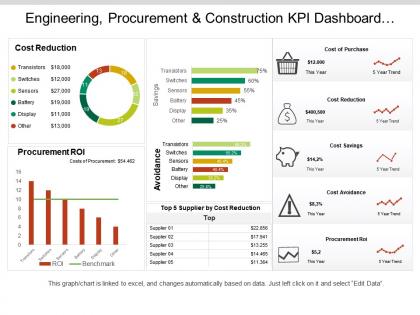
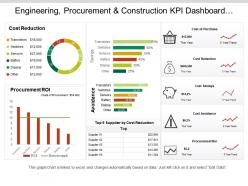
Engineering procurement and construction kpi dashboard showing cost of purchase order and cost reduction




Try Before you Buy Download Free Sample Product
 Impress Your
 Audience
 100%
100% Editable
 Save Hours
 of Time


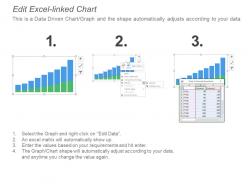
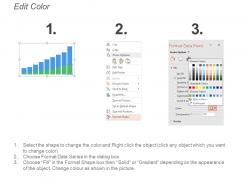
SlideTeam presents to you its Engineering Procurement And Construction Kpi Dashboard Showing Cost of Purchase Order And Cost Reduction. If you are an EPC contractor and you have to present to your clients a detailed comparison between various competitors then don’t waste any more time and download this PPT slideshow. This business template is very popular in the field of engineering, construction, metal and steel industry, purchasing and construction department, etc. Use this dashboard template for presentations on engineering, procurement and construction, construction management, engineering, purchasing and construction. You will be able to present your data with the help of this donut shaped chart graph PPT as it contains numerous charts and graphs, slide bars, dashboard representations. This is the best PowerPoint presentation when you want to show a comparison between various purchase orders and gives you the best of cost reduction plans showing you how much you can save. This kind of PPT slideshow is highly recommended when you want to make a strategic planning presentation to show the contrast of suppliers, cost of purchase, cost reduction, cost savings, cost avoidance, procurement rate of interest, etc. So download and make the most of it. Educate folks on the dangers of climate change with our Engineering Procurement And Construction Kpi Dashboard Showing Cost Of Purchase Order And Cost Reduction. Advocate control of carbon emissions.
People who downloaded this PowerPoint presentation also viewed the following :
Engineering procurement and construction kpi dashboard showing cost of purchase order and cost reduction with all 6 slides:
Each input in our Engineering Procurement And Construction Kpi Dashboard Showing Cost Of Purchase Order And Cost Reduction is investigated for authenticity. It allows for accurate judgements.
FAQs for Engineering procurement and construction kpi dashboard showing cost of purchase order
Honestly, start with the basics - schedule performance and cost tracking are gonna save your ass. Safety incidents too, obviously. Quality stuff like rework percentages matter but don't get lost in the weeds early on. Resource utilization is huge since labor costs get out of hand fast if you're not paying attention. Weekly dashboards are clutch here - way better than scrambling at month-end when it's too late to fix anything. Oh, and punch list items if you're dealing with that phase. Start simple, then add more metrics as things get messier.
Honestly, KPIs are game-changers for projects because you can see problems before they blow up. Like if procurement's dragging or you're burning through budget too fast. Your team actually performs better when they know what they're being measured on - weird how that works, right? I'd focus on schedule performance, cost performance, and safety incidents as your main ones. Don't go overboard though. Pick maybe 3-5 solid metrics instead of tracking every little thing. Real-time data means you catch bottlenecks early rather than scrambling later. Way less stressful that way.
Look, KPIs are like your crystal ball for EPC projects - they'll show you trouble before it hits. Track schedule slips, budget creep, safety incidents, that kind of stuff. Way better than just winging it and hoping everything works out. Nobody wants to be the person explaining why costs doubled, trust me on that one. Set up some dashboards so you're not digging through spreadsheets every Monday morning. The real win? You can actually fix problems early instead of playing damage control later. Data beats guesswork every time.
First thing - get specific people responsible for each metric. Weekly check-ins are crucial for catching discrepancies between your PM tools, financials, and field data. Here's the thing that'll drive you crazy: everyone defines stuff differently (like what counts as "project done"). Automate data pulls wherever you can to avoid human errors. Document everything so when Sarah leaves and Jake starts, he's not totally lost. Oh, and honestly? Start by just auditing what data sources you actually have right now. You'll probably find some surprises there.
Ugh, supply chain delays are the worst - they mess up literally everything. Your schedule gets pushed back when critical stuff arrives late. Cost performance takes a beating from rush fees and workers sitting around with nothing to do. Then productivity tanks because crews are just waiting for materials to show up. It's like watching dominoes fall, honestly makes me want to pull my hair out. Oh and quality suffers too when you're frantically hunting for backup suppliers. Best thing you can do? Build extra time into your procurement timeline and have Plan B suppliers ready to go.
Honestly, tech has completely changed how we track KPIs - no more drowning in spreadsheets all day. IoT sensors automatically pull equipment data, project management tools track your schedules, and field crews can report instantly through mobile apps. Real-time dashboards show everything at once, which is honestly a game changer. AI analytics even flag potential problems before they blow up your budget or timeline. My advice? Pick one solid platform that connects all your data sources together. Way better than juggling five different systems and trying to make sense of scattered numbers.
Look, CPI and SPI are your lifelines here. CPI under 0.9? You're hemorrhaging cash. Watch your burn rate like a hawk too, plus change order percentages. I swear, half the projects I've worked on looked totally fine on paper while the money side was a complete disaster. Weekly dashboards for earned value and forecast-to-complete will save your ass - those numbers don't lie. Oh, and don't let anyone dress up the bad news in your reviews. Raw data only.
Here's the thing - figure out what each group actually cares about first. Owners want costs under control and things on schedule. Contractors? They're worried about productivity and protecting their margins. End users just want stuff that works well. Then pick KPIs that match those concerns, not whatever metrics are easiest to pull. I swear, some projects track like fifty things and nobody looks at half of them. Check in regularly to make sure you're still measuring the right stuff - projects change and so should your metrics. Focus on what actually matters, not what looks impressive in a dashboard.
Keep it simple - regular reporting cycles your team can actually rely on. Visual dashboards beat spreadsheet hell every time (trust me on this). Executives want the big picture stuff and red flags. Project managers need the nitty-gritty details they can actually use. Always explain why numbers changed and what you're doing about problems. Your KPIs should tell a story, not just dump data on people. Oh, and automate whatever you can so you're not pulling your hair out every week trying to get reports together. Makes life way easier.
Look, monthly reviews are the bare minimum, but the big ones need weekly check-ins when things are moving. Safety, cost, and schedule stuff can go sideways really fast - I've watched projects blow millions because they only looked monthly. Set up your formal deep-dives monthly, but honestly? Don't wait if something looks off. Just call an emergency review. Automated dashboards help a ton if you can swing it. Oh, and adjust your thresholds as you go - what matters in planning isn't the same as construction phase.
Oh man, data quality is gonna be your biggest nightmare - subcontractors are terrible at getting you clean info on time. Project managers will push back on extra reporting too, which I get but it's still annoying. Don't try tracking everything at once though, that's a trap. EPC projects are messy and you'll go crazy trying to measure it all. Pick maybe 3-5 KPIs that actually matter first. System integration sucks with old software but once you show some wins, people buy in. Start small, prove it works, then expand from there.
So basically, KPIs help you set measurable targets to keep quality on track. Track stuff like defect rates, rework percentages, inspection pass rates - way better than just guessing how things are going. These metrics catch problems early before they get expensive (learned this the hard way on my last project). Your team gets clear benchmarks to aim for too. Look for patterns in the data over time - you'll spot trends that help improve future projects. I'd start with maybe 3-4 quality KPIs that actually matter for your specific situation and check them weekly.
Look, KPIs basically force people to own their stuff in EPC projects. Your PMs can't just wave their hands and say everything's fine - they've got to show real numbers on schedule, budget, safety, whatever. I've seen teams completely flip their approach once they know someone's actually tracking their work. Pretty wild how fast that happens. The trick is making sure those big-picture KPIs trickle down so everyone gets how their daily grind connects to the overall project goals. Oh, and definitely tie individual targets straight to your main project metrics - that's where the magic happens.
Just throw those sustainability metrics right onto your main dashboard with everything else. Carbon reduction, waste rates, renewable energy usage - treat them like budget numbers. Track weekly. Here's the thing though - if you don't weight them equally with financial stuff, they'll get tossed the second things get crazy (and they always do). I've watched so many teams do this. Set your baselines during planning, maybe tie some to bonuses? Pick 3-4 that actually match what your client cares about and don't budge on them.
So for EPC KPI tracking, Primavera P6 is solid for scheduling stuff, and Power BI or Tableau work great for dashboards. Most places I've seen just cobble together different tools - kind of annoying but it covers more ground. P6 handles your critical path tracking really well. The BI tools make those fancy executive dashboards that bosses love looking at. If it's a smaller project, honestly? A good Excel setup with some automation can do the trick. Figure out what KPIs actually matter to your people first, then grab tools that play nice together. Oh, and SAP/Oracle if you need the heavy financial tracking.
-
Perfect template with attractive color combination.
-
Visually stunning presentation, love the content.