


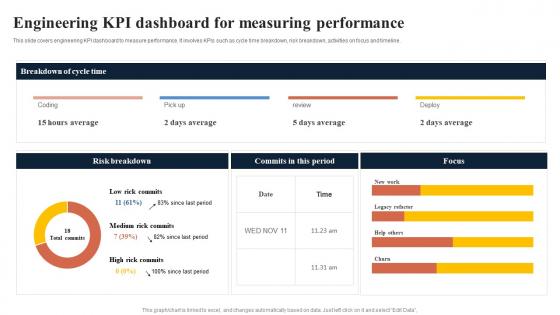
Engineering KPI Dashboard For Measuring Performance




Try Before you Buy Download Free Sample Product
 Impress Your
 Audience
 100%
100% Editable
 Save Hours
 of Time


This slide covers engineering KPI dashboard to measure performance. It involves KPIs such as cycle time breakdown, risk breakdown, activities on focus and timeline.
People who downloaded this PowerPoint presentation also viewed the following :
Engineering KPI Dashboard For Measuring Performance with all 7 slides:
Use our Engineering KPI Dashboard For Measuring Performance to effectively help you save your valuable time. They are readymade to fit into any presentation structure.





FAQs for Engineering KPI Dashboard
Start with velocity stuff - sprint completion rates, cycle time. Bug rates and code coverage for quality. Deployment frequency is huge, plus mean time to recovery (trust me, these will save you from angry leadership meetings). Don't forget technical debt ratio because nobody talks about that enough. Team happiness metrics are actually critical - stressed engineers ship garbage code. If your stuff hits users directly, track uptime and response times too. Keep it to like 5-6 KPIs at first. You can always add more once people get in the habit of actually looking at this data.
So basically, these dashboards show you what's actually happening with your projects in real-time. You can catch problems early instead of scrambling later. All your important stuff - deployment frequency, lead times, bug counts - lives in one spot. Makes it way easier to make smart decisions and keep everyone in the loop about progress. Oh, and don't go crazy with metrics or you'll never look at the thing. Pick like 4-6 that actually matter to your team and keep them updated. Trust me, I've seen too many beautiful dashboards that nobody uses because they're overwhelming.
Line charts are your best bet for tracking trends like deployment frequency and lead time. Code coverage? Go with gauges or simple progress bars. Heat maps are clutch for comparing performance across different teams or time periods. Clean beats fancy every time - engineers hate cluttered dashboards. Red/yellow/green works for status stuff, but don't go overboard with it. Make sure someone can scan everything in 30 seconds max. Oh, and definitely build in drill-down capabilities because someone's always gonna ask why metrics went weird on random days. Trust me on that one.
So real-time data integration basically makes your KPI dashboard actually useful instead of just pretty. You'll see deployment rates, performance metrics, incident times - all updating live. Honestly, once you try it you can't go back to those stale weekly reports. Problems show up immediately instead of you finding out way too late. Connect your CI/CD stuff, monitoring tools, and project management directly to the dashboard. Oh and definitely start with whatever metrics matter most to your team first, then add more later. Trust me on this one.
Look, if engineers can't quickly grab what they need from your dashboard, it's basically worthless. Nobody wants to waste time hunting through confusing charts when they could be fixing actual problems. I've watched so many teams build these flashy dashboards that just collect dust because they're impossible to navigate. Put your most critical stuff right up front. Keep the layout clean and scannable - like, someone should get the gist in 5 seconds. Also, test it with real users super early. Trust me, their feedback will prevent you from building something that looks cool but nobody actually touches.
So basically, these dashboards show you where stuff actually gets stuck vs where you *think* it's getting stuck. Track cycle time, lead time, work-in-progress limits across your pipeline stages. Like if tasks are sitting in code review for weeks but deployment flies by? Bam, found your bottleneck. Way easier to spot patterns visually than digging through spreadsheets (ugh). Set alerts when stages take longer than usual - honestly this saved my team so much headache last quarter. You'll catch problems before they turn into those awful multi-week blockers that make everyone miserable.
Okay so start with the basic industry stuff - weekly deployments, lead time under 2 weeks, change failures below 15%. But honestly? Those numbers are kinda meaningless if you're not Netflix with their massive team and resources. First thing you gotta do is track your current situation for like a month. See where you actually are right now. Then set realistic goals based on YOUR data, not some blog post about Google's engineering team. A 5-person startup shouldn't stress about hitting the same metrics as a tech giant - that's just setting yourself up to feel bad. Once you have your baseline, do quarterly improvements from there.
Start with forecasting models on your most critical KPIs - like project deadlines or when resources might get tight. Tableau and Power BI both have ML built in, or you can hook up external models through APIs. Don't go crazy trying to predict everything right away though. Your team will hate you for it. Focus on metrics where getting a heads up actually lets you do something useful - maybe sprint velocity dropping or equipment about to crap out. Time-series forecasting is honestly the easiest place to begin. Pick the stuff that'll save you real headaches if you see problems coming.
Honestly, data inconsistency will drive you insane. Each team tracks stuff differently and pulling clean data from multiple tools? Total mess at first. Don't make the same mistake I see everywhere - cramming every metric onto one dashboard. Nobody uses those monster dashboards, trust me. Pick like 5-7 KPIs that actually matter to your people. Get your teams on board early or you'll be fighting uphill battles later. Start simple with your data integration. You can always add more complexity once the basic stuff works and people give you real feedback on what they need.
For engineering KPIs, you can't go wrong with the usual suspects - Tableau, Power BI, and Grafana. Power BI's super easy if you're already using Microsoft stuff. Grafana is where it's at for real-time monitoring though, engineers absolutely swear by it. Tableau's got the fanciest visualizations but honestly might be overkill depending on what you need. There's also Looker and Kibana if you're dealing with logs. Some teams just say screw it and build their own in Retool or React when they want total control. I'd probably start with Power BI for business stuff or Grafana for technical monitoring.
Yeah, it really depends on your field. Software teams obsess over deployment frequency and bug rates - makes sense since they're shipping code constantly. But civil engineers? They're all about safety incidents and compliance because nobody wants a bridge collapse on their record. Mechanical teams usually track prototype iterations and testing cycles. Honestly, just ask your team what numbers they actually check every day. Those are probably your best bets for the dashboard. Don't overthink it - the metrics that make people panic when they're off track are usually the ones worth tracking.
Get them involved from day one - seriously, don't just build something and hope they'll use it. I'd run workshops where they actually tell you what success means to them, then work backwards to find metrics that match. Way better than the whole "here's your dashboard, you're welcome" approach. Focus on stuff that ties to real business results they actually care about, not just numbers that look impressive. Oh and definitely check in regularly - like what's helping, what's just clutter? People ignore dashboards when they feel forced on them. But if they help create it? They'll actually open the thing.
Honestly, just dig into your team's old data first. Pull up the last 6 months of sprint velocities, bug counts, delivery times - all that stuff. What jumps out? Maybe you crushed it during those weeks when code reviews were super quick, or when you actually had decent test coverage (shocking, I know). Those "aha moments" are gold. Don't compare yourself to industry benchmarks though - they're pretty much useless. Your team's past performance is way more realistic for setting goals. Look for patterns between process tweaks and actual results.
Update your dashboard weekly minimum, but daily's way better for stuff like deployment frequency. Automate the data collection - seriously, manual updates will make you hate life. You've gotta actually look at this data with your team regularly, not just have it sitting there collecting digital dust. When metrics stop helping you make decisions, ditch them. Add new ones when priorities change. Oh, and set up alerts for when things go wonky so you catch problems before they bite you in the ass during retros.
Honestly, just watch if people actually use the thing. Half the dashboards I've built ended up ignored after two weeks - brutal but true. Check which metrics your team clicks on most and whether they're making faster decisions. Survey them every few months about whether it's genuinely helpful for their daily work. But here's what really matters: are your key numbers improving? Faster cycle times, better code quality, that stuff. Usage patterns don't lie - if it sits there collecting digital dust, you'll know pretty quickly the dashboard isn't hitting the mark.
-
Mesmerized with the fantastic collection! Super sleek, relevant infographics.
-
You know what? I'm so glad I opted for this PPT design. It has been a total game-changer for me and my presentations. Thank you!