


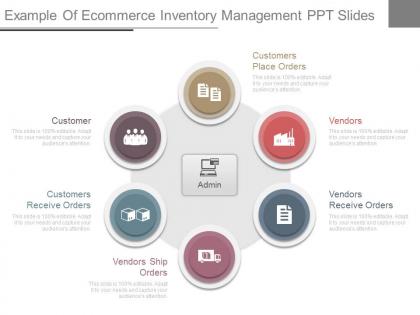
Example of ecommerce inventory management ppt slides




Try Before you Buy Download Free Sample Product
 Impress Your
 Audience
 100%
100% Editable
 Save Hours
 of Time


Take your thoughts into comfort zone. Our Example Of Ecommerce Inventory Management Ppt Slides are like eider down.
People who downloaded this PowerPoint presentation also viewed the following :
Example of ecommerce inventory management ppt slides with all 7 slides:
Colleagues agree to accept change due to our Example Of Ecommerce Inventory Management Ppt Slides. They help you make a good case for it.
-
Example of ecommerce inventory management ppt slides
-
Example of ecommerce inventory management ppt slides
-
Example of ecommerce inventory management ppt slides
-
Example of ecommerce inventory management ppt slides
-
Example of ecommerce inventory management ppt slides
-
Example of ecommerce inventory management ppt slides
-
Example of ecommerce inventory management ppt slides
FAQs for Example of ecommerce inventory
Honestly, demand forecasting is gonna be your biggest headache. You're basically guessing what people want while managing multiple sales channels - it's chaos. Stockouts happen when you least expect them, then you overcompensate and end up drowning in inventory. Seasonal stuff makes it worse, and don't get me started on supplier delays screwing everything up. Managing SKUs across different warehouses? Total nightmare. I learned this the hard way last year. Get solid inventory software that syncs with your sales channels in real-time. Trust me, you'll need that visibility or you'll go insane trying to prevent overselling.
Look, start with demand forecasting using your sales history - it's pretty straightforward once you get the hang of it. Set reorder points so you're not scrambling when stuff runs low. ABC analysis sounds complicated but honestly just means ranking products by how much money they make you. Keep safety stock around for when suppliers are being weird or demand goes crazy. Oh and definitely get inventory software that talks to your sales platforms - saves so much headache. Focus on your top 20% of products first since they're probably carrying most of your business anyway. Regular audits are boring but necessary.
Dude, automation just takes care of all the boring repetitive crap for you. Stock levels update automatically when orders roll in. You'll get alerts before stuff runs out, and it syncs across all your sales channels without you lifting a finger. I used to miss so many errors doing this manually - now the system catches them. You can even set it up to forecast what you'll need based on your sales history, which is honestly pretty smart. Oh, and you won't be stuck updating spreadsheets all day anymore. Start with whatever's eating up most of your time first.
Honestly, data analytics will blow your mind for forecasting. You can spot seasonal patterns, see how promotions actually affect sales, even factor in weird stuff like weather. Way better than just looking at last year's numbers and hoping for the best. The machine learning gets smarter over time too - kind of creepy how good it gets at finding connections. You can break everything down by product type or region for way more precise planning. I'd start by measuring your current accuracy first, then you'll actually see the difference when you add analytics tools.
Set up different statuses for returned stuff - like "needs inspection" or "damaged" - so you don't accidentally sell broken items. Trust me, we learned this during a crazy holiday rush when we oversold like crazy! Your workflow should automatically update inventory counts when returns come in. Have your team inspect returns fast and update everything right away. Also track why people are returning things - you might spot patterns that help cut down future returns. Oh and set alerts for when returned inventory just sits there too long. Nobody wants dead stock taking up space.
Start with ABC analysis - group your stuff by how much revenue it brings in (A = your money makers, B = decent, C = meh). Set up SKU codes that actually make sense - product type, size, color, whatever works for your business. I swear the naming convention is where everyone screws up, but it'll save you so much headache later. Do cycle counting instead of those nightmare annual inventory days. Most systems can auto-calculate when to reorder based on how fast things sell and supplier lead times. Just be super consistent with your categories from the start. Trust me, fixing a messy system later is the worst.
Honestly, start with inventory turnover rate and how often you're running out of stock - those two will tell you the most right away. Track your carrying costs and gross margin per product too. Days sales outstanding matters because it shows how long your cash is just sitting there doing nothing. I'm probably way too obsessed with checking turnover rates, but whatever works right? Also keep an eye on reorder points and lead times so you don't end up in those awful scrambling situations. Those metrics I mentioned first though - turnover and stockouts - they'll give you the biggest wins immediately.
Honestly, multi-channel selling turns inventory into a total nightmare. You're tracking stock everywhere at once - your site, Amazon, maybe a physical store. Real-time syncing becomes crucial because nothing's worse than overselling on one platform while you've got products just sitting around elsewhere (learned that the hard way). Sales can happen anywhere simultaneously, so accurate counts get tricky fast. Get centralized software that auto-updates quantities across channels. Trust me on this one. Without it, you'll be manually updating everything like some kind of deranged juggler. It's basically inventory whack-a-mole and you'll lose your mind trying to keep up.
For real-time inventory tracking, RFID tags are your best bet - they update everything automatically when stuff moves around. Barcode scanning with mobile apps is solid if you're watching your budget. IoT sensors are getting really popular now too, giving you live stock data without manually scanning anything. Though honestly, setting up IoT can be a pain if you're not tech-savvy. Most ecommerce platforms sync with your POS system already. I'd check what your current setup can handle first, then go with whatever doesn't completely mess up your workflow. Start simple and upgrade later.
Ugh, supply chain issues are such a pain - they mess with literally everything about inventory management. You end up needing way more safety stock because who knows when stuff will actually show up. Reorder points have to go higher too. Cash flow takes a beating since you're stockpiling inventory but still might run out of popular items anyway (makes zero sense, right?). I'd definitely line up backup suppliers if I were you. Also maybe look into some decent forecasting software - beats guessing when the next crisis hits. It's stressful but you adapt.
Honestly, JIT is trickier than people think - you need bulletproof demand forecasting first. Dig into your sales data to figure out patterns, then work with suppliers who can actually deliver fast when you order. I'd start with your best-selling stuff since it's safer than jumping in everywhere at once. Set up automatic reorder triggers in your system so it handles the ordering when stock gets low. The whole thing's basically a balancing act though - too little inventory and you're screwed, too much and you're back where you started. Oh, and definitely negotiate shorter lead times upfront or this won't work.
So I've been down this rabbit hole before - QuickBooks Commerce (used to be TradeGecko) is pretty solid for most small businesses. inFlow's super beginner-friendly if your team isn't super tech-savvy. Zoho Inventory works well too, though their interface can be a bit clunky sometimes. Multi-channel selling? Cin7's your best bet there. But honestly, don't overthink it too much - grab free trials of like 2-3 options and actually test them with your real products. You'll know pretty quick which one doesn't make you want to pull your hair out. Most integrate fine with Shopify and WooCommerce anyway.
Dude, you're spot on about inventory being huge for keeping customers happy. Nothing's worse than browsing a site and hitting "out of stock" everywhere - I literally just close the tab and go elsewhere. When you've got your stock levels figured out, customers get accurate info about what's available and way faster shipping. They'll actually trust you'll have their stuff, which is honestly half the battle. Oh, and here's something I learned the hard way - good inventory tracking helps you catch trends before they blow up. You can stock up on the hot items before everyone else sells out. I'd start by just looking at what you're selling most and make sure those don't run dry.
Honestly, start with an audit of where you're wasting the most stuff environmentally - that'll show you the biggest wins. Packaging waste is huge, so switch to sustainable materials when you can. Your warehouse probably sucks energy like crazy, so optimize that. Better demand forecasting helps cut transportation emissions and prevents you from overstocking (nobody wants to be tossing perfectly good inventory in landfills because they screwed up their orders). Try consolidating shipments to reduce delivery trips. Oh, and local suppliers are clutch for shrinking your carbon footprint, though sometimes the quality trade-offs are annoying. Focus on inventory accuracy first though.
So drop shipping is basically when you sell stuff but don't actually keep it in stock - your supplier ships straight to customers when orders roll in. The cash flow thing is huge since you're not dropping money on inventory upfront. You can try out new products without much risk, which is pretty sweet. Plus you get to expand what you're selling fast and use your warehouse space for top sellers while drop shipping the stuff that moves slower. Downside? Your margins take a hit and shipping times are kinda out of your hands. I'd start with 2-3 solid suppliers and test a few product categories first before going all in.
-
Amazing product with appealing content and design.
-
Informative design.