


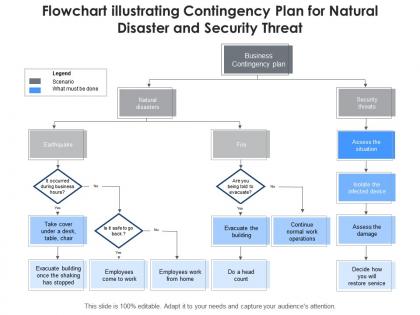
Flowchart illustrating contingency plan for natural disaster and security threat




Try Before you Buy Download Free Sample Product
 Impress Your
 Audience
 100%
100% Editable
 Save Hours
 of Time


Our Flowchart Illustrating Contingency Plan For Natural Disaster And Security Threat are topically designed to provide an attractive backdrop to any subject. Use them to look like a presentation pro.
People who downloaded this PowerPoint presentation also viewed the following :
Flowchart illustrating contingency plan for natural disaster and security threat with all 2 slides:
Use our Flowchart Illustrating Contingency Plan For Natural Disaster And Security Threat to effectively help you save your valuable time. They are readymade to fit into any presentation structure.
FAQs for Flowchart illustrating contingency plan for natural disaster
You need risk assessment and clear trigger points for when shit hits the fan. Map out who does what and how you'll communicate when everything's chaos. Most people screw this up by never actually testing their plan - seriously, run drills or you're just wasting time. Keep it simple enough that someone panicking at 2am can still follow it. Document your recovery steps and make sure decision-making authority is crystal clear. Oh, and identify backup resources ahead of time. Start small though - pick your top 3-5 risks and build focused plans around those first before going crazy with everything else.
Do a solid risk assessment first - hit up operations, IT, supply chain, finance, all that stuff. You're basically playing detective on your own company, which is weirdly fun. Pull in people from different departments because they'll catch things you totally missed. Historical data and industry trends help too. Then use one of those impact vs probability charts to figure out what actually matters. Honestly, don't waste time planning for every single thing that could go wrong. Focus on the big scary stuff that would really mess you up AND has a realistic chance of happening.
So basically, tech makes contingency planning way less of a guessing game. AI can spot patterns in your data and predict what might go wrong before it actually does. Real-time dashboards show you exactly what's happening right now - no more wondering if something's about to blow up. The simulation stuff is pretty cool too; you can test scenarios without breaking anything in real life. Automated alerts ping you when things hit dangerous levels. My advice? Pick your three biggest worries first and find tools that track those specifically. Way easier than trying to monitor everything at once.
Start with what would literally kill your business if it went down - payroll, core operations, customer stuff. Map out dependencies too since your accounting probably needs IT running first. I like the "explain to your CEO" test - if you can't justify why something broke, it's probably critical lol. Break everything into tiers: mission critical, important, and nice-to-have. Then split your budget and backup plans accordingly. Honestly, most people skip the documentation part but you'll thank yourself later when chaos hits and everyone knows what gets fixed first.
Honestly, you can't do contingency planning solo - you'll miss way too much. Different departments see risks you'd never think of, plus your customers and suppliers know their own pain points better than you do. The people who'll actually have to execute your plan when shit hits the fan? Yeah, get them involved early or good luck getting buy-in later. I learned this the hard way once. Map out who gets impacted by each scenario first. Then bring those folks into your planning sessions instead of just dumping a finished document on them.
At minimum, check your contingency plans once a year. But honestly? That's not nearly enough. Any major business changes should trigger an immediate review - new locations, key people leaving, industry shifts, whatever. I can't tell you how many outdated plans I've seen that still list employees who quit ages ago. Quick health checks every six months work well for your most critical stuff. Calendar reminders are your friend here. Oh, and definitely review after any actual incidents happen - you'll always learn something new. Maybe start with your top three plans this month?
Honestly, the worst thing you can do is be too vague - like saying "talk to people" instead of "email the client within 2 hours." Don't try planning for literally everything either, you'll drive yourself nuts. Test it beforehand too, because finding out your plan sucks during an actual emergency is... not ideal. Make sure someone owns each piece - can't have everyone assuming someone else will handle it. And for the love of god, don't bury the plan in some random folder. Keep it somewhere people can actually find when stuff hits the fan.
Run mock scenarios that feel like the real deal - that's your best bet. Tabletop exercises work great where everyone just talks through the steps. Or go bigger with actual drills. Honestly, the tabletop ones always surprise me with weird gaps nobody saw coming. Make it realistic enough to stress things out but not so crazy you can't learn anything useful. Document everything after - what bombed, what worked, all of it. Then tweak your plan. Oh, and start simple first. You don't want to throw your team into some nightmare scenario right off the bat.
Honestly, having a solid communication plan is what separates the companies that bounce back from the ones that completely implode. Map out your key audiences first - employees, customers, media, whoever matters to your business. Then assign specific people to handle each group because trust me, you don't want everyone scrambling to figure out who's supposed to talk when disaster strikes. Draft some template messages ahead of time too. I know it sounds boring, but when you're dealing with an actual crisis, you'll be way too stressed to write clear, thoughtful communications from scratch. The whole thing basically comes down to deciding now how information flows so you're not making it up as you go.
Look, you can't just wing it when it comes to legal stuff - these requirements are your bare minimum, not suggestions. Healthcare, finance, utilities - they all have their own rules about data backups, how fast you report incidents, that whole deal. The paperwork's boring as hell but you gotta do it. Different states or countries? That's more compliance headaches to juggle. Honestly, figure out what regulations hit your industry first, then bake those rules right into your plan from the start. Way easier than retrofitting later.
You need hands-on training, not some boring PowerPoint session. Start with tabletop exercises where teams actually walk through scenarios. Then do full simulations testing your real plan. Cover who does what, communication chains, decision-making authority - because confusion during a crisis is the worst. I've watched companies do one training and think they're set... total disaster waiting to happen. Leadership should go first, then roll it down to everyone else. Oh, and quarterly refreshers are key, especially when plans change. Trust me on this one.
Honestly, you don't need to blow your budget on this stuff. Pick your top 3-5 risks that could actually kill your business and write down simple steps for each one. Start with the free wins - back up your data to the cloud, teach a couple people how to do the critical tasks. My cousin learned this the hard way when his bookkeeper quit with zero notice! Document it all in a shared folder so you're not the only one who knows what's going on. Simple beats perfect here. Test your plans once in a while, even just a quick 15-minute run-through. Better than some fancy binder collecting dust.
You need to measure two main things: how fast you responded and how well you recovered. So track detection time, how quickly the plan kicked in, and whether your communication actually worked. Then look at recovery - service levels, getting back to normal capacity, that stuff. The "chaos factor" is honestly super telling too. Did everyone know their role or were people running around confused? Also compare your emergency costs to what you budgeted. Those overruns can be brutal. Pro tip - set up your tracking dashboard beforehand. You don't want to be figuring out metrics while everything's on fire.
So here's the thing - external partnerships are basically your safety net when stuff hits the fan. You can tap into suppliers, vendors, or even competitors for backup resources you don't have. Maybe it's alternative supply chains, extra workers, or someone with specialized skills. I honestly think the brainstorming alone makes it worth it - you'll spot risks you never considered. The key is mapping out who could cover your critical functions, then actually talking to them beforehand. Don't wait until you're desperate. It spreads the risk around instead of you carrying everything solo.
So basically, scenario planning and forecasting are your bread and butter for figuring out what might actually blow up. You're mapping out different "what if" situations while forecasting gives you the numbers on timing and probability. It's like having a crystal ball but with way more Excel headaches, honestly. The whole point is prioritizing which disasters are worth planning for - because let's be real, you can't prep for everything. I'd start with your top 3-5 nightmare scenarios first. Then build your actual contingency plans around those specific situations instead of trying to boil the ocean.
-
Visually stunning presentation, love the content.