


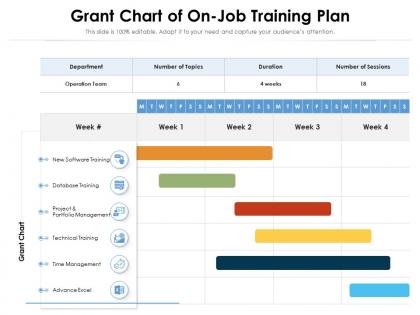
Grant chart of on job training plan




Try Before you Buy Download Free Sample Product
 Impress Your
 Audience
 100%
100% Editable
 Save Hours
 of Time


Our Grant Chart Of On Job Training Plan are topically designed to provide an attractive backdrop to any subject. Use them to look like a presentation pro.
People who downloaded this PowerPoint presentation also viewed the following :
Grant chart of on job training plan with all 2 slides:
Use our Grant Chart Of On Job Training Plan to effectively help you save your valuable time. They are readymade to fit into any presentation structure.
FAQs for Grant chart of on
Key components include training modules, timeline milestones, resource allocation, mentor assignments, skill assessments, and progress checkpoints. These elements work together by providing clear visibility into training progression, ensuring adequate resource planning, and enabling managers to track competency development across departments, ultimately delivering structured onboarding experiences and faster employee productivity.
A Gantt chart enhances training visualization by displaying timelines, dependencies, milestone markers, progress tracking, and resource allocation in a single comprehensive view. This visual framework enables training managers to identify scheduling conflicts, monitor completion rates, and adjust timelines proactively, while trainees can clearly see their learning pathway and upcoming deadlines, ultimately streamlining coordination and improving training outcomes.
**INPUT**: What tools or software are recommended for creating Gantt charts specifically for training plans? **OUTPUT**: Recommended tools include Microsoft Project, Smartsheet, Asana, Monday.com, and TeamGantt, each offering training-specific templates and collaboration features. These platforms streamline training coordination by enabling milestone tracking, resource allocation, and progress monitoring, with many organizations finding that integrated communication tools and automated notifications significantly enhance training delivery and completion rates. [Word count: 53 words]
Gantt charts help identify resource allocation for in-house training by visualizing trainer availability, equipment needs, venue requirements, and participant schedules across training timelines. Through strategic scheduling, organizations can optimize training rooms, minimize instructor conflicts, and balance employee participation with operational demands, ultimately reducing costs while maximizing training effectiveness and ensuring seamless knowledge transfer.
Gantt charts for on-the-job training deliver enhanced visibility, structured milestone tracking, resource optimization, deadline management, and progress transparency across training programs. These visual tools streamline training coordination by identifying bottlenecks early, enabling managers to adjust timelines proactively, and ensuring consistent skill development, with many organizations finding that structured training visualization ultimately reduces onboarding time and improves employee retention rates.
Milestones in training Gantt charts are effectively defined by identifying key competency checkpoints, skill assessments, certification completions, and performance evaluations throughout the program timeline. These markers enable training managers to track progress systematically, ensure participants meet learning objectives at critical intervals, and adjust timelines when needed, ultimately delivering structured skill development and measurable outcomes for organizational capabilities.
Time estimation forms the foundation of effective Gantt charts for on-the-job training by determining realistic durations for each training module, skill assessment period, and competency milestone. Accurate estimations enable HR departments and training managers to allocate resources efficiently, schedule mentors strategically, and set achievable completion dates, ultimately delivering structured learning pathways that enhance employee development while minimizing operational disruption.
Gantt charts can be adapted for varying training durations by incorporating flexible timelines, milestone-based checkpoints, buffer periods for slower learners, and accelerated tracks for quick adopters. Through customizable templates, organizations streamline training management by adjusting task dependencies, reallocating resources based on individual progress, and maintaining visibility across different learning speeds, ultimately delivering personalized development experiences while ensuring consistent training outcomes.
Gantt charts for training effectiveness can track completion rates, skill assessment scores, milestone achievement timelines, resource utilization rates, and participant engagement levels. These metrics enable organizations to monitor training progress across departments, identify bottlenecks in skill development, and measure ROI through improved performance indicators, with many companies finding that visual tracking ultimately enhances training outcomes and employee development success.
Gantt charts enhance team collaboration in training programs by providing visual timeline clarity, establishing shared accountability, enabling real-time progress tracking, and facilitating coordinated resource allocation across departments. Through centralized scheduling visibility, training managers streamline communication workflows, minimize scheduling conflicts, and ensure seamless knowledge transfer, with many organizations finding that collaborative training timelines ultimately deliver faster skill development and stronger cross-functional team integration.
**INPUT**: What challenges might arise when creating a Gantt chart for a multi-departmental training initiative? **OUTPUT**: Multi-departmental training Gantt charts present challenges including coordinating diverse schedules, managing resource conflicts, aligning varying departmental priorities, and tracking dependencies across different skill requirements. These complexities require strategic coordination and clear communication channels, with many organizations finding that robust project management software and dedicated training coordinators streamline execution, ultimately delivering cohesive workforce development.
Feedback loops can be incorporated into Gantt charts through scheduled review milestones, progress checkpoints, and iterative task dependencies that trigger reassessment phases. These structured intervals enable trainers and trainees to evaluate performance, adjust timelines, and refine learning objectives, with many organizations finding that regular feedback integration enhances skill retention and accelerates professional development outcomes.
Effective strategies include establishing regular review checkpoints, assigning dedicated chart maintenance responsibilities, implementing feedback loops with trainees and supervisors, and using collaborative software tools that enable real-time updates. These approaches streamline progress tracking by maintaining accuracy, facilitating communication, and enabling quick adjustments, with many training managers finding that weekly reviews and automated milestone alerts ultimately deliver enhanced program visibility and improved completion rates.
Dependencies between training tasks should be represented using arrows or connecting lines that link prerequisite tasks to subsequent ones, clearly showing the sequential flow from foundational skills to advanced competencies. In manufacturing training programs, arrows might connect safety certification to equipment operation, then to quality control procedures, ensuring trainees complete each phase before advancing, ultimately streamlining the learning pathway and reducing training time.
Common pitfalls include overcomplicating timelines, underestimating skill development duration, failing to account for trainee availability, and creating rigid schedules without buffer time. These issues often derail training programs in manufacturing, healthcare, and retail environments, where successful implementation requires realistic timeframes, flexible milestone adjustments, and regular progress reviews, ultimately delivering more effective workforce development.
-
Great experience, I would definitely use your services further.
-
Great quality product.
-
Perfect template with attractive color combination.
-
Excellent Designs.
-
Unique research projects to present in meeting.