


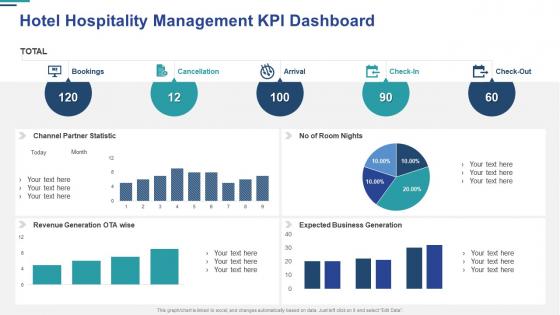
Hotel hospitality management kpi dashboard




Try Before you Buy Download Free Sample Product
 Impress Your
 Audience
 100%
100% Editable
 Save Hours
 of Time


Our Hotel Hospitality Management KPI Dashboard are topically designed to provide an attractive backdrop to any subject. Use them to look like a presentation pro.
People who downloaded this PowerPoint presentation also viewed the following :
Hotel hospitality management kpi dashboard with all 7 slides:
Use our Hotel Hospitality Management KPI Dashboard to effectively help you save your valuable time. They are readymade to fit into any presentation structure.





FAQs for Hotel hospitality
Focus on the big four first: occupancy rate, ADR, RevPAR, and guest satisfaction scores. Those show you financial health plus whether guests are actually happy. Labor costs as a percentage matter too - and honestly, energy costs per room because utilities will destroy your margins if you're not careful. Daily cash flow is huge, plus booking pace vs last year. Oh, and don't go overboard adding every metric you can think of. Your team will get overwhelmed and stop using it altogether. Start simple with these core ones, then layer in more specific stuff once everyone's comfortable with the dashboard.
Real-time data is a game changer - you'll catch issues before they blow up and grab opportunities that would otherwise slip by. Why wait for weekly reports when you can see occupancy dropping or guest complaints spiking as it happens? A maintenance problem gets fixed in one room instead of spreading to five. Honestly, the staffing flexibility alone makes it worth it. Push last-minute deals when bookings slow down, move housekeeping around based on checkouts. Set up alerts for your most important metrics so you're staying ahead instead of scrambling to fix yesterday's mess.
Look, guest satisfaction scores are huge for hotels - they're like your early warning system. Track stuff like NPS scores, review ratings, and survey feedback since happy guests actually come back and spend money. Makes sense, right? When satisfaction drops, you can spot exactly what's broken - maybe housekeeping's slipping or front desk is being weird with people. Set up alerts so you know immediately when scores tank below your target. That way you're not scrambling to fix things after half your guests already had a terrible time. Trust me, catching problems early saves you so much headache later.
Track guest satisfaction scores and response times - those are your bread and butter. Upselling success rates matter too, plus basic stuff like attendance. RevPAR contribution is massive for front desk teams especially. Don't overdo it though. I've seen managers drown in spreadsheets while their actual teams fall apart. Pick maybe 4-5 metrics max that actually move the needle on guest experience and revenue. Set up automated reports so you're not manually pulling numbers every week (trust me on this one). Then just do regular check-ins with your team to review the data. Keep it simple and you'll actually use the system instead of abandoning it after two months.
Go with color-coded visuals - green means you're golden, red means drop everything and fix it. Your main KPIs like occupancy and ADR should be right up front where you can't miss them. Honestly, most dashboards are complete disasters with way too much going on. Group similar stuff together (revenue here, guest satisfaction there, operations over here) and keep the charts dead simple. Your GM needs to get it instantly, even before their second cup of coffee kicks in. You'll want drill-down options available, but start with the big picture view. Oh, and definitely set alerts for anything urgent.
Honestly, getting your systems to talk to each other is a game changer. Your PMS and POS can dump data straight into dashboards - no more manual entry screwups. I've seen too many hotels still using spreadsheets for everything, which is just asking for trouble. Real-time updates mean your occupancy and RevPAR numbers are actually current instead of three days behind. AI catches weird data spikes before they mess up your reports. The trick is avoiding systems that don't play nice together. Otherwise you're back to copying numbers between platforms like it's 2005.
Occupancy rate affects literally everything else on your dashboard. More occupied rooms = more revenue, obviously, plus your fixed costs get spread thinner so profits look better. But it also makes your staff work harder and can mess with guest satisfaction if you're not careful. I've noticed some hotels go crazy trying to hit 100% occupancy - honestly, that's not always smart. You'll end up with overworked housekeeping and cranky guests. Watch your RevPAR and satisfaction scores at the same time, not just occupancy by itself.
Honestly, benchmarking is a game-changer because it stops you from guessing whether your numbers are actually good or bad. Like, if your ADR drops 3%, is that you screwing up or just the whole market tanking? Compare your RevPAR and occupancy rates against similar hotels nearby - suddenly you'll know if you're winning or losing. Maybe your guest reviews are crushing it but your revenue per room sucks compared to competitors. That's gold right there. Focus on fixing the stuff where you're genuinely behind, not just chasing random metrics that might be fine.
RevPAR is your bread and butter - that's revenue per available room. Pair it with ADR (average daily rate) and occupancy rate to see how your rooms are actually doing. GOP shows your gross operating profit, which matters way more than people think. Labor costs will eat you alive if you're not watching that percentage closely. Oh, and don't sleep on food & beverage margins - they can totally save a struggling property. EBITDA's good for the big picture too. Start tracking RevPAR and GOP first, then add the others once you've got those down.
Honestly, daily updates are the bare minimum these days. Real-time is where you want to be if your system can swing it. I've noticed most hotels that actually nail this refresh every few hours during busy periods - occupancy, ADR, guest scores, all that stuff changes constantly. Weekly? Forget about it. You'll miss way too much when you need to pivot on pricing or staffing. Though I will say, don't go crazy and overwhelm your team with updates every 5 minutes either. Set up whatever automated feeds you can, then step back weekly to actually look at the bigger patterns. It's kind of like checking your phone - frequent enough to stay current, but not obsessively.
Honestly, manual data entry will make you want to pull your hair out - automate everything you can. Connect your PMS straight to the dashboard for occupancy and ADR. Your POS should feed F&B numbers daily, and housekeeping software can push room status updates automatically. I learned this the hard way when I spent way too much time fixing inconsistent spreadsheets. For guest feedback, those post-stay email surveys work way better than hoping front desk remembers to log comments. Department heads can just do weekly spot checks instead of scrambling to build reports from nothing.
So basically you'll want to track stuff like Net Promoter Score and average review ratings. I'd break guest comments into buckets - cleanliness, staff, amenities, whatever. Then watch how those scores change month to month. Response time to complaints is huge too, honestly shows way more than people think about how your team actually works. If you're drowning in written feedback, sentiment analysis scores help a lot. Pick maybe 3-4 metrics that hit your property's worst problem areas first. Don't try to track everything at once - you'll just get overwhelmed and nothing will stick.
Here's the thing - you can't just compare July numbers to January and call it a day. Makes no sense! Peak season brings higher ADR and RevPAR, but guest satisfaction often tanks because everything's packed. Off-season's the opposite - revenue drops but service scores usually improve since staff aren't stretched thin. Labor costs bounce around too as you adjust staffing levels. Honestly, the year-round average thing is pretty useless. Set seasonal baselines for each KPI instead. That way you're actually comparing similar periods and can tell if you're doing well or just riding the wave.
Honestly, I'd go with Power BI for your hotel dashboard. It's way cheaper than Tableau and connects easily to most hotel systems you're probably already using. Tableau's great but feels like overkill unless you're managing like 50+ properties or something. Power BI handles all the important stuff - occupancy rates, RevPAR, guest scores - without being overly complicated. Google Data Studio is another option if you just need basic reports and don't want to spend money. But Power BI hits that sweet spot between being powerful enough and actually usable for most hotel operations.
Honestly, you can't just look at RevPAR and occupancy anymore. Guest feedback is where the real story is - surveys, reviews, what your front desk staff are hearing. I do weekly sessions where we match up both sides. Like last month, our revenue looked solid but satisfaction was tanking, which was our red flag. The hard part is actually using the feedback data in decisions instead of just... having it sit there. Pick maybe 2-3 guest metrics that tie directly to your main numbers. Short sentences work better for dashboards too, just saying.
-
Very unique and reliable designs.
-
Content of slide is easy to understand and edit.