


Diapositivas de presentación de Powerpoint del sistema de gestión de inventario




Try Before you Buy Download Free Sample Product
 Impress Your
 Audience
 100%
100% Editable
 Save Hours
 of Time


Nuestras diapositivas de presentación de Powerpoint del sistema de gestión de inventario están diseñadas por temas para proporcionar un telón de fondo atractivo para cualquier tema. Úselos para parecer un profesional de la presentación.
People who downloaded this PowerPoint presentation also viewed the following :
Contenido de esta presentación de Powerpoint
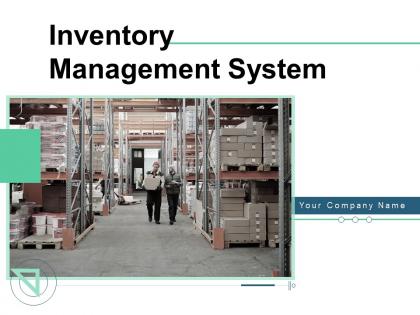
Diapositiva 1 : Esta diapositiva presenta el Sistema de gestión de inventario. Indique el nombre de su empresa y comience.
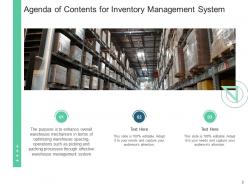
Diapositiva 2 : Esta diapositiva muestra la Agenda de contenidos para el Sistema de gestión de inventario.
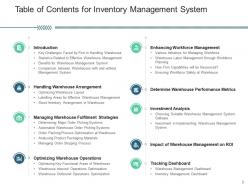
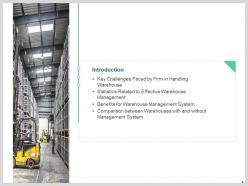
Diapositiva 3 : Esta diapositiva presenta la Tabla de contenido para el Sistema de gestión de inventario.
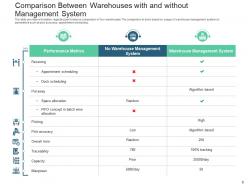
Diapositiva 4 : Esta diapositiva muestra la Comparación entre Almacenes con y sin Sistema de Gestión.
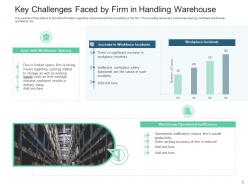
Diapositiva 5 : Esta diapositiva muestra varios problemas que existen en la empresa, es decir, espacio en el almacén, operaciones de almacén ineficientes, etc.
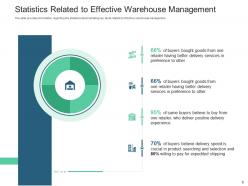
Diapositiva 6 : La diapositiva representa información sobre las estadísticas que demuestran hechos clave relacionados con la gestión eficaz del almacén.
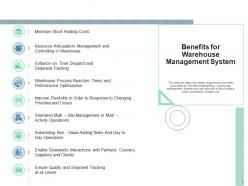
Diapositiva 7 : esta diapositiva muestra los beneficios generados por la empresa después de implementar el sistema de gestión de almacenes, como la reducción de los costos de mantenimiento de existencias, la automatización de tareas, etc.
Diapositiva 8 : Esta diapositiva presenta la Comparación entre almacenes con y sin sistema de gestión.
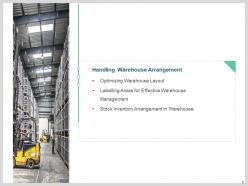
Diapositiva 9 : Esta diapositiva muestra el acuerdo de manejo de almacén.
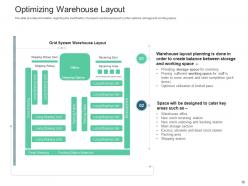
Diapositiva 10 : Esta diapositiva muestra información sobre la modificación del diseño actual del almacén para optimizar el almacenamiento y el espacio de trabajo.
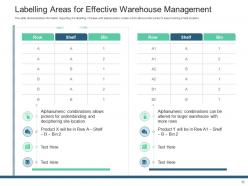
Diapositiva 11 : Esta diapositiva representa el etiquetado de áreas para una gestión eficaz del almacén.
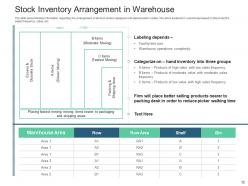
Diapositiva 12 : La diapositiva muestra información sobre la disposición del inventario de existencias asignado con códigos alfanuméricos.
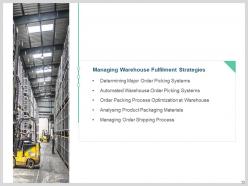
Diapositiva 13 : esta diapositiva presenta la gestión del proceso de envío de pedidos.
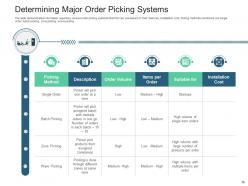
Diapositiva 14 : La diapositiva muestra información sobre varios sistemas de preparación de pedidos que la empresa puede usar en función de sus características, cunas de instalación.
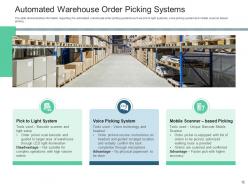
Diapositiva 15 : esta diapositiva muestra los sistemas automatizados de recolección de pedidos de almacén.
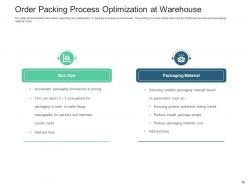
Diapositiva 16 : La diapositiva representa información sobre la optimización del proceso de empaque en el almacén.
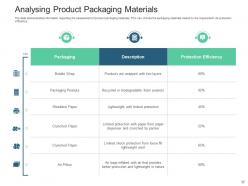
Diapositiva 17 : Esta diapositiva muestra información sobre la evaluación de los materiales de empaque del producto.
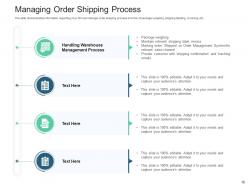
Diapositiva 18 : Esta diapositiva presenta cómo la empresa puede administrar el proceso de envío de pedidos en términos de pesaje de paquetes, etiquetado de envío, facturación, etc.
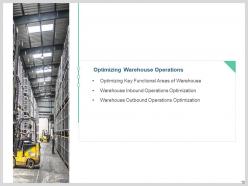
Diapositiva 19 : esta diapositiva muestra la optimización de las operaciones de salida del almacén.
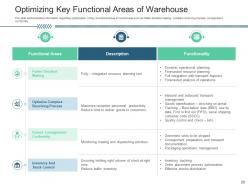
Diapositiva 20 : esta diapositiva muestra la optimización de las áreas funcionales clave del almacén, como una toma de decisiones más rápida, un proceso de recepción complejo y la conformidad del envío.
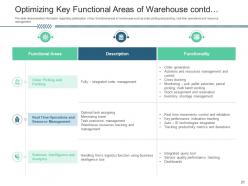
Diapositiva 21 : Esta diapositiva representa la optimización de las áreas funcionales clave del almacén.
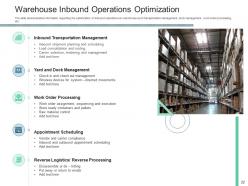
Diapositiva 22 : esta diapositiva muestra la optimización de las operaciones de entrada en el almacén, como la gestión del transporte, la gestión de muelles, el procesamiento de órdenes de trabajo, etc.
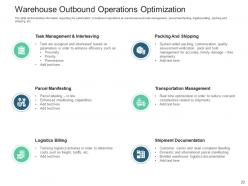
Diapositiva 23 : esta diapositiva presenta la optimización de las operaciones de salida en el almacén, como la gestión de tareas, el manifiesto de paquetes, la facturación logística, el embalaje y el envío, etc.
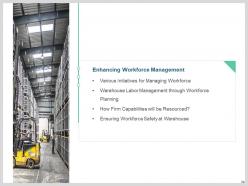
Diapositiva 24 : Esta diapositiva muestra la mejora de la gestión de la fuerza laboral.
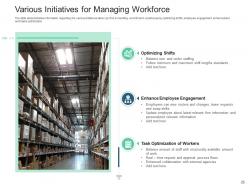
Diapositiva 25 : esta diapositiva muestra varias iniciativas tomadas por la empresa en el manejo de la fuerza laboral en el almacén mediante la optimización de turnos, la mejora del compromiso de los empleados y la optimización de tareas.
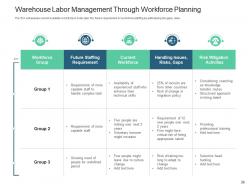
Diapositiva 26 : Esta diapositiva representa la gestión de la mano de obra del almacén a través de la planificación de la fuerza laboral.
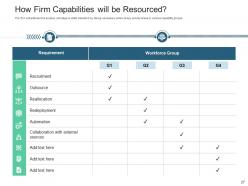
Diapositiva 27 : Esta diapositiva muestra cómo se dotarán de recursos las capacidades de la empresa.
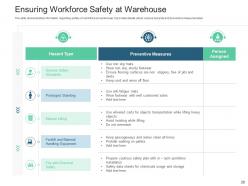
Diapositiva 28 : Esta diapositiva presenta la seguridad del personal en el almacén.
Diapositiva 29 : Esta diapositiva muestra cómo determinar las métricas de rendimiento del almacén.
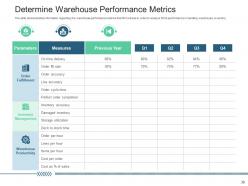
Diapositiva 30 : esta diapositiva muestra las métricas de desempeño del almacén que la empresa utilizará para analizar el desempeño de la empresa en el manejo del inventario del almacén.
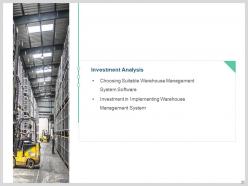
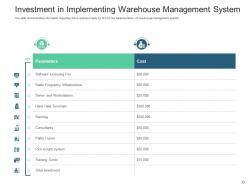
Diapositiva 31 : Esta diapositiva representa la inversión en la implementación del sistema de gestión de almacenes.
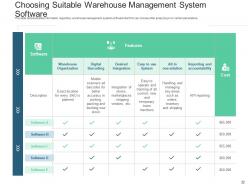
Diapositiva 32 : Esta diapositiva muestra cómo elegir un software de sistema de gestión de almacenes adecuado.
Diapositiva 33 : Esta diapositiva presenta la inversión realizada por la empresa para la implementación del sistema de gestión de almacenes.
Diapositiva 34 : Esta diapositiva muestra el impacto de la gestión de almacenes en el ROI.
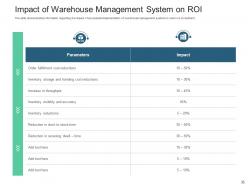
Diapositiva 35 : La diapositiva muestra información sobre el impacto de la implementación exitosa del sistema de gestión de almacenes en el retorno de la inversión.
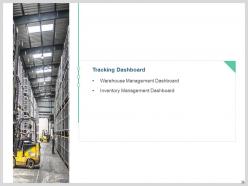
Diapositiva 36 : esta diapositiva muestra el panel de seguimiento.
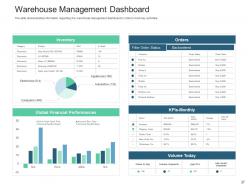
Diapositiva 37 : Esta diapositiva muestra el panel de gestión de almacenes para realizar un seguimiento de las actividades clave.
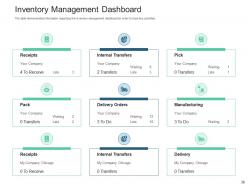
Diapositiva 38 : Esta diapositiva presenta el panel de gestión de inventario para realizar un seguimiento de las actividades clave.
Diapositiva 39 : Esta diapositiva muestra los iconos del sistema de gestión de inventario.
Diapositiva 40 : esta diapositiva se titula Diapositivas adicionales para avanzar.
Diapositiva 41 : Esta es la diapositiva Acerca de nosotros para mostrar las especificaciones de la empresa, etc.
Diapositiva 42 : Esta es la diapositiva Nuestra misión con imágenes y texto relacionados.
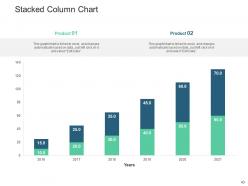
Diapositiva 43 : Esta diapositiva muestra un gráfico de columnas apiladas con una comparación de dos productos.
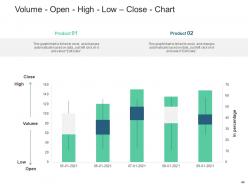
Diapositiva 44 : Esta diapositiva muestra Volumen - Apertura - Alto - Bajo - Cierre - Gráfico con comparación de dos productos.
Diapositiva 45 : Esta diapositiva muestra el mapa mental con iconos y texto relacionados.
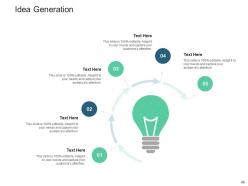
Diapositiva 46 : esta es una diapositiva de generación de ideas para exponer una nueva idea o resaltar información, especificaciones, etc.
Diapositiva 47 : Esta diapositiva muestra Post-It Notes. Publique sus notas importantes aquí.
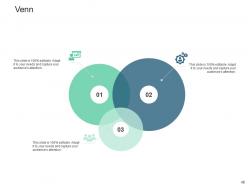
Diapositiva 48 : Esta diapositiva presenta el diagrama de Venn con cuadros de texto.
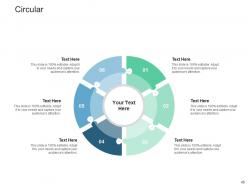
Diapositiva 49 : Esta diapositiva muestra una circular con una comparación de dos productos.
Diapositiva 50 : Esta diapositiva muestra Puzzle con íconos y texto relacionados.
Diapositiva 51 : Esta es una diapositiva de agradecimiento con dirección, números de contacto y dirección de correo electrónico.
Diapositivas de presentación de Powerpoint del sistema de gestión de inventario con las 51 diapositivas:
Utilice nuestras diapositivas de presentación de Powerpoint del sistema de gestión de inventario para ayudarlo de manera efectiva a ahorrar su valioso tiempo. Están listas para adaptarse a cualquier estructura de presentación.


FAQs for Inventory management system
Honestly, start with real-time tracking and automated reorder points - that's the stuff that'll actually save you headaches. Good reporting is clutch too. The interface needs to be dead simple because nobody has time to train everyone on some complicated system. Barcode scanning is pretty much standard now, and if you've got multiple locations, make sure it handles that. Oh, and it better play nice with whatever systems you're already using - data silos are the worst. I'd demo like 2-3 options with your actual inventory before deciding anything.
Dude, barcode and RFID will save you so much headache with inventory mistakes. No more typos when people are manually entering stuff. RFID's pretty sick because you can scan a whole bunch of items at once without even seeing them - though it costs more upfront. Barcodes are cheaper but you need direct line of sight, which honestly isn't that bad. Both update your system in real-time so you'll know what's moving instantly. We went from like 85% accuracy to over 99% when we switched. I'd say start with barcodes if money's tight, then maybe upgrade to RFID later for your busiest areas.
Dude, good inventory management is honestly a game-changer for cash flow. It stops you from dumping all your money into stock that just sits there forever. I've watched way too many businesses almost crash because they went crazy buying seasonal stuff they couldn't move. Track your turnover rate each month - you'll spot patterns fast. Better forecasting means you can actually negotiate decent payment terms with suppliers instead of scrambling. Short version: don't overstock, don't run out of popular items, and time your reorders right. Your working capital will thank you.
Think of demand forecasting as your inventory crystal ball - it tells you what customers will actually buy so you don't get stuck with too much or too little stuff. Historical sales data and seasonal patterns are your best friends here. When you get good at predicting demand, you can run leaner inventory without pissing off customers who can't find what they want. Plus you're not tying up cash in products that just sit there forever (been there, done that). Even basic forecasting beats just winging it with gut feelings. Trust me, it'll save you way more headaches than you'd expect.
So most inventory systems just plug into your ERP and CRM through APIs or database connections. When someone orders through your CRM, it'll automatically update stock levels and ping your ERP if you need to reorder stuff. Pretty smooth once you get it working. Honestly, I'd check if your systems actually play nice together first - compatibility can be a pain. Maybe test it with just one system before going all-in everywhere? Oh, and make sure your inventory platform actually supports what you need. Learned that one the hard way.
Honestly, start with better demand forecasting - that's like 80% of the battle right there. Just-in-time ordering helps too, plus setting automated reorder points based on what you're actually using. Do an ABC analysis and tackle your expensive items first since they're eating up the most cash. I'd also do regular audits to catch slow-moving stuff early. The whole thing gets way easier once you've got decent data coming in. Oh, and find your worst inventory offenders first - then work backwards to figure out why you keep overstocking those particular items. Makes the whole process less overwhelming.
So basically these systems track all the stuff regulators care about - lot numbers, expiration dates, supplier details, the whole audit trail. Super helpful for inspections since you're not digging through random spreadsheets at the last minute (trust me, I've been there). They'll flag expired stuff and recall issues before things get messy. Everything gets timestamped and logged automatically, which auditors eat up. Honestly, just set up some alerts for expiring items and schedule those compliance reports to run themselves. Worth it to avoid the stress later.
Focus on four metrics that actually matter for your inventory. Inventory turnover ratio shows how fast you're moving stuff - super important for cash flow. Then track your stockout frequency and what you're spending on carrying costs as percentages. Fill rate tells you how often you can actually fulfill complete orders. Most companies go crazy tracking like 20 different things, but honestly? These four will show you what's really happening. I'd check them monthly first, then if something looks weird you can dig into specific products or categories.
Yeah definitely! Multi-channel inventory systems are a lifesaver - they sync everything in real time across your website, physical stores, Amazon, all that stuff. When someone buys something online, it automatically updates stock everywhere else so you won't oversell. Trust me, manually updating each channel is pure hell (learned that the hard way). Everything gets centralized in one dashboard which is pretty sweet. Just make sure whatever system you pick has good API connections for your specific platforms. Way less headaches overall.
Ugh, seasonal stuff totally messes with your usual inventory game. You gotta start ordering way earlier - like getting holiday stock in September, which always feels weird. I'd dig into your last 2-3 years of sales data first to spot the real patterns. Then bump up your reorder points during peak seasons instead of keeping them the same all year. Most inventory systems have seasonal multipliers you can set up to handle this automatically. Just don't go crazy with the quantities - I still have nightmares about that fidget spinner overstock situation. Build in extra lead time too since everyone's ordering at once during busy periods.
Dude, cloud inventory systems are seriously worth it. You can check stock from your couch at 10pm if you want - saved me so many times. Updates happen automatically, which is nice because I always forget that stuff. Your data gets backed up without you thinking about it, and adding new people is super easy as you grow. Integration with accounting software usually works pretty well too. Honestly, the main thing is not being stuck at one computer anymore. Start with whatever has a free trial - most of them do these days and you'll know pretty quick if it clicks.
So basically, data analytics can predict when you'll need to reorder stuff and catch slow-moving inventory before it sits around forever. Your system will automatically notice patterns - like how certain products always spike during holidays or whatever. You can also track supplier performance so delays don't blindside you. Honestly, the profit margin analysis is probably the most useful part since it shows which items are actually worth the storage space they take up. I'd start with just your top 20% of products though - that's where you'll see real results without getting overwhelmed by data.
Dude, clean your data first - don't just dump everything into the new system like I did last year (what a mess). Training is huge too because people will literally go back to Excel if they're confused. Start basic, then customize later once you actually know what you need. Oh and seriously, test twice before launch. I'd map your current processes beforehand so you catch stuff like "wait, how do we handle refunds again?" Trust me, those surprise gaps always pop up at the worst times.
Good inventory systems save you from those awful "we're out of stock" moments that kill sales. You'll stop overselling stuff you don't actually have too - trust me, that's a nightmare to deal with. Customers get realistic delivery dates upfront instead of false promises. The best part? You can track what's selling fast and restock before running out. I mean, keeping popular items in stock is like basic business 101, but you'd be surprised how many people mess this up. Your repeat customers will actually stick around when they know you have what they need.
Honestly, AI forecasting is getting scary good at predicting what you'll actually need in stock. IoT sensors track everything in real-time - warehouse temps, where stuff is, all that. Blockchain sounds trendy but it's legit useful for tracking authenticity through your supply chain. Cloud systems mean smaller companies can finally access the same tech as big players, which is pretty cool. Oh, and don't go crazy trying to implement everything - just pick one AI forecasting tool first. You can always add more later once you see how it works.
-
Awesome use of colors and designs in product templates.
-
Great quality slides in rapid time.
-
Great designs, really helpful.
-
Best Representation of topics, really appreciable.
-
Helpful product design for delivering presentation.
-
Presentation Design is very nice, good work with the content as well.
-
Excellent work done on template design and graphics.
-
Nice and innovative design.
-
Innovative and attractive designs.
-
Great product with effective design. Helped a lot in our corporate presentations. Easy to edit and stunning visuals.