


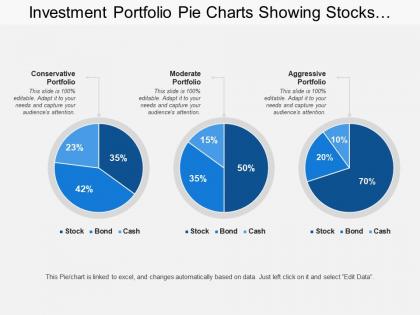
Investment portfolio pie charts showing stocks bonds cash with conservative portfolio




Try Before you Buy Download Free Sample Product
 Impress Your
 Audience
 100%
100% Editable
 Save Hours
 of Time


Our Investment Portfolio Pie Charts Showing Stocks Bonds Cash With Conservative Portfolio contain an artistic element. They add a creativity factor.
People who downloaded this PowerPoint presentation also viewed the following :
Investment portfolio pie charts showing stocks bonds cash with conservative portfolio with all 6 slides:
Explain how you conducted the inquiry with our Investment Portfolio Pie Charts Showing Stocks Bonds Cash With Conservative Portfolio. Highlight the basis for your findings.
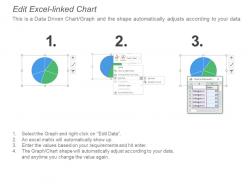
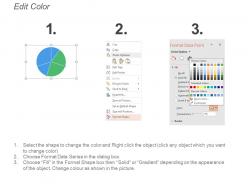
FAQs for Investment portfolio pie charts showing stocks bonds cash
Pie charts are clutch for portfolio stuff - you instantly see what percentage everything takes up. Way better than scrolling through spreadsheet hell, trust me. If you're too heavy on tech or light on bonds, it jumps right out at you. Plus explaining your strategy to other people becomes so much easier with the visual. They're honestly just more intuitive than raw numbers. You can spot rebalancing opportunities in seconds. Just don't go crazy with like 15 tiny slices or you'll need a magnifying glass to read anything.
Dude, pie charts are a game changer for this stuff. You can literally see at a glance what percentage each investment takes up instead of squinting at rows of numbers. Like last month I realized I had way too much in tech just by looking at this massive slice dominating everything else. Way faster than scrolling through spreadsheets. Plus they're oddly satisfying to stare at? Short sentences work better for spotting problems. Trust me, make a quick pie chart next time you're checking your portfolio - you'll catch imbalances you totally missed before.
Honestly, pie charts are clutch for portfolios. They show the split instantly - like boom, 40% stocks, 30% bonds, whatever. Way better than making clients do math in their heads with bar charts or tables. The visual just clicks, you know? Plus they automatically add up to 100% which is how people actually think about their money anyway. I'd definitely go with pie charts when you want that big picture view rather than getting into specific performance stuff. Makes everything feel more digestible.
Dude, this is actually crazy but color choice totally messes with how diversified your portfolio looks. Use contrasting colors like blue, red, green? Each slice pops and everything looks nicely spread out. But throw in all similar shades - like different blues - and suddenly those segments blur together. Your brain tricks you into thinking it's concentrated even when the numbers haven't changed. I learned this the hard way when I made my first pie chart look like a monochrome disaster. Pick contrasting colors or you'll psych yourself out about your actual risk levels.
So for your pie chart, break it down into your main stuff - stocks, bonds, cash, real estate, maybe crypto if you're into that. Label each slice with the name and percentage. Honestly, I'd throw the dollar amounts on there too since percentages can be weird when you're talking real money. Date it because this stuff changes constantly. If you do this regularly, stick with the same colors so you're not confused later. The whole point is seeing your diversification quickly - broad enough categories to actually mean something, but specific enough that you know what to rebalance when things get wonky.
Honestly, I'd say monthly minimum but quarterly is way more doable for most people. Checking daily will make you lose your mind watching every tiny move - learned that the hard way! Big market swings or major trades? Yeah, update sooner. Otherwise find a schedule that works without turning you into a chart-obsessed zombie. Your pie chart needs to show what you actually own right now, not some outdated snapshot from months back. Set a phone reminder or you'll totally forget. Perfect time to rebalance too if things have gotten wonky.
Skip tiny slices under 5% - they're just visual noise nobody can read anyway. Similar colors are your enemy here; people shouldn't need perfect vision to tell your categories apart. Those 3D effects might look fancy but they totally mess with the proportions. Here's the thing: exploding every slice defeats the whole point of showing relationships between parts. Group your smaller stuff into "Other" instead of cramming everything in there. Oh, and clear labels are non-negotiable. Trust me, simple beats flashy every time with pie charts.
Pie charts work great for this! Make one for each strategy so you can see exactly how much each asset class contributed to your returns. Way better than drowning in spreadsheet numbers, trust me. Each slice shows the percentage from stocks, bonds, REITs, whatever you've got. Just use the same colors and categories across all your charts or you'll confuse yourself later. You'll spot stuff immediately - like oh crap, this one's way too heavy in tech while that one's actually diversified. Makes the differences super obvious at a glance.
Excel's probably your easiest option - super clean charts and you can tweak everything. Google Sheets works great too if you're collaborating with people. PowerPoint has chart tools built right in, which is actually pretty convenient. Tableau's way too expensive unless you're doing crazy complex stuff. Oh, and Canva has some slick templates but you'd have to manually punch in all your numbers. Honestly, I'd just stick with Excel since you likely already have it, then copy the chart over to whatever presentation you're making.
Oh totally, this stuff matters more than people think. Western audiences read pie charts clockwise starting at 12, so put your biggest slice there. East Asian cultures might go counterclockwise or start elsewhere though. Colors are tricky too - red means danger here but good luck in China, which is honestly pretty confusing for financial stuff. Different cultures also interpret "diversification" differently. I'd just label everything super clearly and stick to neutral colors for international presentations. Maybe run it by local people first? Way better to catch weird cultural things before you're standing in front of executives.
Dude, interactive pie charts are a game changer. Clients can click around and explore their portfolio themselves instead of just nodding along to your presentation. They hover over different sectors, see performance details, drill into specific holdings - it's like they're actually playing with their own data. Way more engaging than static reports, obviously. The visual aspect helps them get where their money's actually going. Plus they stay way more focused during meetings when they can drive the conversation themselves. I swear, once you let them take control and explore, you'll notice the difference right away.
So pie charts can definitely work for this - just color-code each slice based on risk level while sizing them by your actual allocation percentages. Dark colors for the risky stuff (like small-cap stocks), lighter shades for bonds and safer assets. You could do the same thing for returns with a different color scheme. Honestly though, it starts looking like a rainbow threw up if you go overboard with categories. Stick to maybe 3-4 risk buckets max - low, medium, high - otherwise it's just confusing. The main thing is keeping your color legend consistent if you're comparing multiple charts.
Pie charts are perfect for this - the bigger the slice, the more money you've got in that area. When tech stocks eat up half your pie, boom, that's 50% right there. Way easier than scrolling through endless spreadsheet rows tbh. You'll spot concentration issues instantly, like when you realize you accidentally went overboard on one sector. Makes rebalancing decisions pretty obvious too. Only thing is, don't rely on just eyeballing the slices - angles can be deceiving. Make sure your chart shows the actual percentages somewhere.
Pie charts are perfect for this - you can literally see your whole portfolio breakdown in seconds. When tech stocks explode, that slice gets huge even though you didn't buy anything new. Works the same way when bonds crash or whatever sector is having a moment. Way better than scrolling through endless spreadsheet rows, honestly. The visual just hits different - you'll spot if you're getting too heavy in one area or if market swings are messing with your diversification. I usually peek at mine monthly, maybe when I'm procrastinating other stuff. Catches problems before they get weird.
Dude, you gotta try interactive dashboards - clients go crazy for the hover effects and being able to click through to see individual holdings. The animated transitions are slick too, like when you're showing how allocations changed quarter to quarter. Those static pie chart PDFs? Total dinosaur move at this point. Heat maps look way cleaner for performance data, and honestly the mobile-responsive stuff is clutch since everyone's always on their phones anyway. Check out Tableau or some of those fintech APIs - worth the learning curve because your clients will definitely notice the difference.
-
Informative presentations that are easily editable.
-
Enough space for editing and adding your own content.