


It infrastructure playbook overall it cost management dashboard




Try Before you Buy Download Free Sample Product
 Impress Your
 Audience
 100%
100% Editable
 Save Hours
 of Time


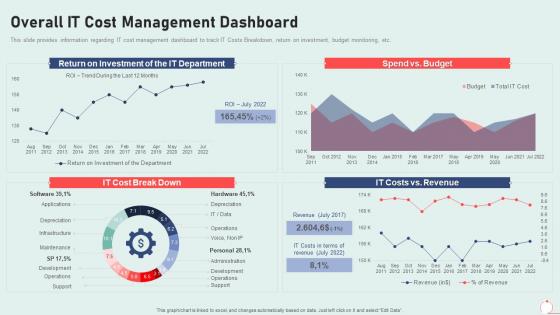
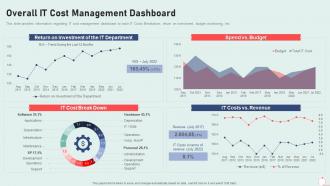
This slide provides information regarding IT cost management dashboard to track IT Costs Breakdown, return on investment, budget monitoring, etc.
People who downloaded this PowerPoint presentation also viewed the following :
It infrastructure playbook overall it cost management dashboard with all 7 slides:
Use our It Infrastructure Playbook Overall It Cost Management Dashboard to effectively help you save your valuable time. They are readymade to fit into any presentation structure.





FAQs for It infrastructure playbook overall it
Honestly? Start with visibility - you can't fix what you don't see. Get all your cloud costs, licenses, and infrastructure spending tracked in one spot first. Then set up some governance (I know, sounds boring) with approval workflows and spending caps. Otherwise things spiral fast. The optimization part comes after - rightsizing stuff, cutting unused services, haggling with vendors. That budget police role sucks but someone's gotta do it! Oh and those cost tracking tools? Install them ASAP because that's your foundation for everything else.
Honestly, measuring IT ROI is pretty straightforward once you get the hang of it. Just compare your financial benefits against what you actually spent - hardware, software, implementation, all that stuff. The math is simple: divide gains by total costs. Revenue increases and cost savings are easy to track, but don't forget the weird indirect stuff like happier employees or less system crashes. I'd pick 2-3 metrics that actually matter to your business goals instead of going crazy tracking everything. Oh, and measure your baseline before you start, then check progress every 6 months or so.
Dude, cloud computing is a game changer for cutting IT costs. No more dropping tons of cash on servers that barely get used - I swear most companies only use like 20% of their capacity anyway. You literally just pay for what you need. Your electric bill goes down, you need way less office space, and scaling up or down happens instantly when demand changes. Oh, and you can kiss those expensive software licenses goodbye too. Honestly, I'd start by moving some non-critical stuff to the cloud first - you'll see the savings pretty quick and it's less risky.
Ugh, license management is such a mess at most places. First thing - do a painful but necessary audit to see what you actually have vs what you're paying for. Trust me, you'll find software nobody even remembers buying. Get a centralized system to track everything instead of random spreadsheets. Set up automated tools to catch when departments go rogue and buy stuff without approval. Half the battle is knowing who's using what. Make someone own the renewal process and create actual workflows for new purchases. Otherwise you'll keep bleeding money on unused licenses.
Honestly, build your budget around 3-4 different scenarios so you're not scrambling when things go sideways. I always tell people to stash away 10-15% for the random stuff that'll definitely happen - trust me on this one. Check your spending monthly, not quarterly, because catching overspend early saves you so much headache later. Split everything into must-haves versus nice-to-haves, and make sure it all connects back to actual business results instead of just tech numbers. Oh, and review quarterly - budgets that just sit there collecting dust are pretty much worthless. You'll thank yourself later for staying flexible.
So basically it's like having a clear picture of all your tech spending and what you actually own. Start with an audit - you'll probably find a bunch of software licenses you're paying for but nobody's using. Honestly, the amount companies waste on forgotten subscriptions is wild. You can spot duplicate licenses, figure out what's just sitting there collecting dust, and plan out when you'll need to replace stuff. The data also helps when you're negotiating with vendors since you know exactly how things are being used. We found like $50K in unused licenses last year just from doing this.
Honestly, start with CloudHealth, AWS Cost Explorer, or Azure Cost Management - they'll show you where your money's actually going. For tracking what you own, ServiceNow or ManageEngine work well (trust me, spreadsheets are a nightmare for this stuff). Monitoring tools like Datadog catch wasteful spending before it gets crazy. The trick is sticking to 2-3 tools that play nice together. I've seen teams juggle like 10 different dashboards and it's just chaos. Pick your main ones and actually use them consistently.
Yeah, you're looking at about 20-40% savings, mostly from cheaper labor and overhead costs. Countries with lower wages = big wins on salaries and benefits. But honestly, there's hidden stuff that'll bite you - communication gets messy, quality can be hit or miss, and managing remote teams is way more complex than people think. The trick is having your processes locked down before you start. I'd seriously recommend doing a small test project first. See how it actually works for your team before throwing your whole IT budget at it. Way less risky that way.
So data tiering is your best bet - move old files to cheap cold storage, keep the stuff you actually use on the faster drives. Most companies are basically digital pack rats anyway. Set up those lifecycle policies to auto-delete expired junk. Compression helps too, obviously. Oh and deduplication if you've got tons of copies floating around. I'd start by just sorting your data by how often people touch it - that alone will save you serious money right off the bat. Don't forget to check your usage reports monthly though, or you'll get hit with surprise bills.
Start with ROI calculations - costs vs benefits over 2-3 years for each project. Build a scoring matrix that covers revenue impact, cost savings, risk stuff, and how well it fits your strategy. That strategic piece is honestly kind of a pain because it's so subjective, but you've gotta quantify it somehow. Rank everything by score and what you can actually afford. Resource constraints will bite you if you don't think about them upfront. Dependencies between projects matter too - some things have to happen before others. Just stay consistent with how you evaluate everything so you're not comparing random things.
Cybersecurity's such a pain for budgeting because it doesn't make you money directly - just protects what you already have. You've got upfront costs for tools, plus training your team, compliance stuff, and maybe incident response down the road. Here's the thing though: good security prevents expensive disasters, but you can't really see those "savings" until something terrible *doesn't* happen to you. Honestly, just bake these costs into your regular budget from the start. Don't treat them like nice-to-haves. Track something like cost-per-asset to prove it's worth it.
Honestly, automation is a game-changer for cutting IT costs. Your team probably spends way too much time on boring stuff like server updates, backups, and monitoring - automate that repetitive work and let them focus on actual projects that matter. Human errors are expensive to fix, but automated systems don't make those kinds of mistakes. They work around the clock too, which is nice since you're not paying overtime. Server provisioning, software patches, alert monitoring - all perfect candidates. I'd pick whatever's currently eating up most of your team's time and start there.
Hey! So for IT metrics, I'd start with cost per employee and what percentage of revenue you're spending - gives you something to compare against industry averages. Utilization rates are huge too because who wants to pay for software sitting there collecting digital dust? Also track how your projects are doing against budget and timeline. ROI on big investments matters, plus how fast you're fixing support issues. Oh and seriously, pick like 3-4 that actually align with what your company cares about. You'll go crazy trying to measure everything.
Dude, training your people actually saves you money on IT stuff. Fewer help desk tickets when everyone knows what they're doing. No more costly screw-ups that bring down servers because someone clicked the wrong thing. Your team gets way faster with their current tools too - seriously, watching someone hunt through menus for 10 minutes when there's a two-second shortcut is painful. Yeah, training costs upfront, but you'll see the payoff pretty quick through less downtime. I'd start with whatever's causing you the biggest headaches right now.
Honestly, a bunch of tech shifts are about to mess with IT budgets in weird ways. Edge computing will probably cut your bandwidth costs since you're processing stuff locally instead of sending everything to the cloud. Automation through AI sounds expensive upfront, but it'll save you tons on manual work - just need people who actually know how to use it. Serverless and containers are making costs way more pay-as-you-go, which is nice. Quantum computing is still pretty far out there for most companies though. My advice? Start small pilots now so you're not blindsided when budget season rolls around.
-
Unique research projects to present in meeting.
-
Designs have enough space to add content.