

Kpi Analytics Dashboard With Procurement Cycle Time




Try Before you Buy Download Free Sample Product
 Impress Your
 Audience
 100%
100% Editable
 Save Hours
 of Time


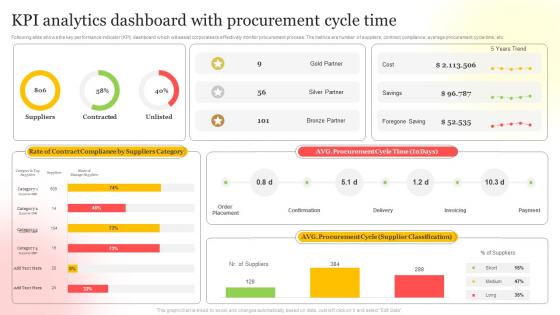
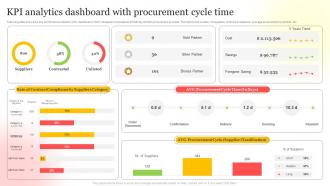
Following slide shows the key performance indicator KPI dashboard which will assist corporates to effectively monitor procurement process. The metrics are number of suppliers, contract compliance, average procurement cycle time, etc.
People who downloaded this PowerPoint presentation also viewed the following :
Kpi Analytics Dashboard With Procurement Cycle Time with all 7 slides:
Use our Kpi Analytics Dashboard With Procurement Cycle Time to effectively help you save your valuable time. They are readymade to fit into any presentation structure.





FAQs for Kpi Analytics Dashboard With
Honestly, it's all about your industry. Retail folks obsess over conversion rates and inventory turnover - makes sense since that's their bread and butter. Manufacturing? They're tracking OEE and defect rates religiously. Service companies live by customer satisfaction scores and response times. Tech is where it gets crazy though - they'll measure user engagement, churn, monthly recurring revenue, plus like fifty other things that probably don't matter. Healthcare focuses on patient outcomes and readmission rates, which is obviously super important. My advice? Pick 3-5 metrics that actually connect to your revenue. Don't overcomplicate it.
Start with your most important stuff in the top left - that's where people look first. Then put the supporting metrics underneath. Simple gauges work great for single numbers, clean bar charts for comparisons. Don't try cramming everything on one screen though, it'll look like a mess. Stick to consistent colors and only use red/green for real alerts, not every little change. Each KPI needs context too - targets, time frames, whatever makes sense. If someone can't get the main point in 10 seconds, you've overcomplicated it.
Honestly? Start with what you can actually afford and what you're comfortable with. Tableau and Power BI are amazing but they'll hit your wallet hard. Google Data Studio is free and pretty decent, though they're killing it off eventually (classic Google move, right?). Don't sleep on Excel or Sheets for basic dashboards - sometimes simple works best. If your company's got money to burn, Looker and Qlik are solid choices. Figure out which data sources you need first, then think about what your team actually wants to see. That'll save you from picking something overpowered or too basic.
Honestly? Weekly or monthly is usually plenty for most dashboards. Daily updates sound impressive but they'll burn you out fast - trust me, I've watched teams go crazy trying to track everything constantly. E-commerce during Black Friday? Yeah, maybe daily makes sense then. But for regular stuff, your metrics probably aren't changing that dramatically day-to-day anyway. The real trick is thinking about when your team actually makes decisions based on this data. Start weekly and see how it feels. You can always dial it up or down once you figure out what rhythm actually works for your situation.
Oh man, the biggest mistake is definitely cramming everything onto one screen - it's like visual vomit, nobody knows where to look. Stick to maybe 5-7 metrics that actually matter for decisions. Don't fall into the vanity metrics trap either (guilty as charged here). Those big impressive numbers that don't help you DO anything? Skip 'em. Make sure your data updates often enough to be useful, keep colors consistent. Always add context like targets so people know if the numbers are good or bad. Test it with real users first - they'll catch stuff you totally missed.
Honestly, just ask each team what they actually need to see. Executives want the big picture stuff - revenue, customer growth, that kind of thing. Sales people care about their pipeline and who's converting. Operations teams need their process metrics. I learned this the hard way when I built dashboards nobody touched because I assumed what they wanted. Start with one group, nail their dashboard first, then move on. The key is asking what decisions they make every day and what numbers would help them decide faster. Way better than guessing and ending up with unused reports collecting digital dust.
First thing - map each KPI directly to a business goal. No clear connection? Toss it. Hunt for leading indicators that predict what's coming, not just the stuff that already happened. Honestly, I've watched teams create these monster dashboards with like 30 metrics that just sit there collecting dust because who has time for that? Stick to 5-7 per area max. Your KPIs need to be things people can actually move with their day-to-day work - otherwise what's the point? Oh, and definitely run your shortlist by stakeholders first. You'll save yourself tons of headaches later.
So you'll need some kind of ETL tool or data integration platform. Tableau and Power BI are solid choices - they can pull from tons of different sources at once. Google Data Studio works too if you're on a budget. Here's the thing though: make sure your data fields match up properly first. I learned this the hard way when date formats from different systems totally screwed up my dashboard. Pick your most important KPIs and start there. You can set up automated refreshes or just do manual imports depending on how often stuff changes. Build it piece by piece.
Dude, accurate data is everything for KPIs. Wrong numbers mean you're basically steering your business blindfolded - not ideal. I learned this the hard way when our sales dashboard was pulling from an old database for weeks. Nobody caught it until we'd already made some pretty questionable budget calls. Short story: clean data = smart decisions. Garbage data = chaos. You'll want validation checks and regular clean-ups, but honestly? The biggest thing is just having someone actually verify the numbers make sense before big meetings.
Start with the filters people actually ask you for - department dropdowns, date ranges, that sort of thing. Interactive stuff is where dashboards get useful though. Let users click into charts to see the details behind the numbers. Hover tooltips are clutch too, honestly everyone expects those little pop-ups now. The goal is letting people mess around and answer their own "what if" questions without bugging you every time. Oh and drill-down features are huge - like clicking on a sales number and seeing which reps contributed. Build what gets used first, then expand from there.
Okay so for operational stuff, you want real-time metrics that actually help your team jump on things fast - response times, error rates, inventory, daily sales. Strategic dashboards are different though. Focus on the bigger picture like monthly revenue trends, customer lifetime value, market share over time. Honestly? Most people try cramming everything into one dashboard and it turns into total chaos. Update operational ones hourly or daily since people need to make quick calls. Strategic ones can refresh weekly or monthly - no rush there. Just ask yourself: does this need immediate action or is it more about planning ahead? That'll sort your priorities pretty quickly.
You're basically shooting in the dark without benchmarks - like, is that 15% conversion rate actually good or trash? Compare it to industry standards or your past performance so you know if you should be celebrating or freaking out. Nobody wants to be hyping up numbers that are secretly below average lol. Set up those reference points in your dashboard first, then track if you're beating them consistently. Historical data works great too if you don't have competitor info. That way you're making real decisions instead of just winging it and hoping for the best.
So basically, leading indicators show you what's happening right now that'll impact your future results - stuff like website traffic, sales calls, training hours. Lagging indicators? That's what already went down. Revenue, churn rates, completed projects. Most dashboards are packed with lagging indicators since they're way easier to track, but honestly that's backwards thinking. It's like only checking your rearview mirror while driving. You need both types. Use leading indicators to catch problems before they blow up, then lagging ones prove if your fixes actually did anything. Makes way more sense that way.
Okay so treat your KPI data like you're telling a story - start with where you were, then hit them with the problem your numbers are showing, and wrap up with what you're doing next. Pick one main metric to be your "star" instead of making everything seem equally important. I always throw in transitions like "but here's the weird part..." between sections because honestly? People zone out fast with data. Oh, and end each part by asking "what does this actually mean for us?" That question is pure gold. Your audience will thank you instead of checking their phones.
Oh man, you'll spot these things everywhere now! Sales teams are obsessed with their conversion funnels and close rates. Marketing people live for CAC and ROAS numbers. Healthcare probably has the most intense ones - patient satisfaction, readmission rates, literally life or death stuff. Manufacturing watches OEE and defects like hawks. SaaS companies? They're all about MRR, churn, and NPS. Here's the thing though - good dashboards stick to maybe 5-7 key metrics tops. Don't overcomplicate it. Just look up what the big players in your industry track. That's honestly your best starting point right there.
-
I have just started downloading templates for my presentations and I must say this is a great design. It helped accelerate my presentation design process and made it more visually appealing.
-
Impressive templates. Designing a presentation is fun now!