


Managed IT Services Pricing Models And Strategies Powerpoint Presentation Slides





Try Before you Buy Download Free Sample Product
 Impress Your
 Audience
 100%
100% Editable
 Save Hours
 of Time


Present IT outsourcing and pricing structure with visual brilliance using Managed IT Services Pricing Models And Strategies PowerPoint Presentation Slides. Showcase the organizational abilities by compiling company background, milestones, team, and key facts using this IT managed services PPT theme. Highlight client requirements like IT infrastructure solutions, and management of IT systems through the professional layout of IT outsourcing PowerPoint template. Illustrate network administration, proactive technology management, or other managed services with the help of IT managed service provider PPT slideshow. Our managed information services PowerPoint theme is useful for listing your pricing structure in a concise tabular format. Demonstrate monthly and hourly pricing plans for various in-house or freelance projects simply by customizing technical managed services PPT presentation. Under competitive analysis, showcase product comparison, and your strengths over contenders via outsourcing IT support PowerPoint deck. By downloading our managed information support PPT template, you get access to impactful graphical representations like dashboard diagrams.
People who downloaded this PowerPoint presentation also viewed the following :
Content of this Powerpoint Presentation
Slide 1: This slide introduces Managed IT Services Pricing Models and strategies. A more cost-effective way to manage your IT infrastructure
Slide 2: Thi slide showcases Agenda for Pricing IT Services.
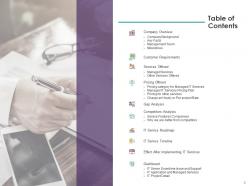
Slide 3: This slide displays Table of Contents of the presentation.
Slide 4: This slide displays Table of Contents of the presentation.
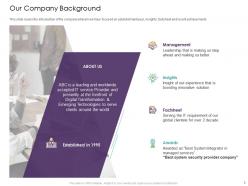
Slide 5: This slide showcases Our Company Background.
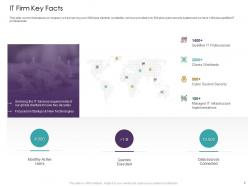
Slide 6: This slide depicts IT Firm Key Facts.
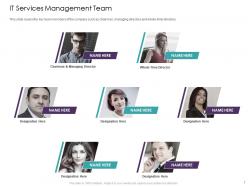
Slide 7: This slide represents IT Services Management Team.
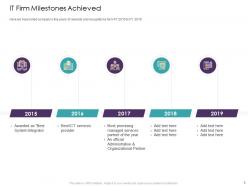
Slide 8: This slide depicts IT Firm Milestones Achieved.
Slide 9: This slide displays Table of Contents.
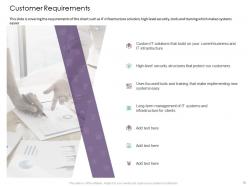
Slide 10: This slide showcases Customer Requirements.
Slide 11: This slide displays Table of Content of the presentation.
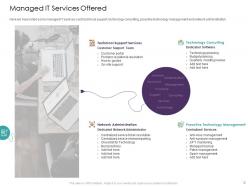
Slide 12: This slide depicts Managed IT Services Offered.
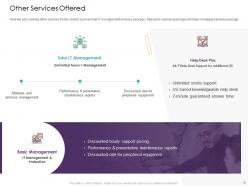
Slide 13: This slide showcases Other Services Offered.
Slide 14: This slide displays Table of Contents of the presentation.
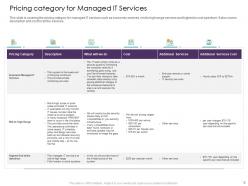
Slide 15: This slide depicts Pricing category for Managed IT Services.
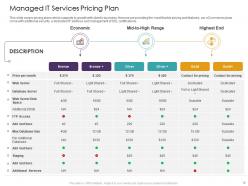
Slide 16: This slide describes Managed IT Services Pricing Plan.
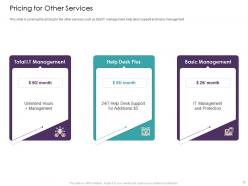
Slide 17: This slide showcases Pricing for Other Services.
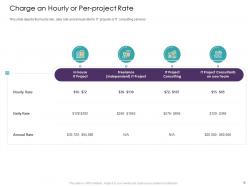
Slide 18: This slide showcases Charge an Hourly or Per-project Rate.
Slide 19: This slide displays Table of Contents.
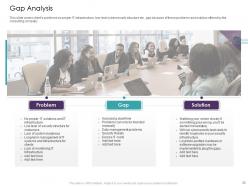
Slide 20: This slide showcases Gap Analysis with- Problem, Gap, Solution.
Slide 21: This slide displays Table of Contents.
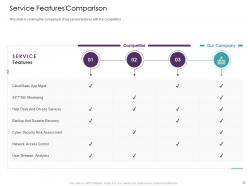
Slide 22: This slide showcases Service Features Comparison.
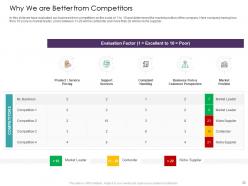
Slide 23: This slide describes Why We are Better from Competitors. In this slide we have evaluated our business from competitors on the scale of 1 to 10 and determined the market position of the company. Here company having less then 10 score is market leader, score between 11-20 will be contender and more than 20 will be niche supplier
Slide 24: This slide displays Table of Contents.
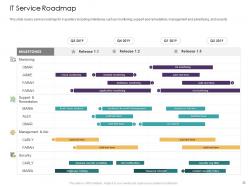
Slide 25: This slide depicts IT Service Roadmap. This slide covers service roadmap for 4 quarters including milestones such as monitoring, support and remediation, management and advertising, and security
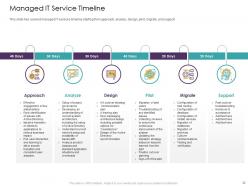
Slide 26: This slide showcased Managed IT Service Timeline. This slide has covered managed IT services timeline starting from approach, analyze, design, pilot, migrate, and support
Slide 27: This slide displays Table of Contents.
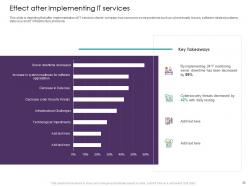
Slide 28: This slide showcases Effect after Implementing IT services.
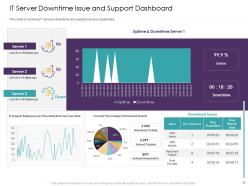
Slide 29: This slide presents IT Server Downtime Issue and Support Dashboard.
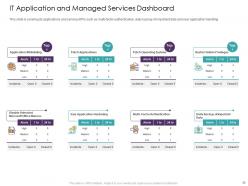
Slide 30: This slide depicts IT Application and Managed Services Dashboard.
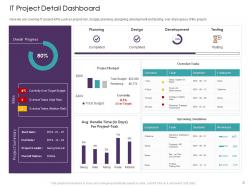
Slide 31: This slide presents IT Project Detail Dashboard.
Slide 32: This is Managed IT Services Pricing Models and Strategies Icons Slide.
Slide 33: This slide is titled Additional Slides for moving forward.
Slide 34: This slide displays Target Audiences.
Slide 35: This is Financial slide. Showcase your finance related stuff here.
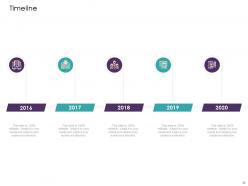
Slide 36: This is Timeline slide.
Slide 37: This is Our Target slide.
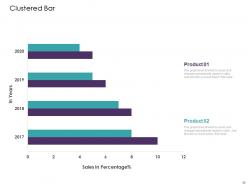
Slide 38: This slide displays Clustered Bar with products comparison.
Slide 39: This is Puzzle slide with icons and text boxes.
Slide 40: This is Thanks You slide with Address, Contact number and Email address.
Managed IT Services Pricing Models And Strategies Powerpoint Presentation Slides with all 40 slides:
Use our Managed IT Services Pricing Models And Strategies Powerpoint Presentation Slides to effectively help you save your valuable time. They are readymade to fit into any presentation structure.


FAQs for Managed IT Services Pricing Models And Strategies
Most companies charge per-user monthly - think $50-200+ per person. Flat rates for the whole org are another option, plus some hybrid setups mixing both. Project-based pricing exists but honestly it's pretty rare for ongoing services, more for one-time migrations. Per-user is popular since it grows with your team and you can budget easier. Oh and definitely get quotes from 3-4 providers using the same pricing model - otherwise you're comparing totally different things and it gets messy fast.
So basically you wanna add up everything you used to spend - salaries, hardware, software licenses, all that stuff. Plus whatever downtime and security incidents cost you (those always hurt more than you think). Then just compare it to your monthly managed service bill. Honestly? The numbers usually make managed services look pretty good. But here's the thing - the real money comes from way less downtime and fixing problems faster. Your team actually gets stuff done instead of fighting fires all day. I'd track it for maybe 6 months minimum to see the real picture.
So the big thing is how many people you're covering - more users means more headaches and licenses. Your tech setup matters a lot too, like if you've got complicated systems or need special security stuff for your industry. Support level is another huge factor. Most places do per-user monthly pricing, but honestly the models are all over the place. I'd get quotes from a few different companies so you can actually compare what you're getting. Oh, and location sometimes matters depending on who you go with. Really depends on what kind of chaos you're dealing with daily.
Oh yeah, definitely watch out for hidden costs. Overage fees are the worst - they'll nail you when you go over user limits or storage. After-hours support usually costs extra too, even though you'd think it's included. Some places charge separately for software licenses and hardware swaps, which is honestly pretty annoying. Make sure you ask about onboarding fees upfront and what happens if you need to terminate early. Scaling up fast can trigger surprise charges too. Get everything written down before you sign - whenever they use vague terms like "additional services," that's where they gotcha.
Yeah so SLAs jack up your costs pretty significantly. You're paying for guaranteed response times and uptime - the stricter they are, the more expensive it gets. Like 99.9% uptime vs 99% makes a real difference in price since they need extra staff and backup systems. Those demanding 24/7 support or super quick response times? That'll bump costs up 20-40% compared to basic business hours coverage. Always check what's included in their base price vs what they charge extra for. Honestly, some companies try to sneak those fees in later.
So it's usually around $100-200 per user monthly, but depends on your industry. Healthcare and finance get hit harder - like $150-300 because of all the security stuff they need. Manufacturing and retail? More like $80-150 since their setup isn't as complex. Professional services is kinda all over the place honestly. Really depends how much you rely on tech day-to-day. I'd definitely get quotes from 3-4 different companies though - their packages can be super different even at similar price points. That's where you'll see the real differences.
So basically, more employees = higher total costs but better per-person rates. Your 10-person startup might pay $100-150 per user monthly. Scale up to 100+ people though? You're looking at $75-120 per user since vendors actually give volume discounts. It's like Costco but for IT services, which is kinda wild when you think about it. Bigger companies also need fancier security stuff and compliance help, so that drives costs up again. My advice? Don't trust those generic pricing pages online. Just call them with your actual headcount and see what they'll offer you specifically.
So most packages come with 24/7 monitoring and help desk stuff, plus they handle your updates and patches. Backup management and antivirus monitoring are pretty standard too. Basic user support for the usual problems - you know, password resets and that kind of thing. Cloud management gets thrown in sometimes, which honestly is a lifesaver. Oh, and here's the thing - definitely ask what counts as "standard" before you sign. Some companies are sneaky about charging extra for stuff you'd think was included. My buddy got burned on that last year.
Honestly, cloud computing has made managed IT way more competitive. Instead of dropping huge money upfront on hardware, you're looking at subscription models that actually scale with what you use. Pretty sweet deal - no more paying for servers that barely get touched. Some providers do try to milk the cloud migration thing though, charging crazy rates for AWS or Azure expertise. My advice? Find someone who sees cloud adoption as genuine cost savings they can share with you, not just another way to jack up prices.
Yeah, so location makes a huge difference in what you'll pay for IT services. Big cities like NYC or SF are gonna cost way more than smaller towns - just how it goes with cost of living and all that. Don't automatically go for the cheapest remote option though, since you might end up missing having someone local when stuff breaks. I've found regional companies usually hit that sweet spot of decent pricing without being impossible to reach. Honestly, just shop around in your area first and figure out if you actually need someone to show up in person before deciding.
Research what other companies your size are paying first - that's your baseline. Figure out what you actually need vs the fancy stuff they'll try to sell you. Bundle everything together if possible since they love that steady monthly income. Shop around and be upfront about getting multiple quotes - honestly, most of these MSP guys would rather cut you a deal than watch you walk. Longer contracts usually mean better rates, but make sure they're locked into some kind of performance standards. Oh, and actually negotiate! Don't just take their first number like most people do.
Yeah, there's a huge difference - small business IT runs about $100-200 per user monthly. Enterprise? You're looking at $300-500+ easy. With enterprise you get the full package: round-the-clock support, heavy security, compliance stuff, dedicated reps. Small biz gets shared resources and basic packages. Kind of like Honda vs Tesla, honestly - wait, bad comparison since Teslas break down constantly lol. Anyway, both work but enterprise has way more bells and whistles. I'd figure out what you actually need first before getting quotes. Don't want to pay for features you'll never touch.
Dude, you're probably spending way more than you think right now. Outsourced IT runs about 30-50% cheaper than in-house when you add up the real costs. Salaries are just the start - there's benefits, training, gear, software licenses. Managing all that is honestly a pain. Your team can't be experts at everything anyway, so you end up hiring outside help regardless. Managed services give you predictable monthly bills plus a whole squad of specialists. The best part? No surprise emergency costs when stuff inevitably breaks. Seriously, dig into what you're actually spending on IT right now - bet it's more than you realize.
Yeah, most managed IT companies are pretty flexible with scaling up or down. Per-user pricing is your best bet - way easier to budget when you know exactly what each new hire costs. Watch out for those annoying tier jumps though, like suddenly paying more when you hit 26 people instead of 25. Super common but still frustrating. Go month-to-month if you can swing it instead of getting locked into yearly contracts. Oh, and definitely ask about minimums upfront - some places will surprise you with that stuff later. The whole scaling process should be pretty straightforward if they're decent.
Honestly, first figure out what you're actually paying extra for. Premium usually gets you faster fixes, round-the-clock support, and someone who actually knows your setup. Basic packages? They'll just patch things up after stuff breaks. Here's what I'd do - add up how much money you lose when everything's down. If it's like $1000 an hour, then yeah, paying more for someone to prevent problems makes sense. Write down what you absolutely need vs what would just be nice. Then see which plan actually covers the stuff that'll kill your business if it goes sideways.
-
Awesome use of colors and designs in product templates.
-
Use of icon with content is very relateable, informative and appealing.
-
Unique design & color.