


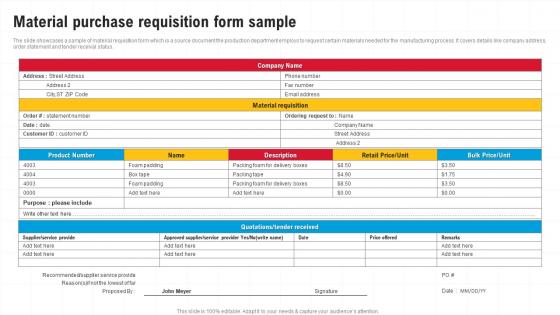
Material Purchase Requisition Form Sample




Try Before you Buy Download Free Sample Product
 Impress Your
 Audience
 100%
100% Editable
 Save Hours
 of Time


The slide showcases a sample of material requisition form which is a source document the production department employs to request certain materials needed for the manufacturing process. It covers details like company address, order statement and tender receival status.
People who downloaded this PowerPoint presentation also viewed the following :
Material Purchase Requisition Form Sample with all 6 slides:
Use our Material Purchase Requisition Form Sample to effectively help you save your valuable time. They are readymade to fit into any presentation structure.





FAQs for Material Purchase
So you'll need the basic stuff - what you're ordering, how much, when you need it by, and your budget code. Don't forget your contact info and which supplier you want (if you care). Oh, and delivery instructions if it's going somewhere weird. Most systems fill in your department automatically, thank god. Here's the thing though - always write a quick reason why you need it. Managers approve way faster when they actually understand what's going on. Double-check everything before hitting submit because once it goes to approval, you're kinda stuck with whatever you put down.
So basically, a purchase requisition is when you ask your company "can I buy this stuff?" It's internal - you're getting permission and budget approval before spending their money. After that gets approved, procurement writes up the actual purchase order that goes to the vendor. The PO has all the real details - pricing, delivery dates, terms, whatever. That's the official document that legally commits the vendor to sell you the thing. Honestly, the requisition part can be annoying but you've gotta do it first. Think of requisitions as asking permission, POs as placing the actual order.
Look, material purchase reqs are basically what get your whole procurement process moving. Submit one and you're giving procurement the heads up they need to plan buys and negotiate contracts. Plus it creates that paper trail for tracking budgets and supplier performance - honestly pretty boring stuff but whatever. Your req affects everything downstream too. Make sure your specs are accurate and timelines realistic because it'll save everyone headaches later. Oh, and it helps maintain inventory levels so you don't end up with too much or too little stock sitting around.
First thing - map out what you're doing now so you can see where it's getting stuck. Templates are huge for this, just pre-fill all the vendor details and stuff you order constantly. Set up digital approvals too because honestly, running around with paper forms is the worst. For smaller purchases, create spend limits that auto-approve so you're not waiting on someone to sign off on office supplies. Oh and if your procurement system can talk to inventory, do that - saves you from ordering things you already have sitting in storage. Just tackle the biggest headaches first, don't try to fix everything at once.
Okay so first things first - confirm you actually need this thing and that there's money for it. Get your specs super detailed upfront because procurement will absolutely bombard you with questions if anything's vague (learned that the hard way). Check that your vendor can actually deliver when you need it. The approval thing is huge - know your company's spending limits and get the right person to sign off. Oh, and see if there's some preferred supplier you're supposed to use instead. Honestly, spending five minutes double-checking everything now beats dealing with rejection emails and starting over later.
Honestly, automated workflows are a game changer for requisitions. Map out your current process first though - that's key. Digital forms catch mistakes upfront, and mobile apps mean approvers don't have to be chained to their desks. Real-time tracking stops all that annoying email back-and-forth we're used to. Once something's approved, your ERP can auto-generate purchase orders. Plus you get decent analytics on where things get stuck and spending trends. I'd probably start small and tackle your biggest headache first rather than overhauling everything at once.
Honestly, the two things that'll bite you are being too vague with specs and not checking if you actually have budget approval beforehand. I always include exact part numbers and quantities instead of generic descriptions - saves so much back-and-forth later. Triple-check your vendor info too because I've watched requisitions just sit there for weeks over some outdated supplier code. Super annoying. Don't forget to see if another department already ordered the same thing. Oh, and scan through all the required fields before submitting - missing cost center info is like the kiss of death for these things.
Think of purchase requisitions as your heads-up to the inventory team. You're basically saying "hey, I'm gonna need this stuff by X date" so they can actually plan instead of panicking later. Really beats the whole "crap, we're out of everything" crisis mode that happens otherwise. Your req shows real usage patterns too, not just random guessing about what to order. Short timelines are fine btw - just be realistic about when you actually need things. The more accurate info you give them, the better they can keep stuff in stock without going overboard.
Ugh, procurement requests are such a pain! You'll need the exact item description and part numbers, plus how many you want. Don't forget your budget code - that's always the thing that trips people up. If you've got a preferred vendor, mention that too. Business justification is key (even if it's obvious), and they want to know who signed off on it. Oh, and be realistic about your delivery date. I swear they bounce back incomplete requests just to mess with us sometimes. The more details you give upfront, the less back-and-forth you'll deal with later.
Honestly, tracking your purchase reqs is a game changer for staying on budget. You'll catch spending patterns before they bite you - like when marketing suddenly goes through twice their usual supplies. Set up alerts at certain spending levels so you're not scrambling at month-end going "wait, how did we spend THAT much?" Early warnings let you pump the brakes before you blow your quarterly numbers. Plus having real data makes budget conversations so much easier. Way better than walking into meetings with just "we need more money" and hoping for the best.
So basically, material purchase requisitions are your lifeline when auditors show up. They prove you didn't just randomly buy stuff without getting proper approvals first. Super critical if you're in pharma or aerospace - those industries are nuts about showing you only bought from approved vendors. Missing signatures or incomplete forms? That's gonna bite you during compliance reviews. Honestly, it's kind of annoying how detailed you have to be, but make sure you're filling out every required field. These docs are literally your paper trail showing you followed all the right processes and controls.
Honestly, getting those three teams talking upfront saves you from endless email chains where stuff just sits there forever. Finance can spot budget red flags early, and ops knows what's actually running out way better than spreadsheets do. Volume discounts become way easier when finance helps you batch orders too. I'd probably set up like a 15-minute weekly check-in - nothing fancy, just align on what's coming up and what needs priority. The ops people are usually pretty good about flagging urgent stuff if you give them a heads up. It's one of those things that sounds like extra work but actually cuts down on all the back-and-forth later.
Track your cycle time from when someone submits a requisition until the PO gets approved - that's huge. Approval bottlenecks will drive you crazy, trust me. Monitor how many requisitions actually get approved vs rejected, plus your average processing costs. Supplier lead times matter too. Oh, and definitely check budget variance between what people request vs what you actually spend. Emergency purchases are a red flag - if you're seeing tons of those, your regular process is probably broken. User satisfaction scores help too. Start there and see what else pops up.
Dude, you HAVE to train people properly - I can't stress this enough. Half the headaches come from users who don't know basic stuff like approval workflows or spending limits. They mess up forms, ignore procurement policies, then act surprised when things get rejected. One department I know literally cut processing time in half after decent onboarding. Short sentences work better than long explanations, honestly. Just do a system walkthrough and give them something to bookmark for quick reference. Trust me, it beats dealing with endless "how do I..." emails later.
Hey! So most places have emergency purchase workflows that skip the usual approval nightmare. You'd mark it "urgent" and it goes straight to senior managers who can approve fast. Safety issues, equipment breakdowns - that kind of stuff qualifies. Some companies even give departments pre-approved emergency spending limits, which honestly saves so much time when machines die unexpectedly. Just don't let people abuse the system by calling everything urgent (we've all worked with *that* person). Set these protocols up now before you're scrambling during an actual crisis.
-
Like always a great experience with you guys. Always there on the drop of hat to help.
-
Very unique and reliable designs.