


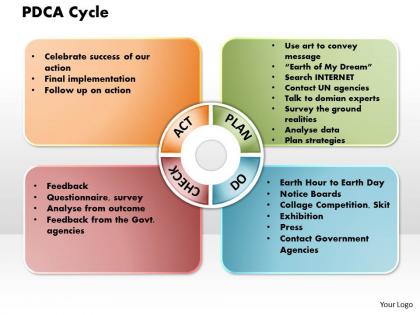
Pdca cycle powerpoint presentation slide template




Try Before you Buy Download Free Sample Product
 Impress Your
 Audience
 100%
100% Editable
 Save Hours
 of Time


Our PDCA Cycle Powerpoint Presentation Slide Template have an encyclopaedic range. Meticulously selected to span the full extent.
People who downloaded this PowerPoint presentation also viewed the following :
Pdca cycle powerpoint presentation slide template with all 7 slides:
Leave a lasting impression with our PDCA Cycle Powerpoint Presentation Slide Template. They possess an inherent longstanding recall factor.
FAQs for Pdca cycle powerpoint
So PDCA is basically four steps that loop together. Plan means figuring out what's broken and how you'll fix it. Then Do - try your solution but keep it small scale first (don't go crazy). Check is where you see if it actually worked like you thought it would. Act means either make it official or go back to planning with what you learned. The whole thing just flows naturally - Act either becomes your new way of doing things or sends you back to Plan with better info. Honestly, it's one of those frameworks that actually makes sense once you try it. Just pick something small to test it on first.
Start with something small - don't try to fix everything at once, you'll just burn out. Plan your change, test it on a small scale first. Honestly check what actually worked (and what totally didn't - happens to all of us). Then either roll it out wider or pivot based on what you learned. The trick is making this a regular thing, not some one-off project that dies in a drawer somewhere. Just grab one thing that's really annoying your team right now and run through the cycle this month. Keep it simple.
Honestly, most people get way too excited and jump straight to solutions without doing the homework first. Root cause analysis? What's that, right? Also, PDCA isn't a checkbox exercise - it's supposed to keep going. People treat it like "one and done" then wonder why nothing sticks. In the Do phase, don't go crazy with massive changes. You'll never figure out what actually moved the needle. And please, for the love of all that's holy, don't skip Study! I see this constantly. Start tiny, write stuff down, and block out real time for each step. Finish the whole cycle before you get distracted by the next shiny problem.
PDCA is basically the stripped-down version of improvement methods. Six Sigma throws a ton of statistical analysis at you, and Lean has all these specific waste-elimination techniques. But PDCA? Just plan-do-check-act. Super basic, which is honestly why I like it. You can slap it on any problem without getting certified first or learning complex methodologies. A lot of companies actually use it as the backbone for their fancier Lean or Six Sigma stuff anyway. If you want something you can start using tomorrow without reading a textbook, go with PDCA.
So for PDCA, you want different metrics at each stage. Plan needs your baseline numbers and targets - like current defect rates versus where you're trying to get. Implementation stuff matters during Do - training rates, whether people actually follow the new process. Check is honestly my favorite part - this is where you compare real results to what you planned. Then Act tracks if you're keeping improvements going or expanding what worked. Don't go overboard with tracking everything though! Pick maybe 2-3 good metrics per stage that actually tie back to your main goals. Less is more here.
Tech makes PDCA cycles way easier - you can automate data collection and get real-time dashboards that actually show you what's happening. The "Check" phase becomes so much faster when software pulls your performance data automatically and alerts you when things go sideways. I've found project management tools are clutch for assigning tasks during the "Do" phase and setting up review reminders. Digital docs are great too since you can look back at old cycles for ideas. Honestly? Just start with tools you already have instead of buying fancy new stuff.
You absolutely need employee feedback during the Check phase - like, they're literally experiencing your changes firsthand. Ask them what's actually happening vs what you thought would happen. Surveys work, but honestly quick coffee chats or team huddles give you better insights. They'll spot stuff the data misses completely. What looked good on paper might be a total mess in practice, and they're the ones who know. Without their input you're basically guessing before you move forward. Don't skip this step!
Yeah totally! PDCA works for pretty much anything, which is kinda wild when you think about it. Teachers use it all the time - they'll plan some new lesson, try it with one class, check how kids did on tests, then decide whether to keep it or change things up. Same with hospitals and patient safety stuff. Plan the intervention, test it out, look at the data, then make your move. What I love about it is you're not just crossing your fingers hoping it works. You actually get real feedback. Works great for personal projects too - I've used it for random stuff like organizing my garage (don't judge).
Honestly, the trick is making PDCA just how people naturally work instead of some annoying extra step. Get your boss to actually use it out loud - like when they're talking through their own Plan-Do-Check-Act stuff in meetings. That makes it normal, you know? Build it right into your regular check-ins too. I know teams that just threw PDCA items onto their weekly agenda and boom - way more effective than those boring training sessions. Oh, and celebrate the tiny wins that come from it, not just the massive victories. People need to feel good about the whole thing or they'll just drop it after a week.
So Toyota's the classic example everyone talks about - they're constantly planning small improvements, testing them out, checking what worked, then rolling it out bigger. Hospitals do this too actually. Virginia Mason used it to cut down patient wait times and reduce med errors. Software teams run PDCA cycles between sprints to get better. Even McDonald's does it for drive-through speed and testing new menu items (which honestly surprised me when I first heard that). My advice? Don't try to fix everything at once. Pick one thing, keep your test cycles small, and just focus on that process first.
PDCA works because it forces everyone to actually talk to each other. During the Plan phase, you can't move forward until the whole team's on board - different viewpoints get heard right away. Then when you're executing (Do phase), everyone owns a piece. Check and Act become these natural problem-solving sessions where you're figuring stuff out together instead of playing blame games. Honestly, it's kind of brilliant how the structure gives quieter people built-in moments to speak up. No one can hide in their corner anymore because of those regular touchpoints. Run your next sprint this way and you'll see what I mean about the team vibe shifting.
So traditional PDCA? That's like planning for months, doing big chunks of work, then having those formal quarterly check-ins. Agile flips it completely - you're doing tiny Plan-Do-Check-Act cycles constantly. Daily standups replace those long reviews. Planning becomes quick conversations, not lengthy documents. The "do" part shrinks into small experiments you can test right away. Instead of waiting for milestone dates, you're checking in continuously. Honestly, once you start thinking of it as a rhythm rather than scheduled events, everything clicks faster. You catch problems when they're still small and pivot without the drama.
Honestly? I'd say every 3 months minimum, but it really depends on your field. Tech moves crazy fast so maybe every 2 months there. More stable stuff like manufacturing, you could probably get away with twice yearly. Just don't be like my old boss who kept saying "we'll look at it next quarter" for two years straight lol. The real trick is actually sticking to whatever timeline you pick - I always forget this stuff unless it's in my calendar screaming at me. Watch for what keeps breaking versus what's humming along. Consistency beats perfection here.
Look for basic PDCA workshops or grab some online courses from lean/six sigma folks - that'll give your team the foundation they need. Also, "The Improvement Guide" by Langley is solid and actually readable, unlike most business books. But honestly? Theory only gets you so far. Just pick something small and low-stakes to try your first cycle on. Get someone who knows what they're doing to walk you through it initially. Your team will pick up the rhythm after a few rounds - it becomes pretty automatic once you get the hang of it.
Don't wait until the end to worry about documentation - weave it into every PDCA step. When you're planning, write down what you think will happen. Actually track everything during the Do phase (yeah, even the stuff that goes wrong). Check is where you analyze and capture insights. Then Act documents what stays, what changes, what gets tossed. Honestly, a shared spreadsheet works better than fancy tools most of the time. Schedule regular retrospectives too - there's something about talking through lessons in person that just clicks better than reading reports.
-
Innovative and Colorful designs.
-
Thanks for all your great templates they have saved me lots of time and accelerate my presentations. Great product, keep them up!