

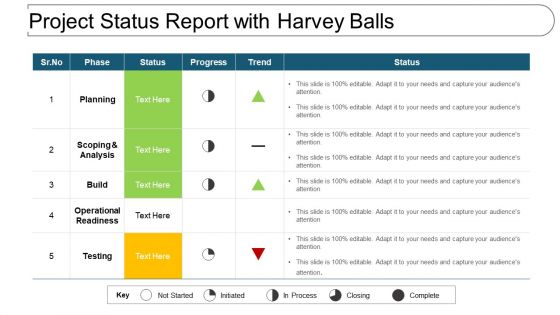
Project status report with harvey balls





Try Before you Buy Download Free Sample Product
 Impress Your
 Audience
 100%
100% Editable
 Save Hours
 of Time


When you want to create awareness when you want to get your audience involved all you need are the best Project Status Report With Harvey Balls. This can only come from the PowerPoint gurus.
People who downloaded this PowerPoint presentation also viewed the following :
Project status report with harvey balls with all 6 slides:
Our Project Status Report With Harvey Balls are happy to be of assistance. They are glad to lend a hand.


FAQs for Project status report
For your status report, hit the basics first: where you are vs milestones, budget stuff, and what's coming up in the next 2-4 weeks with actual dates. Don't forget risks or anything that's blocking you - executives hate surprises later. I always add a "quick wins" section because honestly, stakeholders eat that up. Resource updates matter too, especially if you need more people or someone's going on vacation. Oh, and format it with bullet points and headers. Nobody wants to read paragraphs when they're rushing between meetings.
Weekly reports usually work best for most stuff. You catch problems early without drowning everyone in paperwork. Daily makes sense if you're in crisis mode or have crazy deadlines. Monthly? Sure, for those slow-burn projects that take forever anyway. I've watched teams completely burn out doing daily reports when honestly, weekly would've been perfect. Match your reporting to how fast things actually move and what your stakeholders need. If big decisions happen every week, then report weekly. Start there and see what happens - you can always change it up based on what people tell you.
Honestly, project management tools like Asana or Monday.com are lifesavers - they'll pull status reports straight from your task data automatically. Trello's solid too if you want something simpler. For the visual stuff, Tableau and Power BI create those fancy real-time dashboards that make you look way more organized than you actually are. Stuck with Excel? Been there. At least use pivot tables and conditional formatting so you're not manually updating everything like it's 1995. Google Sheets works if your team needs to collaborate. Just pick whatever plays nice with the tools you're already using.
Honestly, just stick to three things: what you got done, what's going sideways, and what you need from people. Traffic light colors work great - green, yellow, red. Execs barely read these things anyway, so put the big stuff right up top. One line per bullet point, max. Always throw in actual numbers or dates when you can. Save the long explanations for your team meetings - trust me on this one. If it's more than a page, you're definitely hiding the important stuff under a pile of fluff.
Start with the big four: scope, schedule, budget, and quality. Schedule variance tells you if you're behind. Budget variance catches cost overruns. Scope creep indicators? Super helpful for when clients keep adding "just one more thing." Quality stuff like defect rates matter too - honestly, what's the point of being on time if your product sucks? I'd also watch team velocity and resource utilization. Don't go crazy though. Pick maybe 5-7 metrics that actually make sense for your project. You can always add more later if needed.
Honestly, you've got to tailor your updates to what people actually want to hear. Executives? Hit them with the big picture stuff - budget, timeline, major risks that could derail things. Skip the technical weeds completely (learned that one the hard way at my last job). Your team needs the opposite though. They want the nitty-gritty - what's done, what's coming up, what's blocking them. It's like... zooming way out for leadership, then zooming way in for your actual team. Just write two different versions of the same info with totally different detail levels.
Ugh, the worst thing you can do is be super vague. Like saying "making progress" instead of "finished 3 of 5 user interviews" - be specific! Also, don't sugarcoat everything. Yeah, it's tempting to only share wins, but people need to know about roadblocks too. Keep it short though - nobody reads those essay-length updates. Bullets are your friend. Oh, and always include what's happening next with actual dates. Proofread that thing because typos just scream "I don't care." Honestly, if you're specific and honest without writing a novel, you'll be golden.
Dude, visuals are a game changer for status reports. People instantly get what's happening instead of reading through tons of text. I swear, I've watched executives completely zone out during text-heavy presentations, but show them a red-yellow-green chart and boom - they're paying attention. Progress bars give you completion percentages right away. Timeline charts show if you're running late or ahead. Plus graphs help you catch patterns you'd miss otherwise - like why certain tasks always get delayed. Oh, and pro tip: start simple with one visual per main thing you're tracking.
So risk assessment is basically calling out what might screw up your project and how screwed you'd be if it happens. Look for stuff like budget issues, team conflicts, tech problems - whatever could mess with your timeline. Honestly, stakeholders get super cranky about surprises, so this section saves your butt. Don't just dump a list of doom though. Show how likely each thing is and what you're gonna do about it. I always throw in my confidence level too - makes it feel less like you're just panicking about everything that could go wrong.
Just ask your team straight up what they actually need from your status reports. I usually grab people after meetings or send a quick survey - way easier than guessing. Some people want all the charts and details, others literally just need bullet points. It's wild how different everyone's preferences are. Find out what you're not including that would help them too. Make the changes, test it for a few weeks, then circle back. Don't overthink it - if something's not working, just pivot again.
Look, just be straight up about it - hiding delays never works and stakeholders always figure it out anyway. Tell them exactly why you're behind and how it affects the timeline. But here's the thing: don't just dump bad news on them. Come with your plan to fix it, what resources you need, any roadblocks they can help remove. Honestly, I've seen people panic and just throw problems at leadership hoping they'll solve everything. Don't be that person. Show you're already working on solutions and just need their support to execute.
Honestly, status reports are like the pulse check of your project - they catch problems before they blow up. Regular reporting keeps everyone honest about what's really going down. I can't tell you how many times I've watched projects implode because nobody wanted to write down the obvious warning signs. The trick is being brutally honest in them, not just making colorful charts that look impressive. Your stakeholders stay in the loop. Your team knows they're accountable. Think of it as your radar system instead of boring paperwork nobody reads.
Dude, you've gotta way over-communicate when working remote - like more than feels normal. Can't just pop over to ask questions anymore, right? Throw in way more context than you think you need: blockers, who you're waiting on, next steps with actual dates. Trust me, saying "making progress" is basically useless when nobody sees you grinding. Keep the format consistent so people know where to find stuff. Oh, and maybe add a quick wins section? Sounds cheesy but honestly keeps everyone from getting bummed out. Send them on the same day each week so your team can actually plan around the updates.
Honestly, your old project data is gold for this stuff. Pull reports from your last 3-5 projects and hunt for patterns - like where you always get stuck or how off your time estimates were. I'm weirdly obsessed with this because the same problems show up over and over, but most people just ignore them. Look for early warning signs too. Maybe budget discussions always drag on, or certain team members consistently miss deadlines. Once you spot these trends, you can actually plan around them instead of being surprised every single time.
Honestly, milestones are like your project's highlight reel - they show stakeholders actual progress instead of just "yeah we're busy with stuff." Without them, your updates become this weird mix of random tasks and percentages that nobody really gets. They're perfect for catching issues before they blow up, plus you get natural celebration moments when you hit them. Leadership loves seeing concrete proof things are moving forward. Track those dates religiously though - if you're gonna miss one, tell people early. Way better than scrambling to explain later why everything's suddenly behind schedule.
No Reviews