

Strengthening Process Improvement KPI Metrics Dashboard To Measure Automation Performance




Try Before you Buy Download Free Sample Product
 Impress Your
 Audience
 100%
100% Editable
 Save Hours
 of Time


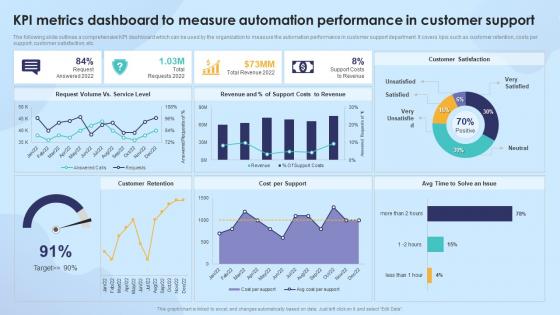
The following slide outlines a comprehensive KPI dashboard which can be used by the organization to measure the automation performance in customer support department. It covers kpis such as customer retention, costs per support, customer satisfaction, etc.
People who downloaded this PowerPoint presentation also viewed the following :
Strengthening Process Improvement KPI Metrics Dashboard To Measure Automation Performance with all 7 slides:
Use our Strengthening Process Improvement KPI Metrics Dashboard To Measure Automation Performance to effectively help you save your valuable time. They are readymade to fit into any presentation structure.





FAQs for Strengthening Process Improvement KPI Metrics Dashboard To
Honestly, start simple and pick maybe 3-4 metrics that actually matter to your project. Time savings is obvious - how much faster are things running? Cost reduction and error rates are no-brainers too. ROI has to be there or leadership won't care. Don't forget about your team though - track employee satisfaction because automation should make their jobs better, not worse. Throughput and system uptime are pretty critical operationally. I've seen people try to measure everything and just get overwhelmed with data they never use. Focus on what aligns with your specific goals first.
Honestly, it depends on what you're trying to automate. Manufacturing guys obsess over OEE and throughput. Financial services? They want perfect transaction accuracy and speed. Healthcare's all about patient safety and staying compliant - which makes sense, obviously. Retail focuses on inventory turnover and getting orders out fast. IT teams track uptime and how quickly they can deploy stuff (or fix things when they break). The trick is figuring out which metrics actually matter for your business goals. Don't just measure what's convenient to track.
Honestly, data quality makes or breaks your automation metrics. Bad data in means useless measurements out - like trying to track your budget with wrong bank statements. I've seen teams chase phantom problems because their data was garbage from the start. Clean data shows you what's actually working and what isn't. You'll want to check your data sources regularly and throw in some validation checks. Otherwise you're just guessing at performance improvements. Short version: fix your data first, then worry about optimizing everything else.
I'd go with Datadog or New Relic for real-time monitoring - they show you success rates and execution times as stuff happens. Prometheus plus Grafana works too if you want something more hands-on. Splunk's decent but honestly gets expensive fast. Main thing is finding what plays nice with your setup, whether it's Jenkins or Ansible or whatever. Oh and definitely start with free tiers first. Set up some basic alerts so you know when things break instead of finding out later when users start complaining. Trust me, catching failures immediately saves so much headache.
Honestly, you gotta connect your automation stuff to what the big bosses actually care about - money and customer happiness. Don't just say "we ran 500 tests today." Show them how you cut deployment time from 3 hours to 20 minutes, or how bugs caught early saved $50K in support costs. The dollar signs always get their attention way better than technical metrics. I worked with one team that got zero traction until they started showing how automation dropped production incidents by 40%. Now they can't stop talking about it. Keep tweaking what you measure based on what actually moves the needle for business value.
Don't get caught up in vanity metrics like "tasks automated" - that stuff looks impressive but doesn't mean much. Your bot could process 1000 requests and still be frustrating users with errors. I've seen teams cherry-pick timeframes to make their numbers look way better than reality. Here's the thing though - you still need humans babysitting these automations, and that effort counts too. Focus on what actually moves the needle: time saved, fewer errors, real cost cuts. Stakeholders care about tangible results, not how busy your bot looks on paper.
Look, start with the hard numbers - processing time, error rates, throughput. That stuff gives you your baseline. But honestly? Data alone won't tell you if users are frustrated or if weird edge cases are breaking things. You've gotta layer in the human stuff too. Do surveys, talk to stakeholders, actually watch people use your automated processes. It's kinda like... the numbers show you what's happening, but the feedback tells you why it matters. Set up your main KPIs first, then build in regular check-ins to capture what people really think.
Start with your metrics - figure out what's actually broken. Slow execution? High failure rates? Nobody using the tools? Pick your biggest pain point first, don't try fixing everything at once (learned that the hard way). Look at your most critical processes and clean those up - ditch redundant stuff, update old scripts. Sometimes the metrics you're tracking are garbage anyway, which throws everything off. Make sure your team actually knows how to use the tools too. I know it sounds obvious but you'd be surprised how often that's the real issue.
I'd say check weekly, report monthly. That cadence works well for catching problems early without drowning people in constant updates. Daily checking is honestly kind of neurotic unless you're running something mission-critical. When you first launch or make big changes though, yeah you'll probably want to peek more often. Monthly reports give your stakeholders the overview they actually need. Some teams get weird about metrics and obsess over every little blip. Start with that weekly/monthly rhythm and see how it feels - if things are running smooth you can always back off a bit.
Honestly, engaged employees are your secret weapon for better automation metrics. They'll actually use the systems right instead of finding sneaky workarounds. Happy teams catch problems way faster too. Here's the thing though - their feedback is pure gold since they see the real bottlenecks you miss from your office. I'd start tracking engagement scores right alongside your tech metrics. You'll probably notice the correlation pretty quick. When people buy into the automation strategy, adoption rates go up and your data stays cleaner. Trust me, it makes a huge difference.
Honestly, these metrics are just telling you what's crushing it and what's failing miserably. Track your ROI, error rates, processing times, and how much your team actually uses the stuff (that last one's brutal but super telling). You'll start seeing patterns - like maybe certain processes always work great while others are a nightmare. I learned this the hard way when we kept automating things nobody wanted to use. Use that data to figure out what to automate next and don't promise the moon on timelines. Start with 3-4 key metrics now so you're not flying blind later.
Track your bot's speed and accuracy first - execution time, how many transactions it handles per hour, error rates. Uptime matters too because bots crashing during busy periods is the worst. Cost per transaction shows your ROI to the bosses. Don't forget exception handling rates when bots get stuck and need human help. Honestly, real-time dashboards are a game changer for catching problems early. I learned this the hard way when our bot failed for three hours before anyone noticed. Monitor throughput and quality together - they're both critical.
You need those industry benchmarks to know if your 85% success rate is actually worth celebrating or if you're lagging behind. Numbers by themselves don't mean much - like, are you killing it or barely keeping up? Hard to tell without comparison points. Those benchmarks help you spot where you're falling short and set targets that make sense. Plus leadership loves seeing how you stack up against competitors when you're asking for more automation budget. Find benchmarks that match your specific industry and automation type first. Then build dashboards that'll actually help you make better decisions going forward.
Look, fast response times don't mean anything if users hate the experience. I've watched so many teams celebrate their "blazing performance" while users are literally struggling to complete basic tasks - it's painful to see. Track completion rates, satisfaction scores, and how many support tickets you're getting. Those metrics actually matter. Your automation could be technically perfect but if people can't figure out the flow or get frustrated trying to use it, you've basically failed. The goal is making users happier and more productive, not just hitting speed benchmarks.
Ugh, seasonal stuff will totally throw off your automation metrics! Like, holiday traffic spikes make everything look wonky compared to normal months. I'd dig into 2-3 years of old data to spot the actual patterns first. Don't freak out when December numbers tank if you're in retail - that's just how it goes. Set different thresholds for each season instead of using the same ones year-round. Compare this December to last December, not to November. Oh, and tweak your alerts so they account for expected dips. Otherwise you'll get annoying notifications about "problems" that are totally normal.
-
This site is exelent
-
Extensive range of templates! Highly impressed with the quality of the designs.
-
A big thanks to SlideTeam! An incredible and diverse library of templates helped me with my business project presentation.