Cash Flow Dashboard Measuring Business Performance Using Kpis

Rating:
90%
A cash flow dashboard showing financial metrics for a business
Slide 1 of 8

or

Favourites Favourites

Try Before you Buy Download Free Sample Product

Audience Impress Your
Audience
Editable 100%
Editable
Time Save Hours
of Time
The Biggest Sale is ending soon in
0
0
:
0
0
:
0
0
Rating:
90%
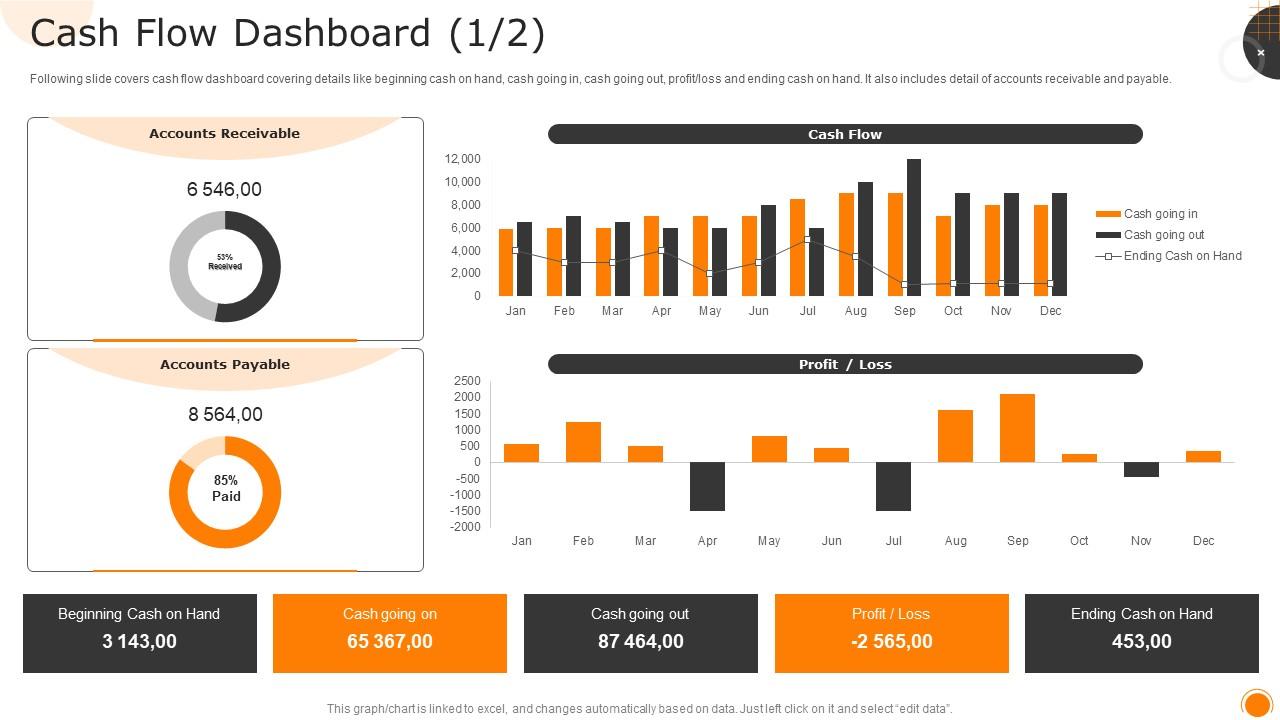
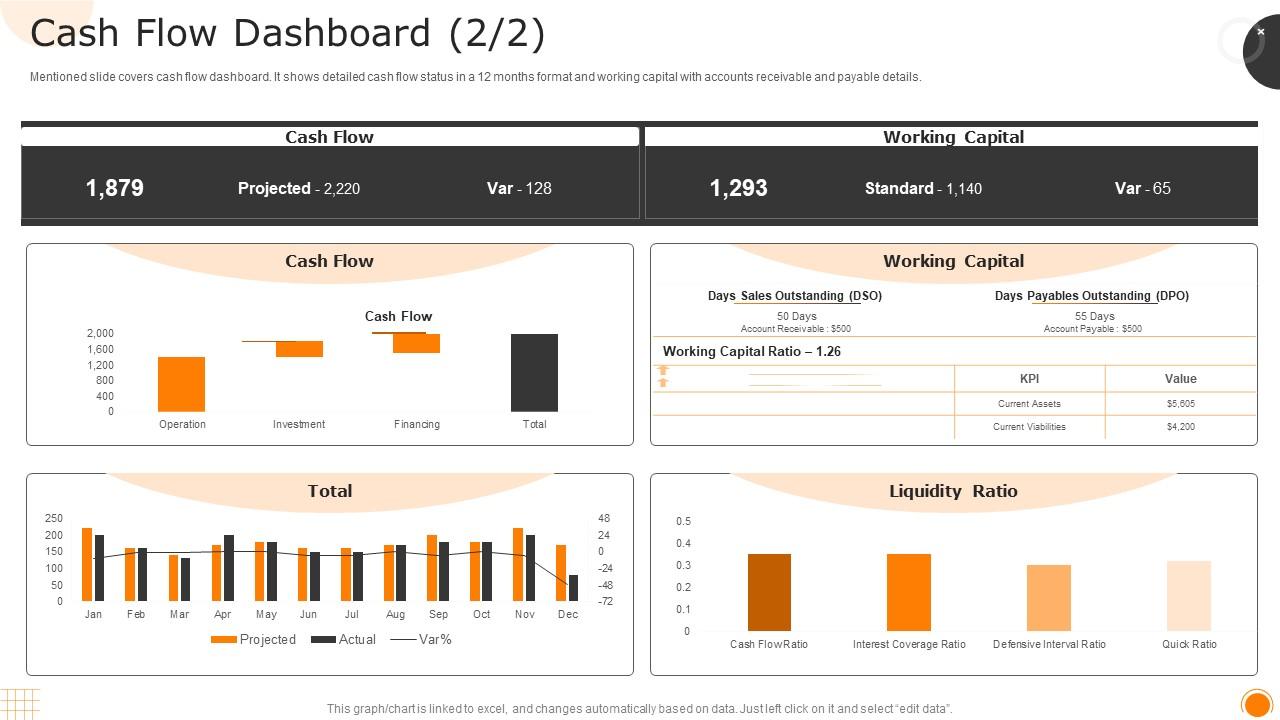
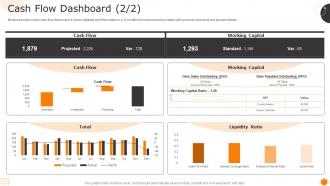
Following slide covers cash flow dashboard covering details like beginning cash on hand, cash going in, cash going out, profit or loss and ending cash on hand. It also includes detail of accounts receivable and payable. Present the topic in a bit more detail with this Cash Flow Dashboard Measuring Business Performance Using Kpis. Use it as a tool for discussion and navigation on Dashboard, Accounts, Receivable. This template is free to edit as deemed fit for your organization. Therefore download it now.

FAQs for Cash Flow Dashboard Measuring Business

Look, start with operating cash flow and accounts receivable aging - those are non-negotiable. Cash burn rate too. Then add your current cash position and DSO (days sales outstanding). The forecasting bit for 30-90 days out? That's what actually saves your ass from surprises. Don't forget accounts payable aging either. If you've got inventory, throw in cash conversion cycle. But seriously, keep it simple or you won't use it. I swear half the dashboards I see are so bloated nobody even opens them. Better to nail the basics first - you can always pile on more metrics later once you're actually checking it daily.

Honestly, it's a game changer for seeing your money flow in real time. You'll catch seasonal dips before they hurt, plus spot when clients start dragging their feet on payments (ugh, why is that always happening?). The cool part is using old data to run "what if" scenarios - like if your biggest client suddenly pays 30 days late or sales tank by 20%. I'd definitely set up alerts for the important stuff though, because who has time to check dashboards all day? Way better than scrambling when cash gets tight.

Line charts are your best friend here - they'll show you cash flow patterns way better than just staring at numbers. I always color-code green for money coming in, red for going out. Your brain picks up on colors so much faster than reading labels. Only put 3-4 key things on your main dashboard though. Trust me, more than that and you'll just get overwhelmed and never actually use it. Oh, and definitely compare your forecasts to what actually happened - that's where the real learning is. Set alerts when cash gets low so you don't have to wait for your monthly review to panic.

Dude, those default dashboard templates are trash for most businesses. You gotta focus on what actually drives cash in your industry. Like if you're retail, track seasonal stuff and how fast inventory moves. SaaS? Monthly recurring revenue and churn rates are your best friends. Manufacturing is all about supplier payment cycles and production costs. Honestly, just make a list of your biggest 5 cash flow headaches first. Then build widgets around those specific numbers. Way better than trying to force some generic template to work for you.

You definitely want real-time data for your cash flow dashboard. Cash moves way too fast to rely on old info - it's like trying to drive by only looking behind you. When payments get delayed or random expenses pop up, you'll catch them right away instead of finding out days later when it's harder to fix. I learned this the hard way actually. Set up alerts for the important stuff so you don't have to babysit the dashboard constantly. Trust me, spotting revenue dips the moment they happen makes all the difference in staying ahead of problems.

Honestly, just start with Google Sheets or whatever accounting software you're already using - QuickBooks and Wave both have decent dashboards built right in. Most people think they need some crazy expensive setup, but that's total overkill. Track maybe 3-4 things: money coming in, going out, how long your runway is, and accounts receivable if that applies. I'd skip all the fancy charts for now. Takes me like 30 minutes each week to update everything, and you'll actually catch cash flow issues before they bite you. Way better than scrambling when you're already in trouble.

Honestly, I'd go with **Tableau** or **Power BI** first - they look super professional and plug right into your accounting software. **Google Data Studio** is free which is nice, but yeah the setup can be annoying at first. Excel works if you're just starting out, though it becomes a total pain once you have multiple data sources going. Oh, and whatever you pick, make sure it updates automatically. Trust me on this one - manually refreshing data every week will drive you insane. Power BI's probably the sweet spot between features and price if I had to choose.

Honestly, charts are a game-changer for catching stuff you'd never notice just staring at numbers. Your cash flow trends become super obvious with line charts - you'll see if you're actually growing or just getting hammered every winter. Bar charts? They'll flag weird spikes that need digging into. Heat maps are clutch for finding those categories that always suck in certain months. I'm obsessed with color coding everything because it makes the problems pop out immediately. Like when your collections randomly crater in Q3 compared to last year - you can't miss it. Set up some alerts too so you catch problems before they get ugly.

Don't cram everything onto one screen - you'll just confuse people. Focus on the big three: cash position, burn rate, and runway. Skip the tiny fonts and weird colors (trust me on this one). Executives don't want to see every daily transaction either. That's way too much detail for them. Keep your time periods consistent across everything. Oh, and make sure the data actually tells a story about where your cash stands. Sometimes I see dashboards that look impressive but don't actually help anyone make decisions. Way better to show less but make it count.

So most platforms let you connect through APIs or built-in integrations - pretty straightforward actually. I'd hook it up to your accounting software first (QuickBooks, Xero, whatever you're using), then your ERP if you have one. Power BI works great for reporting too. Once everything's talking to each other, your cash flow syncs automatically with P&L and balance sheets. Real-time data is crucial though - nobody wants to make decisions off stale numbers. Honestly took me forever to map out which systems needed connecting, but it's worth the headache. Start simple and build from there.

Honestly, the real-time updates alone make it worth it - no more manually punching in numbers every week like some kind of data entry robot. Your bank accounts sync automatically with the dashboard, and the visualizations actually look professional (Excel charts are tragic, let's be real). When you hit certain cash flow thresholds, you'll get alerts instead of discovering problems weeks later. Plus no more "wait, which version of the spreadsheet are we using?" disasters. I was skeptical at first, but try any dashboard tool for a month and you won't go back to Excel hell.

Honestly, I'd say weekly at minimum, but daily is way better if you can swing it. Cash flow moves fast - invoices hit, random expenses pop up, clients pay late. Weekly gives you enough heads up to avoid nasty surprises. Daily though? That's where you really stay on top of things, especially if you're growing quickly or deal with seasonal swings. I learned this the hard way when I got blindsided by a late payment once. Start weekly and see how paranoid you get - you'll figure out pretty quick if you need to check more often.

Ugh, seasonality totally screwed me over my first year managing budgets - those predictable ups and downs will mess with your cash flow big time. What saved me was setting up dashboards that show historical patterns next to current numbers. Makes it way easier to spot the trends coming. Rolling forecasts are your friend here, especially ones that factor in those seasonal swings. Oh, and definitely set up alerts for when things go off track from what you'd normally expect. The buffer calculations for slow seasons are clutch too. Honestly wish someone had told me this stuff earlier - would've saved me so much stress!

Honestly, just get everyone in a room together first - hands-on training beats sending emails about it. Pick the metrics that actually matter for your business instead of showing them every bell and whistle (that's how you lose people). Make some quick reference sheets they can stick by their computers. Each department should probably have someone who gets it well enough to help others - saves you from being the only go-to person. Oh, and definitely check in with them regularly the first month or so. People always have questions they didn't think to ask initially.

Honestly, if you're at a startup you need to watch cash flow like a hawk - daily or weekly tracking because every dollar matters when you've got maybe 6 months runway. Burn rate and cash position should be front and center on your dashboard. Bigger companies? They can chill with monthly reports since their revenue's more predictable. Different metrics matter too - startups obsess over cash-to-revenue ratios while established businesses track working capital efficiency. Oh, and seasonal stuff becomes way more relevant once you've been around a few years. Start with whatever keeps the lights on.

Ratings and Reviews

90% of 100
Review Form
Write a review
Most Relevant Reviews
  1. 100%

    by Delmer Black

    A big thanks to SlideTeam! An incredible and diverse library of templates helped me with my business project presentation.
  2. 80%

    by Jones Cook

    Qualitative and comprehensive slides.

2 Item(s)