


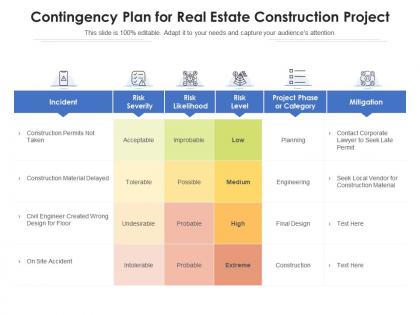
Contingency plan for real estate construction project




Try Before you Buy Download Free Sample Product
 Impress Your
 Audience
 100%
100% Editable
 Save Hours
 of Time


Our Contingency Plan For Real Estate Construction Project are topically designed to provide an attractive backdrop to any subject. Use them to look like a presentation pro.
People who downloaded this PowerPoint presentation also viewed the following :
Contingency plan for real estate construction project with all 2 slides:
Use our Contingency Plan For Real Estate Construction Project to effectively help you save your valuable time. They are readymade to fit into any presentation structure.
FAQs for Contingency plan for real
So first thing - figure out your biggest risks and work backwards from there, trust me it's way easier. You need clear triggers that kick the plan into action, plus who's doing what when things go sideways. Communication is honestly the make-or-break part - how you'll contact people and keep everyone updated during the mess. Budget for resources, backup systems, all that practical stuff. Set realistic timelines for recovery too. And here's the thing people always skip - actually test the damn thing regularly. Plans gathering dust are worthless. Oh, also map out your step-by-step procedures so nobody's scrambling around confused when it hits the fan.
Honestly, just get your team together and brainstorm everything that could mess up your business. Look at what's happened to other companies in your space - that stuff's usually a good starting point. Think internal disasters like your best employee quitting or servers crashing, plus external ones like floods or cyber attacks. Those weird scenarios that seem impossible but would totally wreck you? Yeah, include those too. Once you've got your list, rank everything by how likely it is versus how badly it'd hurt. Different departments will catch risks others miss, so don't skip that part. Oh, and you'll need to revisit this regularly since new threats pop up constantly.
Dude, communication can totally make or break your backup plan. Set up who calls who BEFORE disaster hits - otherwise you'll have people scrambling around not knowing what's happening. Test your phone trees and all that stuff regularly too. I've watched solid plans completely fall apart because nobody could reach the right person when it mattered. Don't forget about customers and maybe even press if things get messy. Oh, and definitely have backup ways to communicate since phone systems always seem to crap out at the worst possible moments.
Honestly, once a year minimum but that's barely cutting it. Big changes should trigger updates right away - new regulations, staff turnover, tech upgrades, whatever. I can't tell you how many "current" plans I've seen that still reference some system they ditched three years ago lol. Quarterly check-ins work well, then do the full deep dive annually. Testing is huge too because what sounds perfect on paper might totally bomb when you actually try it. The whole thing needs to stay alive and relevant, not just sit there collecting digital dust somewhere.
Honestly, the worst thing you can do is be too vague about it. Like, don't just say "call manager" - spell out WHO calls, WHEN, and what exactly they're supposed to say. Most people freeze up during actual emergencies anyway. Oh, and everyone obsesses over huge disasters but ignores the mundane stuff that actually happens more often. You'll spend forever planning for earthquakes while your server crashes every other month. Update the thing regularly too - I've seen so many plans with phone numbers from 2019. Run practice drills occasionally, otherwise it's just expensive paperwork sitting in a drawer somewhere.
Honestly, tech makes contingency planning so much easier than doing it old school. Get some risk assessment software to spot problems early. Those scenario modeling tools are pretty cool too - you can test crazy situations without actually breaking anything. Store everything in the cloud so your team can access plans from wherever (trust me, you don't want to be locked out of the office during a crisis). Slack keeps everyone talking when stuff hits the fan. Oh, and definitely digitize your current plans first - having everything scattered across random folders is the worst when you're panicking.
Track your response time first - how fast did you actually kick things into gear? Then measure recovery time and whether costs matched what you predicted. Communication is huge too (learned this the hard way) - did everyone get the info they needed when they needed it? Document where reality didn't match your plan. Stakeholder satisfaction scores are gold if you can swing it. Here's the thing though - test all this stuff during drills. Don't wait for an actual crisis to figure out your metrics are garbage.
Think of scenario planning as running your backup plan through a bunch of different disasters to see where it breaks. Instead of just prepping for the most obvious problem, you're gaming out 3-4 realistic situations that could mess with your world. What if the supply chain crashes AND there's a cyberattack? Your current plan might totally fall apart - that's the point. You'll spot weaknesses you never considered and build more flexible responses. Honestly, most people's contingency plans are way too rigid. Map out those scenarios first, then stress-test what you've got. Better to find the holes now than during an actual crisis.
Get everyone who matters in one room right off the bat - IT, HR, operations, finance, the whole crew. Map out how each team's work impacts the others first, because honestly, I've watched so many companies crash and burn when departments don't talk to each other. You'll want regular meetings where teams can update their scenarios and test responses together. Oh, and assign someone to own each risk area - can't have stuff falling through cracks. Set up some kind of shared digital space where everyone accesses the latest plans and updates their status. Sounds obvious but you'd be surprised how often this gets skipped.
Focus on job-specific stuff first – nobody cares about protocols that don't affect them. Quarterly tabletop exercises work way better than boring manuals. Test weird scenarios, not just the obvious fire drill type things. Actually debrief afterward (this part's crucial but everyone skips it). Keep everything somewhere people can actually find it – shared drives work fine. Make it hands-on since that's what sticks. Quick refresher every six months keeps things fresh. Oh, and always have backup people trained for key roles because Murphy's Law is real.
Okay so basically you can't just make stuff up when shit hits the fan - there are actual legal rules you have to follow. Like if you get hacked, there's specific timelines for reporting breaches. Same with safety stuff at work or financial reporting during emergencies. Some industries even require you to have business continuity plans, which honestly feels like overkill but whatever. The smart move? Figure out what regulations actually apply to you first. Then build your backup plans around those requirements since they're non-negotiable. Data protection, workplace protocols, crisis reporting - map all that out before anything else.
Yeah, small biz contingency planning is brutal compared to big corps. You don't have a whole risk management team or those expensive modeling tools they use. Cash flow's usually tight too, so building financial cushions? Good luck with that. Honestly, when you're juggling everything daily, planning for "what ifs" feels impossible - I get why people skip it. But here's the thing: even a messy one-page plan beats having nothing. Just nail down your top 3 risks and call it a win. Something's better than getting blindsided later.
Skip the rigid step-by-step stuff - you'll hate yourself later when everything goes sideways. Instead, nail down your key decision points and core principles first. Give your teams clear roles and communication rules, but let them figure out the tactics as things unfold. Honestly, most plans fall apart because they're too detailed anyway. Run practice scenarios regularly - they'll show you what actually needs structure vs. where people just need room to think. Set the guardrails, then get out of their way. Test it, tweak it, repeat.
Look at Johnson & Johnson in the 80s - they pulled Tylenol nationwide after the poisoning scare and rebuilt trust through total transparency. That's textbook crisis management. Southwest had backup plans ready for 9/11 while other airlines tanked. Toyota bounced back faster after the 2011 tsunami because they'd already mapped out supply chain alternatives. The key isn't just having backup plans though - you gotta test them regularly. Run those tabletop exercises quarterly to catch gaps before disaster hits. Honestly, most companies skip this part and regret it later.
Don't just throw diverse people on your team as an afterthought - get them in from day one. Mix up your planning group with folks from different departments, backgrounds, people with accessibility needs. They'll catch stuff you totally missed. Survey everyone about what actually trips them up during disruptions. I've watched so many disaster plans crash and burn because nobody thought about remote workers or language barriers (which seems obvious but apparently isn't?). Run practice drills with your whole mixed group. When someone says "yeah this won't work for us because..." - actually listen to them.
-
Informative design.
-
Amazing product with appealing content and design.
-
Unique research projects to present in meeting.
-
Use of different colors is good. It's simple and attractive.