

ETL Database Powerpoint Presentation Slides





Try Before you Buy Download Free Sample Product
 Impress Your
 Audience
 100%
100% Editable
 Save Hours
 of Time


ETL Database aids organizations in storing the companys data on an offsite server that requires a well framed strategy, where our beautifully designed module comes into the picture. Here is an efficiently designed ETL Database template that walks you through the data management agenda and its trends. It also highlights the need to manage data in an organization and discusses the challenges encountered in cloud ETL Databases. Some issues faced are data criticality, data sprawl, and data growth. It also gives a glimpse of competitive advantage after implementing cloud data management like flexibility, high security, data availability, etc. Emphasize master ETL Database solutions by taking the assistance of this fantastic cloud management PowerPoint module. Elucidate the master ETL Database architecture seamlessly with supply chain management, relationship management, and enterprise resource planning by grabbing the given module. It also lists the services provided along with showcasing real-time data integration. You can also take the assistance of this ETL Database services implementation roadmap.
People who downloaded this PowerPoint presentation also viewed the following :
Content of this Powerpoint Presentation
Slide 1: This slide displays title i.e. 'ETL Database' and your Company Name.
Slide 2: This slide presents agenda.
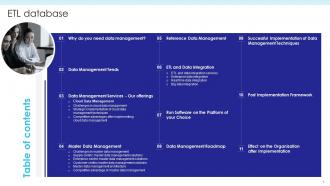
Slide 3: This slide exhibits table of contents.
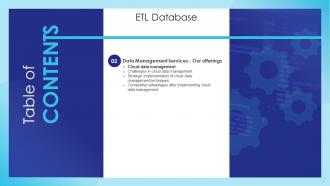
Slide 4: This slide depicts title for two topics that are to be covered next in the template.
Slide 5: This slide covers the reasons for data management in an organisation such as minimizing the data movement and attention to data security.
Slide 6: This slide gives the glimpse that continuous intelligence, augmented analytics, information fabric, etc.
Slide 7: This slide depicts title for three topics that are to be covered next in the template.
Slide 8: This slide shows the dual challenges of not only managing and mining the data they produce and use.
Slide 9: This slide shows Strategic implementation of cloud data management techniques.
Slide 10: This slide gives a glimpse of completive advantages after implementing cloud data management strategy such as reliability, flexibility, etc.
Slide 11: This slide depicts title for six topics that are to be covered next in the template.
Slide 12: This slide shows Challenges in master data management.
Slide 13: This slide shows Supply centric master data management solutions.
Slide 14: This slide shows Enterprise-centric master data management solutions.
Slide 15: This slide shows Customer-centric master data management solutions.
Slide 16: This slide covers the master data management architecture with supply chain management, customer relationship management and enterprise resource planning.
Slide 17: This slide shows the effect after implementing master data management solutions in the organization such as a single view of the data.
Slide 18: This slide depicts title for one topic that is to be covered next in the template.
Slide 19: This slide shows Reference data management.
Slide 20: This slide depicts title for four topics that are to be covered next in the template.
Slide 21: This slide shows ETL and data integration services.
Slide 22: This slide highlights Enterprise data integration.
Slide 23: This slide presents Real time data integration.
Slide 24: This slide displays Big data integration.
Slide 25: This slide depicts title for four topics that are to be covered next in the template.
Slide 26: This slide illustrates Run software on the platform of your choice.
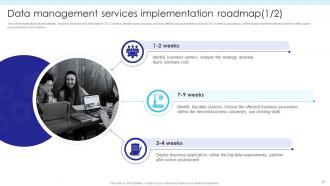
Slide 27: This slide states that we will identify, analyse, develop and estimate in 1 to 2 weeks, identify data sources, choose, etc.
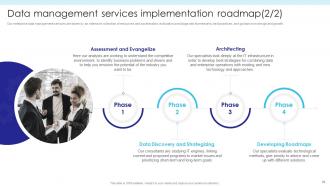
Slide 28: This slide h8ighlights Data management services implementation roadmap.
Slide 29: This slide covers the implementation of data management services in the clients organization.
Slide 30: This slide depicts title for two topics that are to be covered next in the template.
Slide 31: This slide covers the framework for value extraction from multiple data sources and for generating actionable insights.
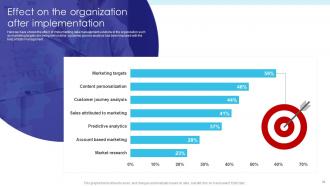
Slide 32: This slide shows Effect on the organization after implementation.
Slide 33: This is the icons slide.
Slide 34: This slide presents title for additional slides.
Slide 35: This slide shows about your company, target audience and its client's values.
Slide 36: This slide exhibits yearly timeline.
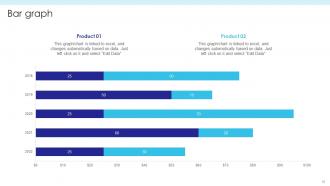
Slide 37: This slide exhibits yearly bar graph for different products. The charts are linked to Excel.
Slide 38: This slide displays puzzle.
Slide 39: This slide displays Venn.
Slide 40: This slide showcases financials.
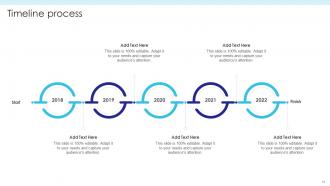
Slide 41: This slide exhibits yearly timeline.
Slide 42: This slide displays location of company in world map.
Slide 43: This slide depicts 30-60-90 days plan for projects.
Slide 44: This is thank you slide & contains contact details of company like office address, phone no., etc.
ETL Database Powerpoint Presentation Slides with all 49 slides:
Use our ETL Database Powerpoint Presentation Slides to effectively help you save your valuable time. They are readymade to fit into any presentation structure.
-
ETL Database
-

Agenda for ETL database
-
ETL database
-

ETL Database
-

Why do you need data management
-

Data management trends
-
ETL Database
-

Challenges in cloud data management
-

Strategic implementation of cloud data management techniques
-
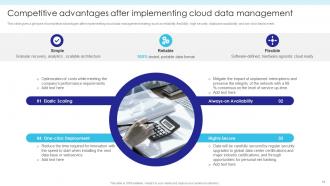
Competitive advantages after implementing cloud data management
-

ETL Database
-

Challenges in master data management
-

Supply centric master data management solutions
-

Enterprise centric master data management solutions
-

Customer centric master data management solutions
-

Master data management architecture
-
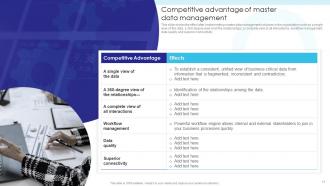
Competitive advantage of master data management
-

ETL Database
-

Reference data management
-

ETL Database
-
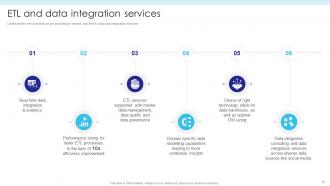
ETL and data integration services
-
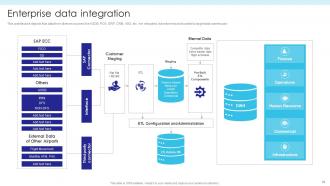
Enterprise data integration
-
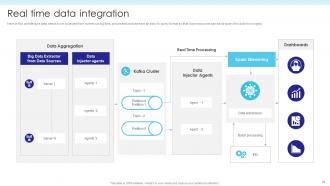
Real time data integration
-
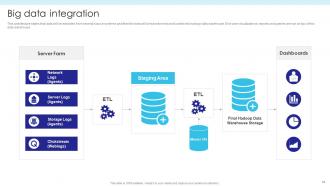
Big data integration
-
ETL Database
-
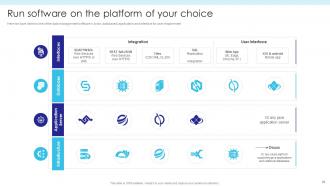
Run software on the platform of your choice
-
Data management services implementation roadmap 1 2
-
Data management services implementation roadmap 2 2
-

Successful implementation of data management in your organization
-

ETL Database
-

Post implementation of data management solutions
-
Effect on the organization after implementation
-

Icons slide for ETL database
-

Additional slides
-

About us
-
Timeline
-
Bar graph
-
Puzzle
-
Venn
-

Financial
-
Timeline process
-

Location
-

30 60 90 days plan
-

Thanks for watching
-

-

-

-

-

FAQs for ETL Database
So ETL breaks down into three parts that actually matter. **Extract** grabs data from wherever it lives - databases, APIs, random CSV files your coworker emailed you. Then **Transform** does the heavy lifting (honestly, this is where you'll lose your mind debugging weird edge cases). It cleans everything up, fixes formatting issues, makes sure different data sources can talk to each other. **Load** takes that cleaned data and puts it somewhere useful, like a data warehouse. The whole thing creates a pipeline so your analysts aren't stuck dealing with messy, scattered data anymore. I'd start by figuring out what sources you're working with first.
So ETL transforms your data before loading it anywhere, but ELT dumps the raw stuff in first then transforms it later. ETL's the old way - you clean everything upfront like meal prepping on Sunday (honestly still works fine). But ELT's taken off because cloud warehouses like Snowflake can handle transformations now without breaking a sweat. You'll get better speed with ELT on big datasets, plus you keep all the raw data which is clutch for flexibility. If you're on modern cloud stuff, I'd probably lean ELT.
Okay so data quality in ETL is huge - seriously can't stress this enough. Bad data going in means your reports will be trash, and nobody wants to explain to their boss why the numbers are all wrong (been there, not fun). You're basically the filter between messy source data and your clean warehouse. During transforms, validate everything - nulls, formats, duplicates, all of it. Set up checks at each stage or you'll hate yourself later. Oh and stakeholders will actually trust your data instead of questioning every dashboard you build, which is honestly worth the extra effort upfront.
So basically you want to split your data into smaller chunks and run them at the same time - parallel processing is clutch for this. Tools like Informatica let you do incremental loads too, which means you're only grabbing new/changed stuff instead of everything again. That saves so much time it's not even funny. Memory streaming helps handle the flow better. Oh and definitely figure out where your slowest bottlenecks are first before you start tweaking parallel settings. Trust me, don't just randomly optimize everything at once.
Honestly, data quality will drive you insane - missing values, weird formats, duplicates everywhere. Your transforms just randomly break. Then there's performance issues when datasets get huge, which happens faster than you'd think. Schema changes are the worst though, they cascade and break everything downstream. Error handling is a pain too. Good luck figuring out where things went sideways in a 20-step pipeline at 2am. My take? Set up solid validation rules early and log everything obsessively. You'll thank yourself later when debugging doesn't feel like detective work.
Honestly, start tracking data lineage from the beginning - trust me on this one. Log every transformation with source/target tables and business rules applied. I wasted way too many hours debugging something that should've taken minutes to fix! Tools like Apache Atlas can automate most of the capture work. Your ETL jobs should write to lineage tables right alongside the actual data transforms. Even if you just start with a basic spreadsheet documenting what you've got now, you'll save yourself major headaches down the road. It's one of those things that seems boring until you desperately need it.
Data source connectivity is huge - check if it works with your databases and APIs first. You'll want something that scales with your volumes and matches your team's skills. Error handling is critical because nobody wants pipelines failing silently overnight (been there!). Transformation features matter, plus scheduling flexibility and both batch/real-time processing options. Cost adds up fast as data grows, so factor that in early. Honestly, skip the feature comparisons and just run a proof of concept with your actual data sources. That'll show you what really works for your specific setup before you're locked in.
Think of ETL as the cleanup crew for your data mess. You've got information scattered everywhere - different formats, inconsistent naming, the works. ETL grabs all that chaos and transforms it into something your analytics tools can actually digest. Without it? Good luck running reports when half your customer names are "Smith, John" and the other half are "[email protected]" - been there, it sucks. Once ETL dumps everything into your data warehouse properly, tools like Tableau can do their magic. Just make sure your pipelines stay reliable or you'll have executives asking why yesterday's numbers don't match today's dashboard.
So real-time processing basically turns your old ETL world upside down. Instead of those scheduled batch jobs, you're dealing with continuous data streams now. Pretty overwhelming when you first dive in, honestly. But for anything time-sensitive? The results are worth it. You'll have to rebuild your transformation logic to work piece by piece as data flows through. Kafka's probably your best friend here, along with other stream processing tools. My advice though - don't go crazy and redo everything at once. Pick one pipeline that really matters and test it out first.
Dude, automation is a game changer for ETL stuff. Schedule your data pulls to run overnight or whenever makes sense - no more manual extractions eating up your day. Real-time monitoring catches problems early, and automated validation rules beat checking everything yourself (trust me on this one). Your transformations stay consistent too, so you won't have those "crap, I missed cleaning that column again" moments. Honestly? The best part is getting time back for actual analysis instead of babysitting pipelines. I'd start with whatever repetitive tasks annoy you most.
Okay so first thing - always validate your source data before doing anything else. Check for nulls, duplicates, wrong data types. I can't tell you how many times I've watched ETL jobs completely blow up because people skip this basic step (it's honestly painful to watch). Standardize everything consistently - dates, phone numbers, addresses, all of it. Use lookup tables for reference stuff. Document your transformation logic really well or you'll hate yourself later when you're trying to figure out what the hell you were thinking six months ago. Set up proper error handling and logging too. Makes troubleshooting way easier. I'd start by auditing what you've got now and see where you're missing validation checks.
Honestly, cloud ETL is way cheaper since you're not buying tons of hardware upfront. Plus it scales automatically when you get hit with crazy data spikes. On-premises though? You get total control, which some companies desperately need for compliance stuff. The cloud route is definitely less of a headache - someone else deals with all the maintenance BS. But here's the thing: if you've got strict data residency rules or need everything customized exactly how you want it, you might be stuck going on-premises. I'd figure out your security requirements first, then see what makes sense financially.
Dude, ETL is literally everywhere once you notice it. Retail stores pull data from registers, inventory systems, and online sales to see the big picture. Hospitals combine patient records with billing and lab results (compliance is a nightmare there). Financial companies are probably the heaviest users though - they're constantly shuffling transaction data and regulatory stuff between systems. Manufacturing does it too for supply chains and all those IoT sensors. Honestly, just start by figuring out where your data lives right now and how it moves around. You'll probably find more silos than you expected.
So there's actually a bunch of ways to work ML into your ETL setup. During the Transform phase, you can throw in models to automatically clean stuff - anomaly detection, filling gaps in data, format standardization, whatever. Predictive models are solid too for enriching data as it moves through. Some people get fancy and use ML to optimize the whole pipeline itself, like predicting when to scale up or if a data source is about to crap out. Honestly, platforms like Databricks make this way easier than it used to be. I'd say just pick one manual step you're doing and see if you can automate it with a model first.
First thing - figure out what data you're actually dealing with and how sensitive it is. Encrypt everything in transit and at rest, obviously. Set up role-based access so random people can't see PII. Mask or tokenize sensitive stuff during transformations because honestly, compliance nightmares are the worst. Your ETL logs shouldn't capture any of that data either - I've seen that bite people before. Use anonymized datasets for dev/test environments. Oh, and audit trails are your friend - track who accessed what and when. Sounds like a lot but you'll thank yourself later.
-
“Thank you to the SlideTeam. Your presentations look really skillful and have made my life so much easier.”
-
Superb! The innovative and inspiring template designs provide an edge to the presentation.