


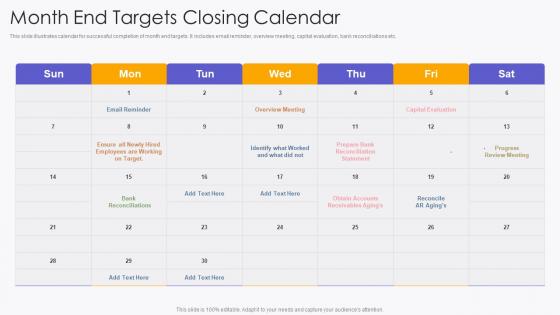
Month End Targets Closing Calendar




Try Before you Buy Download Free Sample Product
 Impress Your
 Audience
 100%
100% Editable
 Save Hours
 of Time


This slide illustrates calendar for successful completion of month end targets. It includes email reminder, overview meeting, capital evaluation, bank reconciliations etc.
People who downloaded this PowerPoint presentation also viewed the following :
Month End Targets Closing Calendar with all 6 slides:
Use our Month End Targets Closing Calendar to effectively help you save your valuable time. They are readymade to fit into any presentation structure.





FAQs for Month End
Start with bank recs and credit card reconciliations - they take forever but catch the worst mistakes. Then hit your accruals for any expenses or revenue you haven't recorded yet. Don't forget depreciation calculations (ugh). Go through all your journal entries to make sure they're not garbage. Close revenue and expense accounts to retained earnings at the end. Seriously, document everything as you work - when audit season rolls around you'll want to kiss your past self. Oh, and make a checklist! Busy months make you forget the stupidest things.
Stop cramming everything into those last few days - that's your first mistake. Spread the work out instead. Daily reconciliations for your busy accounts will save you so much pain later. Automate whatever journal entries you can, and honestly? Checklists are boring but they work. My old boss used to say month-end shouldn't feel like the apocalypse, and she was right. Try pre-close meetings to catch problems before they blow up at 9 PM. Pick one thing to fix each month - don't try to revolutionize everything at once or you'll burn out your team.
Dude, automation is where it's at for month-end close. Start with your biggest time-suck reconciliations - that's the low-hanging fruit. The software flags weird stuff automatically and shows you exactly where things are getting stuck. No more chasing people down for approvals or wondering if Dave forgot to submit his part again. Workflows route everything to the right person without you having to babysit the process. I know teams who've literally cut their close time in half. The dashboard thing is pretty sweet too - you can see everything in one place instead of juggling fifteen different spreadsheets.
Ugh, discrepancies are the worst - they literally stop everything until you fix them. Can't close books with unreconciled differences or your financials will be wrong, plus auditors will tear you apart. What really kills me is how much time gets wasted tracking these down. You'll spend hours digging through transactions and comparing systems, trying to figure out what went wrong. Honestly such a pain. My advice? Build in extra time for this stuff and stay on top of reconciliations during the month. Way better than scrambling last minute when you're already stressed about closing deadlines.
Ugh, the worst parts are always those crazy tight deadlines and chasing down missing data from other departments. Manual processes will kill your soul too. Plus reconciliation headaches and getting approvals when everyone suddenly disappears - like, where did Bob from accounting even go?? Anyway, what helped me was setting up a closing calendar with actual deadlines for each team. Automate the repetitive stuff if you can. Don't wait until the last minute for reconciliations - spread them throughout the month. And honestly? Start bugging department heads early about their submissions or you'll be scrambling.
Honestly, you've got to create solid processes and actually stick to them. I always set up detailed checklists with real deadlines - sounds boring but trust me, I've watched too many month-ends crash because people figured they could skip the "minor" stuff. Don't wait until the last minute for reconciliations either. Spread that work throughout the month instead of going crazy those final days. Get someone else to review everything before you lock it down. Catching mistakes early saves your sanity later. Oh, and start prepping a few days before month-end closes so you're not scrambling like everyone else.
Honestly, shared calendars are a lifesaver - map out who needs what from each department and when. Set up those communication channels early too, maybe a dedicated Slack channel or quick daily check-ins during crunch time (I know it sounds like overkill but trust me). Document the problems that keep popping up so you're not solving the same issues every single month. Oh, and definitely sit down with all your department heads first to figure out where things always get stuck. Making those dependencies super obvious helps everyone stay on track instead of playing the guessing game.
Do it every month, seriously. I know tons of people try to get away with quarterly reviews but that's just asking for trouble. Fresh problems are way easier to fix than ones you discover three months later. Compliance stuff pretty much requires monthly cycles anyway - your auditors will NOT be happy if you're skipping around. Honestly, the errors just pile up and become this nightmare to untangle. What I do is block out the same few days each month for this. Like, literally put it on your calendar as non-negotiable time with your books. Trust me on this one.
Look at revenue vs budget first - that's your starting point. Gross margins and operating expenses give you the full picture. Cash flow's huge too, plus AR aging if you're dealing with invoices. Industry stuff matters here - like if you've got inventory, track those turnover rates. Customer acquisition costs are gold for most businesses, retention rates too. Honestly, financial ratios are pretty much the same everywhere, but your specific KPIs depend on what you're actually doing. Oh, and set up some kind of dashboard so you're not digging through spreadsheets every month like I used to do.
Honestly, check out FloQast or BlackLine for close management - they're total lifesavers for tracking tasks and automating reconciliations. Excel's still our bread and butter (seriously, what would we do without it?), but NetSuite or SAP might be worth it if you're dealing with crazy volume. Monday.com works great for keeping everyone synced up timeline-wise. Oh, and whatever you pick needs to actually play nice with your current systems - nobody wants another data silo nightmare. I'd start by figuring out what's driving you nuts right now, then tackle those problems first.
Honestly, regulatory deadlines run the whole show - you're just working backwards from there. Public companies get 40 days for 10-Qs (35 if you're big enough), but that time disappears fast once you factor in audit reviews and getting management to actually sign off. Banks have their own nightmare calendar on top of everything else. Map out those regulatory dates at the start of the year, trust me on this one. Always build in 3-5 days of buffer time before any hard deadline. Something will definitely break at 4pm on a Friday when you need it most.
Honestly, checklists are lifesavers for month-end. They stop you from forgetting stuff when everything's crazy busy. You'll know exactly what's done and what still needs work. No more "wait, did we handle that accrual?" panic moments at 9pm. Each month won't feel like starting from scratch either. If someone calls in sick, whoever covers can actually figure out where things stand. Build one that fits how your company actually works - not some generic template. Oh, and update it whenever you catch something that got missed. Trust me on this one.
So for training your month-end team, I'd honestly start with those online modules in the Learning Portal - journal entries, variance analysis, all that stuff. Your people can do them whenever they're not drowning in deadlines. The monthly webinars are decent but yeah, timing's always weird. One-on-one coaching with the accounting leads is clutch if someone's really struggling. Oh, and the quick reference guides are actually pretty good for refreshers. You could also set up shadowing sessions with the experienced closers - that works better for some people than sitting through modules. Start online, then add the live training as you figure out what gaps you still have.
Dude, public companies are on a completely different level with deadlines. SEC gives you 40 days for both 10-Ks and 10-Qs, which sounds reasonable until you're actually doing it. Then there's all the SOX compliance stuff, detailed footnotes, executive certifications - honestly, the exec certs are terrifying because people can literally go to jail if they mess up. Private companies? They basically make their own rules since they're only answering to owners or lenders. Your auditors might have opinions about timing, but no government agency is watching every move. My advice? Start your close process way earlier than feels necessary.
Honestly, month-end closing is like finally checking your bank account after avoiding it all month - you get the real picture of where your cash actually stands. All those timing differences between recording stuff and money actually moving? They'll mess up your forecasting if you don't catch them. Plus you'll spot receivables and payables that could bite you next month. I always find weird stuff I forgot about lol. The whole reconciliation thing gives you a solid starting point for next month's projections instead of just winging it. Then you can actually tweak your cash strategy based on real numbers.
-
I am really satisfied with their XYZ products. Used their slides for my business presentations and now I am taking their help for my son's high-school assignments. Super satisfied!!
-
“There is so much choice. At first, it seems like there isn't but you have to just keep looking, there are endless amounts to explore.”