

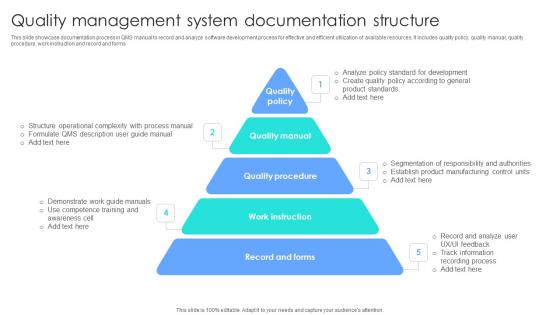
Quality Management System Documentation Structure




Try Before you Buy Download Free Sample Product
 Impress Your
 Audience
 100%
100% Editable
 Save Hours
 of Time


This slide showcase documentation process in QMS manual to record and analyze software development process for effective and efficient utilization of available resources. It includes quality policy, quality manual, quality procedure, work instruction and record and forms.
People who downloaded this PowerPoint presentation also viewed the following :
Quality Management System Documentation Structure with all 6 slides:
Use our Quality Management System Documentation Structure to effectively help you save your valuable time. They are readymade to fit into any presentation structure.





FAQs for Quality Management
So there's basically four layers to QMS docs. Quality manual sits at the top - that's your big picture policy stuff. Below that you've got procedures (the how-to guides), then work instructions with all the detailed steps, and finally records and forms at the bottom. It's like a pyramid, I guess? Manual gives you direction, procedures walk through processes, work instructions get super specific, and records show you're not just making it all up. Honestly, I'd start by seeing what you already have lying around - you might be surprised how much is already there, just needs organizing.
Honestly, good QMS docs are a game changer. Your team stops guessing what to do and just follows the playbook. New people can actually figure things out without bugging everyone constantly. Auditors eat this stuff up too - I've seen companies breeze through inspections because everything was properly documented. Here's the thing though: don't go crazy trying to document every tiny process right away. You'll just overwhelm yourself. Pick your most important stuff first and build from there. Oh, and make sure it's written clearly - nobody wants to decode corporate speak when they're trying to get work done.
So here's the thing - continuous improvement keeps your QMS docs from becoming useless paperwork nobody reads. Schedule quarterly reviews for your most-used documents first. Get feedback from your team about what's confusing or outdated. Then actually update the stuff that isn't working. Think of it like cleaning out your closet, but for procedures - if it doesn't help people do their jobs better, fix it or ditch it. The whole point is making sure your documentation changes when your actual processes do. Otherwise you'll have this perfect system on paper that has zero connection to reality.
Honestly, just get everything digital first - way easier than dealing with paper chaos. Put it all in one searchable platform so people aren't wasting time hunting around. Your folder names should actually make sense (none of that "Final_v3_ACTUALLY_FINAL" nonsense). Write stuff in normal English instead of corporate speak, and throw in some flowcharts when things get confusing. The biggest thing though? Actually ask your team what sucks about the current system. Then fix it. I know it sounds obvious, but most places just ignore the feedback they get.
Honestly, the hardest part is getting people to actually update the damn things. Nobody wants to do it - feels like homework. Also getting teams on board and not making procedures so complicated that everyone just ignores them. My advice? Give each doc a clear owner and set up review schedules. But here's the key - let the people doing the work write them, not management. They actually know what happens day-to-day. Start with your most critical stuff first, then expand. Oh, and make sure what you're documenting matches reality, not some fantasy version of how things "should" work.
Honestly, digital QMS tools are a total game changer. Real-time collaboration means no more version nightmares, and cloud storage lets everyone work on stuff simultaneously. The search functions actually work too - I'm talking instant results instead of digging through endless folders. Automated workflows handle approvals way faster, plus electronic signatures speed everything up. My favorite part though? The audit trails track everything automatically, which saves you during compliance reviews. Document management software that plays nice with your current setup is where I'd start. Trust me, you'll wonder how you survived without it.
Look, you really need to get your stakeholders involved from the start. These people use the system every day - they know what actually works vs what sounds nice in theory. I learned this the hard way on my last project, honestly. Get process owners and end-users in there early so you catch the weird edge cases before they bite you. People will actually follow procedures they helped build instead of rolling their eyes at top-down mandates. Your documentation ends up more realistic and user-friendly. Regular check-ins work way better than dumping everything on them at the end.
Honestly, once a year is the bare minimum but don't do that to yourself. I'd hit the important stuff every 6 months, maybe quarterly for anything super critical. Also trigger reviews when regulations change or after audits - trust me on this one. The worst thing is letting docs sit there for like 3 years untouched. Then audit season hits and you're scrambling to update everything at once (been there, it sucks). Just set some calendar reminders now and make sure someone's actually responsible for each document. Future you will thank present you.
Honestly, just give each group what they actually want to see. Executives? Short dashboards they can glance at between meetings. Your frontline people need those step-by-step guides with pictures - flowcharts work great. Middle management (bless them) wants ALL the data they can dig into. Auditors are picky about formal docs that follow their templates. External folks usually just want the summary or a certificate to check their box. Don't waste time trying to make one perfect document - keep separate versions. Oh, and actually ask each team what format they prefer first. Saves so much headache later.
Honestly, you gotta make it hands-on and connect it to what they actually do every day. Role-specific sessions work best - show them exactly how these QMS docs affect their real tasks. Nobody wants to hear about abstract compliance garbage. Try lunch-and-learns since people chill out more when there's food involved. Focus on WHY they need to document stuff, not just what to document. Let them mess around with the actual forms they'll use. Quick reference guides are clutch, and get some QMS champions in each department. The whole point is making it feel like something that'll help them get their job done easier, not another corporate checklist to suffer through.
Honestly, ISO 9001 is way more chill about documentation than you'd think. You literally only need six mandatory procedures - stuff like document control and internal audits. Compare that to aerospace standards like AS9100 or medical device ones? Those are documentation nightmares with crazy specific requirements. What's cool is you get to decide what docs actually make sense for your business based on your processes and risks. Industry standards basically tell you "document this, this, and this" whether it makes sense or not. I'd start by checking what you already have against ISO 9001's requirements. You might be surprised - could be you're already mostly there!
Honestly, just bake the audit stuff right into your docs from day one. Add audit checkboxes to your review templates and track everything - who looked at what, when stuff changed, findings, all of it. Most teams I know treat audits like some terrifying annual event, but you shouldn't! Build mini-audits into your regular doc reviews. That way your QMS becomes actually useful instead of just... compliance busy work, you know? Start small with your current templates and work from there. Way less stressful than scrambling when audit season hits.
Here's what worked for us - map your QMS stuff directly to whatever your main business goals are. Customer satisfaction matters? Your document procedures better actually help with that. Get your department heads involved since they're the ones dealing with this daily. Leadership needs to check in regularly because documents just... drift, you know? Nobody wants to admit it but it happens. Focus on metrics that actually move the needle for your business instead of just ticking compliance boxes. We do quarterly reviews to make sure everything still makes sense and hasn't gone off the rails.
Honestly, regulatory requirements run your entire QMS documentation - they're not optional. Map everything back to your specific standards like ISO 13485 or FDA QSR. What gets annoying is they also control update frequencies, approval workflows, and retention periods. Building codes that keep changing is probably the best way to describe it! I learned this the hard way when our team scrambled during an MDR transition. Set up solid change control early so you're not panicking when regs shift. Trust me on this one - it'll save you major headaches later.
Honestly, flowcharts are your best friend here - way better than dumping paragraphs on people. Clean tables and simple charts work great, just make sure they actually back up what you're saying instead of adding clutter. Screenshots are perfect for software stuff, and those before/after photos? They really sell the improvements. I always throw in callout boxes for the critical steps because let's face it, everyone skims anyway. Oh, and color coding helps but stick with the same system throughout or it gets weird. If you'd hate reading your own documentation, nobody else will touch it either.
-
Unique design & color.
-
A library of engaging, customizable and content-ready templates.