


Security Alarm And Monitoring Systems Company Profile Powerpoint Presentation Slides




Try Before you Buy Download Free Sample Product
 Impress Your
 Audience
 100%
100% Editable
 Save Hours
 of Time


A Company profile summarizes an entitys relevant elements, which helps the investors and stakeholders evaluate the business value and performance. Check out our professionally designed Security Alarm and Monitoring Systems Company Profile PowerPoint Presentation. Firstly, this profile covers the executive summary, company overview with value-added services, company presence, integrated security services and solutions, intelligent smart home security devices, company expertise and smart devices integration. Additionally, it includes the business model, end-to-end service delivery model, company journey, organization chart and top management team, clients, customer testimonials, awards and external recognition with strategic partnerships. Moreover, this deck includes revenue and net profit, sales revenue by market and services, paid subscribers by channel, competitive analysis including operations and financials performance, and SWOT analysis. At last, it includes the market positioning based on technology and service capabilities, existing channel development strategy, business development strategy, corporate social responsibility initiatives and security case study. Download our 100 percent editable and customizable deck to know more in detail.
People who downloaded this PowerPoint presentation also viewed the following :
Content of this Powerpoint Presentation
Slide 1: This slide introduces Security Alarm & Monitoring Systems Company Profile. State Your Company Name and begin.
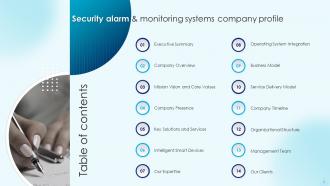
Slide 2: This slide presents Table of Content for the presentation.
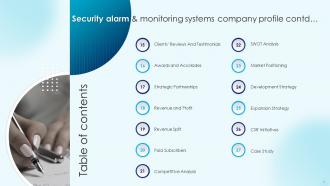
Slide 3: This is another slide continuing Table of Content for the presentation.
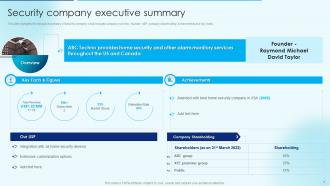
Slide 4: This slide displays Security company executive summary.
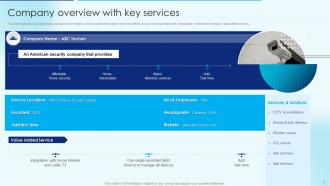
Slide 5: This slide represents Company overview with key services.
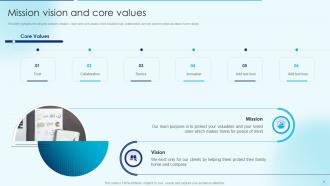
Slide 6: This slide showcases security company mission, vision and core values.
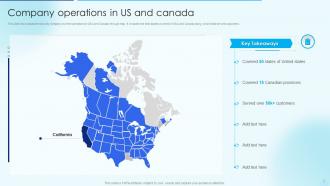
Slide 7: This slide shows Company operations in US and Canada.
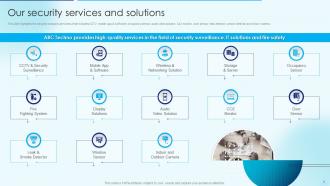
Slide 8: This slide presents security company services which includes CCTV, mobile app & software, etc.
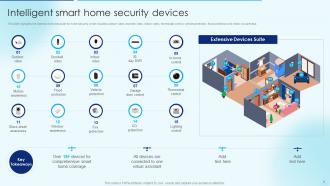
Slide 9: This slide displays Intelligent smart home security devices.
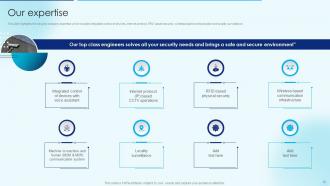
Slide 10: This slide represents security company expertise which includes integrated control of devices.
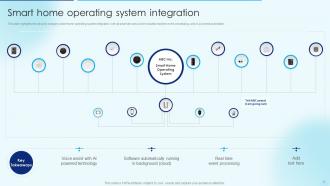
Slide 11: This slide showcases Smart home operating system integration.
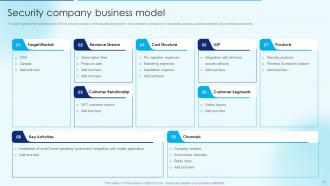
Slide 12: This slide shows Security company business model.
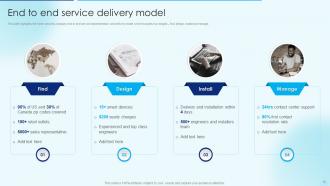
Slide 13: This slide highlights the home security company end to end service implementation.
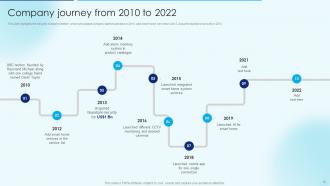
Slide 14: This slide presents security company timeline which showcases company started operation in 2010.
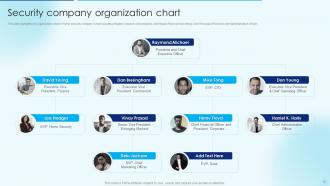
Slide 15: This slide displays Security company organization chart.
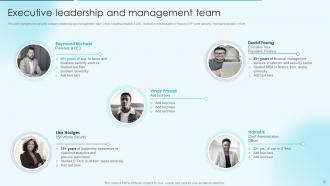
Slide 16: This slide represents Executive leadership and management team.
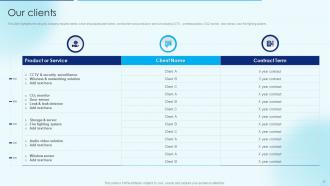
Slide 17: This slide showcases security company reputed clients.
Slide 18: This slide shows security company customer testimonials.
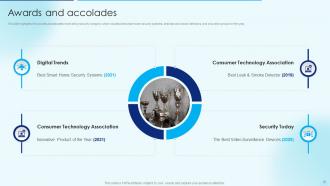
Slide 19: This slide presents awards and allocates received by security company.
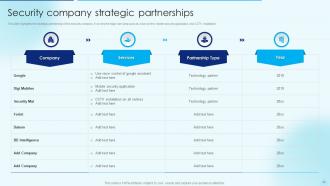
Slide 20: This slide displays Security company strategic partnerships.
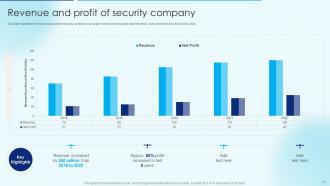
Slide 21: This slide represents Revenue and profit of security company.
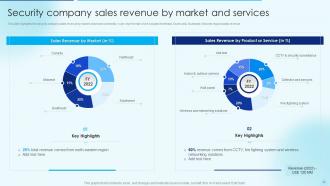
Slide 22: This slide showcases Security company sales revenue by market and services.
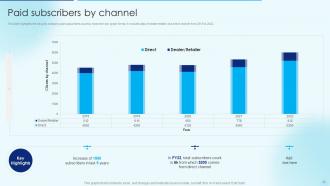
Slide 23: This slide shows security company paid subscribers count by channel in bar graph format.
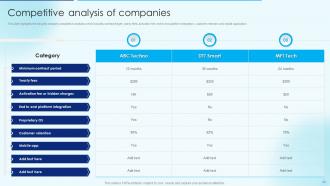
Slide 24: This slide presents security company competitive analysis.
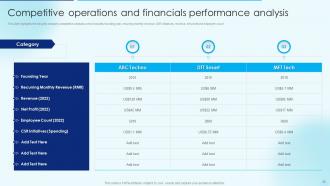
Slide 25: This slide displays Competitive operations and financials performance analysis.
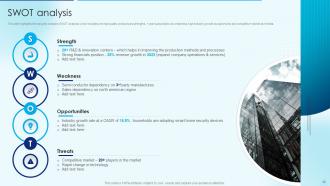
Slide 26: This slide represents security company SWOT analysis.
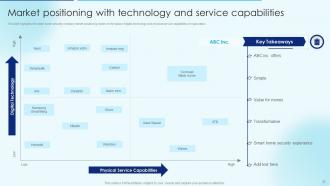
Slide 27: This slide showcases Market positioning with technology and service capabilities.
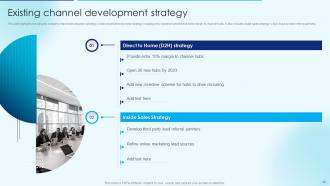
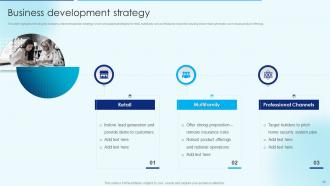
Slide 28: This slide shows Existing channel development strategy.
Slide 29: This slide presents security company channel expansion strategy.
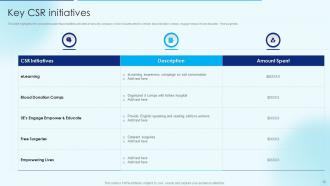
Slide 30: This slide displays corporate social responsibilities activities of security company.
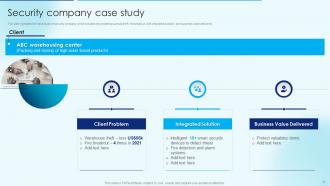
Slide 31: This slide represents case study of security company.
Slide 32: This slide showcases Icons for security alarm & monitoring systems company profile.
Slide 33: This slide is titled as Additional Slides for moving forward.
Slide 34: This is About Us slide to show company specifications etc.
Slide 35: This is Our Mission slide with related imagery and text.
Slide 36: This is Our Team slide with names and designation.
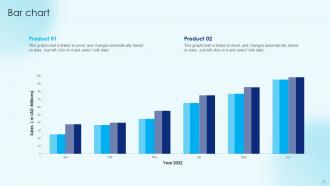
Slide 37: This slide presents Bar chart with two products comparison.
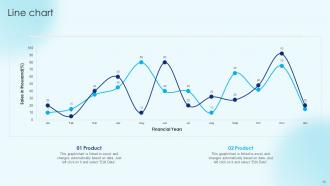
Slide 38: This slide describes Line chart with two products comparison.
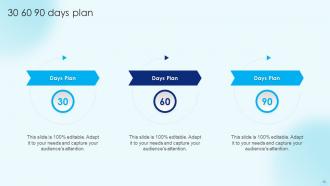
Slide 39: This slide provides 30 60 90 Days Plan with text boxes.
Slide 40: This slide shows Post It Notes. Post your important notes here.
Slide 41: This is Our Target slide. State your targets here.
Slide 42: This is a Thank You slide with address, contact numbers and email address.
Security Alarm And Monitoring Systems Company Profile Powerpoint Presentation Slides with all 47 slides:
Use our Security Alarm And Monitoring Systems Company Profile Powerpoint Presentation Slides to effectively help you save your valuable time. They are readymade to fit into any presentation structure.
-
Security Alarm And Monitoring Systems Company Profile Powerpoint Presentation Slides
-
Security Alarm And Monitoring Systems Company Profile Powerpoint Presentation Slides
-
Security Alarm And Monitoring Systems Company Profile Powerpoint Presentation Slides
-
Security Alarm And Monitoring Systems Company Profile Powerpoint Presentation Slides
-
Security Alarm And Monitoring Systems Company Profile Powerpoint Presentation Slides
-
Security Alarm And Monitoring Systems Company Profile Powerpoint Presentation Slides
-
Security Alarm And Monitoring Systems Company Profile Powerpoint Presentation Slides
-
Security Alarm And Monitoring Systems Company Profile Powerpoint Presentation Slides
-
Security Alarm And Monitoring Systems Company Profile Powerpoint Presentation Slides
-
Security Alarm And Monitoring Systems Company Profile Powerpoint Presentation Slides
-
Security Alarm And Monitoring Systems Company Profile Powerpoint Presentation Slides
-
Security Alarm And Monitoring Systems Company Profile Powerpoint Presentation Slides
-
Security Alarm And Monitoring Systems Company Profile Powerpoint Presentation Slides
-
Security Alarm And Monitoring Systems Company Profile Powerpoint Presentation Slides
-
Security Alarm And Monitoring Systems Company Profile Powerpoint Presentation Slides
-
Security Alarm And Monitoring Systems Company Profile Powerpoint Presentation Slides
-
Security Alarm And Monitoring Systems Company Profile Powerpoint Presentation Slides
-

Security Alarm And Monitoring Systems Company Profile Powerpoint Presentation Slides
-
Security Alarm And Monitoring Systems Company Profile Powerpoint Presentation Slides
-
Security Alarm And Monitoring Systems Company Profile Powerpoint Presentation Slides
-
Security Alarm And Monitoring Systems Company Profile Powerpoint Presentation Slides
-
Security Alarm And Monitoring Systems Company Profile Powerpoint Presentation Slides
-
Security Alarm And Monitoring Systems Company Profile Powerpoint Presentation Slides
-
Security Alarm And Monitoring Systems Company Profile Powerpoint Presentation Slides
-
Security Alarm And Monitoring Systems Company Profile Powerpoint Presentation Slides
-
Security Alarm And Monitoring Systems Company Profile Powerpoint Presentation Slides
-
Security Alarm And Monitoring Systems Company Profile Powerpoint Presentation Slides
-
Security Alarm And Monitoring Systems Company Profile Powerpoint Presentation Slides
-
Security Alarm And Monitoring Systems Company Profile Powerpoint Presentation Slides
-
Security Alarm And Monitoring Systems Company Profile Powerpoint Presentation Slides
-
Security Alarm And Monitoring Systems Company Profile Powerpoint Presentation Slides
-
Security Alarm And Monitoring Systems Company Profile Powerpoint Presentation Slides
-

Security Alarm And Monitoring Systems Company Profile Powerpoint Presentation Slides
-

Security Alarm And Monitoring Systems Company Profile Powerpoint Presentation Slides
-
Security Alarm And Monitoring Systems Company Profile Powerpoint Presentation Slides
-

Security Alarm And Monitoring Systems Company Profile Powerpoint Presentation Slides
-
Security Alarm And Monitoring Systems Company Profile Powerpoint Presentation Slides
-
Security Alarm And Monitoring Systems Company Profile Powerpoint Presentation Slides
-
Security Alarm And Monitoring Systems Company Profile Powerpoint Presentation Slides
-
Security Alarm And Monitoring Systems Company Profile Powerpoint Presentation Slides
-
Security Alarm And Monitoring Systems Company Profile Powerpoint Presentation Slides
-

Security Alarm And Monitoring Systems Company Profile Powerpoint Presentation Slides
-

Security Alarm And Monitoring Systems Company Profile Powerpoint Presentation Slides
-

Security Alarm And Monitoring Systems Company Profile Powerpoint Presentation Slides
-

Security Alarm And Monitoring Systems Company Profile Powerpoint Presentation Slides
-

Security Alarm And Monitoring Systems Company Profile Powerpoint Presentation Slides
-

Security Alarm And Monitoring Systems Company Profile Powerpoint Presentation Slides
FAQs for Security Alarm And Monitoring Systems Company Profile
You'll need door/window sensors and motion detectors as your main gear. Control panel ties everything together, plus keypads for arming it. Sirens or phone alerts are clutch - honestly, the mobile notifications saved me once when I wasn't even home. Backup power's a must too, learned that during a storm last year! If you can swing it, get monitoring service. I'd start by walking around and figuring out which doors/windows are most exposed. Motion detectors in main areas work great. Map it out first so you're not buying random stuff you don't actually need.
So motion sensors pick up heat signatures or microwave patterns - they basically spot when something warm moves around. They're awesome because they cover way more ground than those door sensors. Plus if someone gets in through like a window or something, you'll still catch them. I'd put them in hallways and main rooms where nobody should be walking when you're gone. Oh and don't stick them near heating vents - learned that one the hard way with false alarms going off constantly. They've gotten really good lately though, way more reliable than they used to be.
Wired ones are rock solid but installing them sucks - you're drilling holes and fishing cables through walls all day. Wireless is way simpler, just stick the sensors where you want them. Only downside is changing batteries every few years and maybe some interference if your neighbor has a million devices running. I went wireless when I did mine last year and honestly don't regret it. You can probably handle the install yourself too which saves like $500 in labor. Unless you're doing new construction, wireless is the move.
Dude, it's like upgrading from a basic car alarm to a Tesla. Your phone becomes mission control - you'll get alerts instantly and can arm/disarm from wherever. The AI stuff is actually legit, it knows your dog isn't a burglar so you won't get woken up at 3am for nothing. Motion sensors can trigger lights automatically, cameras record everything, smart locks do their thing when you arm the system. Honestly the automation part is what sold me on it. I'd grab a smart hub first that works with whatever sensors you already have - way cheaper than starting over.
Dude, you absolutely need monitoring. Without it, you're basically hoping some random neighbor notices your alarm going off and actually calls the cops - which almost never happens. Professional monitoring means someone's watching 24/7 and calls emergency services immediately when there's a real break-in. Plus they can tell if it's a false alarm before police show up, so you won't get hit with those annoying fines. The response time is way faster too. Honestly, I'd get basic monitoring before spending money on all the fancy door sensors and stuff. That's what actually makes your system useful instead of just... loud.
Most false alarms? User error, hands down. Wrong codes, forgetting to disarm - we've all been there. Wind can mess with motion sensors too, and pets are notorious for setting things off. Train everyone on the codes properly. Position sensors away from vents and heat sources (learned that one the hard way). Get pet-immune detectors if you have animals - seriously worth it. Oh, and set longer entry delays so you're not sprinting to the keypad every time you walk in. Regular maintenance catches wonky equipment before it screws you over. Equipment fails sometimes but honestly it's usually human error.
So basically, DIY means you're doing all the mounting, wiring, and setup yourself - which is way cheaper but can be a total headache if you're not good with tools. Professional install costs more but they handle everything and actually test it properly. I'd go DIY if you've got decent WiFi everywhere and don't mind spending a weekend figuring it out. Professional's probably worth it though if you want someone to show you how everything works. Oh, and make sure your internet doesn't suck in the back rooms - learned that one the hard way with my last place.
Start by walking around your place and figuring out what actually needs protection - entry points, sketchy windows, that sort of thing. Budget's probably your biggest factor since you can go anywhere from basic DIY stuff to the full monitoring deal. Honestly, I'd spring for the professional monitoring if you can swing it - getting alerts on your phone is cool but having someone actually call the cops hits different. Check what your insurance covers too, some companies give decent discounts. Do you want cameras or just the basic door sensors? Also depends if you're trying to connect it to other smart home stuff you've got going.
Oh yeah, it's super easy these days! Your security system basically talks to everything else through your main app. When I arm mine, it automatically locks doors and dims lights. Most stuff uses Z-Wave or WiFi to connect - works great once you get it set up. You can create scenes too, like "Away Mode" that arms everything AND adjusts your thermostat. Honestly feels like living in the future sometimes lol. Just make sure whatever alarm you buy actually supports integration first. Some of the cheaper ones don't play well with other devices.
So you'll need permits for installation - your installer usually handles that part though. False alarms are where they get you - most cities give you like 2-3 freebies then start charging $50-200 each time. Honestly such a money grab. You might have to register with local police too, depends where you live. Oh and if you've got an HOA, check their rules first because they can be way pickier than the city. I'd definitely look up your area's false alarm fees before you get the system. Last thing you want is getting hit with surprise charges because your cat keeps setting it off!
Start with figuring out where you're most exposed - that's your risk assessment right there. Motion sensors and cameras at entry points are obvious, but honestly I've seen so many setups that completely miss the back door or side windows. Get everything talking to one central system that pings your phone AND a monitoring service. Door contacts, environmental stuff for fires or floods - the whole deal. Oh, and test it monthly or it's useless. Your staff needs to know how to arm and disarm without setting off false alarms every week.
Honestly, the biggest thing is having someone actually watching your system 24/7. Like when you're dead asleep at 3am or stuck in some boring meeting - they'll call the cops immediately instead of just sending you a notification you might miss. Plus if your wifi craps out, they usually have backup ways to communicate. Self-monitoring is fine I guess, but let's be real, how many times do we all ignore our phones? Yeah, you'll pay monthly for it, but most people think it's worth not worrying. I'd shop around though - different companies have totally different response times and prices.
Oh yeah, environmental stuff totally screws with alarms. Your pets are the worst offenders - motion sensors go crazy when dogs roam around at night. I swear getting woken up at 3am because your cat's having zoomies is the absolute worst! Weather's a pain too. Heavy rain or snow can mess with sensors, and wind sometimes triggers door/window sensors if they're not set right. Extreme temps don't help either, especially with wireless systems. The upside? Most newer systems let you tweak sensitivity settings and set up pet zones to cut down on false alarms.
Dude, the AI stuff is seriously impressive now - it can actually tell the difference between your dog running around and someone breaking in. No more 3am false alarms, thank god. Everything connects to your phone too, so you can check cameras or unlock doors remotely. The facial recognition tech is getting weirdly good at identifying people. Smart home integration is everywhere now - your security system will automatically turn on lights and lock doors. I'd honestly spend the extra money on something with solid AI features and a decent app. The convenience factor alone makes it worth it, plus response times are way faster with cloud monitoring.
Test it monthly - just walk around triggering sensors to make sure alerts actually go through. Those backup batteries? Replace them every 3-4 years, or honestly whenever you hear that annoying chirping (always happens at 3am, I swear). Keep dust off your motion detectors and door contacts. Update your contact list when people change numbers - sounds obvious but everyone forgets. Professional checkup once a year is smart too. Better to catch problems early than find out your system's busted when someone's actually breaking in. Stay ahead of it instead of being reactive.
-
I never had to worry about creating a business presentation from scratch. SlideTeam offered me professional, ready-made, and editable presentations that would have taken ages to design.
-
The templates are the best in class. Very clear and innovative graphics! I am excited to explore and download more presentations.