


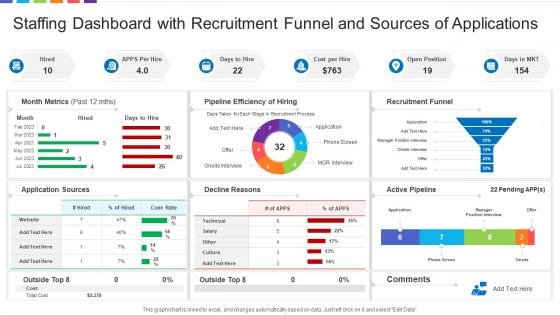
Staffing Dashboard Snapshot With Recruitment Funnel And Sources Of Applications




Try Before you Buy Download Free Sample Product
 Impress Your
 Audience
 100%
100% Editable
 Save Hours
 of Time


Our Staffing Dashboard Snapshot With Recruitment Funnel And Sources Of Applications are topically designed to provide an attractive backdrop to any subject. Use them to look like a presentation pro.
People who downloaded this PowerPoint presentation also viewed the following :
Staffing Dashboard Snapshot With Recruitment Funnel And Sources Of Applications with all 7 slides:
Use our Staffing Dashboard Snapshot With Recruitment Funnel And Sources Of Applications to effectively help you save your valuable time. They are readymade to fit into any presentation structure.





FAQs for Staffing Dashboard Snapshot With Recruitment Funnel And
Start with headcount by department, open positions, and time-to-fill - that's your bread and butter. Turnover rates matter too, plus cost-per-hire and employee utilization. Absenteeism can bite you if you're not watching it. Pipeline stuff like interview stages helps a ton. Honestly, hiring manager satisfaction scores are underrated - nobody talks about those enough. Keep everything visual with trend lines and set up alerts when numbers get wonky. Don't go crazy adding metrics right away though. See what your leadership actually looks at first, then build from there.
Honestly, real-time dashboards are such a lifesaver for this stuff. Instead of finding out about problems days later (ugh, the worst), you'll see everything as it happens - call spikes, people calling out sick, skill gaps, whatever. Makes those quick fixes actually possible, like grabbing someone from another team or getting backup in before things go sideways. Way better than the old spreadsheet nightmare we used to deal with. Just set up alerts for the important metrics so you're not glued to your screen all day watching charts.
Honestly, the data stuff is gonna be your biggest pain. HR systems never play nice with scheduling software or payroll - took us weeks just to get everything syncing properly. Managers hate feeling watched too, so you'll deal with pushback on that front. Oh, and don't get caught up in fancy metrics that look cool but don't actually help - been there. My take? Pick one department first. Get their data flowing right before you even think about expanding. Once they see it working and saving time, the rest will follow. Trust me on this one.
Honestly, those dashboards are lifesavers for planning ahead. You get this birds-eye view of who's leaving, when they're gone, and what's in your hiring pipeline. Like, imagine seeing three accounting people bail next quarter but you've only got one replacement lined up - yikes! I love how they show patterns too. Maybe you always need extra help during busy season or whatever. The cool part? You can mess around with different scenarios and figure out your hiring timeline. Oh, and definitely start planning 3-6 months out - learned that one the hard way.
So you can track diversity metrics throughout your whole hiring process - like who's applying, getting interviews, promotions, staying vs leaving. The visual data is honestly way better than just guessing how you're doing. You'll spot trends super quickly, like if certain departments are consistently less diverse or which managers actually retain diverse talent well. I'd set up automatic alerts when your diversity numbers drop below targets. That way you're not scrambling to fix things during your annual review (been there). It's wild how much clearer everything becomes when you see the actual patterns instead of relying on assumptions.
Honestly, automated reporting is a game changer - no more pulling data manually every single week. Your dashboard just generates those staffing reports automatically, sends alerts when you're short-handed, and can even predict what you'll need based on patterns. I literally don't know how I functioned before setting this up. Instead of working with outdated numbers, you're always looking at fresh data. Your managers get their updates without you having to think about it. Takes like an hour to set up initially but then you're golden.
Your staffing dashboard is only as good as the data feeding it, honestly. All your HR systems, payroll, scheduling tools - they need to sync up and share clean, real-time info. Otherwise you're stuck doing manual updates all day (trust me, it's awful). Good integration gives you accurate headcount, turnover rates, capacity planning in one spot. I'd start by figuring out which systems have your most critical data. Then connect the ones that update frequently first - those are usually your biggest headaches anyway.
Honestly, it's way more flexible than most people think. Each department can set up their own metrics and filters - like sales wants headcount vs quota numbers, but HR cares more about turnover and how long it takes to fill positions. Most platforms have role permissions too, so managers aren't drowning in irrelevant data from other teams. Time frames are adjustable as well. Some departments need daily updates while others just check monthly trends. My advice? Ask each team what their biggest 3-5 staffing headaches are first, then build dashboards around those. Way easier than guessing what they'll actually use.
Dude, mobile dashboards are a game changer. You're not stuck at your desk anymore checking staffing numbers - just whip out your phone while you're walking around or whatever. Real-time data means you can actually fix problems fast instead of finding out about them hours later. Your team stays in the loop better too. Honestly, it just kills that anxiety of not knowing what's going on when you're away from your computer. Just make sure the mobile version doesn't suck - I've seen some that are basically unusable on phones and nobody bothers with them.
Honestly? Update it daily at minimum, but real-time is way better if you can swing it. People call out sick constantly and shifts get swapped last minute - I can't tell you how many times I've seen managers using yesterday's numbers that were already wrong by lunchtime. Most places do hourly updates, which works pretty well. During busy periods though, maybe bump it to every 2-4 hours. Oh and definitely set up auto-refresh so you're not sitting there hitting F5 all day like some kind of maniac.
Honestly, Tableau and Power BI are your best bets if you want something that actually looks professional. Excel works fine for basic stuff too - don't let anyone shame you for that lol. Grafana's great for real-time data if that's what you need. Google's Looker Studio is free and way better than it used to be. Monday.com has dashboard features but they're kinda meh unless you're already using it for everything else. My advice? Pick whatever plays nice with your current HRIS. Trust me, you'll thank yourself later when you're not wrestling with data imports every week.
Honestly, just ask the people actually using your dashboard what they think. Managers and staff will tell you exactly what's broken or missing - like maybe they desperately need real-time alerts when shifts aren't covered, or they're constantly trying to filter by skills instead of just basic headcount. Set up quick check-ins or send out surveys. Sometimes I even watch people navigate it because you'll spot confusing stuff they won't mention. Then focus on fixing whatever comes up most often. No point building features nobody wants, right? Regular feedback loops are what separate useful dashboards from the ones that just collect digital dust.
Honestly, start simple with the stuff that actually matters - headcount vs budget, turnover, time-to-fill. Put your most critical numbers at the top where people will see them first. Don't try cramming everything onto one screen (learned that the hard way). Color coding is your friend: red means fix this now, green's good, yellow needs watching. Daily or weekly refreshes work best depending on how fast your company moves. I'd stick with maybe 3-5 key metrics initially. You can always add more once people get hooked on using it regularly.
Honestly, staffing dashboards are game-changers for this exact problem. Everyone sees the same real-time info - open roles, where candidates are in the pipeline, hiring progress, all that stuff. No more endless "what's the update?" emails (seriously, those kill me). Your hiring managers can check time-to-fill numbers and spot bottlenecks themselves. Makes conversations way more productive since you're all working off the same data. I'd do weekly reviews with your main hiring managers - keeps everyone on the same page and cuts down the confusion. Worth setting up for sure.
So you'll want to learn the basics first - reading staffing levels, those color-coded alerts, and how to pull reports. Navigation's pretty straightforward, way better than whatever ancient system you're probably using now. Focus on your specific metrics like staff ratios and skill requirements, plus how to tweak schedules when things get crazy. Oh and definitely figure out the escalation stuff for when you're critically short. The mobile app is clutch since you'll be checking it constantly. I'd do a 2-hour hands-on session first, then circle back after you've actually used it for a week or so.
-
Easily Understandable slides.
-
Great quality slides in rapid time.