


Diapositivas de presentación de PowerPoint de ingeniería de sistemas





Try Before you Buy Download Free Sample Product
 Impress Your
 Audience
 100%
100% Editable
 Save Hours
 of Time


Describa la necesidad y la relevancia de la ingeniería de sistemas para que la empresa administre varias funciones y procesos comerciales con nuestras diapositivas de presentación de PowerPoint de ingeniería de sistemas. ¿Explica los conceptos de ingeniería de sistemas? Cuales son sus necesidades? Sus características y beneficios para la empresa. Así, el concepto surge debido a un aumento en la demanda de los clientes comerciales. La ingeniería del sistema ofrece a la asociación una ventaja competitiva razonable con el uso correcto de los estándares y prácticas del sistema que ayudarán a reconocer las ventajas significativas para la empresa. Describa sus ventajas con este diseño PPT, ya que ayuda a administrar el riesgo comercial, mejora las decisiones comerciales, ayuda a la empresa a administrar cualquier cambio comercial de manera efectiva, desarrollos comerciales generales y mucho más. Por lo tanto, esta presentación de ingeniería de sistemas también ayuda a la empresa a mantener la precisión de los proyectos de su empresa. Por lo tanto, comience a inicializar esta diapositiva de presentación para crear documentos de presentación atractivos para los clientes comerciales. Cada ángulo recibe una consideración completa con nuestras diapositivas de presentación de Powerpoint de ingeniería de sistemas. Aseguran debates fructíferos.
People who downloaded this PowerPoint presentation also viewed the following :
Contenido de esta presentación de Powerpoint
Diapositiva 1 : esta diapositiva presenta la ingeniería de sistemas. Indique el nombre de su empresa y comience.
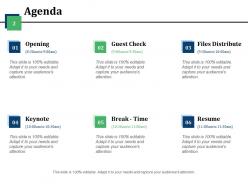
Diapositiva 2 : Esta es una diapositiva de la agenda que muestra varios eventos con sus respectivos horarios- (8:30 am a 9:00 am) - Apertura, (9:00 am a 9:30 am) - Cheque de invitados, (9:30 am a 10:00 am) - Distribución de archivos, (10:00 am a 10:30 am) - Keynote, (10:30 am a 11:00 am) - Receso - Hora, (11:00 am a 11:30 am) - Reanudar.
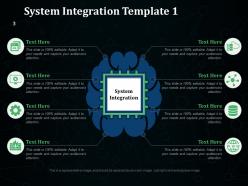
Diapositiva 3 : Esta es la primera diapositiva que muestra la Plantilla de integración del sistema con imágenes de mapas mentales y cuadros de texto. Aquí menciona aspectos, factores, etc. de la integración del sistema y utilícelo en consecuencia.
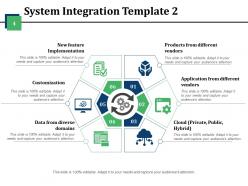
Diapositiva 4 : Esta es la segunda diapositiva que muestra la plantilla de integración del sistema con: productos de diferentes proveedores, aplicaciones de diferentes proveedores, nube (privada, pública, híbrida), datos de diversos dominios, personalización, implementación de nuevas funciones.
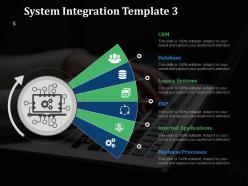
Diapositiva 5 : Esta es la tercera diapositiva que muestra la Plantilla de integración de sistemas con los siguientes puntos: CRM, Base de datos, Sistemas heredados, ERP, Aplicaciones internas, Procesos comerciales.
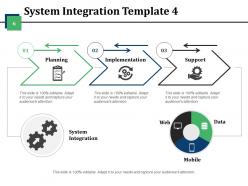
Diapositiva 6 : Esta es la cuarta diapositiva que muestra la plantilla de integración del sistema con estos tres pasos básicos: planificación, implementación y soporte. También muestra: Web, datos y dispositivos móviles.
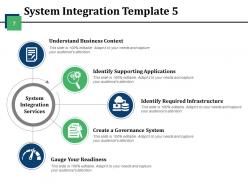
Diapositiva 7 : Esta es la quinta diapositiva que muestra la Plantilla de integración de sistemas que consta de los Servicios de integración de sistemas. Estos servicios incluyen: comprender el contexto comercial, identificar las aplicaciones de soporte, identificar la infraestructura requerida, crear un sistema de gobierno, evaluar su preparación.
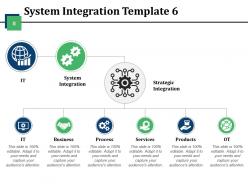
Diapositiva 8 : Esta es la sexta diapositiva que muestra la Plantilla de integración de sistemas con los siguientes componentes: Integración de sistemas, Integración estratégica, TI, Negocios, Procesos, Servicios, Productos, OT.
Diapositiva 9 : Esta es la séptima diapositiva que muestra la Plantilla de integración del sistema con cuadros de texto e imágenes de iconos.
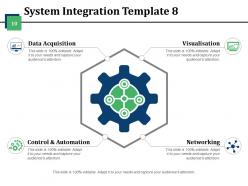
Diapositiva 10 : Esta es la octava diapositiva que muestra la Plantilla de integración de sistemas con los siguientes pasos: Adquisición de datos, Control y automatización, Redes, Visualización.
Diapositiva 11 : Esta es la diapositiva de iconos de ingeniería del sistema con varios iconos. Puede modificar / editar los iconos según sus necesidades.
Diapositiva 12 : esta diapositiva se titula Diapositivas adicionales para avanzar. Puede cambiar el contenido de la diapositiva según sus necesidades.
Diapositiva 13 : Esto es ACERCA DE LA EMPRESA, diapositiva para indicar información y especificaciones de su empresa.
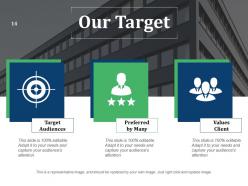
Diapositiva 14 : Esta es la diapositiva de Nuestro objetivo con los públicos objetivo, Preferido por muchos y Clientes de valores como ejemplos. Puede indicar sus objetivos aquí.
Diapositiva 15 : Esta diapositiva ayuda a representar a Nuestro equipo con cuadros de texto.
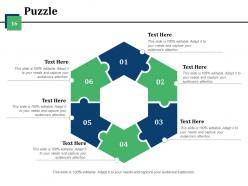
Diapositiva 16 : Esta es una diapositiva con imágenes de piezas de rompecabezas para mostrar información, especificaciones, etc.
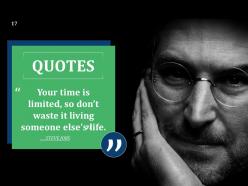
Diapositiva 17 : Esta es una diapositiva de Cotizaciones. Pon una cita o cualquier cosa que quieras resaltar aquí.
Diapositiva 18 : Esta es una diapositiva de imagen del diagrama de Venn para mostrar información, especificaciones, etc.
Diapositiva 19 : Esta es una diapositiva Post It para marcar eventos, información importante, etc.
Diapositiva 20 : esta es una diapositiva de LEGO con cuadros de texto para mostrar información.
Diapositiva 21 : Esta diapositiva muestra tablas y gráficos para avanzar. Modifique el contenido según sea necesario.
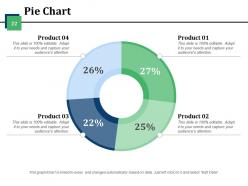
Diapositiva 22 : Esta es una diapositiva de gráfico circular para mostrar la comparación de productos, etc.
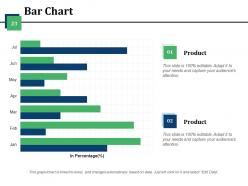
Diapositiva 23 : Esta es una diapositiva de gráfico de barras para presentar la comparación de productos / entidades, especificaciones, etc.
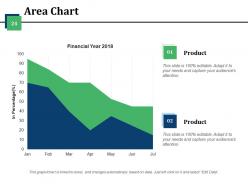
Diapositiva 24 : Esta es una diapositiva de Gráfico de áreas para presentar la comparación de productos / entidades, información, etc.
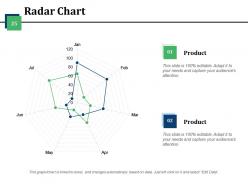
Diapositiva 25 : Esta diapositiva presenta un gráfico de radar para mostrar el crecimiento de producto / entidad, comparación, etc.
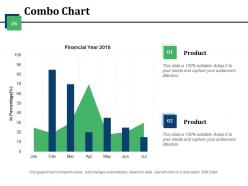
Diapositiva 26 : Esta diapositiva presenta un gráfico combinado para mostrar el crecimiento del producto / entidad, la comparación, etc.
Diapositiva 27 : Esta es una diapositiva de agradecimiento con dirección de correo electrónico: números de contacto, número de dirección, número de calle, ciudad, estado.
Diapositivas de presentación de PowerPoint de Ingeniería de Sistemas con las 27 diapositivas:
Nuestras diapositivas de presentación de Powerpoint de ingeniería de sistemas tienen patrones de diseño atractivos. Sus ideas también se volverán atractivas.



FAQs for Systems engineering
So there's basically six phases you'll go through: concept development, system design, implementation, integration & testing, deployment, then operations & maintenance. It's kinda like building a house - start with the idea, make blueprints, build the thing, test that everything actually works together, move in, and then spend forever fixing stuff that breaks. Honestly, the testing phase always takes longer than you think it will. Each phase has deliverables and reviews with stakeholders. But here's the thing - these phases overlap constantly and you'll end up cycling back through them when requirements change or problems come up.
Think of systems engineering and project management like a good partnership. SE handles the technical stuff - what you're building and how it should work. PM takes care of timing, budgets, and keeping everyone happy. Honestly, the verification and validation steps from SE line up pretty well with your project milestones anyway. Your systems engineer figures out the "what" and "how," while you're dealing with "when" and "who's gonna do it." Map out those SE deliverables against your timeline early though - trust me on this one, it prevents chaos later.
Honestly, requirements analysis is make-or-break for any project. Without solid requirements, you're basically shooting in the dark and hoping something works out. Listen to your stakeholders first - really listen, don't just nod along. Document everything clearly because vague requirements will absolutely come back to haunt you later (learned that one the hard way). It's like building a house without knowing if they want a studio or a mansion. Good requirements give everyone the same playbook and help you spot problems before they become expensive disasters. Short version: figure out what you're actually building before you start building it.
Look, MBSE gives you one place where everything lives - no more digging through email threads when requirements change. You build these digital models that link requirements, architecture, and testing together. When something shifts upstream, you'll see exactly what breaks downstream right away. Way better than juggling hundreds of docs that never match up. Plus your stakeholders can actually see what you're building instead of just imagining it, which honestly saves so many headaches later. The "wait, this isn't what I wanted" conversations drop dramatically. Try it on just one subsystem first though - easier to show the wins that way.
Ugh, scope creep is the absolute worst - everyone suddenly needs "just one tiny thing" added when you're already halfway done. Getting stakeholders aligned? Good luck with that mess. Integration stuff will make you want to pull your hair out too since nothing ever connects as smoothly as it should. Requirements change constantly, deadlines get tighter, and you're juggling like fifty different priorities. Honestly, document literally everything (I mean everything) and talk to your team way more than feels necessary. Trust me on the over-communication thing, especially when you're trying to get systems to play nice together.
Think of it like this - verification is checking "did we build what we said we'd build?" You're basically comparing your finished system against the original specs and requirements. Validation's different though. That's asking "does this thing actually solve the problem people have?" Way trickier to nail down. Here's the kicker - you can have a perfectly verified system that's completely useless in the real world. Seen it happen way too many times, honestly. Your code matches the requirements perfectly, but turns out the requirements were garbage. Do both throughout the project, not just at the end when it's too late to fix anything major.
Start with DOORS or Jama Connect for requirements - they're your go-to for tracking what the system actually needs to do. Enterprise Architect or Cameo are decent for modeling, but wow, the learning curve hits hard initially. Basic project management stuff like Jira or Monday.com helps with tasks and dependencies. Git's surprisingly useful even for non-code stuff - version control everything. My buddy learned this the hard way after losing weeks of work. Pick one requirements tool and one modeling platform first. You can always add more tools later when things get messier.
Yeah totally! Systems engineering works great outside tech stuff. So like in healthcare, you'd map out how patients move through the system and find where things get stuck. Wedding planning is honestly just systems engineering with flowers - you're coordinating vendors, timelines, all that chaos. Break big messy problems into smaller pieces first. Then figure out how everything connects to everything else. Project management, org changes, whatever - same deal. I'd start by just writing down what you're doing now and see where the relationships are. Makes the whole thing way less overwhelming.
Dude, you absolutely have to talk to your stakeholders first - like, before you build anything. Map out who actually cares about this project and what they need. I've watched so many teams skip this step and it's honestly brutal. They'll spend months building something that works perfectly but solves the wrong problem entirely. Schedule regular check-ins with these people throughout the whole thing. Trust me, flying blind never works out. You'll save yourself tons of headache later if you just figure out what everyone wants upfront. Short story: involve them early and keep them looped in.
Honestly, systems engineering is a game-changer because you do all the hard thinking upfront. Map out your architecture and interfaces before you start building anything - trust me on this one. You'll catch those nasty integration problems early when they don't cost an arm and a leg to fix. Plus your whole team stays on the same page about what you're actually making, so no weird scope surprises pop up later. The requirements-to-testing flow becomes way cleaner too. Yeah, it feels like extra work at first, but finding issues late is brutal and expensive.
Honestly, stick with the basics first - schedule adherence, budget performance, and requirements traceability. Those three will show you if things are actually working. Defect rates matter once you're live, obviously. But here's what I think is underrated: change request frequency. If you're drowning in change requests, your initial requirements gathering probably sucked. Focus on leading indicators like milestone completion rather than just looking backward. Performance specs are crucial too, but don't overcomplicate it early on. Add other metrics based on what your stakeholders actually care about.
So risk management runs through every single phase of systems engineering - you're constantly finding, checking, and dealing with risks from day one through operations. When you're defining requirements, that's where you catch the big technical and programmatic risks early. Design and development is all about watching how those risks change and actually doing something about them. Honestly, it feels like drinking from a fire hose at first but then becomes routine. The trick is getting your risk processes locked down early and - this is crucial - updating that risk register at every milestone review religiously. Just start with a basic risk matrix and bring it to team meetings. Trust me on this one.
Dude, systems engineering is actually perfect for sustainability stuff. Instead of fixing one piece at a time, you're looking at the whole picture - that's where you catch all the waste and inefficiencies hiding between departments. I always tell people to bake environmental metrics right into their requirements upfront. Way easier than trying to retrofit green initiatives later (trust me on that one). The lifecycle thinking really pays off too. Next project you work on, just map out where your system touches the environment during requirements. You'll probably spot issues you never noticed before.
Honestly, data analytics is pretty clutch for this stuff. Start by collecting metrics from your systems - performance logs, how users actually behave, failure rates, all that good data. Then throw it into some visualization tools to spot patterns and bottlenecks you didn't even know existed. The cool part? You can actually predict when things might break before they do. Plus it helps you make design decisions based on real evidence instead of just winging it (which, let's be real, we've all done). I'd say pick one component you're curious about first and track a few key metrics there. Don't go overboard initially.
So digital twins are huge right now, plus AI/ML for predictive stuff. MBSE is basically becoming the norm - took me forever to wrap my head around it but it's everywhere now. Agile and DevOps completely changed how we do development cycles too. Everything's connected these days so you've gotta think cloud-native and bake security in from the start. Oh, and if you don't know Cameo or Rhapsody yet, definitely check those out. Maybe grab a course on systems thinking with AI integration? That combo's pretty hot in the job market right now.
-
Much better than the original! Thanks for the quick turnaround.
-
Use of different colors is good. It's simple and attractive.