


Data Science Implementation Powerpoint Presentation Slides





Try Before you Buy Download Free Sample Product
 Impress Your
 Audience
 100%
100% Editable
 Save Hours
 of Time


Data science is an area of study that combines domain experience, computer abilities, and mathematical and statistical understanding to extract valuable insights from data. Grab our insightfully designed Data Scientist template that will be of great assistance for companies to present an overview of their current scenario and assess the need for data science adoption. Further, this data science module showcases the gap analysis of the company and the introduction of data science. In addition, it contains information on the requirements of the data science adoption, life cycle and phases of data science, and critical components of the data science. Furthermore, this data mining template includes the data science tools such as SAS, Apache Spark, Excel, Tableau, NLP, and TensorFlow, along with this role of data science in decision making. Moreover, this module highlights the difference between data science and other tools, data science workflow, job roles in data science, and top data science applications such as healthcare, logistic, finance, airlines, and business. Lastly, our template comprises a checklist, a timeline, a roadmap, a 30-60-90-day plan, a dashboard, and impacts of the data science integration on the organization. Get access to the data science ppt templates now.
People who downloaded this PowerPoint presentation also viewed the following :
Content of this Powerpoint Presentation
Slide 1: This slide introduces Data Science Implementation. State your company name and begin.
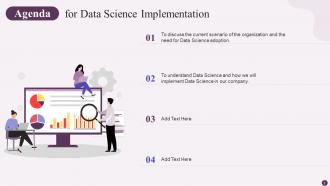
Slide 2: This slide states Agenda of the presentation.
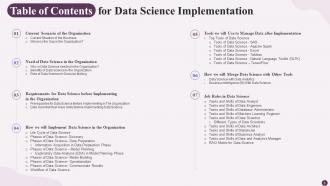
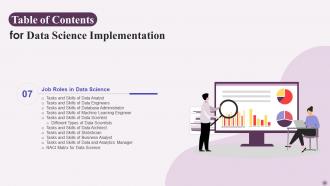
Slide 3: This slide shows Table of Content for the presentation.
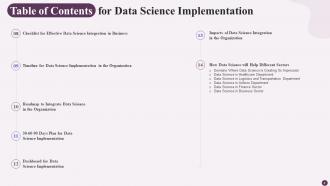
Slide 4: This is another slide continuing Table of Content for the presentation.
Slide 5: This slide highlights title for topics that are to be covered next in the template.
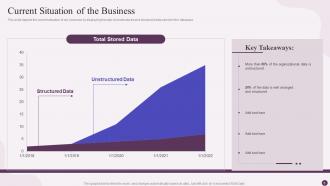
Slide 6: This slide presents current situation of our business by displaying the ratio of unstructured and structured data stored in the database.
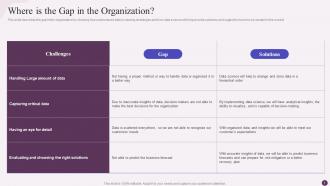
Slide 7: This slide shows how unstructured data is causing challenges and how data science will help provide solutions.
Slide 8: This slide highlights title for topics that are to be covered next in the template.
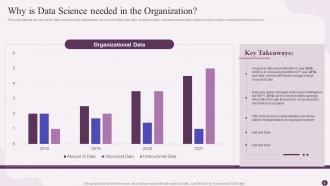
Slide 9: This slide represents the need of the data science in the organization.
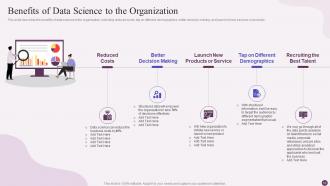
Slide 10: This slide shows Benefits of Data Science to the Organization.
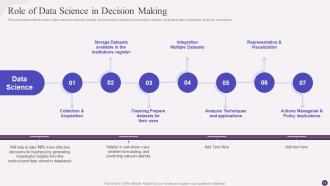
Slide 11: This slide presents the role of data science in decision making, and it includes collection & acquisition, storage, cleaning of data, etc.
Slide 12: This slide highlights title for topics that are to be covered next in the template.
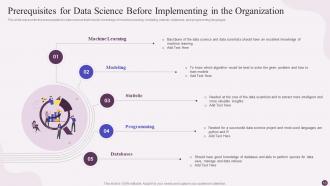
Slide 13: This slide displays the prerequisites for data science that include knowledge of machine learning, modeling, statistic, database, and programming languages.
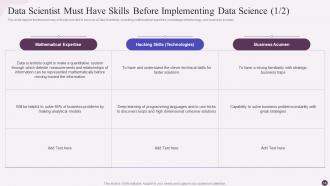
Slide 14: This slide represents Data Scientist Must Have Skills Before Implementing Data Science.
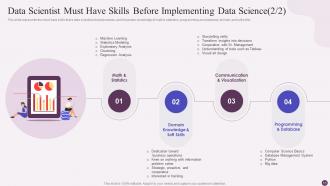
Slide 15: This is another slide showing Data Scientist must have Skills before Implementing Data Science.
Slide 16: This slide highlights title for topics that are to be covered next in the template.
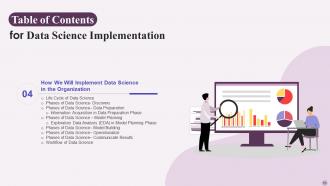
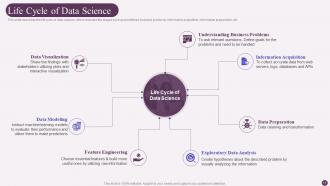
Slide 17: This slide describes the life cycle of data science, which includes the stages such as predefined business problems, information acquisition, etc.
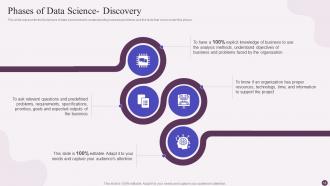
Slide 18: This slide displays the first phase of data science that is understanding business problems and the facts that come under this phase.
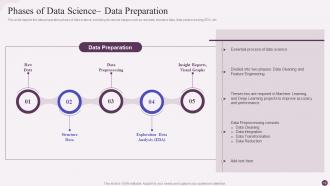
Slide 19: This slide represents the data preparation phase of data science, including its various stages such as raw data, structure data, data preprocessing, EDA, etc.
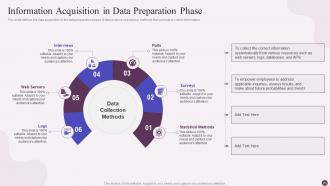
Slide 20: This slide shows Information Acquisition in Data Preparation Phase.
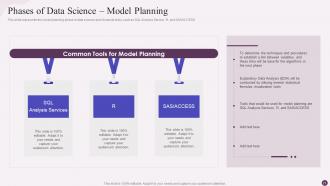
Slide 21: This slide presents model planning phase in data science and shows its tools, such as SQL Analysis Service, R, and SAS/ACCESS.
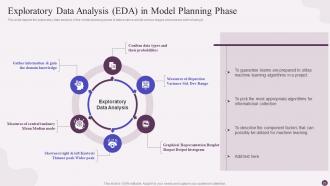
Slide 22: This slide shows exploratory data analysis in the model planning phase of data science and its various stages and reasons.
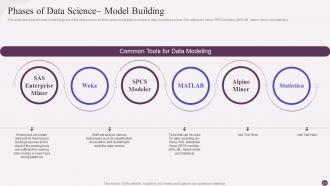
Slide 23: This slide displays various tools that could help in data modeling such as SAS enterprise miner, SPCS modeler, MATLAB, etc.
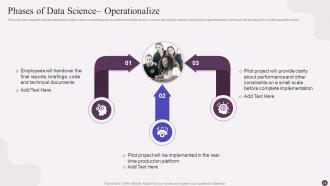
Slide 24: This slide represents operational phase of data science and what tasks are performed in this phase.
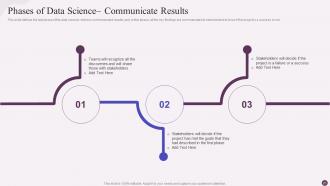
Slide 25: This slide shows last phase of the data science and in this phase, all the key findings are communicated to stakeholders.
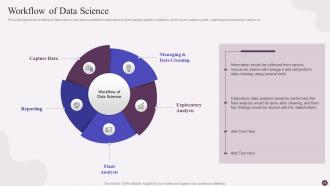
Slide 26: This slide presents how data scientists throughout the project manage data till completion.
Slide 27: This slide highlights title for topics that are to be covered next in the template.
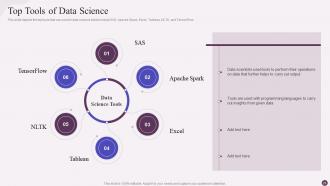
Slide 28: This slide displays top tools that are used in data science which include SAS, Apache Spark, Excel, etc.
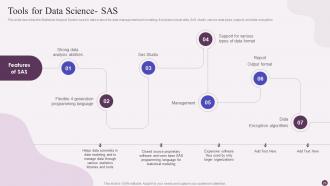
Slide 29: This slide represents Statistical Analysis System used in data science for data management and modeling.
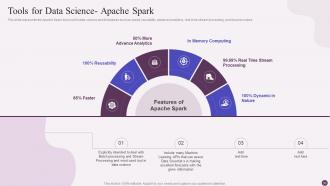
Slide 30: This slide shows Apache Spark tool used in data science and its features such as speed, reusability, advanced analytics, etc.
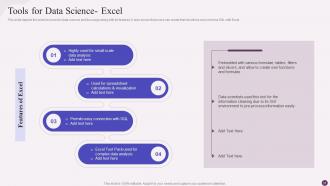
Slide 31: This slide presents excel tool used in data science and its usage along with its features.
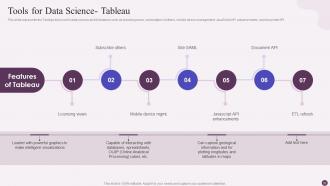
Slide 32: This slide shows tool used in data science and its features such as licensing views, subscription of others, etc.
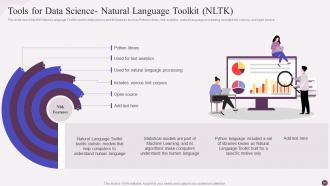
Slide 33: This slide displays Tools for Data Science- Natural Language Toolkit (NLTK).
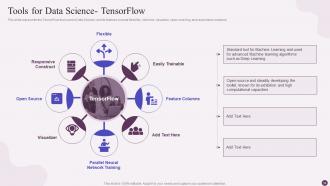
Slide 34: This slide represents TensorFlow tool used in Data Science, and its features include flexibility, columns, visualizer, etc.
Slide 35: This slide highlights title for topics that are to be covered next in the template.
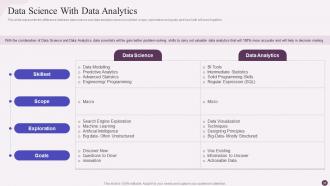
Slide 36: This slide presents difference between data science and data analytics based on skillset, scope, exploration and goals.
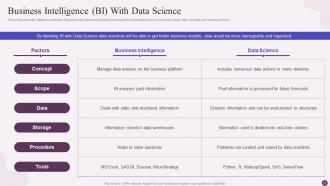
Slide 37: This slide shows difference between Business Intelligence and Data Science based on the factors such as concept, scope, data, etc.
Slide 38: This slide highlights title for topics that are to be covered next in the template.
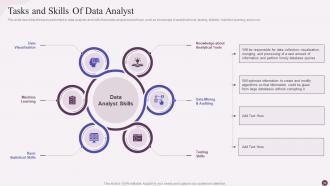
Slide 39: This slide represents tasks performed by the business analyst and how he will be helpful to improve business operations.
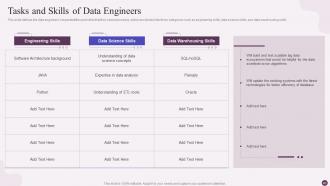
Slide 40: This slide shows data engineers’ responsibilities and skills that they should possess.
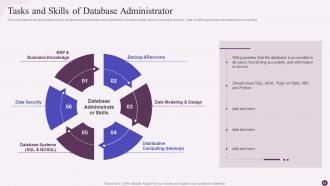
Slide 41: This slide presents tasks performed by a Database Administrator and skills that he should possess.
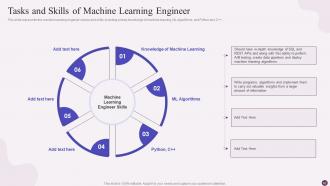
Slide 42: This slide shows machine learning engineer’s tasks and skills, including a deep knowledge of machine learning, ML algorithms, and Python and C++.
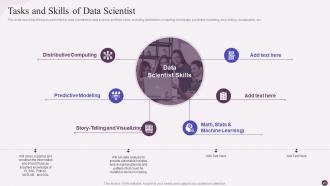
Slide 43: This slide displays the tasks performed by data scientists in data science and their skills.
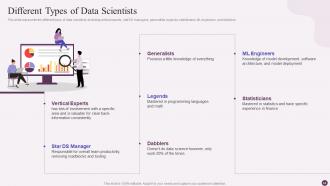
Slide 44: This slide represents the different types of data scientists, including vertical experts, stat DS managers, generalists, etc.
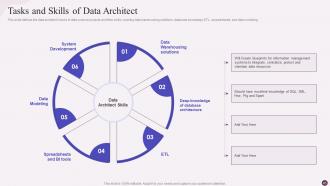
Slide 45: This slide shows data architect’s tasks in data science projects and their skills.
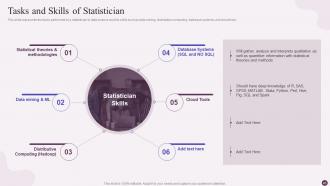
Slide 46: This slide presents tasks performed by a statistician in data science and his skills such as data mining, distributive computing, etc.
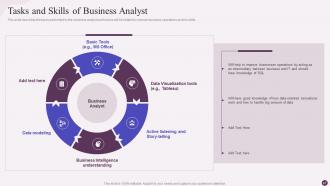
Slide 47: This slide shows tasks performed by the business analyst and how he will be helpful to improve business operations.
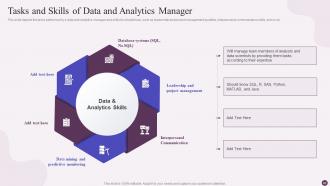
Slide 48: This slide displays tasks performed by a data and analytics manager and skills he should have.
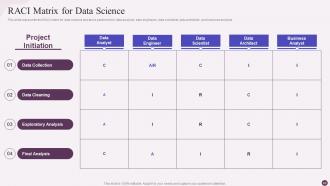
Slide 49: This slide represents RACI matrix for data science and tasks performed by data analysts, data engineers, data scientists, etc.
Slide 50: This slide shows Table of Content highlighting Checklist for Effective Data Science Integration in Business.
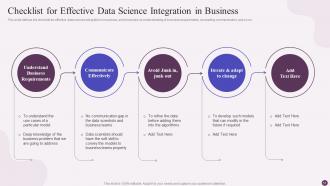
Slide 51: This slide presents Checklist for Effective Data Science Integration in Business.
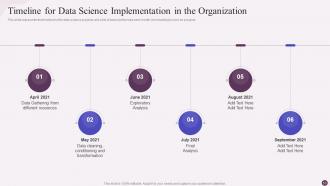
Slide 52: This slide shows Table of Content highlighting Timeline for Data Science Implementation in the Organization.
Slide 53: This slide displays Table of Content highlighting Timeline for Data Science Implementation in the Organization.
Slide 54: This slide represents Table of Content highlighting Roadmap to Integrate Data Science in the Organization.
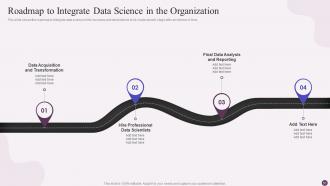
Slide 55: This slide shows Roadmap to Integrate Data Science in the Organization.
Slide 56: This slide presents Table of Content highlighting 30-60-90 Days Plan for Data Science Implementation.
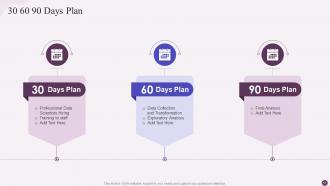
Slide 57: This slide shows 30-60-90 Days Plan for Data Science Implementation.
Slide 58: This slide displays Dashboard for Data Science Implementation.
Slide 59: This slide represents dashboard for data integration in the business, and it is showing real-time details about expenses, profits, margins percentage, etc.
Slide 60: This slide shows Table of Content highlighting Impacts of Data Science Integration in the Organization.
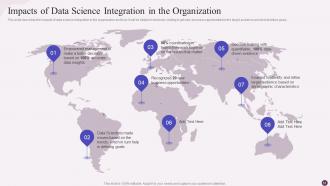
Slide 61: This slide presents Impacts of Data Science Integration in the Organization.
Slide 62: This slide highlights title for topics that are to be covered next in the template.
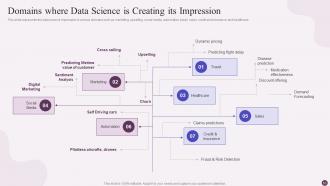
Slide 63: This slide displays Domains where Data Science is Creating its Impression.
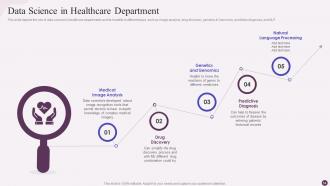
Slide 64: This slide represents data science in healthcare departments and its benefits in different ways.
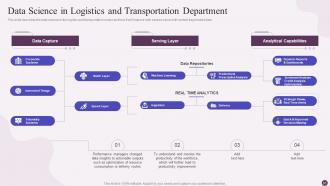
Slide 65: This slide shows Data Science in Logistics and Transportation Department.
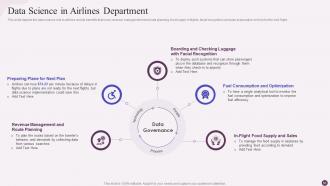
Slide 66: This slide presents data science role in airlines and its benefits that cover revenue management and route planning.
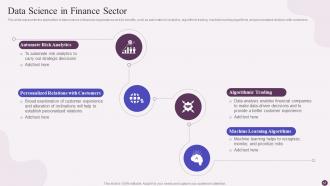
Slide 67: This slide shows application of data science in financial organizations and its benefits.
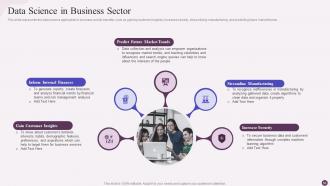
Slide 68: This slide displays the data science application in business and its benefits.
Slide 69: This slide highlights title for topics that are to be covered next in the template.
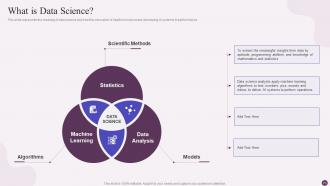
Slide 70: This slide shows the meaning of data science and how this innovation is helpful in businesses developing AI systems.
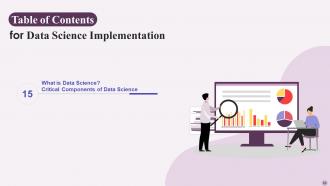
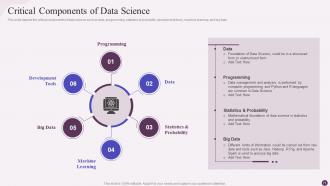
Slide 71: This slide presents critical components of data science such as data, programming, statistics & probability, etc.
Slide 72: This slide contains all the icons used in this presentation.
Slide 73: This slide is titled as Additional Slides for moving forward.
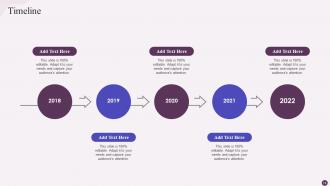
Slide 74: This is a Timeline slide. Show data related to time intervals here.
Slide 75: This slide shows Post It Notes. Post your important notes here.
Slide 76: This is Our Target slide. State your targets here.
Slide 77: This slide contains Puzzle with related icons and text.
Slide 78: This is an Idea Generation slide to state a new idea or highlight information, specifications etc.
Slide 79: This slide showcases Magnifying Glass to highlight information, specifications etc
Slide 80: This is an Idea Generation slide to state a new idea or highlight information, specifications etc.
Slide 81: This slide depicts Venn diagram with text boxes.
Slide 82: This is a Thank You slide with address, contact numbers and email address.
Data Science Implementation Powerpoint Presentation Slides with all 87 slides:
Use our Data Science Implementation Powerpoint Presentation Slides to effectively help you save your valuable time. They are readymade to fit into any presentation structure.








FAQs for Data Science Implementation
Start by nailing down exactly what problem you're trying to solve - seriously, this part will save your sanity later. Then dig into your data to see what you've actually got to work with. Data cleaning comes next and ugh, it's gonna eat up way more time than you think. Build your models after that, test them against real-world stuff, then get everything deployed. Oh and here's what everyone forgets - you need to keep checking how it's performing once it's live. Trust me on the problem definition thing though. I've seen too many projects completely restart because someone decided they wanted something totally different halfway through.
Hunt for spots where you're drowning in data but people are still doing everything manually - that's gold. Go chat with different teams about what's driving them crazy daily. Then figure out what data you can actually get your hands on. Honestly, I've watched way too many companies chase some sexy AI project when they should've just automated the boring stuff first. Target anything where even a small 20% boost saves real money or hours. Those quick wins? They're your ticket to getting budget for the cool stuff later. Don't overthink it.
Dude, data cleaning will literally make or break your whole project. Seriously, I've watched teams waste weeks on complex algorithms while their messy data made everything pointless. Your models are only as good as what you feed them - garbage in, garbage out, you know? Most people don't realize you'll spend like 60-80% of your time just cleaning and prepping data. It's honestly kind of annoying but totally necessary. Check your data sources early and set up some validation rules. Otherwise you'll be debugging forever and wanting to throw your laptop out the window.
Okay so first thing - profile your raw data upfront to see what you're actually dealing with. Missing stuff, weird outliers, formats that don't match. Build automated checks right into each pipeline step for completeness and accuracy against your business rules. Trust me, this saves SO much headache later when things break at 2am. Track data lineage too so you know where everything came from. The trick is baking validation into your normal workflow instead of treating it like some separate thing. Because let's be real, when deadlines hit you'll totally skip the manual stuff.
Figure out what kind of problem you're dealing with first - classification, regression, whatever. Dataset size matters a lot. Small datasets? Go simple with linear regression or decision trees instead of getting fancy with neural networks (trust me, I bombed a project doing this). But honestly, you should still try a few different algorithms because sometimes the obvious choice isn't the winner. Your computer specs and deadlines are gonna factor in too. My usual game plan: start basic, get a decent baseline working, then mess around with fancier stuff if you need better results.
Look, you've gotta get these people actually working together, not just sitting in meetings. Pair up your data scientists with domain experts on real problems - like properly working side by side. This whole "here's what we need, go figure it out" approach is trash and kills projects. Teach your data folks some business basics while helping the domain people understand what you can actually do with messy real-world data (not their fantasy datasets). Oh, and start small - pick some quick wins where both sides can see results. Once they trust each other, the bigger stuff gets way easier.
Okay so for production you'll definitely want Docker for containerization first. Kubernetes handles the orchestration stuff when you scale up. MLflow or Kubeflow are solid for versioning your models - trust me on this one. Cloud platforms like AWS SageMaker or Google AI make life so much easier than doing everything yourself. I'd go with Flask or FastAPI for your prediction APIs. Prometheus works great for monitoring performance and catching drift issues. Oh and DataDog's another good option there. Honestly just start simple with Docker and a basic REST API, then build from there as things get more complex.
Honestly, figure out your success metrics before you even touch the project - otherwise you're totally winging it. I'd track business stuff like revenue and customer retention, plus technical metrics like model accuracy. ROI is just benefits minus costs (salaries, tools, infrastructure, all that). The annoying part? Measuring fuzzy benefits like "better decisions." Pro tip: start small with a pilot where you can actually see clear results. Then copy that approach for bigger projects. Way easier than trying to measure some massive initiative from day one.
Honestly, the worst part is always the data being way messier than you think - missing stuff everywhere, formats that don't match, you know the drill. Business requirements? Good luck getting a straight answer on what they actually want. I'd start with realistic timelines and dig into the data early so you're not panicking later. Also, talk to the business teams constantly or you'll get to the end and they'll be like "wait, this isn't right at all." Oh, and always pad your timeline for data cleaning - trust me on this one. Run everything by the domain experts too.
So data visualization is basically about turning your messy findings into stuff people can actually get. Nobody wants to stare at spreadsheets all day. Charts and graphs? Way more memorable than bullet points – trust me on this one. Most execs will totally forget your written summary but they'll remember a solid visual. You've got to match the chart type to who you're presenting to though. Oh, and figure out your main point first – like what's the ONE thing you want them to take away? Then build your visual around that. Makes the whole process way easier.
Honestly, these frameworks are lifesavers because they do all the annoying infrastructure work for you. Instead of coding algorithms from scratch (which takes forever), you get pre-built stuff plus automated training workflows. Way less debugging, way more time solving actual problems. Most come with visualization tools and evaluation metrics built in too. The workflow standardization across projects is huge - makes everything consistent for your whole team. Oh, and start with scikit-learn if you're doing basic ML, TensorFlow for deep learning stuff. Trust me on this one.
Ugh, bias is the big one - check if your training data screws over certain groups or just copies existing problems. Privacy stuff gets wild too, like you can figure out crazy personal details from random data points now. Can you actually explain how your model decides things? Because black box algorithms are sketchy as hell. Get real consent before using people's data, not that fine-print BS. Oh and make yourself an ethics checklist early on - review it at every milestone or you'll forget. Trust me, it's way easier than fixing things later.
Make it part of your regular routine, not just formal training stuff. Monthly show-and-tell sessions work great - teams share discoveries, new tools they tried, even epic fails (which honestly teach you way more). Give people 10-15% time to mess around with new techniques. Set up Slack channels where they can ask dumb questions without feeling judged. Oh, and celebrate the smart failures just as much as wins - that's huge for building the right culture. Maybe start with just one session this month? See how it goes first.
Dude, you absolutely need to monitor your models after deployment. They'll start sucking over time - data changes, business conditions shift, the whole thing just degrades. I've watched so many teams deploy something and then just... forget about it? Big mistake. Track your performance metrics and set up alerts when accuracy drops. Honestly, the firefighting you'll avoid is worth the upfront investment. Schedule regular retraining too. Without monitoring, you won't even know when your model starts making garbage predictions that mess up business decisions. Trust me on this one.
Dude, get your data foundation sorted first before hiring a bunch of people. Seriously, I've seen so many teams mess this up - they scale the headcount but their infrastructure is garbage. Start small and centralized, then spread data scientists into different business units once you've got standardized processes and deployment pipelines that actually work. Oh and invest in self-service tools early! Otherwise your data team becomes glorified report monkeys for everyone else. The trick is building your tech stack at the same pace as your team size, not playing catch-up later when everything's already chaotic.
-
I can always count on your designs for my professional needs. I believe I found a one-stop-shop for PPTs.
-
Thanks for all your great templates they have saved me lots of time and accelerate my presentations. Great product, keep them up!