


Determine Project Status Report To Manage Progress Project Planning Playbook




Try Before you Buy Download Free Sample Product
 Impress Your
 Audience
 100%
100% Editable
 Save Hours
 of Time


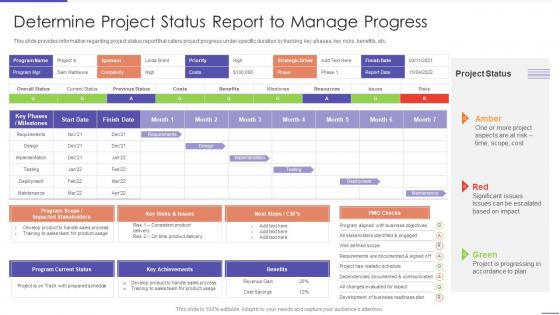
This slide provides information regarding project status report that caters project progress under specific duration by tracking key phases, key risks, benefits, etc.
People who downloaded this PowerPoint presentation also viewed the following :
Determine Project Status Report To Manage Progress Project Planning Playbook with all 6 slides:
Use our Determine Project Status Report To Manage Progress Project Planning Playbook to effectively help you save your valuable time. They are readymade to fit into any presentation structure.





FAQs for Determine Project Status Report To Manage Progress
Honestly, just hit the basics: where you are vs your milestones, budget stuff (boring but they love it), any roadblocks, and what's next. I always used to skip the money part but learned that was a mistake lol. Call out your wins from this sprint and anything where you need their input or approval. If you're behind schedule, just be straight about why and your plan to catch up. Don't bury the important stuff in a wall of text - nobody has time for that. Oh, and make yourself a template! Saves me like 30 minutes every time.
Dude, seriously start throwing some visuals into those status reports. Most people just skim text anyway (I definitely do). Gantt charts work great for timelines, and those red/yellow/green indicators instantly show if something's on fire. Bar charts for budget stuff too. Here's the thing - when you're building the report, you'll actually notice patterns and weird outliers way easier with visuals. I'd swap out like half your bullet points for charts or graphs next time. People will actually look at the data instead of their phones during the meeting. Way more engaging than walls of text, trust me.
Don't be vague - "everything's fine" means nothing without actual data to back it up. Executives want different info than your dev team, so tailor accordingly. Never hide problems because surprises absolutely destroy trust (learned this the hard way). Focus on what's next, not just what you finished. Be upfront about timeline changes and what decisions you need from leadership. Oh, and skip the technical rabbit holes unless people specifically ask for them. Short updates with clear next steps work way better than these massive reports nobody reads anyway.
Honestly, weekly works best for most stuff. I used to do reports every couple days and it was such a time suck - don't recommend it. Fast-moving or risky projects might need twice a week, but that's pretty rare. Monthly's fine if you're dealing with those slow-burn, stable projects where nothing really changes. The biggest thing is just being consistent about it. Pick whatever matches how quickly things move on your project and stick with that schedule. Your stakeholders will actually love knowing when updates are coming, plus you'll get into a good groove with tracking everything.
Schedule variance and budget burn rate are your bread and butter - plus how much of your actual deliverables you've finished. Risk tracking is huge too since that's usually what bites you later. Quality stuff matters if you're building something real, and team velocity helps you guess what's coming next. Honestly though, don't go crazy measuring every little thing. Pick maybe 4 or 5 that actually connect to whether your project succeeds or tanks. Focus on what helps people make real decisions instead of just making your reports look fancy.
Honestly? Quote people directly in your status reports instead of watering everything down. I hate when reports just say "positive feedback" - that tells me nothing. Create a whole section for it and actually name names: "Marketing wants clearer timelines" or "Sarah loved the risk plan." People feel heard when you use their exact words. Then - and this part's key - show how you're fixing their concerns in your next steps. It's like closing the loop, you know? Keeps everyone way more engaged than those generic summaries everyone ignores.
Think of risk assessment as your project's weather forecast - what could mess things up, how likely is it, and how bad would it be? Honestly, this part trips up a lot of people because they either go overboard with the doom-and-gloom or pretend everything's perfect. Neither works. Show stakeholders the potential roadblocks ahead, but pair each risk with your plan to handle it. That's what they really want to see - that you're not just worrying, you're actually thinking two steps ahead. Don't panic them, just keep it real about what might happen.
Honestly, just grab a project management tool like Asana or Monday - they'll save your sanity. Set them up to auto-generate status reports instead of manually chasing everyone down (seriously, it's exhausting). The best part? Everything's in one place, so no more copying stuff from random spreadsheets. Your stakeholders get automated updates through email or dashboards. I'd pick whatever tool your team's already using though - there's no point forcing something new if they won't actually use it. Oh, and Jira works too if you're feeling fancy.
Honestly, you just gotta figure out what each group actually gives a shit about. Execs want the big picture stuff - budget, timeline, major risks. Don't bore them with implementation details. Your team needs all the messy specifics though: blockers, deadlines, who's handling what. Stakeholders are weird because they're somewhere in the middle - they want impact info but nothing too technical. What I do is write one main report then tweak different sections for each audience. Oh and always put their most critical stuff first, then add the extra details after.
So basically, status reports are like having a gym buddy for your whole team. People naturally step up when they know their progress will be out there for everyone to see. It's weird how well that works, honestly. Your team starts connecting their daily work to the bigger goals too, which is huge. Make sure you call out individual wins alongside the overall progress - people eat that recognition up. The transparency thing really does motivate everyone to actually deliver what they promised instead of just letting stuff slide.
Just put the delays right up front - don't try to hide it. Give them the real reason (not enough people, scope creep, whatever went wrong) and actual new dates. Trust me, I've watched PMs try to dance around this and it always blows up later. Show what you're doing to fix it - moving people around, cutting features, whatever. Make sure you ask for help if you need it. The whole thing is about taking responsibility but also proving you've got a solid plan. Short sentences work better than long explanations when you're delivering bad news.
Yeah, so you want to create a clear before/after comparison in your status report - like what was originally planned vs. what's changing now. Make sure you spell out the timeline and budget impacts too. Honestly, I've watched so many projects crash because scope creep gets buried in boring updates. Put it in its own "Scope Changes" section or use a callout box - whatever makes it pop. Document who approved it and when, plus any new dependencies that come up. Oh, and don't just report the changes and hope everyone's cool with it. Get actual sign-off from stakeholders first.
Dude, templates are a total game changer for status reports. I used to waste like 30 minutes every week just figuring out what to write - now it's done in 10. Your team will love having everything in the same spot each time, makes it super easy to scan for what they need. Comparing reports month-to-month becomes way simpler too, so you'll actually catch trends instead of missing them. Plus you won't forget the boring stuff like budget updates (learned that the hard way lol). Just start basic and adjust as you go - mine's changed like 3 times already.
Honestly, just hit the big three: what's done, what's screwed, and what you need from people. Start with red/yellow/green - execs love that traffic light thing because they can skim it in two seconds. Then dive into blockers or wins that actually mess with your timeline or budget. I used to write these massive reports about every tiny detail (spoiler: nobody cared). Technical stuff goes in appendices where it belongs. Your summary needs to answer "are we totally fucked?" in under 30 seconds. Each section should end with who's doing what next - otherwise nothing happens.
Honestly, I just throw everything into a shared spreadsheet with due dates and who's responsible. Works way better than you'd think! Calendar reminders are clutch too - I set them to bug me weekly. Email follow-ups? They disappear into the void, let's be real. If your team has budget, Asana's pretty solid for this stuff. Weekly check-ins during meetings help too. The main thing is picking one method and actually sticking with it. Oh, and make sure someone owns each task upfront - otherwise it's just wishful thinking on a document nobody looks at.
-
A fantastic collection of templates. I'll likely use this as my go-to resource for future templates and support.
-
Eye-catching PPT designs, outstanding team, and best customer service. I’m a super satisfied customer here!