

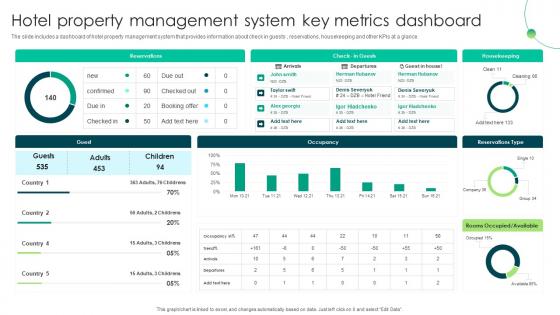
Hotel Property Management System Key Metrics Dashboard




Try Before you Buy Download Free Sample Product
 Impress Your
 Audience
 100%
100% Editable
 Save Hours
 of Time


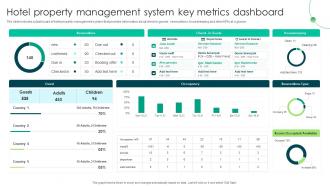
The slide includes a dashboard of hotel property management system that provides information about check in guests, reservations, housekeeping and other KPIs at a glance.
People who downloaded this PowerPoint presentation also viewed the following :
Hotel Property Management System Key Metrics Dashboard with all 7 slides:
Use our Hotel Property Management System Key Metrics Dashboard to effectively help you save your valuable time. They are readymade to fit into any presentation structure.





FAQs for Hotel Property Management System
Honestly, start with booking and reservation management - that's what'll make or break you. Real-time inventory tracking is a must. Automated rate management saves so much headache. Make sure it distributes across all the booking sites seamlessly. The reporting dashboard needs to actually be useful, not just pretty charts that tell you nothing. Integration with your payment and accounting systems is huge. Guest communication tools are clutch - automated emails, mobile check-in, maybe even digital keys if you're feeling fancy. Oh and the interface better be simple because nobody has time to train staff on complicated software. List your biggest pain points first, then find something that fixes those specific problems.
So basically a PMS makes everything run smoother for your guests. Check-in becomes super fast because staff can instantly see reservations and room preferences. No more losing track of special requests either - the system keeps everything organized. What I really like is how it remembers guest history, so your front desk can actually personalize service instead of treating everyone like strangers. Checkout's way faster too since billing is all connected. Honestly, guests just end up happier because they feel recognized and aren't stuck waiting around forever.
So automation takes care of all that tedious stuff your front desk people hate doing. You know - check-ins happen automatically, room assignments match what guests actually want, pricing updates itself throughout the day. Plus it pings housekeeping when someone checks out and sends follow-up emails without anyone remembering to do it. Your team can actually talk to guests instead of staring at computers all day updating room statuses (which honestly sounds mind-numbing). The efficiency boost is pretty crazy. I'd start with whatever tasks take up most of your day first - that's where you'll see the biggest difference.
So basically, connecting your PMS to OTAs means you can update pricing and inventory everywhere at once instead of doing it manually on each site. No more logging into Booking.com, then Expedia, then whatever else - it all syncs automatically. The real magic happens with dynamic pricing though. Your rates can shift based on demand and what competitors are doing, sometimes even hourly if you want to get crazy with it. Honestly saved my ass from overbookings more times than I can count. I'd say start with your biggest 2-3 channels first and see how it goes.
Ugh, staff resistance is the worst part honestly - everyone hates learning new systems. Data migration will stress you out too since you can't afford to lose guest info or booking history. Your POS and accounting software might not play nice with the new system either. Oh and expect some downtime obviously. I'd definitely overestimate training time by like 50%. Also make your IT people document every single connection point first - trust me on this one. We learned that the hard way when our booking engine completely broke for two days.
So basically your staff can ditch being glued to that front desk computer all day. They can check people in right from the lobby, update room status while they're walking around, process payments anywhere - even by the pool if you want. Guests get mobile check-in, digital keys, the whole nine yards. Your housekeeping team stays in the loop instantly, and honestly? Everything just flows better when people aren't constantly running back to a computer. I'd start by figuring out what tasks are keeping your team trapped at their desks, then find mobile options that actually free them up.
Start with encryption for guest data and payments - that's your biggest win. Multi-factor authentication for staff is critical too, especially managers and front desk people. Set up role-based access so like, housekeeping staff can't see billing info. PCI compliance isn't optional if you take credit cards (learned that one the hard way). Auto backups and security audits will literally save you when things go sideways. Oh, and activity logging for everything - super helpful during investigations. Honestly, nail the encryption and MFA first since those cover most attack vectors.
So basically your PMS data shows you what's actually making money and when. Look at which room types bring in the most cash, when people book the most, stuff like that. The forecasting part is honestly clutch - no more getting blindsided by sudden demand spikes. You'll catch problems way earlier too, like if you're overstaffed on Tuesdays or whatever. I'd start with the revenue reports first since those are pretty straightforward, then mess around with the guest analytics once you get the hang of it. Way better than just winging it with pricing.
Dude, cloud PMS is seriously worth it. You can access everything from anywhere instead of being stuck at that front desk computer all day. Staff check people in on tablets, room statuses update instantly - it just flows better. The automatic updates are clutch too, no more dealing with IT disasters every other week. Way more reliable than those old clunky systems. Honestly the remote access alone sold me on it. I'd say figure out what's driving you crazy operationally right now, then see how cloud features fix those specific problems. Makes the switch feel less overwhelming.
Your PMS has crazy good data on guests - booking habits, what rooms they like, how much they spend, all their weird requests. I'd start simple though, just segment by how often people book and their average spend. That alone will make your emails way better. Business travelers want totally different stuff than families, right? Plus you can track what actually works instead of guessing. High-spenders should see your fancy packages while repeat guests get loyalty stuff. The targeting gets pretty specific once you dig into all that guest behavior data sitting there.
Dude, it's a game changer. No more switching between ten different systems or updating rates manually everywhere – that alone will save your sanity. The automated pricing actually works too, adjusting based on demand and what competitors are doing. I was skeptical at first but saw about 12% RevPAR boost after switching. Real-time forecasting means you catch opportunities as they happen instead of realizing you could've charged more last week. Oh, and goodbye to those awful spreadsheets! Try running their automated suggestions alongside your current pricing for a month. You'll see the difference pretty quick.
Honestly, a PMS is a lifesaver for cutting down all that back-and-forth between departments. Your housekeepers get mobile updates showing exactly what each room needs - deep clean, maintenance, whatever. No more constant radio chatter! Room statuses update automatically when guests leave, and the front desk knows the second a room's ready. The system even tracks how long tasks actually take, which is pretty neat for scheduling. You can set up workflows so maintenance requests get prioritized properly instead of everything feeling urgent. Trust me, once you automate this stuff, your daily scramble becomes way more manageable.
So basically your PMS can handle contactless check-in through mobile apps and kiosks. Guests verify their identity, pick rooms, and boom - digital keys get sent to their phones. Check-out's even easier, they just leave and get emailed receipts. Behind the scenes it's doing room assignments, processing payments, deactivating keycards, notifying housekeeping. Some places use QR codes for lobby kiosks which is honestly pretty slick. I'd start with mobile check-in first since most people already have your app downloaded anyway - seems like the obvious move.
Dude, seriously - don't skimp on training your staff. I've watched hotels blow serious money on these amazing systems that nobody knows how to actually use. Your check-ins get way faster when people aren't fumbling around the interface. Fewer booking mistakes too, which saves everyone headaches. Staff confidence goes up big time, and honestly guests can tell when your team actually knows what they're doing. Oh, and make sure you've got decent ongoing support lined up. Systems always update or break at the worst possible times. Trust me on this one.
Hotel PMSs are about to get crazy smart with AI. Predictive analytics will forecast demand, chatbots'll handle guest complaints, and pricing will adjust automatically - which honestly sounds both amazing and terrifying. Cloud systems are taking over because they're just easier to update. Guests want everything on their phones now (can't say I blame them), so mobile-first design is essential. The integration stuff is where it gets really interesting though - your PMS will connect to smart room controls, IoT devices, all sorts of third-party apps. When you're shopping around, focus on AI capabilities and how flexible their APIs are rather than basic features everyone already has.
-
“Excellent information with easy access.”
-
“Ample and amazing variety of templates available, really helpful for making professional PPT for day to day workings.”