

Project budget management and resource allocation dashboard





Try Before you Buy Download Free Sample Product
 Impress Your
Audience
 100%
Editable
 Save Hours
of Time


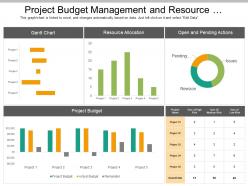
Are you asked to create presentation on project budget management and resource allocation? If yes, then this PPT slide is perfect for you. Managing the budget in the most effective manner is important to complete the project in the stipulated time. Project managers have to allocate many resources when managing a project, starting from budget to equipment and tools, to data and project strategy. Our PowerPoint template has been designed by experienced and skilled designers who have good knowledge and understanding about the business requirements. The presentation design has been crafted with Gantt chart, bar graph etc. for you to present the information in the way that any individual could understand. This PPT graphic is accessible in excel format in which you can edit the data and replace the content as per you need and then present it among your people. Apart from using it for project budget management and resource allocation, you can use it to present other key aspects of your business as it is completely amendable. Download it now. Our Project Budget Management And Resource Allocation Dashboard embody elegance. Crafted by design freaks.
People who downloaded this PowerPoint presentation also viewed the following :
Project budget management and resource allocation dashboard with all 6 slides:
Experience bliss with our Project Budget Management And Resource Allocation Dashboard. They create an air of ecstacy.


FAQs for Project budget management and
So first thing - track what you're actually spending vs what you planned. Sounds obvious but most people skip this part. Set realistic goals and check in monthly or quarterly, whatever works for you. Break expenses into clear categories like fixed costs, variable stuff, different departments if that applies. Always build in a buffer because something random will pop up, guaranteed. Oh and here's what actually matters - get someone to own this process. Can't just set a budget and walk away. Start small though, pick one area to nail down first before you go crazy tracking everything.
Look back at your last 2-3 years of spending to see the patterns and seasonal stuff. Factor in any growth plans, new hires, or big projects you've got coming. Inflation's been brutal lately - don't ignore it or your numbers will be way off. Be realistic about revenue first, then build expenses around that. Honestly, I'd throw in a 5-10% cushion because something unexpected always pops up. Break it down by month so you can actually track how you're doing and tweak things as you go.
Honestly, you can't do budgeting effectively anymore without decent tech tools. Automated tracking saves so much time on data entry - no more spreadsheet hell. Real-time dashboards let you actually see what's happening with your money instead of guessing. The predictive stuff is pretty cool too, helps catch issues early. Cloud platforms mean your team can work from anywhere (which, let's be real, everyone expects now). I'd just pick one solid budgeting app and get everyone trained on it. You'll probably kick yourself for not switching sooner.
Honestly, quarterly reviews work for most companies. But it really depends on your situation - if you're growing super fast or in a crazy unpredictable industry, you might need to check monthly instead. Stable businesses can usually get away with quarterly since you get enough time to spot actual trends without freaking out over random bad weeks. I'd still peek at your key numbers monthly though, just so nothing blindsides you. Don't completely restructure everything after one rough month - that's a mistake I've seen too many times. Quarterly formal reviews plus monthly check-ins is probably your sweet spot.
Ugh, the classic mistakes? People always lowball their budgets - like they forget inflation exists or that stuff breaks. Then they never check in on spending until it's too late. Finance teams are the worst at this, honestly - they'll make these elaborate budgets without asking the people actually buying things what they need. Super backwards. Your budget isn't a tattoo, so review it quarterly and adjust when needed. I'd say track actual vs planned spending monthly so you can fix problems before they spiral. Oh, and don't let departments work in silos - that's budget suicide right there.
Okay so first thing - figure out where you want to be in like 3-5 years, then work backwards from there. What financial milestones do you need each year to get there? Your budget should actually support those bigger goals. If you're planning to expand, budget for new hires and infrastructure way ahead of time. Trust me, I learned this one the hard way when we tried scaling too fast without thinking it through! Also track your progress every quarter and tweak things as you go. Honestly, budgets work best when you think of them as roadmaps instead of just "here's what we can spend."
Dude, economic ups and downs totally mess with your budgeting game. That yearly budget you made? Forget it - it's basically worthless when things get crazy. I had to learn this lesson during the last recession, ugh. What actually works is planning for different scenarios instead. Check your numbers way more often too, like monthly or weekly when stuff gets unpredictable. Honestly, budgeting during volatile times is exhausting but necessary. Build in backup plans for everything. Your budget becomes this living thing you're constantly tweaking rather than something you set once and ignore.
Track every single expense for a month first - yeah, even that weird $3 coffee shop thing. You'll be amazed where your money disappears. I just use a basic spreadsheet because those fancy apps are honestly more trouble than they're worth. Break everything into simple buckets: fixed costs, random expenses, emergency fund. Check it weekly though, not monthly - waiting a whole month means you're already screwed if something's off. Set limits for each category and actually follow them. The whole point is using real numbers instead of just guessing what you think you spend.
Dude, you absolutely need your team's input on budgets. They're the ones actually using the resources day-to-day, so they know where you're burning cash or being too stingy. Department heads will catch waste you can't see from your level. When people help build the budget, they actually follow it – shocking, I know. Nobody wants random spending limits dropped on them. Start by asking each department what's driving them crazy resource-wise this quarter. Seriously makes budgeting so much easier when it's not just you guessing at numbers.
Yeah, budgeting varies SO much by industry it's crazy. Tech companies do frequent revisions because their costs are all over the place with scaling. Manufacturing? They're locked into longer planning cycles and fixed costs. Healthcare gets screwed by regulatory changes and insurance stuff that throws everything off. Retail's just constantly dealing with seasonal swings and inventory headaches - honestly sounds exhausting. Bottom line: don't just copy what worked somewhere else. You gotta adapt based on how your specific business actually operates and when cash flows in and out.
Honestly, I'd just start with Excel or Google Sheets if you know your way around formulas - they're super flexible and free. YNAB is amazing for personal stuff with that zero-based budgeting thing (totally changed how I think about money), but Mint's easier since it connects to your bank automatically. Though fair warning, Mint can be kinda glitchy sometimes. QuickBooks is solid for business budgets but you'll pay for it. Look, whatever you'll actually stick with is the right choice. Don't overthink it - start simple and upgrade later if you need fancy features.
Honestly, digging into your past spending is a game changer. See where you always blow the budget - usually the same departments every time. Notice seasonal stuff too, like how December always costs more than you think it will. There's literally always some random expense that pops up, so build cushions where you actually need them. Track which categories are all over the place month to month. Those need babysitting. But here's the thing - write down what went wrong each cycle, not just the numbers. Otherwise you'll forget and make the same mistakes next year.
Excel skills are absolutely essential - no way around that one. Get them solid training in financial analysis and basic accounting stuff like variance analysis and forecasting. Communication is huge though, because they're always having to explain budget calls to other departments who probably don't want to hear it. Project management helps since everything connects to timelines anyway. Critical thinking and being detail-oriented are obvious musts. I'd probably start with a general financial planning course first. Then you can add more specialized training based on whatever weird quirks your industry has.
Honestly, scenario planning is your best friend here. I always create three budget versions - conservative, realistic, and optimistic - because nonprofit funding is just wildly unpredictable. Keep restricted and unrestricted funds separate religiously! That compliance mess will haunt you otherwise. Do quarterly reviews instead of waiting all year, since grants can vanish or pop up randomly. Oh, and try keeping 3-6 months in reserves if you can swing it. First step though? Map out when all your funding sources renew. That timeline view alone will save you from those awful cash flow surprises that hit out of nowhere.
Track your variance analysis first - actual vs budgeted numbers will tell you everything. Cash flow trends are critical too, don't sleep on those. I always watch burn rate religiously if you're growing fast, plus revenue forecasting accuracy. Expense ratios by category help spot weird spending patterns. Working capital ratios catch liquidity problems early - learned that one the hard way lol. Monthly dashboards are your friend here. Most accounting software does the heavy lifting automatically which is honestly a lifesaver. Way better than scrambling with spreadsheets at month-end.
No Reviews