


Property and facility kpi dashboard showing occupancy cost delinquencies and distributions





Try Before you Buy Download Free Sample Product
 Impress Your
 Audience
 100%
100% Editable
 Save Hours
 of Time


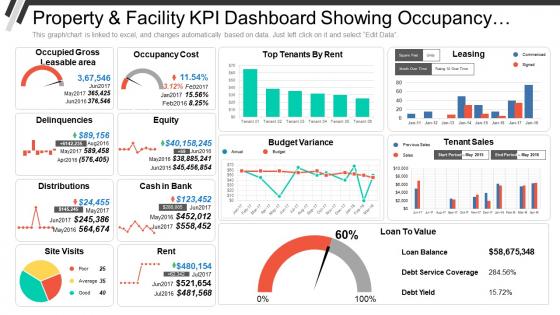
The KPI Dashboard PowerPoint template is perfect for illustrating the different parameters of property as well as the facility. A user can take help of Property And Facility KPI Dashboard PPT slide to present the Occupied GLA, Delinquencies, Distribution and Site Visit, along with that he can also demonstrate Occupancy Cost, Equity, Cash in Bank, Rent and many more. A user can define all these things in an effective manner as the designing team of SlideTeam has utilized a variety of figures such as meter icon, line chart, rectangular wave graph, pie chart and many other. The presenter can use the Top Tenants by Rent Line Graph template to present the number of tenants along with their respective rent amount. Representing the budget was never so easy earlier when an individual insert the KPI Budget Variance Presentation template in his PPT, it looks more appealing and he can easily explain the variation between actual amount and budget. By taking help of Loan To Value Meter slide, you can explain loan balance, debt service coverage and Debt yield and you can also do changes in the values manually as the KPI Metric PowerPoint Slide gets linked with Excel Spread Sheet. Arrive at comprehensive conclusions with our Property And Facility Kpi Dashboard Showing Occupancy Cost Delinquencies And Distributions. Closely examine all the important information.
People who downloaded this PowerPoint presentation also viewed the following :
Property and facility kpi dashboard showing occupancy cost delinquencies and distributions with all 6 slides:
Counter efforts to dishearten folk with our Property And Facility Kpi Dashboard Showing Occupancy Cost Delinquencies And Distributions. Deter any demoralizing elements.


FAQs for Property and facility kpi dashboard showing occupancy cost
Track your cost per square foot and total occupancy expenses first - those are the big ones. Utilization rates show if you're actually using what you're paying for (spoiler: probably not as much as you think). Vacancy rates matter too, plus lease expiration dates so you don't get caught off guard. Break down operating expenses by category and definitely set up alerts when costs spike. Oh, and compare budget vs actual over time - trends will jump out at you. Space efficiency ratios are clutch for spotting wasted money on empty areas.
Start with basic charts showing rent, utilities, maintenance broken down by category. Heat maps are perfect for cost per square foot across different areas. Once your data's clean (which honestly matters more than any fancy visualization), set up trend charts to catch seasonal patterns. I'd add automated alerts when costs jump above normal ranges - super helpful. The interactive part is clutch though, lets you dig from big picture down to specific problem areas. Don't overthink it initially, just get something working then layer on complexity as your team gets used to reading the data.
Think of real-time data like your financial radar for office costs. You'll spot problems way before they blow up your budget. So instead of discovering months later that you're paying full rent on empty conference rooms, you can actually do something about it. The data shows space usage, energy costs, maintenance issues - all happening live. You can shift HVAC settings, move teams around, whatever makes sense. Honestly, the best part is setting up automatic alerts so you don't have to babysit dashboards all day. Let the system ping you when something's weird.
Honestly, those dashboards are pretty clutch for budgeting. You'll get all your historical spending data plus real-time numbers, so forecasting becomes way less of a guessing game. The breakdown by location or department is super helpful - you can actually see where all your money's disappearing to. What really got me was how it picks up on seasonal patterns you'd totally miss otherwise. Like utilities spiking in summer or maintenance costs going nuts in winter. Way better than just looking at last year's total and calling it good. Start with 12 months of data to get your baseline - that's usually enough to spot the trends.
Put your biggest metrics right up front - cost per square foot, budget variance, that stuff. I'd stick with the same colors everywhere (red = over budget, green = under). Charts beat tables every time for catching trends fast. Don't cram too much on one screen though, it gets messy quick. Your filters should be super obvious - group by building, department, whatever makes sense. Oh and honestly? If they can't get your main point in 10 seconds, you've overcomplicated it. Keep it simple.
Pull up your historical data - like 2-3 years back. You'll start seeing patterns in costs creeping up at certain locations, plus whether you're actually using all that space or just burning money. Honestly, the best part is when something super obvious jumps out that nobody caught before. I'd set up alerts when costs go way above your historical averages, that way you're catching problems early instead of just staring at old numbers. Also compare current performance against what you normally spend. Way better than scrambling to fix overspend after it happens.
Power BI and Tableau are your best bets for occupancy cost dashboards - both handle real estate data sources really well. Excel works if you're just starting out, but it gets messy once you have multiple properties. Google Data Studio is actually pretty decent too, especially if your team already uses Google stuff. My old boss swore by it. The main thing is making sure whatever you pick connects smoothly with your property management software and financial systems. Start with whatever your IT team already knows how to support. Trust me, you don't want to be troubleshooting integration issues for weeks.
Honestly, these dashboards are pretty clutch for making actual data-driven decisions about your space. You'll spot which areas are burning cash per square foot and find those dead zones nobody's using. Perfect for when you need real numbers to justify budget requests to leadership - way better than just winging it with guesswork. Tracking trends over time helps with lease negotiations and planning reconfigs too. I'd start with cost per employee metrics first, that's usually the easiest sell. Oh and it makes showing ROI on facility investments so much cleaner when you've got the dashboard backing you up.
Honestly, data quality is your biggest nightmare. Facilities measures square footage one way, finance does costs totally different, HR has their own headcount - it's a mess. People hate change too, obviously. Then you've got all these random systems that weren't built to work together, so good luck with that integration headache. Oh, and everyone thinks their version of the data is the "right" one. Start with just one solid data source though. Don't try to fix everything at once - you'll lose your mind.
So basically these dashboards show you exactly what you're spending on rent, utilities, maintenance - all that stuff. Look for weird outliers first, like why one floor costs way more to heat (seriously, what are they doing up there?). The coolest part is comparing cost per square foot between locations. You'll find spaces just sitting there burning cash or catch lease renewals sneaking up. Track everything over time and those big cost differences will jump out at you. That's where you'll get the biggest bang for your buck fixing things.
So for retail occupancy stuff, track cost per square foot, sales per square foot, and occupancy cost as percentage of revenue. Those three are money. Year-over-year trends matter too since retail gets weird seasonally - learned that the hard way. Compare your locations against each other and industry benchmarks. Really though, watch how occupancy costs move vs your sales performance. Set up alerts when occupancy percentage hits certain thresholds so you catch problems early. Way easier than scrambling later when things go sideways.
Honestly, an occupancy cost dashboard just stops all those annoying "wait, where'd you get these numbers?" email chains between finance and ops. Both teams can see the same real-time data - space usage, lease costs, operational expenses - which is huge for getting everyone on the same page. Finance finally gets why ops makes certain decisions, and ops can see how their choices hit the budget. Plus you'll catch inefficiencies way faster when everything's transparent like that. My advice? Figure out what metrics both teams actually give a damn about first, then build around those.
So occupancy costs usually run 10-20% of your total operating expenses - though honestly that swings pretty wide depending on your industry and where you're located. I'd set up your dashboard with color-coded metrics against benchmarks from BOMA or CoreNet (they've got solid data). Automated alerts are clutch when you hit certain thresholds. Don't forget year-over-year trends too - they'll catch patterns before they bite you. The whole point is making decisions, not just looking at fancy charts that don't actually help anyone.
So basically, you want to break down your office costs by different chunks - like which teams, floors, or buildings are eating up the budget. Super helpful because otherwise it's just one massive expense that tells you nothing. You'll probably find weird stuff, like your marketing crew costs way more per person than you thought, or some floors get crazy busy during certain seasons. Start with whatever makes sense for how your company actually works - departments, cost centers, whatever. Oh and try looking at 2-3 filters at once. That's usually where the real "aha" moments happen with what's driving your space costs up.
Look, tenant feedback is everything for your dashboard. I've watched so many people build these gorgeous cost breakdowns that totally miss the mark. Your numbers might look perfect, but tenants will call out stuff that doesn't match reality fast. They're the ones actually cutting checks, right? Survey them first - ask what costs actually influence their decisions to stay or bail. Missing this step is honestly where most dashboards become pretty but useless. They'll point out blind spots you never considered and help you figure out which metrics actually matter vs. just looking impressive.
-
Topic best represented with attractive design.
-
Excellent products for quick understanding.