

Data driven sales performance dashboard for achieving sales target ppt slides




Try Before you Buy Download Free Sample Product
 Impress Your
 Audience
 100%
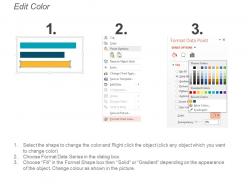
100% Editable
 Save Hours
 of Time


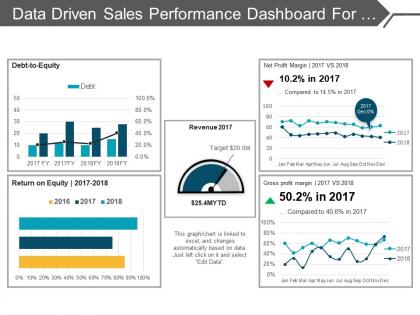
Meet your targets in time using our data driven sales performance dashboard for achieving sales target PPT slides. Measure the performance of your product in the market by assessing the sale. Provide your team mates with a motivation to achieve the set goals. Put forth your action plan clearly for your team to execute it efficiently. Make an effective summary of relevant data including proper analysis using our sales dashboard PPT template. A dashboard can be a great tool for quickly reviewing key metrics as well as actions that need to be taken. Drive business goals in right direction with help of our sales management PPT dashboard. Deliver the data and information by applying sales KPI dashboard. You can analyse your collected information without any difficulty. Draw all the finances through graphs and other measuring charts using this sales dashboard PowerPoint examples. With this high quality graphic slide, make your business presentation visually appealing. Reduce the time of an effective presentation with this readily available sales performance dashboard PPT slide. Let our Data Driven Sales Performance Dashboard For Achieving Sales Target Ppt Slides handle it for you. You will be amazed by their contribution.
People who downloaded this PowerPoint presentation also viewed the following :
Data driven sales performance dashboard for achieving sales target ppt slides with all 5 slides:
Dangle the carrot for your audience. Bait them with our Data Driven Sales Performance Dashboard For Achieving Sales Target Ppt Slides.
FAQs for Data driven sales performance dashboard for achieving sales
Focus on the stuff that actually matters for making decisions - revenue pipeline, conversion rates by stage, average deal size, and sales cycle length. Those are your bread and butter. Win/lose ratios and lead response time matter too. Activity metrics? Honestly they're just vanity numbers unless they connect to real outcomes. Quota attainment and comparing individual reps is solid data. Oh, and don't go crazy with the dashboard - more than 8-10 metrics and people's eyes glaze over. Start simple with these basics, then add whatever your team keeps bugging you about later.
Dude, real-time data is a game changer for sales teams. Instead of waiting weeks to see what went wrong, you catch issues while they're happening. Like when leads start getting stuck or your conversion rates tank - you'll know immediately. Way better than those awful monthly Excel dumps we all hate, right? Set up alerts for stuff that actually matters: deal velocity, territory numbers, conversion drops. That way you can fix problems fast instead of scrambling to catch up later. Honestly feels like cheating compared to the old way.
Okay so basically data viz just turns all those boring sales spreadsheets into charts you can actually read without wanting to cry. Like, instead of scrolling through endless rows of numbers, you get graphs that instantly show what's crushing it and what's totally flopping. Honestly, the best part is catching issues early before they blow up. You'll spot patterns way faster too - which products are hot, which sales reps are killing it, whatever. Just don't go overboard with fancy colors and weird fonts (I've seen some truly awful dashboards). Pick maybe 3-5 metrics that actually matter to your goals and stick with those. Clean and simple wins every time.
Honestly, looking at your historical data is like having a crystal ball - kinda. You'll see what actually moved the needle and what flopped. Seasonal spikes become obvious, plus you can figure out which products or regions are your reliable moneymakers. Economic shifts? Yeah, those show up clearly too. The best part is catching problems early before they wreck your numbers. I'd grab 2-3 years of data and hunt for your top 3 patterns first. Then dig into your killer quarters - what did your team do different those months? That's gold right there.
Biggest mistake is cramming too many metrics on one screen - total nightmare to read. Pick like 5-7 things that actually matter for decisions. Skip the vanity stuff that looks cool but doesn't help anyone sell (who cares about total calls if they're all garbage leads?). Your data needs to refresh often enough to be useful... week-old pipeline info is basically useless. Oh, and definitely get your sales team involved early. I learned this the hard way - what I thought they needed vs what they actually wanted were totally different things.
Honestly, CRM integration is a game changer - it makes your dashboard actually useful instead of just pretty charts. Real-time data flows straight from your sales pipeline, so you can see deal progress, rep performance, and pipeline bottlenecks without touching a single spreadsheet. I used to waste so much time on manual updates. You'll spot your hottest prospects instantly and drill down from big picture numbers to specific customer details. My advice? Start with connecting the API to pull opportunity data first. That's where you'll feel the difference right away, and then you can get fancy with other features later.
Definitely hit up your CRM first - that's where all the good stuff lives like lead sources and conversion rates. Email platform data is huge too, plus your website analytics for engagement tracking. Your sales team's activity metrics matter a lot (calls, meetings, follow-ups). Social selling tools should be included if you're using them. Honestly, customer support tickets are underrated for post-sale insights. I'd start with those main sources. You can always add more specialized data down the road once you see what's actually useful.
Honestly, just build different views for different people. Sales reps only want to see their pipeline, deals, and quota progress - you know, the stuff that affects their commission checks. Managers need the team overview plus individual comparisons so they can figure out who needs help. VPs are looking at bigger picture things like win rates across territories and regional trends. Set up filters and permissions so people aren't drowning in data they don't care about. I always ask each group what they're actually deciding on every day, then just show them those numbers. Makes everything way cleaner.
Honestly, if your sales team can't figure out the dashboard in like 30 seconds, they'll just ignore it completely. Make everything super intuitive - clean charts, simple filtering, stuff grouped logically. I've watched teams abandon dashboards that looked amazing but were impossible to navigate. Short sentences work better than cramming everything together. Ask your reps what numbers they actually check every day, then build around that. Nobody wants to hunt for basic metrics. Oh, and drill-down features are clutch if you can swing it. The whole point is making data feel effortless to consume.
Start with basic trend forecasting - it's way easier than you think. Add models that crunch your historical sales data, pipeline stuff, and how your reps usually perform. Revenue predictions, churn risk, deal probability scores, all that good stuff. Your dashboard shows what's happening now AND what's coming next, which honestly feels like cheating sometimes. ML can flag hot leads or accounts about to bail. Don't go crazy at first though. Get your team used to simple forecasts, then pile on the fancier algorithms once they're hooked on the insights.
Dude, this thing is so much better than guessing what your reps suck at. Like, you'll see Sarah crushes prospecting but bombs at closing, while Tom always forgets follow-ups. Way better than that old "coach everyone the same" nonsense we used to do. You can spot team-wide issues too - maybe everyone's choking on the same objection or struggling with one product line. The trend data actually shows if your coaching works over time, which is honestly pretty cool. Oh, and definitely pull individual reports before your next one-on-ones. Makes those conversations way more productive.
So you'll want to connect your dashboard to whatever your team already uses - Slack, Teams, Salesforce Chatter, whatever. The API integrations let people comment directly on metrics and tag teammates when something looks weird. Real-time notifications are clutch for catching performance issues early. Honestly, the shared chart annotations are probably my favorite feature - saves so much back-and-forth when everyone's asking "wtf happened on Tuesday?" Just focus on integrating the collaboration tools your team actually bothers using first. Don't go crazy trying to connect everything at once.
Honestly, skip the PowerPoints - nobody's paying attention anyway. Get them into hands-on workshops where they're actually clicking around with real data from your pipeline. Hit the commission-related metrics first because that's what they actually care about lol. Then do scenario training with your actual deals so they can practice spotting the warning signs. I'd pair up your veterans with newer reps for those buddy dashboard sessions too. The whole thing needs to feel useful for their day-to-day work, not just another box to check. Give them concrete next steps based on what the numbers are telling them.
Honestly, build flexibility in from day one - you'll save yourself so much headache later. Pull your targets from a central spreadsheet or goals database instead of hardcoding everything. Most BI tools have parameters where you can swap KPIs or adjust date ranges without starting over. I learned this the hard way after rebuilding the same dashboard like three times lol. Make your data sources modular. Always throw in a "last updated" timestamp too. People get weird about stale data, and rightfully so. Design for change rather than trying to retrofit everything when goals inevitably shift.
Okay so three big things to nail down: data anonymization, access controls, and regulatory stuff. Strip out any personally identifiable info from customer records first. Then limit who can actually see the dashboard - only people who genuinely need it for their job. Compliance is honestly such a headache but you've gotta think about GDPR, CCPA, maybe HIPAA depending on what you do. Don't forget data retention policies and where everything's stored geographically either. Seriously though, get your legal and IT folks involved before you launch anything. They'll catch stuff you missed.
-
Informative presentations that are easily editable.
-
Much better than the original! Thanks for the quick turnaround.