


Determine Project Status Report To Managing Project Development Stages Playbook





Try Before you Buy Download Free Sample Product
 Impress Your
 Audience
 100%
100% Editable
 Save Hours
 of Time


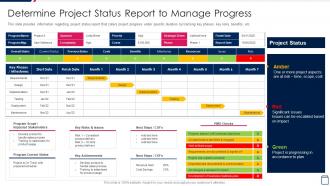
This slide provides information regarding project status report that caters project progress under specific duration by tracking key phases, key risks, benefits, etc.
People who downloaded this PowerPoint presentation also viewed the following :
Determine Project Status Report To Managing Project Development Stages Playbook with all 6 slides:
Use our Determine Project Status Report To Managing Project Development Stages Playbook to effectively help you save your valuable time. They are readymade to fit into any presentation structure.





FAQs for Determine Project Status Report To Managing Project
So you definitely need to hit five main things: where you stand on milestones, budget stuff, what's coming up with actual dates, any roadblocks, and what happens next. I always start with a quick summary at the top - honestly saves so much back-and-forth later. Don't just throw around vague percentages in your progress section. Be specific about what's actually finished vs. what you planned. Oh, and mention any scope changes or resource headaches since last time. Better to flag problems early than pretend everything's fine. Keep it short but detailed enough that people can make decisions without bugging you with questions.
Weekly's usually the way to go, but honestly it depends on what you're dealing with. Fast-moving stuff or anything high-risk? You might be doing updates twice a week, maybe even daily when things get crazy. Longer projects can probably handle bi-weekly - though I've watched teams push it to monthly and then act surprised when people keep bugging them for info. You don't want to spend your whole life writing reports, but stakeholders need to feel like they know what's happening. I'd start weekly and see how it feels, then tweak from there.
Honestly, progress bars and those red/yellow/green indicators are your best friends here. Executives don't want to decode tiny charts - they just need to see if you're screwed or not. A simple dashboard with key percentages and maybe a Gantt chart (if things get messy) usually does the trick. Keep your colors the same across everything so people aren't confused. Oh, and make sure the visuals basically explain themselves without you having to narrate the whole thing. Trust me, you'll appreciate that later when you're scrambling before the next meeting.
Be brutally honest upfront - no corporate fluff or burying bad news at the bottom. Start with your worst problems and say stuff like "We're definitely missing the deadline because..." instead of dancing around it with fancy words. Red/Yellow/Green coding works great, honestly saves everyone time scanning for disasters. Always pair each problem with your actual solution though, not just doom and gloom. People freak out way less when they see you've got it handled. Oh, and end each section telling them exactly what you need from them - more money, extra people, whatever.
Honestly, just focus on the basics first - are you hitting deadlines and staying on budget? Those two will save your ass more than anything fancy. Track your scope completion percentage too, plus some quality stuff like how many bugs you're getting or if clients are actually happy. Resource utilization is clutch - nobody wants a burned-out team or people sitting around doing nothing. Oh, and definitely monitor your risks if you've got any brewing. Don't go crazy though. Pick maybe 4-6 metrics that actually matter for YOUR project. You can always get more detailed later if your stakeholders start asking for the nitty-gritty stuff.
Honestly, it's all about reading the room. Executives want the bird's eye view - budget updates, big milestones, anything that needs their sign-off. Skip the nitty-gritty details or you'll lose them fast. Your team though? They need the opposite. Give them task breakdowns, deadlines, who's waiting on what. I made the mistake once of boring a CEO with technical updates for 20 minutes - never again. Think of execs as wanting the highway map while your team needs turn-by-turn GPS directions to actually get stuff done.
Think of project status reports as your GPS for resources - they tell you where your budget, time, and people are actually going. You'll catch bottlenecks early and see who's drowning while others have nothing to do. Plus they show which tasks are eating money way faster than planned. I learned this the hard way on a project that went sideways because we weren't tracking properly. Without these reports, you're basically flying blind and fixing disasters instead of preventing them. Check them weekly and actually do something with the info - don't just file them away.
Honestly, just automate the boring stuff first. Jira or Monday.com can pull real-time data so you're not chasing people down for updates every week. Even basic spreadsheets with conditional formatting work if you're on a budget - I've seen some pretty slick setups. The visual dashboards are a game changer because you can actually spot problems instead of drowning in text updates. Don't go crazy though. Pick something that plays nice with whatever you're already using. I'd start small with one automated report and see how it goes.
Honestly, the worst thing you can do is bury the real issues under fluffy language. Just say it straight - are things good, bad, or totally stuck? Nobody wants to read a novel when they're checking project updates. Keep it short and scannable because executives have like 30 seconds max. Also, ditch the corporate jargon - half the time stakeholders are just guessing what you actually mean. I learned this the hard way after sending way too many wordy updates that got ignored. Oh, and don't sugarcoat problems thinking you're being diplomatic. That backfires when surprises blow up later. Consistent formatting helps too so people know where to look.
Yeah, frequent reporting totally works for accountability - your team can't just coast for weeks then panic at deadline time. Weekly check-ins beat monthly ones because nobody can get away with "everything's going great!" when clearly it's not. It's like... you know how you can't fake being productive during daily standups? Same energy. Catching problems early is huge too, before they turn into disasters. Just don't go overboard with meetings or everyone will hate you. I'd start weekly and see how it feels - some teams need more structure, others less.
Look, action items are what actually make your status reports useful instead of just boring updates nobody cares about. Without them, you're basically saying "here's what happened" and then... crickets. People want to know what's next and who's doing it. These sections prove you're thinking ahead, not just reporting yesterday's news. They catch problems before they blow up and make it obvious who owns what (with real deadlines, not vague "soon" promises). Honestly, stakeholders get annoyed when there's no clear next steps. Always assign specific people and dates - otherwise it's just a fancy wishlist that'll get ignored.
Honestly, dig into your old project retrospectives - like the last 2-3 you did. Pull out the stuff that actually went sideways and worked well. Then weave that into your current status reports. So instead of boring "we're 80% done" updates, you're saying things like "hey, remember when Project X hit scope creep right around this phase?" Your stakeholders get way better context that way. Plus you'll spot problems before they blow up. I've seen too many generic status reports that just... miss everything important, you know? Takes like 10 minutes but makes such a difference.
Honestly, think of status reports as your team's group chat but organized. Everyone knows what's going on without those annoying "hey what happened with that thing?" slack messages every five minutes. People can see how their stuff fits into the bigger project, plus you're not wasting half your meetings just catching up on basic updates. The trick is making them two-way though - not just managers asking for updates. I'd add a section where people can actually ask for help or flag when they're stuck on something. Way more useful than just "here's what I did this week" reports.
Honestly, empathy and self-regulation are game-changers here. You've gotta read your audience and stay chill when dropping bad news. Don't just dump data on people - figure out what they actually care about first. Self-regulation saves you from getting defensive during those inevitable tough questions (and trust me, there will be plenty). Social awareness matters too. If someone's clearly stressed or distracted, adjust your approach. Here's the thing - emotions are contagious, so if you're confident and solution-focused, your team will mirror that energy. Stay neutral when sharing setbacks, but always come with next steps ready.
Honestly, feedback from those status reports is like your early warning system. You'll catch problems way before they turn into total disasters. Team members and stakeholders give you heads up on roadblocks or resource issues you might've missed - basically extra sets of eyes watching your back. Here's the thing though: don't just blast out updates and hope for the best. End each report with actual questions about specific risks or concerns. That feedback lets you tweak timelines or shift resources around while you still can. Way better than scrambling later when everything's already gone sideways.
-
Topic best represented with attractive design.
-
The designs by SlideTeam are honestly the best I have seen so far. Will be definitely coming back for more.