


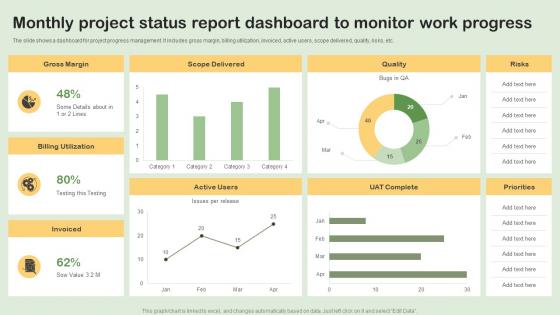
Monthly Project Status Report Dashboard To Monitor Work Progress




Try Before you Buy Download Free Sample Product
 Impress Your
 Audience
 100%
100% Editable
 Save Hours
 of Time


The slide shows a dashboard for project progress management. It includes gross margin, billing utilization, invoiced, active users, scope delivered, quality, risks, etc.
People who downloaded this PowerPoint presentation also viewed the following :
Monthly Project Status Report Dashboard To Monitor Work Progress with all 7 slides:
Use our Monthly Project Status Report Dashboard To Monitor Work Progress to effectively help you save your valuable time. They are readymade to fit into any presentation structure.





FAQs for Monthly Project Status Report Dashboard To
Honestly, just track what actually matters for telling the story. Timeline stuff is obvious - % complete vs where you planned to be. Budget burn rate too. Don't forget milestones hit or missed, and definitely include risk indicators since those bite you later. Team capacity and blockers are huge - I always underestimate how much those slow things down. Quality metrics like defect rates matter depending on your project. Keep it visual so people can scan it quickly. Start with those basics, then add whatever your stakeholders keep bugging you about in meetings.
Honestly, visual dashboards are game changers for project management. Your brain processes charts and color-coded stuff way faster than endless spreadsheet rows - I learned this the hard way after sending status reports nobody read. Gantt charts work great for timelines, pie charts for budgets, and those traffic light colors for showing if things are on track. You'll actually catch bottlenecks and delays immediately instead of hunting through data. Start with basic charts first though. Don't go crazy with complexity right away or your team will hate it.
Honestly, just automate everything you can - hook straight into your project tools and databases so it updates itself. Trust me, manual updates are the worst because people always forget. For refresh timing, I'd do hourly for active sprints, daily for regular stuff. Make sure someone actually owns each section though, otherwise it becomes nobody's job. Oh, and throw timestamps everywhere so people know if they're looking at stale data. The biggest thing? Only track metrics that actually help people make decisions. I've seen way too many dashboards full of pretty numbers that nobody cares about.
Check that dashboard every day and update your stuff in real-time - seriously, don't let it become one of those dead tools everyone ignores. Jump on blockers right when they happen and @ people when you need their help. The color system makes sense after you mess with it a bit. Actually read what your teammates are posting too, not just your own area - that's how you spot problems early or figure out where you can pitch in. Oh, and definitely turn on notifications so you don't miss anything important. We use it during standups now and it keeps everyone way more focused.
Honestly, you've gotta talk to your stakeholders first - don't just guess what they want to see. I've watched so many dashboards turn into expensive wallpaper because nobody asked the actual users what they needed. Different people care about totally different stuff too. Executives want the big picture trends, but project managers are digging into task-level details. Set up some feedback sessions to figure out what deserves the prime spots on your dashboard. Oh, and start by asking them about their daily decisions and what's driving them crazy right now - that'll tell you everything.
Start with whatever's keeping you up at night - those are definitely dashboard material. Look for anything mission-critical, high-visibility stuff leadership cares about, or projects with serious budget implications. Tight deadlines matter too, especially if there are cross-team dependencies involved. Think about your audience though - what do they actually need versus what's just extra noise? I'd say stick to 5-7 key projects max. More than that and people's eyes just glaze over. Only add others if they're genuinely worth tracking. Oh, and anything currently at risk should probably make the cut too.
So for project dashboards, I'd check out Monday.com first - their visuals are honestly pretty sweet. Asana and Trello work great too if you want something your team won't hate using. Smartsheet's solid for data-heavy stuff, or you could go fancy with Power BI if you're into that. Actually, don't sleep on Google Sheets or Airtable - I've seen people do surprisingly cool things with those. The real trick is figuring out what you actually need first. Like do you want real-time updates? Budget tracking? Timeline views? Match the tool to that instead of falling in love with features you'll never touch.
Check if your current project tool has dashboard widgets first - that's usually the easiest route. Monday.com and Asana both do this pretty well. If not, you can build something custom with JavaScript libraries like DHTMLX, though that's obviously more work. The main thing is setting up real-time updates so your Gantt isn't showing outdated info. Stakeholders eat up those visual timelines, so put it somewhere they'll actually see it. Oh, and most dashboard platforms these days can pull Gantt data through APIs if you need to get fancy with it.
Looking at your dashboard's historical data is honestly a game-changer. You'll start noticing which project phases always drag on longer than you thought, plus see patterns in your team's performance over time. Some people are just more reliable than others - the data doesn't lie. Seasonal trends pop up too, showing how holidays or busy periods mess with your timelines. I've found it really helps with spotting those annoying bottlenecks that keep happening. The best part? Comparing your original estimates to what actually happened. Makes you way better at planning realistic deadlines instead of being overly optimistic like we all tend to be.
So you basically need different dashboards for different people. Executives just want the big picture - budget stuff, timeline updates, major risks. They don't care about tiny task details. Your team members though? They need all the granular stuff like sprint progress, what's blocking them, deadlines coming up. Most dashboard tools handle this pretty well with user permissions and widgets you can customize. I'd start by figuring out what questions each group asks all the time, then build around that. Like, what decisions do they actually need to make? That's your roadmap right there.
Don't cram everything onto one screen - that's the biggest mistake I see. Pick like 5-7 metrics that actually matter for decisions, not every single thing you can measure. Rainbow dashboards with all that red/yellow/green stuff? Total nightmare to read. Your data needs to refresh often enough to be useful (obvs), and honestly, think about who's actually looking at this thing. What works for executives won't work for project managers. Keep it clean and simple. Oh, and definitely test it with real people first - you'd be surprised how differently others interpret your "intuitive" design. Trust me on that one.
Honestly, your dashboard's colors can make or break the whole thing. Bad color choices mess with people's heads - I've seen dashboards use red for both errors AND success (why??). You want greens for good stuff, reds for urgent things, yellows for warnings. Pretty standard. The key is making important data stand out while keeping the less critical stuff quiet in the background. Keep everything consistent too - nothing's worse than a dashboard that looks like a rainbow threw up on it. Maybe audit what you've got now and see if it actually helps people make decisions faster or just confuses them.
Dude, you'll love this - AI can grab data straight from Jira, GitHub, Slack, all that stuff so you're not stuck doing manual updates. It catches patterns too, like when teams keep missing deadlines or scope starts getting crazy. Honestly the predictive stuff is pretty cool - tells you when projects will actually finish based on how fast you're moving. You get auto-generated summaries for execs and smart notifications. Oh, and it flags risks before they blow up into real issues. I'd start with whatever manual task annoys you most - that's your best automation target.
Think of it like clicking through layers of a website - you start with "Project X is 60% complete" then boom, click deeper to see which tasks are actually lagging. No more jumping between five different tools or that awkward moment in meetings when your boss asks for specifics and you're like "uh, let me get back to you." You can drill right into who's working on what and spot bottlenecks instantly. Honestly saves me so much time since I'm not constantly digging through reports. Your dashboard basically becomes detective mode instead of just showing surface-level stuff.
Start with role-based access so only the right people see sensitive stuff. Encrypt everything - data moving around and data sitting still. Your industry probably has regulations (GDPR, HIPAA, whatever applies), so make sure you're covered there. Audit logs are a pain but compliance teams will thank you later. Data masking works great for people who need dashboards but not the actual sensitive bits. Oh, and don't forget retention policies - you can't keep everything forever. Honestly though, first figure out what sensitive data you're even showing, then build security around those specific risks. Way easier that way.
-
A library of engaging, customizable and content-ready templates.
-
This design is not only aesthetically pleasing but it has many uses making the cost worthwhile. The graphics look stunning, and you can edit them as per your needs.