

 0 Comment
 Customer Reviews

Imagine there’s a large manufacturing unit with multiple sites and onsite machines working day and night. Production was going smoothly until there was a surprise audit that revealed missing compliance reports, safety concerns, and inconsistent quality checks. The fallout? Delays in production, regulatory penalties, and losing client trust at the cost of brand reputation.
How to avoid these fallouts?
The root of the problem lies in outdated inspection methods and poor data tracking. With an Inspection Dashboard, businesses can gain real-time insights, streamline quality checks, and ensure regulatory compliance with ease.
Check out our blog on the Testing Dashboard to assess the progress of project automation.
Why Do You Need an Inspection Dashboard?
Inspection Dashboard is not just a digital report; it’s a nerve centre for monitoring. Whether tracking safety compliance, quality assurance, or regulatory compliance, this dashboard gives you a real-time overview across multiple inspection points and operations. Tools like QA/QC dashboard for quality control, the Quality Inspection Panel for product checks, the Safety Check Monitor for workplace pitfalls, or the Regulatory Compliance Dashboard to track audit readiness all assist businesses in complying with inspections at every stage. The importance of having an Inspection Metrics Dashboard becomes even more evident when you consider the complexity of managing multiple locations, teams, and standards.
To enhance project management efficiency, explore our blog on Project Reporting Dashboard Templates now.
Simplify Inspection Tracking with SlideTeam’s Templates
To simplify the monitoring process, SlideTeam has brought 100% editable PPT templates, which serve as a powerful tool for managing, analyzing, and improving the performance of inspection programs, ultimately contributing to safer, more compliant, and more efficient workplaces.
Let’s have a look at some of the important templates:
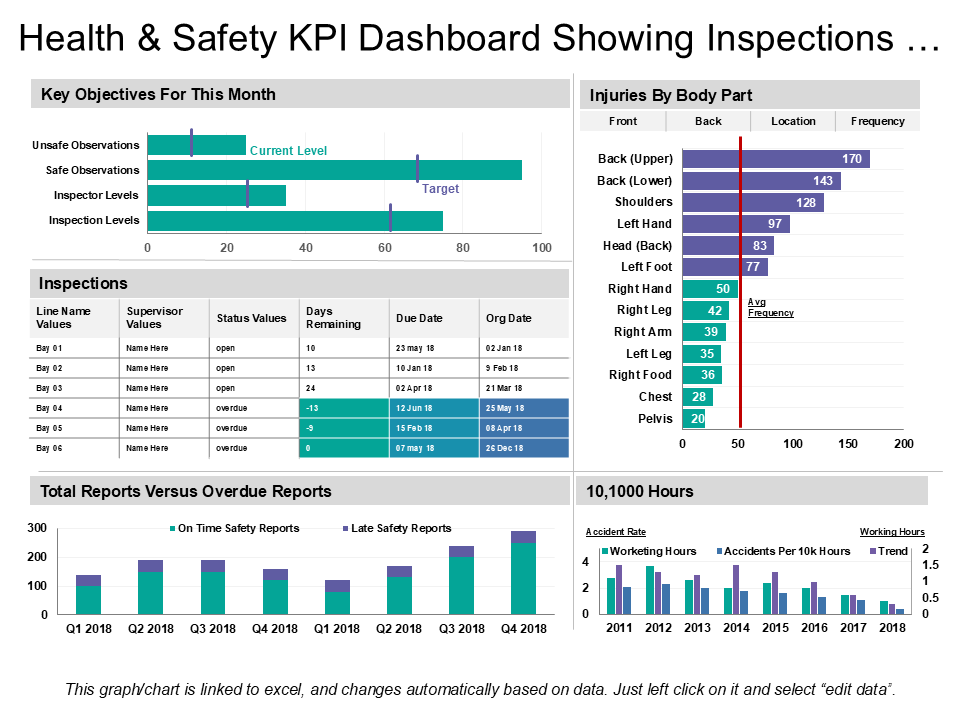
Template 1: Health and Safety KPI Dashboard Showing Inspections and Injuries
When tracking health and safety performance feels scattered, this inspection dashboard template simplifies the whole process. It clearly presents key safety metrics such as unsafe observations, inspection levels, overdue reports, and injury frequency by body part. You can quickly compare current progress against targets and identify critical safety issues. It also highlights accident rates and working hours over time, helping you monitor trends effectively.
Template 2: Monthly Sales Performance Inspection Dashboard
Track every aspect of your sales performance in one view with this dashboard. It shows key details like product-wise sales, actual versus target numbers, regional and channel-based performance, and monthly sales growth. It also monitors outstanding inventory and receivable days to spot delays. This all-in-one template makes it easy to assess sales efficiency, compare trends, and take timely action to boost business performance. Download now.

Template 3: KPI Dashboard Of Complaint Inspection Maintenance Report
Monitor compliance inspection with ease using this detailed dashboard. It captures key data like inspections per day, inspection duration, types of inspections, and inspection across various assets. Through graphs, you can quickly spot trends, delays, or issues requiring attention. This tool helps ensure that your maintenance standard and compliance processes run smoothly, keeping it all transparent and well-documented. Get access now!

Template 4: Manufacturing Audit Team Inspection Dashboard
Stay on top of your manufacturing audits with this inspection dashboard. It presents a clear summary of audit activity, showing progress status, scores, and recent audit dates across multiple locations along with audit names. You can quickly spot which audits are in progress and which is completed, helping teams act faster on issues. With digitally tracking multiple audits you’ll get a full report which simplifies decision-making and boosts operational transparency.

Template 5: IoT-Based Food Inspection Monitoring Dashboard
Use this dashboard to conduct food inspection and safety control using real time data. This template gives a clear view of storage inventory, product health, live data temperature and any incidents in the form of graphs to spot issues timely. With live updates, you can easily monitor food quality and take timely action. This tool helps ensure compliance with food safety standards while reducing the quality risk of stored inventory.

Template 6: Automated Dashboard for Inspecting Production Defects
Evaluate the quality of product and monitor production efficiency with this powerful dashboard. This dashboard template gives QA/QC managers a snapshot of total units produced, defect %, production rate and average cycle duration. Further, it also gives a glimpse of testing issues and electric faults if any. It also tracks defects reported by each manager to improve accountability. This layout spots early problem detection, streamline the process and enhance the production line.

Final Thoughts
Inspection dashboard is a digital tool that highlights the inspection data and results and aids in quality check, spots early issues and improves overall performance. With this dashboard, you can give a clear view of inspection to the audience and help the team make better decision making. To make the process smooth, SlideTeam has prepared 100% editable PPT templates on the same. These templates not only streamline the process but also help you to present inspection data in a professional manner. Download these templates today.
FAQs on Inspection Dashboard
-
What does inspection mean on the dashboard?
Inspection on the dashboard means visually presenting the data related to the inspection whether it is related to quality checks, defects, audit scores, inspection date along with progress status. With an Inspection dashboard, managers or QA/QC officers will monitor and track the performance and quality review will be done to ensure it meets the compliance standards.
-
What is the purpose of inspection?
Inspection is done to ensure quality standards and regulation standards are complying properly by the organization. Inspection evaluates the production, process and system to identify any defects or errors. Inspection helps in preventing future problems, improve safety and maintain compliance by checking the quality at different stages.
-
What is the inspection process?
The inspection process involves planning, examining, recording, and reporting the condition or quality of a product, service, or system. This process starts with conducting inspections, noting findings, and taking corrective actions if needed. This approach ensures everything meets required standards.