


0314 business ppt diagram vertical process 3 stages powerpoint template




Try Before you Buy Download Free Sample Product
 Impress Your
 Audience
 100%
100% Editable
 Save Hours
 of Time


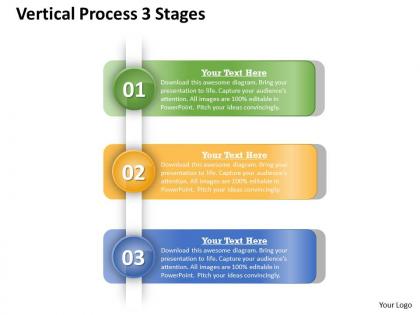
Change the game with our 0314 Business Ppt Diagram Vertical Process 3 Stages Powerpoint Template. Your thoughts will be the catalyst.
People who downloaded this PowerPoint presentation also viewed the following :
0314 business ppt diagram vertical process 3 stages powerpoint template with all 5 slides:
Experience excellence with our 0314 Business Ppt Diagram Vertical Process 3 Stages Powerpoint Template. They will take your breath away.
FAQs for 0314 business ppt diagram vertical process 3
So you'll want the basics: ovals for start/stop, rectangles for tasks, diamonds for decisions. Arrows connect everything. Swimlanes are clutch - they show who does what and honestly prevent so much confusion later. Oh, and add gateways if you have parallel stuff happening. Start simple with just the main process flow first. I always do the "everything goes right" version before adding all the weird edge cases and exceptions. If it ends up looking like tangled Christmas lights, you've gone too far. The whole point is making things clearer, not turning your process into some abstract art piece that nobody can follow.
Basically, these diagrams let you see where work actually gets stuck in your company. You can spot the bottlenecks and all those redundant steps that drive everyone crazy. Think of it like a roadmap - suddenly it's obvious where people waste time or where handoffs get messy. The visual aspect makes training new hires so much simpler too. I'd start with whatever process annoys you most right now. You'll probably find some easy fixes pretty fast, plus you can see what might work better with automation. Honestly, just seeing everything laid out usually reveals who should be doing what.
Okay so the basic ones are ovals for start/end, rectangles for regular steps, and diamonds when you need to make decisions. Arrows show which way everything flows. You'll probably need circles too - those are connectors for when your flowchart gets all tangled up (trust me, it will). Parallelograms are for inputs and outputs. Cylinders mean data storage. Honestly though? Don't stress about memorizing every single shape. Tools like Visio have templates anyway. Just pick whatever makes sense and keep it readable for whoever has to look at this thing later.
So process diagrams are for mapping actual business stuff - like how orders get processed or how you onboard new people. Flowcharts are more for logical decisions and algorithms. Honestly, I used to mix these up all the time too. If you need to show who's doing what and when work gets passed around, go with a process diagram. Flowcharts are better for yes/no decisions or troubleshooting steps. Quick test: are you mapping roles and handoffs between people? Process diagram. Just showing if-then logic? Flowchart. Makes sense once you think about it that way.
So basically, these diagrams are like a map of your whole process - you can see where stuff gets stuck or where people are doing the same work twice. Really helpful for catching bottlenecks too. I always start by drawing out what's happening now, then circle the messy parts. When you're trying to convince your boss to change things, showing them a visual beats explaining it with words every time. You'll spot redundant steps pretty fast once it's all laid out. Honestly, it's the best way to figure out where time just disappears during the day.
Honestly, business process diagrams are your best friend here. Start by having everyone sketch out how they think the current process works - I swear people's versions will be wildly different and it's kinda eye-opening. Then gather around the diagram and mark up pain points together. Non-tech people actually get into it when there's something visual to work with. Assign owners to each step as you go and jot decisions directly on the diagram. Don't try to tackle multiple processes at once though. That's a recipe for chaos and glazed-over eyes.
Honestly, I'd just start with draw.io (they renamed it to diagrams.net or something). It's completely free and does everything the fancy paid ones do. Lucidchart's pretty solid too, super popular for business stuff. Visio works great if you're already using Microsoft everything - integrates well with Office. Miro gets weird when too many people jump in at once, but it's nice for collaborative work. I mean, why spend money right away? Try the free one first and see if you need to upgrade later.
Honestly, process diagrams are amazing for this stuff. You can actually see where everything gets jammed up - like when five different tasks all dump into one person's lap, or there's some handoff that takes forever. Map out what you're doing now first. Then look for steps that drag on way longer than they should, or spots where everything converges into a bottleneck. Sometimes I think of it like looking at traffic from above - suddenly you're like "oh, THAT'S why we're always backed up here." If you add timing data to your diagram, you'll pinpoint the worst slowdowns pretty quick.
Start simple - just map the main flow, details come later. Sticky notes on a whiteboard are honestly your best friend here, way easier than trying to get it perfect in software right away. Make sure every step has someone responsible for it. Decision points need clear yes/no paths, and definitely include the messy stuff like approvals and when things break. Oh, and use the same symbols throughout or it gets confusing fast. The real game-changer though? Walk through it with whoever actually does this work daily. They'll catch gaps you'd never think of.
Dude, process diagrams are seriously clutch for new hires. They can actually see how work moves through the company instead of drowning in boring manuals. Think of it like a map - they know exactly what step comes next and who handles what. New people can check these on their own when they're lost, which honestly makes them way more confident. You'll spot training bottlenecks too, which is super helpful. Oh, and make different versions for each role so people see their specific piece of the puzzle. Trust me on this one.
Honestly, it really depends who's gonna be looking at this thing. For executives? Keep it high-level - just the major steps and key decisions. But if you're training newbies or trying to fix broken processes, go way more detailed with sub-steps, exceptions, all that stuff. I always start broad first, then add detail later. Trust me, it's so much easier than starting complex and trying to strip it down. Here's what works: include enough that someone who's never done this could actually follow along, but don't make it so detailed that people zone out. Run it by a few people first to see if it makes sense.
Honestly, swimlanes are a game-changer because they actually show who's responsible for what - regular flowcharts leave you guessing half the time. You can instantly see where work bounces between departments, which is usually where stuff gets stuck. My team started using them last year and wow, onboarding became so much easier since new people could actually follow who does what. They're perfect for catching those annoying inefficiencies too. I'd definitely try them out on any process involving multiple teams. You'll probably be surprised how much clearer everything becomes once you can visualize the handoffs properly.
So business process diagrams are perfect for this - you basically map out where compliance checks happen and who's responsible at each step. Think of it as a visual audit trail. What I really like about them is how obvious the gaps become when everything's laid out visually. You can bake regulatory requirements right into the diagram too, so there's no confusion about what needs to happen. Just don't let them sit there collecting dust - regulations change constantly, so you'll need to update them regularly or they become pointless.
Honestly, the two big traps are overcomplicating everything and not checking your work with real people. You'll be tempted to squeeze every detail into one massive diagram - don't. It just turns into visual chaos. Map what actually happens, not what the handbook says should happen (trust me on this one). Keep your symbols consistent and mark clear start/end points. Oh, and here's what saved me tons of headaches: always review the final thing with whoever does that job daily. They'll spot the gaps you totally missed.
Honestly, those diagrams are game-changers for finding what's broken in your processes. You can actually *see* where stuff gets stuck or where people are doing the same work twice - way better than just talking it through. I always start by mapping what you're doing now, then draw out what you want it to look like. The gaps between those two? That's your to-do list right there. Plus when you're in meetings trying to fix things, everyone's looking at the same picture instead of arguing about different versions in their heads. Makes tracking metrics at each step way easier too.
-
Awesomely designed templates, Easy to understand.
-
Great designs, Easily Editable.