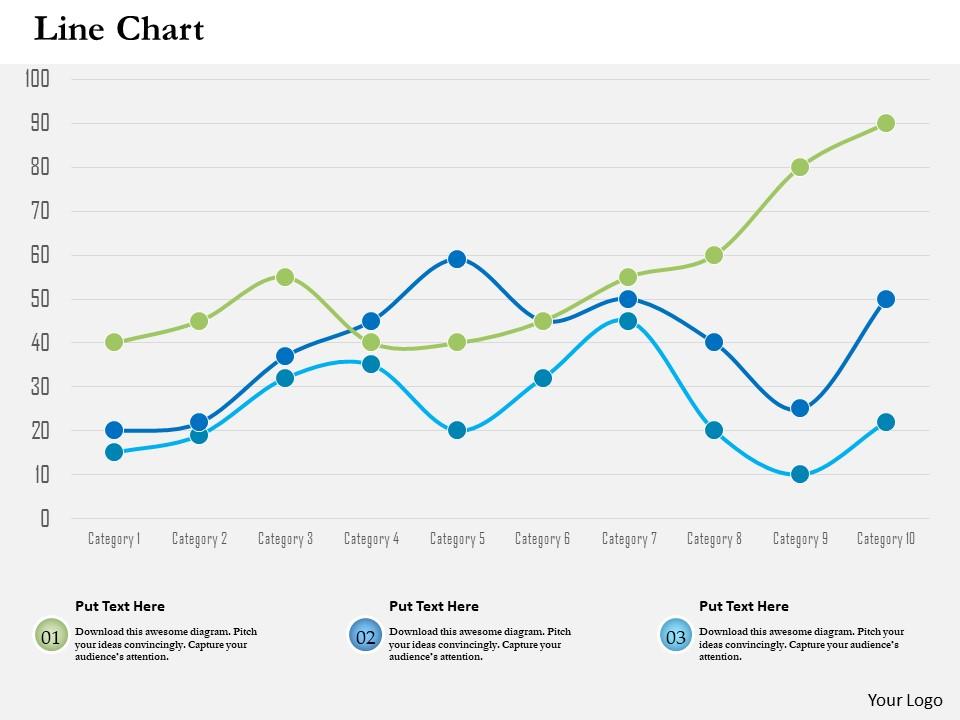
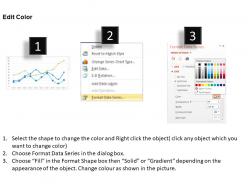
0514 Diapositives PowerPoint de diagramme de courbes basées sur les données

Rating:
90%
0514 data driven line chart diagram powerpoint slides
Slide 1 of 3
Favourites Favourites

Try Before you Buy Download Free Sample Product

Audience Impress Your
Audience
Editable 100%
Editable
Time Save Hours
of Time
The Biggest Sale is ending soon in
0
0
:
0
0
:
0
0
Rating:
90%

Caractéristiques de ces diapositives de présentation PowerPoint :

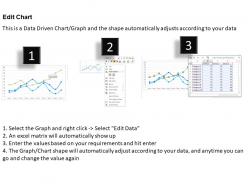
SlideTeam annonce les diapositives PowerPoint 0514 de diagramme en ligne piloté par les données qui vous aident à présenter la conclusion d'un projet. Toutes ces diapositives sont entièrement compatibles avec les diapositives Google. Ces diapositives peuvent être modifiées à tout moment comme vous le souhaitez. Nos experts travaillent sur ce diaporama depuis longtemps et le résultat va être très fructueux pour vous. Désormais, vous pouvez même visualiser la présentation au format grand écran 16:9 au lieu de l'ancien format d'écran standard 4:3.

FAQs for 0514 data driven line chart

Data-driven line charts enable clear trend visualization, pattern identification, comparative analysis, predictive insights, and stakeholder communication through intuitive visual formats. These visualizations streamline decision-making by revealing seasonal fluctuations, growth trajectories, and performance correlations, with organizations across retail, finance, and healthcare finding that dynamic charts enhance strategic planning and operational efficiency.

Effectively choosing the right scale for a line chart involves starting the y-axis at zero to avoid misleading viewers, selecting intervals that highlight meaningful data variations, and ensuring the scale range captures all data points without excessive white space. Testing different scales helps identify which best reveals trends and patterns, with many data analysts finding that consistent scaling across related charts enhances comparative analysis and audience comprehension.

Essential data preparation steps include cleaning datasets for accuracy, organizing time-series data chronologically, handling missing values through interpolation or removal, standardizing units and scales, and validating data consistency across all variables. These steps streamline chart creation by ensuring reliable trend visualization, preventing misleading interpretations, and enabling accurate forecasting, with many organizations finding that proper preparation ultimately delivers clearer insights and more confident decision-making.

Line charts excel at trend analysis compared to bar graphs and pie charts by displaying continuous data changes over time, revealing patterns, fluctuations, and directional movements that other formats can't match. While bar graphs effectively show discrete comparisons and pie charts illustrate proportional relationships, line charts uniquely enable businesses to track performance metrics, sales trajectories, and market trends with precision, ultimately delivering strategic insights for forecasting and decision-making.

Common pitfalls include misleading scale manipulation, overcrowding with excessive data points, poor color choices that reduce readability, missing context or baseline references, and inconsistent time intervals. These design flaws undermine data interpretation by creating visual confusion, misrepresenting trends, and reducing analytical accuracy, with many organizations finding that clean, properly scaled charts enhance decision-making and stakeholder trust.

Color schemes significantly impact line chart interpretability by enhancing data differentiation, reducing cognitive load, and improving accessibility for diverse audiences. Strategic color choices, such as using contrasting hues for multiple data series, colorblind-friendly palettes, and consistent branding colors, enable viewers to quickly identify trends and patterns, ultimately delivering clearer insights and more effective data-driven decision making.

Labeling plays a crucial role in line chart clarity by providing context through descriptive axis titles, data point values, legend identification, and trend annotations. Clear, strategically placed labels enable viewers to quickly interpret data relationships, compare multiple variables accurately, and draw actionable insights, with many organizations finding that comprehensive labeling reduces misinterpretation and enhances decision-making speed.

Time series data can be effectively represented by plotting chronological data points with clear time intervals on the x-axis, consistent scaling, and distinct line colors for multiple datasets. Through proper labeling, trend indicators, and strategic use of markers at key data points, organizations can visualize patterns, seasonal variations, and growth trajectories, ultimately enabling stakeholders to make informed decisions based on historical performance and predictive insights.

Professional line chart creation tools include Microsoft Excel, Tableau, Power BI, Google Sheets, and specialized platforms like D3.js and R. These solutions streamline data visualization by offering customizable templates, automated formatting, and interactive features, with many organizations finding that platforms like Tableau and Power BI deliver enhanced analytics capabilities and seamless integration across business systems.

Interactivity in line charts enhances user engagement by enabling real-time data exploration, personalized filtering options, and dynamic visualization adjustments during presentations. These interactive features streamline audience participation through hover tooltips, clickable data points, and customizable time ranges, with many presenters finding that interactive elements ultimately deliver deeper audience understanding and more productive discussions around key insights.

Best practices for annotating significant data points include using clear callout boxes, strategic color contrast, concise descriptive labels, consistent positioning, and selective highlighting of only the most critical peaks or trends. These annotation techniques enhance data comprehension by drawing attention to key insights, reducing cognitive load, and enabling faster decision-making, with many analysts finding that well-placed annotations transform complex datasets into actionable business intelligence.

Line chart designs can be optimized by adjusting axis labels, font sizes, touch targets, and spacing for mobile screens, while leveraging larger canvas areas and detailed hover interactions for desktop displays. Through responsive design principles, organizations streamline data visualization across retail analytics, financial reporting, and performance dashboards, with many finding that device-specific optimizations enhance user engagement, improve data comprehension, and ultimately deliver more effective business insights.

Single-line charts display one data series over time, making trends and patterns clear for focused analysis, while multi-line charts compare multiple data series simultaneously, enabling relationship identification and comparative insights. Multi-line visualizations enhance decision-making by revealing correlations, performance gaps, and competitive positioning across different metrics, ultimately delivering comprehensive analytical perspectives that streamline strategic planning.

Incorporating multiple data sets into a single line chart requires strategic visual differentiation through distinct colors, line styles, and clear legends, while limiting datasets to 3-5 for optimal readability. Organizations successfully achieve clarity by using consistent scales, strategic spacing, and interactive features like hover tooltips, with many finding that color-coding by category or time period ultimately delivers comprehensive insights without overwhelming viewers.

Sales revenue trends, customer acquisition costs, website traffic patterns, conversion rates, and operational efficiency metrics are most effectively illustrated using line charts in business contexts. These visualizations enable executives to quickly identify growth trajectories, seasonal fluctuations, and performance anomalies across time periods, with many organizations finding that line charts streamline quarterly reviews and strategic planning discussions.

Ratings and Reviews

90% of 100
Review Form
Write a review
Most Relevant Reviews
  1. 80%

    by Damion Ford

    Presentation Design is very nice, good work with the content as well.
  2. 100%

    by Darwin Mendez

    I discovered this website through a google search, the services matched my needs perfectly and the pricing was very reasonable. I was thrilled with the product and the customer service. I will definitely use their slides again for my presentations and recommend them to other colleagues.

2 Item(s)

per page: