


1214 quarterly roadmap q1 q2 q3 q4 powerpoint presentation






Try Before you Buy Download Free Sample Product
 Impress Your
 Audience
 100%
100% Editable
 Save Hours
 of Time


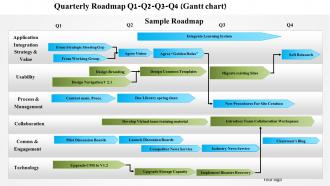
To save your time for reviewing number of official documents and to ensure a comparative study, we provide you with 1214 quarterly roadmap Q1 Q2 Q3 Q4 PowerPoint presentation. The given quarterly PPT model provides thorough audit and planning in respect to product management. This roadmap template slide design is organized on quarterly basis to provide a clear and focused insight of each quarter. Over here, Q1, Q2, Q3 and Q4 represent 1st, 2nd, 3rd and 4th quarter of a year respectively. The entire PPT background is a single shot depiction of the annual business model subdivided and focused based on quarters. The quarterly timeline design is editable and hence you can fit in your data as per need. It also contains an inbuilt flowchart which will take you through step by step process of your business plan or strategy. This quarterly PPT infographic template is a very useful tool for communicating amongst team members and executives internally and with customers externally. Cater to changing demands with our 1214 Quarterly Roadmap Q1 Q2 Q3 Q4 PowerPoint Presentation. Accept and adapt to fresh calls.
People who downloaded this PowerPoint presentation also viewed the following :
1214 quarterly roadmap q1 q2 q3 q4 powerpoint presentation with all 5 slides:
Our 1214 Quarterly Roadmap Q1 Q2 Q3 Q4 PowerPoint Presentation avoid any cliches. They add on to your creative dimensions.
FAQs for 1214 quarterly roadmap q1 q2 q3
So for quarterly roadmaps, you want your strategic priorities front and center, plus specific deliverables with timelines that won't make you look like an idiot later. Resource allocation is huge - call out what teams need. Dependencies between groups will absolutely wreck you if you don't map them out early. Success metrics are obvious but people still forget them somehow. Oh, and definitely recap last quarter's wins for context. Risk and blockers deserve a slide too. Keep everything visual because death by bullet points is real. Leave time for questions at the end or people will just interrupt you anyway.
So first thing - grab your company's annual goals and figure out what chunk needs to happen this quarter. Work backwards from there. Like if they need to hit some revenue target or ship a new product, what does YOUR team actually need to do to make that happen? Honestly, I'm super visual so I literally draw this stuff out (probably overkill but whatever). Check in with your boss regularly to make sure you're not going down the wrong rabbit hole. The whole point is being super clear about how your work connects to the big picture instead of just staying busy with random tasks.
For quarterly roadmaps, timeline bars and color-coded priorities are seriously clutch. Swim lanes help separate different teams - makes everything way cleaner. Milestone markers show your key deadlines and deliverables. Gantt charts can work too, but honestly? Some people hate them because they look too busy. Really depends who you're presenting to. I always add progress indicators so stakeholders can instantly see what's on track vs. what's totally screwed. Oh, and stick to 3-4 colors tops with a simple legend. Trust me on this one - your brain will thank you later when you're not squinting at some rainbow mess trying to figure out what's what.
Look, stakeholder feedback is honestly what makes or breaks your quarterly roadmap. Customers, internal teams, execs, partners - they all have different pain points and requests you need to hear. Building roadmaps without their input? Total recipe for disaster. The real challenge is filtering everything through your strategic goals and what you can actually deliver. You can't just build everyone's wishlist, right? Oh, and here's something people forget - always circle back to stakeholders about how their feedback shaped decisions. Even if you couldn't tackle their specific request, they appreciate knowing you listened.
Track both delivery stuff and actual outcomes - you need the full picture. Sprint completion rates, delivery dates vs what you planned, scope changes throughout the quarter. But honestly? Hitting dates is pointless if you're building garbage nobody wants. That's where outcome metrics save you. User engagement with new features, customer satisfaction, the business KPIs your roadmap was supposed to move. Set up a basic dashboard showing both types. I learned this the hard way - you can be "on track" for delivery while completely whiffing on impact.
Here's the thing - your roadmap format should match how your team actually works. Small teams? Skip the fancy breakdowns and just track milestones. Bigger teams need clearer swim lanes so people know who owns what. I'd organize around outcomes instead of departments, especially with cross-functional folks. That way everyone sees how their piece fits. Honestly, most roadmaps fail because they use some cookie-cutter template that doesn't match reality. Start by figuring out how decisions actually get made in your org, then build your format around that. Way more effective than trying to force everyone into the same box.
Look, prioritization is honestly what saves your quarterly roadmap from becoming a complete mess. You've got to be ruthless about ranking stuff by impact, effort, and how well it fits your strategy - there's always way more ideas than time anyway. Without priorities, your team just bounces around half-finishing everything. The brutal truth? Say no to decent ideas so you can nail the amazing ones. List everything out first, then force-rank them. And yeah, no ties - that's just avoiding the hard decisions!
Honestly, just bake risk planning into your quarterly sessions right from the beginning. I map out what could go wrong with each big project - stuff like waiting on other teams, tricky tech problems, not having enough people, or vendors being slow. A basic spreadsheet works great for tracking these (nothing fancy needed). Rate each risk by how likely it is and how much damage it'd cause. Then give someone ownership of the scary ones. Here's the thing though - you've got to actually review this stuff weekly during roadmap meetings, not just create it once and let it collect dust.
Honestly, skip the wall-of-text approach - nobody reads that stuff anyway. Make it visual with clear priorities and timelines, then send it company-wide. But here's the thing: follow up with each department separately so they can actually ask questions about their piece. Can't tell you how many roadmaps just die in people's inboxes. Be upfront about what might shift and why (spoiler: things always change). Set up regular check-ins throughout the quarter for updates. Each team needs to see how it affects *them* specifically, not just some generic slide deck that sits forgotten somewhere.
Honestly, just pick whatever tool your team's already using - makes life so much easier. Asana and Monday are solid for quarterly roadmaps since you can build timelines and track who's doing what. Notion works too if you're into that vibe. For brainstorming though? Miro's pretty clutch, or Figma if you're feeling fancy. The commenting features are actually useful - people can drop feedback right on specific stuff instead of those nightmare email threads we all hate. Oh, and stakeholders can just log in and see everything instead of constantly asking for updates. Win-win.
Honestly, timeline planning is where most people mess up. Factor in holidays and vacations first - trust me on this one. Your team knows way more about actual work time than you do, so loop them in early. Break big stuff into smaller chunks so you're not flying blind for months. Dependencies will bite you if you ignore them, and always add buffer time because something weird always happens. I usually aim for what's definitely doable, then maybe toss in one ambitious goal if the team's feeling it. Oh, and don't forget about other company stuff that'll steal your people's attention.
Honestly, you've gotta get your team involved in *building* the roadmap from the start - don't just drop it on them later. People actually care about stuff they help create. I made this mistake way too many times before figuring it out! Run collaborative planning sessions where everyone can speak up about priorities. Be upfront about trade-offs and explain why some things made the list while others got cut. Regular updates help too. But here's the thing - you really need to connect their day-to-day work to those bigger quarterly goals. That's where the magic happens with buy-in.
Honestly? You're gonna overcommit hard. Everyone does it. Don't jam-pack your roadmap because random fires will definitely pop up, plus stakeholders change their minds like every week. Super vague goals are useless too – like "make UX better" tells you absolutely nothing. Get specific about what you're actually building and shipping. Oh, and talk to your team before you finalize anything! They'll catch dependencies you totally missed (learned this the hard way). Plan for maybe 70% capacity max. That buffer time will save your sanity when everything inevitably goes sideways.
Check your velocity trends and completion rates first - that's where the real story lives. Which projects always run over? What dependencies keep screwing you up? I learned this the hard way after my disaster Q2 predictions (still recovering from that optimism lol). Build buffer time around those patterns you keep seeing. Sequence your big initiatives based on what actually works for your team, not what looks good on paper. Those bottlenecks aren't going anywhere, so plan around them. Your future self will thank you when things don't implode.
Honestly, save yourself 20-30% buffer capacity right from the start. Those "urgent" requests will destroy your quarter otherwise - trust me on this one. Monthly check-ins are clutch for shifting priorities when things change (and they always do). Break big projects into smaller pieces so you're not stuck when you need to pivot. I used to treat roadmaps like they were written in blood, but treating them as flexible documents saves so much headache. Course-correcting becomes way easier when you're not trying to move mountains every time.
-
Great product with effective design. Helped a lot in our corporate presentations. Easy to edit and stunning visuals.
-
Easily Editable.