Chronologie des activités de 3 mois Diagramme de Gantt Ppt Images de présentation Powerpoint

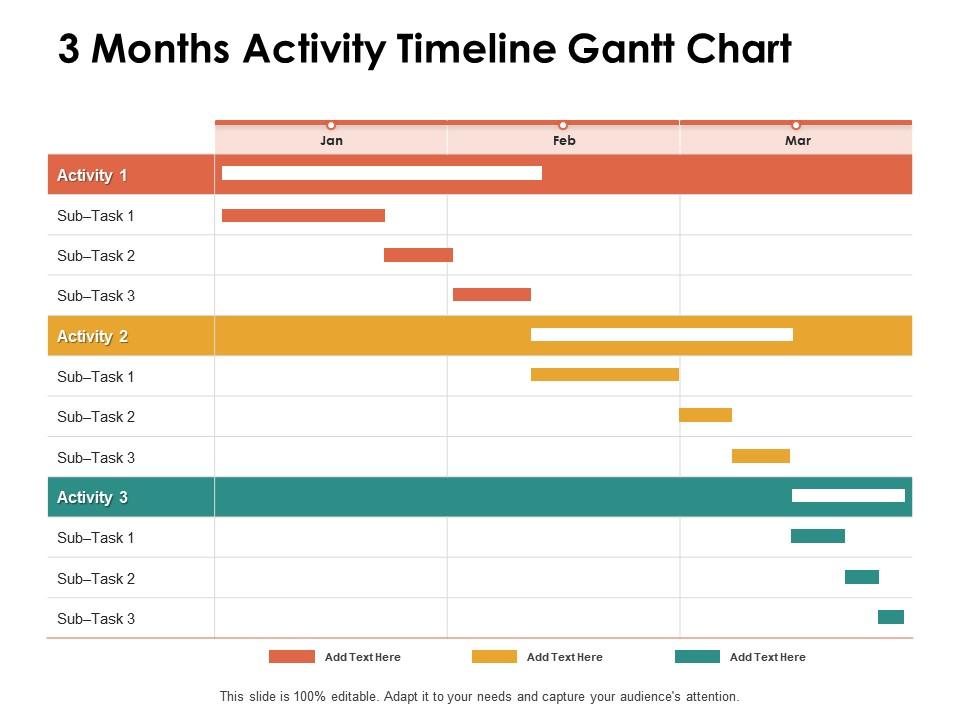
3 months activity timeline gantt chart ppt powerpoint presentation pictures
Slide 1 of 2
Favourites Favourites

Try Before you Buy Download Free Sample Product

Audience Impress Your
Audience
Editable 100%
Editable
Time Save Hours
of Time
The Biggest Sale is ending soon in
0
0
:
0
0
:
0
0

Caractéristiques de ces diapositives de présentation PowerPoint :

Gérez vos projets complexes et organisez-les simultanément avec ce modèle Powerpoint de diagramme de Gantt détaillé. Suivez vos jalons, tâches, phases, activités, sous-tâches parmi d'autres composants qui vous donneront un visuel mis à jour de votre projet. Reflétez votre horizon de planification et capturez votre plan de publication en une seule vue avec ce modèle de présentation Powerpoint de diagramme de Gantt. Vous pouvez tracer diverses dépendances directement sur cette mise en page de présentation Powerpoint de la chronologie pour voir quelles tâches sont encore dans le pipeline et comment leurs retards affectent les horaires et les délais du projet. En dehors de cela, vous pouvez également partager ce visuel mis à jour avec les membres de votre équipe et les parties prenantes, ce qui en fait un outil ingénieux à intégrer dans la structure de votre entreprise. Non seulement cela, mais aussi la mise en page modifiable de cette diapositive vous aide à ajouter vos données et statistiques à votre convenance.

FAQs for 3 months activity timeline gantt chart ppt

Oh, Gantt charts! So they're basically horizontal bar charts that show your project timeline. Each task gets its own bar showing start/end dates. Super helpful for seeing how everything connects - like which tasks need to finish before others can start. I used to think they were overly complicated but honestly? They're lifesavers for keeping track of who's doing what and when. You'll spot problems way earlier too. If you're just starting out, try making one in Excel first. Don't overthink it - even a basic version beats trying to juggle dates in your head.

So basically you've got your tasks listed down the left side, then there's a timeline across the top. Each task gets a bar showing how long it takes and when it happens. Dependencies are those connecting arrows - like when one thing can't start until another finishes. Those honestly trip people up the most! You'll also see diamond-shaped milestones for big deadlines and who's assigned to what. Oh, and don't go crazy adding everything at once. Start with just the basic tasks and timeline, then layer in the fancy stuff later when you actually need it.

Honestly, Gantt charts are game-changers for keeping your team organized. Everyone can see exactly who's responsible for what and when stuff is due. No more digging through messy email threads to figure out project status - thank god for that! They're great for spotting where things might get stuck or delayed. You'll quickly see when you need something from a teammate or when they're waiting on you. I'd suggest updating it during your weekly meetings (assuming you have those). Keeps people honest and you can catch problems early before they snowball into disasters.

Honestly depends what you're after! Microsoft Project is still king if you don't mind paying out the ass for it. For online stuff, I'd check out Asana or Monday.com - both solid choices. TeamGantt's pretty decent too if you want something straightforward. You could even hack together something in Excel if you're into that sort of torture. Free options? OpenProject and ProjectLibre aren't terrible. Oh, and GanttProject's actually not bad either. Real talk though - just see what your team's already using first. Most project tools throw in basic Gantt charts now anyway, so you might not need anything new.

Yeah, Gantt charts can work for agile - you just gotta flip your approach. Don't plan out months ahead like traditional PM stuff. Stick to sprints or maybe releases at most. Update them constantly when priorities change (and they will change, trust me). I'd focus on the big milestones instead of getting into detailed task dependencies. That's where people usually mess up. Use it for release planning but keep your actual sprint work in Jira or whatever agile tool your team likes. Some purists hate mixing the two approaches, but honestly? It works if you stay loose with it.

Honestly, most people just overcomplicate the hell out of these things. Don't cram every tiny task in there - you'll go crazy trying to read it. Focus on your big milestones instead. Dependencies are huge too, that's usually where everything goes sideways. I learned this the hard way on my last project lol. Time estimates? Always pad them because you're probably being way too optimistic. Keep updating it regularly or it becomes totally useless. Treat it like something that grows with your project, not some static thing you make once and ignore.

Honestly, Gantt charts are game-changers for project tracking. They show your whole timeline visually - all tasks, how long they take, and which ones connect. When something's running late, you'll spot it immediately and see how it affects everything else. Way better than staring at spreadsheets all day (seriously, who has time for that?). You can update completion percentages as you go and actually watch progress happen. The best part? Dependencies become crystal clear - you'll know exactly what needs finishing before the next thing can start. Oh, and try color-coding by team or priority. Makes everything pop.

Think of milestones as those little wins that keep everyone sane during long projects. You'll catch problems early instead of scrambling at the end. Plus your team actually gets to celebrate hitting targets instead of just... existing in project limbo for months. When you update stakeholders, milestones make it super clear what's done vs what's next. I learned this the hard way on a project that felt endless. Start with your big deliverables and work backwards to pick dates that actually matter. Trust me, it's like having GPS for your project timeline.

So basically, just throw everyone's names onto a Gantt chart timeline with their tasks. Super helpful for catching those "oops, Mike's triple-booked" moments before they blow up your project. The visual thing really works - you can literally see when someone's swamped while others are just sitting around. Plus dragging stuff around when priorities change? So much easier than redoing spreadsheets. I'd start by dumping all your current tasks in there first, then add people to see where the chaos is. Trust me, you'll spot the conflicts immediately once it's all laid out visually.

Gantt charts are those horizontal bar timelines - super easy to read and great for showing stakeholders where you're at. PERT charts? They're more like network diagrams that map out which tasks depend on others. Honestly, PERT gets messy fast once you have a bunch of moving pieces. But it's clutch for finding your critical path. Most teams I know stick with Gantt for daily stuff since you can quickly see what's due when. PERT's better when you're trying to figure out task dependencies and bottlenecks. Really depends on whether you need the "when" or the "what affects what" view.

Honestly, I'd go with weekly check-ins if things are moving fast, bi-weekly if not. Just update where tasks stand and shift deadlines when stuff inevitably gets delayed. The trick is doing little updates constantly instead of these huge monthly overhauls that make you want to cry. Also - and this drives me crazy - make sure people actually speak up when they're behind schedule instead of ghosting you until crunch time. Set reminders to check dependencies because those change literally all the time. Oh, and don't forget to add new tasks as they pop up. Basically keep it alive, not fossilized.

Definitely go for drag-and-drop scheduling and real-time collaboration - those are game changers. Resource management is clutch so you can actually see who's drowning in work. Integration with whatever you're already using (Slack, Jira, Google stuff) makes adoption way smoother. Critical path visualization sounds fancy but it's super helpful for spotting where things get stuck. Mobile access is nice too. The interface thing is weirdly important though - I've seen teams abandon perfectly good tools just because they felt clunky to use. Oh, and always do a free trial with an actual project first. Don't just click around the demo.

Honestly, Gantt charts are lifesavers for catching problems early. You'll see which tasks are on the critical path - mess those up and your whole project's screwed. Dependencies become super obvious too, so you can spot where things might pile up or create bottlenecks. I always color-code the riskiest stuff because it makes team reviews way easier. Oh, and build in buffer time for anything sketchy - trust me on this one. The visual layout shows resource conflicts before they bite you. When delays hit (and they will), you can actually see how they'll ripple through everything else.

Dude, construction and manufacturing teams swear by these things - they've got so many moving parts that depend on each other. Software dev too, obviously. Marketing campaigns use them a ton, plus event planning and research stuff where timing's crucial. Pretty much any project with multiple people and deadlines works, but those industries basically can't function without them. Honestly, if you've got clear start/end dates and want to catch problems early, just try it once. I was skeptical at first but man, it makes everything so much clearer when you can actually see the whole timeline laid out.

First thing - mess with the timeline scale. Switch from days to weeks or months based on how long your project actually is. Add custom columns for priority levels, who's assigned to what, budget stuff, whatever you need. Colors make everything clearer honestly - I use different ones for departments or task status. Most tools let you hide elements when you're presenting to different people (executives don't need to see every tiny detail, you know?). Oh, and start mapping out your critical path tasks first, then work outward from there. Makes the whole thing way less overwhelming.

Ratings and Reviews

0% of 100
Review Form
Write a review
Most Relevant Reviews

No Reviews