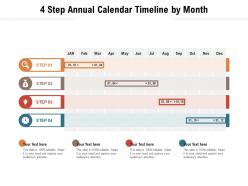
Chronologie du calendrier annuel en 4 étapes par mois
Try Before you Buy Download Free Sample Product
Audience
Editable
of Time
Notre chronologie du calendrier annuel en 4 étapes par mois est conçue pour fournir une toile de fond attrayante à n'importe quel sujet. Utilisez-les pour ressembler à un pro de la présentation.
Caractéristiques de ces diapositives de présentation PowerPoint :
Présentation de cet ensemble de diapositives avec le nom Chronologie du calendrier annuel en 4 étapes par mois. Il s'agit d'un processus en quatre étapes. Les étapes de ce processus sont la chronologie du calendrier annuel en 4 étapes par mois. Il s'agit d'une présentation PowerPoint entièrement modifiable et disponible en téléchargement immédiat. Téléchargez maintenant et impressionnez votre public.
People who downloaded this PowerPoint presentation also viewed the following :
Chronologie du calendrier annuel en 4 étapes par mois avec les 2 diapositives :
Utilisez notre chronologie de calendrier annuel en 4 étapes par mois pour vous aider efficacement à économiser votre temps précieux. Ils sont prêts à l'emploi pour s'adapter à n'importe quelle structure de présentation.
FAQs for 4 step annual calendar
Start with the big stuff - product launches, campaign deadlines, fiscal year-end. Map out your recurring monthly reviews and quarterly planning too. I always add buffer time around major projects because, honestly, nothing ever goes as smoothly as you think it will. Don't forget external things like holidays or industry conferences that'll mess with your timeline. Oh, and regulatory deadlines if those apply to you. Make it visual so your whole team can actually see what's coming and how everything connects. Otherwise people just wing it and wonder why they're stressed.
Honestly, having everything laid out for the whole year is such a lifesaver. You'll catch scheduling conflicts way before they become disasters, and your team can actually plan ahead instead of scrambling. Plus stakeholders love realistic timelines - saves everyone headaches later. I always use something visual that the whole team can update, though finding one everyone actually uses is... well, that's the real challenge. Short bursts work better than marathon planning sessions too. Makes tracking progress against your original plan way less painful when things inevitably shift around.
Canva's probably your best bet – super easy to use and has tons of calendar templates. If you want something fancier, Adobe Creative Suite is solid but might be overkill. Excel or Google Sheets work too for basic timeline charts, though they're not exactly pretty. Oh, and PowerPoint actually makes decent timelines if you're already comfortable with it. Notion's cool if you need your team collaborating on it. I'd just start with Canva honestly – you can whip up something that looks professional pretty quick without wanting to throw your computer out the window.
Honestly, annual calendar timelines are a game changer for this stuff. Plot out your big milestones first - product launches, campaign seasons, budget deadlines, whatever. Then fill in the smaller activities around them. I've watched so many teams crash and burn because they didn't see overlapping projects coming. Short sentences work great here. The visual aspect makes it way easier when you're trying to explain timing to your boss or other stakeholders. Plus you can actually spot conflicts before they become disasters. Oh, and don't overthink the format - even a simple spreadsheet works if it shows everything at once.
Think of annual calendar timelines as your sanity-saver for marketing campaigns. Plot out launch dates so you can spot potential disasters before they happen - like when three huge projects magically end up scheduled for the same crazy week. I always start with the big campaigns first, then squeeze smaller ones around them. It keeps you from bombarding your audience and helps balance seasonal stuff with company events. Honestly, I wish I'd started using these earlier because the workload feels way more manageable when you can actually see everything laid out.
Honestly, annual timelines are game-changers for classrooms. Students actually start connecting dots between subjects and real events happening at the same time. Your lesson planning becomes way less chaotic too - seeing everything mapped out just makes sense. Kids remember stuff better when they grasp how events flow chronologically. Time management skills improve naturally because they can see what's coming. I'd start with just one timeline per semester though, don't go overboard. My cousin tried doing monthly ones and it was overkill. But seriously, watch how much better they get at sequencing and planning ahead.
Honestly, the worst thing you can do is underestimate timing. Everything takes longer than you think - seriously, add buffer time or you'll be stressed out of your mind. Break down vague stuff like "launch campaign" into actual steps. Get key people involved early because last-minute feedback is a nightmare. I learned this the hard way lol. Regular check-ins are your friend - catch problems before they snowball. Don't pack your schedule too tight either. You need wiggle room when things go sideways, and trust me, they will.
Colors and icons totally change the game - way better than boring text blocks. I've watched so many people just tune out when they see plain spreadsheets in meetings. It's kinda sad actually. Try red/yellow/green for status updates, different shapes for deadlines vs deliverables. Progress bars work great too. People instantly get what's happening with the project when you group stuff visually. Your stakeholders will actually pay attention instead of checking their phones the whole time.
Honestly, just throw it on something like Miro or Notion where everyone can jump in and edit together. Google Sheets works too if you're keeping it simple. Color code different teams or regions - makes everything way clearer at a glance. Oh, and if you've got people in different time zones, add those indicators somewhere visible. Game changer, seriously. Set up periods where people can drop comments and feedback without having to coordinate schedules. Way better than having some static PDF floating around in email threads that nobody updates.
You should totally try spiral designs that wrap around like a clock - they look amazing. Interactive digital ones are super cool too since you can click to expand different months. I'm obsessed with those vertical "tower" layouts where months stack like building blocks. Oh, and hand-drawn botanical versions? Chef's kiss. Each month gets seasonal illustrations which is honestly my favorite approach. Don't just stick to boring horizontal lines though. Circular designs show cyclical patterns really well, and tree structures can connect different projects throughout the year. Just pick whatever matches how your brain actually processes time, you know?
Honestly, just work with people's natural rhythms instead of fighting them. Spring's perfect for launches and fresh starts. Summer? That's when everyone's actually social and wants to do events. Fall hits different - people are back from vacation and ready to plan stuff. Winter's more about reflection time, which... makes total sense if you think about it. Start by mapping out the four seasons, then throw in holidays and industry stuff. Even weather patterns matter depending on your audience. Quick tip though - audit what you're already doing first. You want seasonal themes to actually enhance your messaging, not make it feel forced or weird.
Do a monthly check-in on your annual calendar - I always do mine first Friday of the month because it feels like a fresh start. Add new deadlines as they pop up, remove cancelled stuff, update dates that shifted. Color-coding by priority or team makes everything way easier to scan. Oh and definitely loop in the right people because missing a major launch because nobody told you about it is the worst. Actually, scratch that - share updates with your team right away so everyone's on the same page. Trust me, it saves so much confusion later.
Dude, annual calendar timelines are seriously clutch for KPI tracking. Plot your most important metrics first, then work backwards with review dates and deadlines. I learned this the hard way - never schedule major reviews during your busiest periods! Quarterly check-ins work great for most stuff. The visual aspect really helps you spot conflicts before they happen. You can sync everything with budget cycles too, which your finance team will love. Oh, and leave buffer time for improvement sprints between reviews. Trust me, you'll thank yourself later when you're not scrambling to hit deadlines.
Hover effects are a game changer - let people see event details without clicking away. Drag-and-drop is pretty essential too, everyone expects to move stuff around these days. I'd add some basic filtering by category or date range. Zoom controls are nice if you want monthly vs quarterly views. Honestly though, don't throw everything at it right away. Pick maybe 2-3 features that actually make sense for how people will use it. You can always add more later, but a clean interface beats a cluttered one every time.
Okay so basically you've gotta flip your whole approach and think about their world, not yours. Ask upfront what holidays and dates actually matter to them - religious stuff, cultural celebrations, when they take time off. Their fiscal year might be totally different too. Oh and don't be that person who forgets the Southern Hemisphere exists in winter during our summer! School schedules vary everywhere. Time zones are obvious but still worth mentioning. The trick is building around their rhythm instead of assuming everyone follows the same calendar you do. Makes such a difference once you start doing this.
-
Really like the color and design of the presentation.
-
Great quality slides in rapid time.
-
Illustrative design with editable content. Exceptional value for money. Highly pleased with the product.