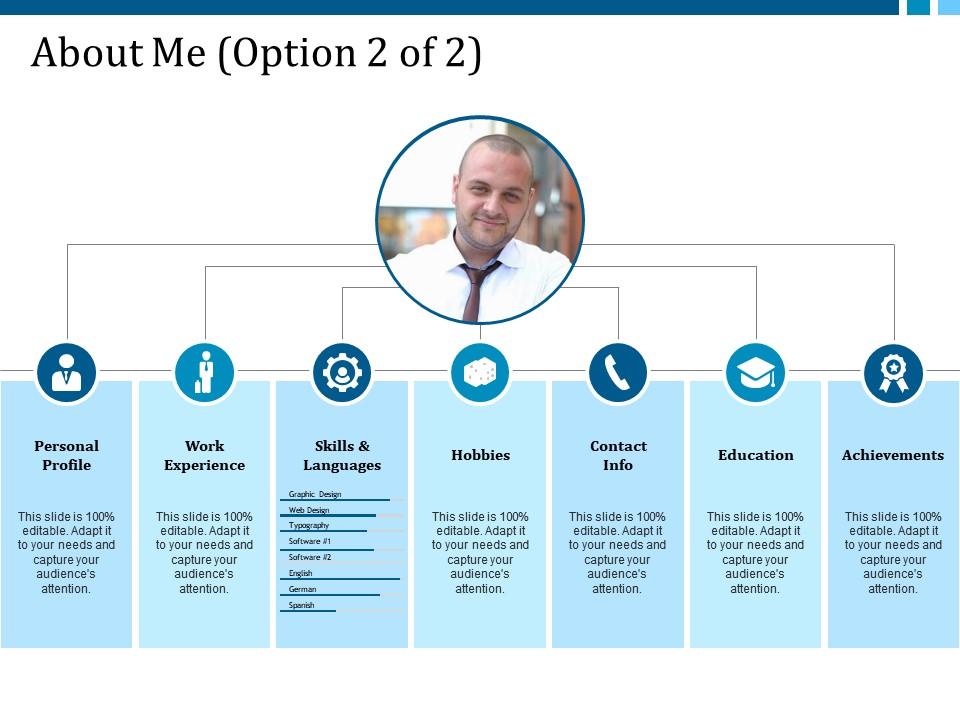
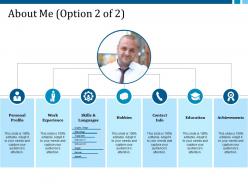
À propos de moi Profil personnel Expérience de travail Loisirs Coordonnées
Try Before you Buy Download Free Sample Product
Audience
Editable
of Time
Obtenez un modèle de présentation entièrement professionnel et moderne À propos de Moi Profil personnel Expérience de travail Hobbies Coordonnées modèle de présentation pour représenter la section À propos de moi de votre personnalité professionnelle. La diapositive est parfaitement adaptée pour afficher votre résumé de carrière professionnelle à vos supérieurs, à vos supérieurs immédiats ou à votre patron. Vous pouvez personnaliser la conception en mettant les détails personnels et professionnels que vous souhaitez représenter à votre public, tels que votre profil personnel, les détails de votre qualification, votre expérience professionnelle, vos loisirs, vos compétences et vos réalisations, vos coordonnées, etc. Cette diapositive est généralement utilisée par des professionnels, des étudiants , les chercheurs pour présenter leur force clé au public cible. C'est l'une des conceptions PPT les plus merveilleuses pour représenter la section À propos de moi de PPT parmi un large éventail de conceptions PPT de profil personnel et d'expérience de travail professionnelle. La mise en page de conception est magnifique; chaque attribut est représenté par une icône modifiable de haute qualité. Alors, téléchargez maintenant et utilisez ce PPT attrayant pour impressionner votre public cible avec ce design PPT efficace. Encouragez la création de conditions d'égalité avec nos informations de contact À propos de moi Profil personnel Expérience professionnelle Loisirs. Pouvoir réduire les disparités.
Caractéristiques de ces diapositives de présentation PowerPoint :
Présentation de cet ensemble de diapositives avec nom - À propos de moi Profil personnel Expérience professionnelle Loisirs Coordonnées. La diapositive est entièrement modifiable; vous pouvez insérer le logo de l'entreprise, la marque pour rendre le PPT plus impressionnant et authentique. Vous pouvez facilement télécharger et réorganiser les diapositives. Des conseils pour l'exécution des changements ont été fournis par nos professionnels. La qualité de la conception ne sera pas compromise lorsque PPT est ouvert sur un écran large. Les diapositives sont entièrement compatibles avec plusieurs logiciels, par exemple Google Slides et Microsoft PowerPoint.
People who downloaded this PowerPoint presentation also viewed the following :
À propos de moi Profil personnel Expérience professionnelle Loisirs Coordonnées avec les 5 diapositives :
Affrontez vos adversaires avec nos informations de contact à propos de moi Profil personnel Expérience professionnelle Loisirs. Passez à l'action avec notre profil personnel à propos de moi Expérience professionnelle Loisirs Coordonnées.
FAQs for About me personal profile work experience
Okay so you'll want a solid intro that hooks people right away, plus your main skills and work experience with actual numbers/results if you have them. Education and contact stuff too, obviously. I'd add a section about what you're actually looking for next - employers love knowing your goals. Keep everything punchy but detailed enough to get people talking. Honestly, the best profiles tell a story that makes sense for whoever's reading it. Oh, and if it's for something where photos matter, throw in a professional headshot. Start putting this together now so you're not scrambling when something good pops up.
Honestly? Stop trying to be everything to everyone - that's where most people mess up. Figure out your weird combination of stuff first. Like, what problems do you actually solve? What makes you different from the other million people doing similar work? I'd pick maybe 2-3 things that define you and just own them completely. The data person who does stand-up comedy. The sustainability-obsessed marketer. Whatever your thing is. Then make sure everything matches - your photos, bio, how you talk about yourself. People remember the quirky specialists way more than the generic "I'm good at lots of things" crowd anyway.
Keep it simple with lots of white space and clear headings - that's what really matters. I can't tell you how many resumes I've seen that are just visual chaos because people try to fit everything in. Use 2-3 colors tops and make sure the contrast is good so it's actually readable. Pick consistent fonts and let your eye flow naturally from your photo down to the important stuff. Icons or subtle borders are nice touches, but don't go overboard. Honestly? Start with a basic layout first, then make it prettier once the structure works.
Dude, forget just listing your skills - tell a quick story instead. Like instead of "I'm detail-oriented," share how you caught some tiny error that saved your whole project. It's way more memorable than boring bullet points, honestly. People actually connect with real moments, not just facts about yourself. Throw in specific details, maybe even what someone said if it matters. You know that "show don't tell" thing from English class? Same concept here. Start your profile with a mini-story that shows who you are at work. Trust me, it'll stick with people way longer than the usual generic stuff everyone writes.
Ugh, the worst thing you can do is be super generic. Like everyone says they're "hardworking" - so what? Pick maybe 2-3 actual accomplishments and tell quick stories about those instead of just rattling off every skill. Don't try to squeeze your whole life story in there either. Stay relevant to what they care about. And please don't sound like you're reciting your resume word for word - that's painful to watch. Oh, and watch your time! Going over makes you look like you can't follow basic instructions. Keep it natural but focused.
Think of it like this - same you, different spotlight. Employers want to see your skills and problem-solving wins upfront. Clients? They care more about your track record and whether you actually get their industry. It's honestly just like having a LinkedIn vs your personal portfolio site - you're not lying, just highlighting different stuff. Keep your facts straight but switch up which accomplishments you lead with. The tone shifts too. Figure out what each group values most, then rearrange everything to match that. Works way better than one generic version for everyone.
Honestly, just go with Canva first - it's ridiculously easy and has a bunch of templates you can mess around with. Adobe InDesign is better if you want more control, but it's overkill unless you're already familiar with design stuff. Word or Google Docs work fine too if you just need something basic and text-heavy. Oh, and Figma's solid for web stuff. I'd say start with Canva's free version to figure out what layouts actually look good, then maybe upgrade later if you need fancier features. Way easier than starting from scratch.
Honestly, multimedia stuff can make a huge difference for profiles. When I'm looking at LinkedIn or whatever, videos and portfolio samples always grab my attention first - way more than another wall of text. Shows you actually know tech too, which is pretty much expected now. Just don't get carried away with crazy animations or anything that screams "look at me!" A solid video or infographic that actually highlights your skills works best. Oh, and it definitely helps you stick in people's minds later. Start with just one thing though - you can always add more.
Dude, colors actually matter way more than you'd think for profiles. Blue's the safe bet - builds trust, makes you look professional. That's literally why LinkedIn is drowning in blue everywhere. Red shows energy but can come off aggressive depending on your field. Green screams creativity and growth, black looks sophisticated but maybe too distant? Honestly, I'd stick with 2-3 colors tops and use them across everything. People recognize consistency. Just match whatever you pick to your industry - like don't go neon if you're in finance, you know?
Your resume needs a killer opening statement - basically your elevator pitch on paper. After that, group your skills by category instead of dumping everything in a random list. Nobody wants to dig through that mess. Got numbers? Use them. "Boosted sales 30%" sounds way better than just saying you're "good at sales." Put your best stuff up top since people skim fast. Oh, and be picky about what you include. You don't need every job you've ever had - just focus on what actually matters for what you're going for. Quality over quantity, you know?
Pick your best 2-3 wins and start there - nobody's reading past the first few lines anyway. Throw in real numbers instead of fluffy words ("boosted sales 30%" hits way harder than "greatly improved performance"). Here's what really works: write everything first, then slash 40% of it. Sounds brutal but your writing gets so much tighter. Skip the corporate buzzwords too - you don't want to sound like every other LinkedIn post. Oh, and definitely end with something personal or what's got you pumped lately. People remember that stuff and it's perfect for breaking the ice later.
Start with a rough outline and run it by people you trust - colleagues, mentors, whoever. Get their take on what strengths you're missing or underselling. Draft version comes next. Ask specific stuff like "does my value prop come through?" or "what gaps do you see?" Outside eyes catch things you never would, honestly. It's kinda wild how blind we are to our own work sometimes. Keep revising after each round. Test different versions with different people if you can. I always keep notes on feedback themes - that's where you'll find the patterns that actually matter.
So basically, LinkedIn = show off your work stuff. Social media = be yourself (but not *too* yourself lol). Your professional profiles should highlight achievements and skills with those boring industry keywords recruiters search for. Social platforms can be way more fun and personal. Just don't post anything totally stupid because yeah, employers definitely stalk your Instagram. I learned that the hard way. Keep LinkedIn polished with real accomplishments you can actually back up. For everything else, authentic is fine but use common sense. Oh, and clean up both regularly - what seemed funny at 2am might not look great later.
Honestly, treat your profile like it's alive - keep updating it as you pick up new skills and wrap up projects. I do a quick scan every few months, though I'll admit I sometimes forget and then panic-update everything at once (not my finest moments). The real trick is being picky about what you include. Don't dump your entire work history on there - just focus on stuff that actually matters for whatever you're going after next. Oh, and set a calendar reminder or you'll definitely forget like I do.
Digital needs clickable links and short paragraphs - people just scan on phones anyway. Keywords matter for searchability too. Print's totally different though. Readers actually sit with it, so you can write longer, more story-like sections. Honestly, dense text blocks that'd kill you online work fine in print. Either way, keep your main message the same across both. I'd write the print version first, then hack it down for digital. Oh, and use tons of bullet points and white space online. Trust me on that one.
-
Content of slide is easy to understand and edit.
-
Great product with highly impressive and engaging designs.