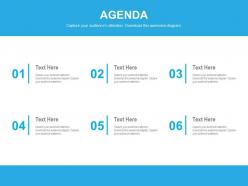
Diagrama de agenda com seis vários slides em PowerPoint de agendas de negócios
Try Before you Buy Download Free Sample Product
Audience
Editable
of Time
As conquistas dos objetivos de negócios exigem uma comunicação eficaz, que pode ser abordada usando nosso diagrama de agenda com seis slides em PowerPoint de várias agendas de negócios. O modelo da agenda do evento, as atas e o formato devem ser mantidos em mente antes de qualquer reunião de negócios. Esses slides de apresentação ajudam a explicar o propósito, as vantagens e a importância da agenda de negócios. Além disso, esses visuais PPT ajudam a destacar as seis principais agendas para os negócios. Pode incluir a lista de atividades e processos relacionados a serem iniciados no futuro. Junto com isso, os slides da apresentação são úteis em exemplos de agenda de reuniões e na criação de modelos de agenda. Além disso, essas fotos em PowerPoint fornecem impulso para conferências e reuniões oficiais. Todo o conteúdo da agenda e sua estrutura devem ser propositalmente destacados para a implementação eficaz dos planos e objetivos. O tempo é um atributo importante que deve ser mantido em mente para o cumprimento frutífero dos pontos da agenda. Junto com isso, a estrutura da reunião de gestão é uma questão importante que também não deve ser ignorada. Além disso, esses ícones PPT ajudam a fornecer um planejador personalizado para manter os pontos-chave na forma de agenda. Se você estiver enfrentando qualquer problema sobre o que e como a agenda deve ser feita, tente nossos temas em PowerPoint. Cada elemento é exibido corretamente em nosso Diagrama de Agenda com seis slides em PowerPoint de várias agendas de negócios. Eles têm olho para detalhes finos.
Recursos desses slides de apresentação do PowerPoint:
Fornece uma expressão clara da ideia que está sendo retratada nos gráficos da apresentação. Elaborado por profissionais especialistas tendo em mente todas as habilidades de apresentação. Construtivo para os usuários, como profissionais de negócios e marketing, destacando as seis agendas principais. Os modelos PPT podem ser visualizados em uma tela mais ampla de acordo com as necessidades do usuário. Os slides da apresentação podem ser editados em grande parte, incluindo o texto, a cor e as instruções.
People who downloaded this PowerPoint presentation also viewed the following :
Conteúdo desta apresentação em PowerPoint
Diagrama de agenda com seis slides em PowerPoint de agendas de negócios diferentes com todos os 4 slides:
Explodir a bola com suas ideias. Cubra todas as bases com nosso diagrama de agenda com seis slides em PowerPoint de agendas de negócios diferentes.
FAQs for Agenda diagram with six various business
So agenda diagrams are just visual layouts showing your presentation flow - could be flowcharts, timelines, whatever works. Put it near the start so people know what's coming. Most presenters skip this but honestly? Big mistake, especially for longer talks when people's minds wander or someone walks in halfway through. You can circle back to it between sections too, which is kinda nice for keeping everyone on track. Oh and actually USE it during your presentation - don't just throw it up there and forget about it. Keep the design clean and simple.
Basically it gives people a roadmap so they don't get lost (which is the worst). I always highlight where we are in the presentation - keeps everyone on track. Creates anticipation too instead of watching people's eyes glaze over midway through. The visual breaks up boring text slides, gives brains a rest. Here's what works: check off sections as you finish them. Sounds dumb but it actually builds momentum and shows you're making progress. People can see the finish line coming which honestly makes everyone happier.
Put the meeting objective right at the top of your diagram, then list out your main topics with how much time each one gets. I always add arrows or something to show how topics connect - makes it way easier to follow. Mark where you need decisions or actual deliverables, and write down who's running each part. Oh, and build in extra time because honestly? Meetings never stick to schedule. The whole point is making it visual so people can glance at it and immediately get what's happening and what they're supposed to do.
Design totally makes or breaks agenda retention. Clear sections and visual breaks? Game changer. I swear, half the agendas I see look like someone copy-pasted everything into Word and hit print. People zone out instantly. But group related stuff together, use white space, throw in some color for key points - suddenly brains can actually process it. Your audience will reference it during meetings instead of staring at their phones. Also helps if you don't make it look like a legal document, honestly. Try visual hierarchy next time and watch the difference.
Honestly, the biggest trap is overcomplicating things. Don't cram every detail into each box - people zone out when it gets messy. Time estimates are tricky too... that "5-minute check-in" always becomes 15, so build in buffer time. I used to go overboard with fancy colors and graphics (looked cool but nobody could follow it). Keep the flow logical, test it with someone first. Oh, and avoid making it so complex that half the room gets lost. Simple beats pretty every time when you're trying to actually run a meeting.
Honestly, color and typography are game-changers for agenda design. Use contrasting colors to make important stuff pop - helps people scan through without getting lost. I always go bold/bigger fonts for main topics, then scale down for the smaller details. Don't make my mistake of sizing everything the same though, it looks messy as hell. Good hierarchy basically walks people through your info step by step. Stick to 2-3 colors tops and pick readable fonts. You want someone to glance at it and immediately know what's happening when.
I'd go with **Lucidchart** or **Miro** for agenda diagrams. Lucidchart has solid meeting flow templates, but Miro's collaboration stuff is honestly pretty sweet if you're working with a team. **Canva** is another option - way more visual and user-friendly than the other two. You can also just use **PowerPoint** or **Google Slides** with their SmartArt tools if you don't want to learn something new. I always end up tweaking things forever in Lucidchart though, so maybe that's just me. Try the free version first and see what clicks.
Yeah, definitely customize those diagrams! Academic stuff needs numbered sections and clear methodology - keep it formal and structured. Business presentations should focus on time blocks and decision points with obvious timelines. Creative ones are where you can actually have fun - throw in colors, icons, maybe some sketches. Honestly, I've seen some pretty boring creative presentations that could've used way more visual punch. Match your style to whoever's watching. Start with a basic template, then just adapt it. The complexity should fit what your audience expects, not what looks coolest to you.
Think of agenda slides as giving your audience a heads up about what's coming. Nobody wants to sit there wondering if you're halfway done or just getting started - it's torture honestly. When people can see the roadmap upfront, they'll know which parts to really pay attention to based on what matters to them. Short sentences work here. You can break up longer sections mentally and prepare for topic shifts. Always throw it near the beginning, maybe slide 2 or 3. Then you can circle back to it if people seem lost later.
Start with your big topics, then add just enough detail so people aren't walking in blind. I always think of it like - what would I want to know beforehand? Use bullet points instead of long sentences, and group similar stuff together. Complex topics? Break them down into maybe 2-3 smaller pieces, tops. Honestly, most people just skim agendas anyway, so make it scannable. Ask yourself what your team actually needs to prep for. Keep tweaking it until someone could glance at it and immediately get the flow. The goal is clarity without information overload.
Oh, tons of options! Try timeline diagrams that flow sideways, or those circular ones where everything radiates from the center - they actually look pretty cool in presentations. For digital stuff, clickable flowcharts work great. Swim lane diagrams are perfect when multiple teams are involved since you can show who owns what. Here's a weird one that actually works: Kanban boards for longer workshops. You move items through "to discuss," "discussing," "done" columns. Honestly, anything beats those boring bullet point lists everyone defaults to. Just match whatever format to your meeting type and you'll be golden.
Get feedback right after you present - people forget details fast. Just ask a few quick questions about whether the agenda diagram made sense. I'm terrible at remembering to do this honestly, but it's so worth it when you actually follow through. Look for patterns in what people say. Did everyone stumble at the same transition? Was the timeline confusing? Write down the good stuff too, not just what bombed. Before your next presentation, run the updated version by someone you trust. Oh and keep notes somewhere - I've definitely recreated the same fixes multiple times because I forgot what worked.
Honestly, everything's going digital now - clickable timelines beat boring bullet points every time. People are throwing in tons of visual stuff too: icons, color coding, mini charts right in the flow. Gantt charts are everywhere suddenly (kinda overkill but whatever). The coolest part? Attendees can actually mess around with agendas beforehand - add their own questions, vote on what matters most. Makes meetings way less one-sided. You should try Miro or Figma for your next big one. Trust me, your team won't zone out as much when they can actually interact with something instead of staring at another boring slide deck.
Yeah, cultural stuff can totally throw off how people interpret your agenda diagrams. Time perception is huge - some cultures see time as flexible, so those rigid step-by-step flows feel weird to them. Others expect everything chronologically ordered. Hierarchy's another thing - certain cultures need clear authority levels shown, while others want everything flat. Oh, and colors/symbols mean completely different things depending where you are (red = danger vs. good luck, etc). I'd definitely test these with team members from different backgrounds first. Honestly might be worth making separate versions for different regions if you're going global.
Dude, interactive agenda diagrams are such a huge upgrade from boring PDFs nobody reads. You can throw in clickable sections that expand with details, timers for each topic, even live polls. People actually engage instead of checking their phones the whole time. Your team can navigate however they want and dig deeper into stuff that matters to them. The real-time feedback is clutch too - you can pivot if something's dragging on. Honestly just start with hover details or expandable bits. Way better than staring at static documents. Trust me, people will actually participate for once.
-
Really like the color and design of the presentation.
-
Qualitative and comprehensive slides.