Agile User Story Audit Checklist

Rating:
90%
Agile User Story Audit Checklist
Slide 1 of 6

or

Favourites Favourites

Try Before you Buy Download Free Sample Product

Audience Impress Your
Audience
Editable 100%
Editable
Time Save Hours
of Time
The Biggest Sale is ending soon in
0
0
:
0
0
:
0
0
Rating:
90%
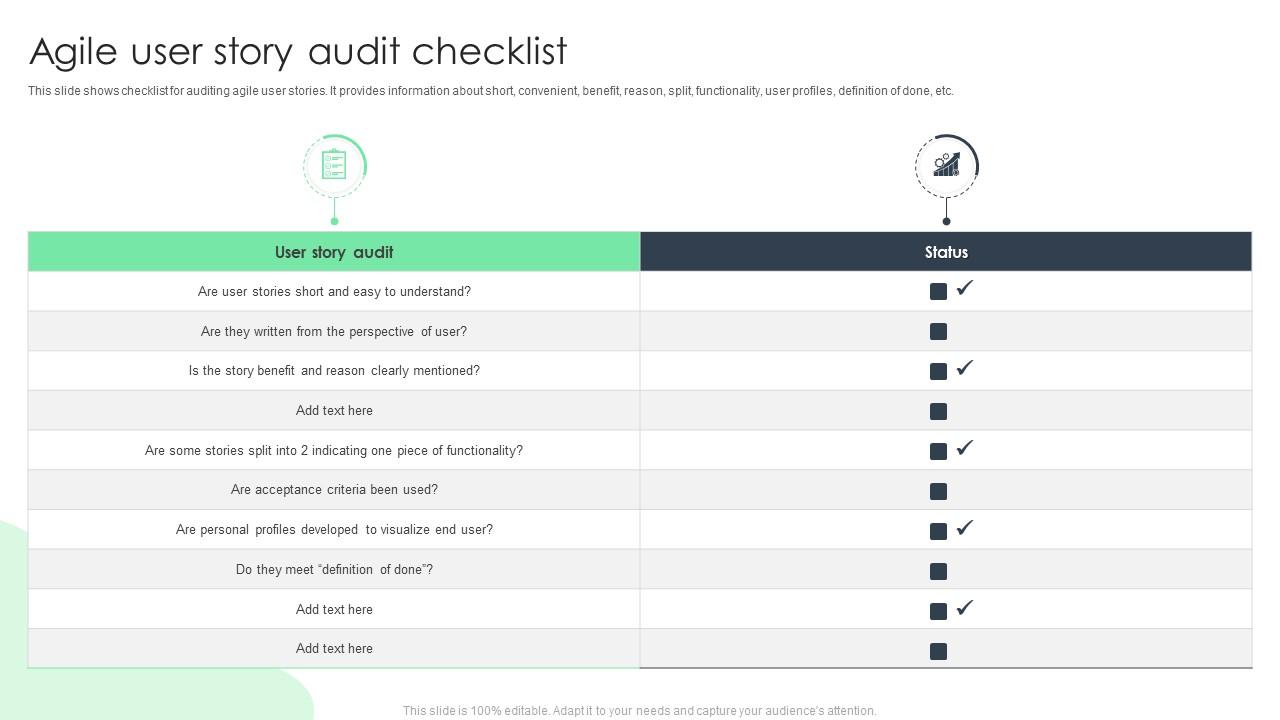
This slide shows checklist for auditing agile user stories. It provides information about short, convenient, benefit, reason, split, functionality, user profiles, definition of done, etc. Presenting our well structured Agile User Story Audit Checklist. The topics discussed in this slide are Personal Profiles, Acceptance Criteria. This is an instantly available PowerPoint presentation that can be edited conveniently. Download it right away and captivate your audience.

People who downloaded this PowerPoint presentation also viewed the following :

FAQs for Agile User

Good user stories need three things: who's using it, what they want to do, and why it matters. That "As a [user], I want [thing] so that [reason]" template works fine, but don't stress about perfect formatting. What really counts is adding clear acceptance criteria so everyone knows when you're actually done. Follow the INVEST rules - independent, negotiable, valuable, all that stuff. Write from the user's perspective, not how the system works internally. I always mess this up at first honestly. Keep them conversational and focus on what the user gets out of it. Just start practicing with whatever you're working on now - you'll get the hang of it.

Think of user stories as your team's way to talk about features without getting lost in tech jargon. They use this simple format: "As a [user], I want [goal] so that [benefit]" - which honestly feels weird at first but works. Developers, testers, and product people can all understand what you're actually building for users instead of arguing about implementation details. During sprint planning, they give you concrete stuff to discuss and help spot problems early. Try writing them together in your next refinement meeting. You'll see how much easier it gets when everyone's focused on the same user goals instead of technical rabbit holes.

There are a bunch of good ways to tackle this. MoSCoW is probably the easiest - just bucket everything into Must have, Should have, Could have, Won't have. Value vs. Effort matrices are great too because they're visual and help you find quick wins. WSJF gets into the math side if your team's into that (factors in cost of delay). Kano modeling focuses more on customer satisfaction impact. Oh, and story mapping - that one's clutch for understanding user flow. Honestly, the technique doesn't matter as much as being consistent with whatever you pick. Your team will thank you for it.

So user stories are basically the "why" - like "As a customer, I want to save my cart so I don't lose my stuff." They're written from the user's perspective and focus on value. Requirements get into the nitty-gritty technical details of how it actually works. Think of user stories as saying "I need to get downtown" while requirements map out the exact route and speed limits. Honestly, I like starting with user stories because they get everyone talking about the actual problem instead of jumping straight into specs. Then during sprint planning, you break those stories down into specific requirements. Way better workflow.

Acceptance criteria are your "definition of done" for each story. They're testable conditions that spell out exactly what needs to happen for a feature to be complete. Without them, you'll get those awkward moments where devs think they're finished but stakeholders expected something totally different. They keep everyone on the same page about what success looks like. Your QA team loves them too since they get clear testing scenarios. Oh, and write them before you estimate - trust me on this one. Otherwise you're just guessing at scope and that never ends well.

Honestly, user stories are genius because they flip your whole mindset. You're literally forced to think like the person who'll actually use this thing. The format is "As a [user], I want [goal] so that [benefit]" - and that last part? That's where you find the real problem you're solving. I always get users involved in writing these because they'll tell you stuff that never makes it into those boring requirements docs. Short sentences work great. But also ask yourself upfront: what's the actual pain point here? Sometimes what people ask for isn't what they really need.

Don't get too technical or super vague - both kill user stories. Write from the user's view, not the system's. Like "I want helpful error messages when my email's wrong" instead of "system validates emails." Keep stories bite-sized too. Those massive epics that drag on for weeks? Total nightmare. Always explain the why behind each story - what's the actual benefit? I learned this the hard way when my PM kept asking "so what?" about everything I wrote. Quick test: read your stories back and see if they'd make sense to someone who doesn't live in your codebase all day.

Use the INVEST criteria to break down your user stories - Independent, Negotiable, Valuable, Estimable, Small, and Testable. Anything taking more than a sprint? Too big. I look for natural split points like different user roles or workflows. Those stories that make you think "ugh, where do I even start?" are way too chunky. Focus on the tiniest slice that still gives users real value. Here's my rule: can't demo it in 5 minutes? Break it down more. Oh, and honestly, I've found that smaller stories just feel less overwhelming when you're actually coding them.

For stakeholder input, I'd start with user interviews - they're gold because you can really dig into the "why" behind what people need. Surveys are solid when you need feedback from a bunch of people fast, just way less detailed obviously. Story mapping workshops get everyone collaborating in real-time which is pretty cool, though they can turn into a total circus with too many voices. Oh, and definitely try shadowing users while they're actually working - you'll spot stuff they'd never think to tell you in an interview. If you're not sure where to begin, interviews are your best bet.

Honestly, you gotta figure out your success metrics *before* you start building anything - that's where most people mess up. Once it's live, check if users are actually doing what you expected them to do. Analytics will show engagement, but don't forget about user feedback too. Sometimes what looks like a total win in the data doesn't actually move your business goals at all, which is super frustrating. Set up tracking early so you're not scrambling later to prove if the story worked. Oh and acceptance criteria isn't just busy work - it's literally how you'll know if you succeeded.

INVEST is this framework for user stories - Independent, Negotiable, Valuable, Estimable, Small, and Testable. Basically it keeps you from writing those monster stories that nobody can estimate properly. I've totally been there with stories that seemed fine until sprint planning turned into a disaster. Your developers will love you when they can actually figure out how long something takes. Product owners can prioritize better too. Honestly, the "Small" part trips up most teams - we always think we can cram more into one story than we actually can. Just run your stories through this checklist before planning. Trust me on this one.

Dude, remote user stories are a whole different beast. You can't just walk over and ask "wait, what did you mean by this?" So pack way more detail into each story - acceptance criteria, mockups, the works. Honestly, video calls beat Slack every time for story refinement. Too much gets lost in translation otherwise. Don't forget to think about time zones when scheduling those discussions (learned that one the hard way). Tools like Miro help a ton for story mapping sessions. Basically you're gonna over-communicate everything that used to happen naturally around the office.

Honestly, Jira's the gold standard but it's way too much if you're just getting started - like bringing a bazooka to a water balloon fight. Trello's super clean and visual, perfect for smaller teams. Azure DevOps is solid if you're already using Microsoft stuff. Most people I know do story mapping with Miro or literally just Post-it notes on a whiteboard (old school but it works). Pick whatever your team will actually stick with. The fanciest tool means nothing if half your people ignore it.

Honestly, treat user stories like rough drafts that you'll keep tweaking. You're gonna refine them, split the big ones up, sometimes totally rewrite them as you figure out what users actually want. During sprint planning, go through your backlog and update stuff based on feedback. Don't stress about getting everything perfect upfront - that initial messiness is totally normal. Your product owner will be your best friend here, helping you sort out what changes actually matter versus random requests that'll just derail you. The whole point is letting them evolve as you learn more about technical limits and user needs.

Definitely start with story mapping so everyone can see the user journey visually. Break people into small groups after that - way better than one giant discussion that goes nowhere. Oh, and bring tons of sticky notes, seriously more than you think because people get weird about their colors lol. Your product owner needs to be there to make calls on the spot, otherwise you'll just end up with a million "we'll circle back on this" moments. Timebox everything or discussions will drag forever. Keep a parking lot for random stuff that comes up. Most importantly, get people actually writing stories together instead of just talking about writing them.

Ratings and Reviews

90% of 100
Review Form
Write a review
Most Relevant Reviews
  1. 100%

    by Alexander Ramirez

    The PPTs are extremely simple to modify. Thank you for providing the slides that are ready to be used. They assist me in saving a lot of time.
  2. 80%

    by Walsh Turner

    “The presentation template I got from you was a very useful one.My presentation went very well and the comments were positive.Thank you for the support. Kudos to the team!”

2 Item(s)

per page: