


Ap timeline text infographics for text representation powerpoint template





Try Before you Buy Download Free Sample Product
 Impress Your
 Audience
 100%
100% Editable
 Save Hours
 of Time


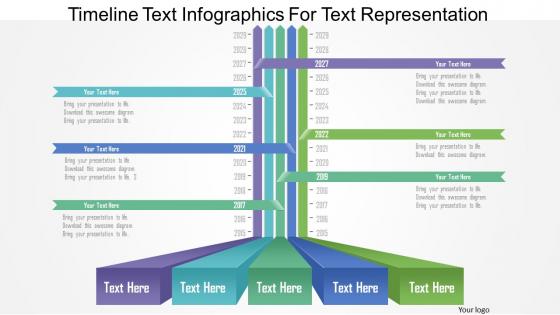
Formulating timelines is a task in itself. This goes on to show how difficult it can be to stage a PowerPoint presentation which does not lose the essence of a designed timeline. With our ap timeline text infographics for text representation PowerPoint template, it has become extremely easy to design a PowerPoint template wherein all the necessary details of a timeline are covered and further explained with the help of high quality graphics. This PPT layout shows a timeline which can accommodate an entire network of time-based events and collaborate all of them in a single go. The layout of the PPT diagram is fairly easy to understand and with different color schemes available, the audience is bound to pay all the attention. Further, as the PPT slide allows addition of text, it become fairly easy for the facilitator to explain the concept of the presentation. Download this PowerPoint diagram to take the load of your shoulders when it comes to designing and explaining the concept of a timeline. Go beyond the comfortable with our Ap Timeline Text Infographics For Text Representation Powerpoint Template. Get adventurous in your endeavor.
People who downloaded this PowerPoint presentation also viewed the following :
Ap timeline text infographics for text representation powerpoint template with all 5 slides:
Our Ap Timeline Text Infographics For Text Representation Powerpoint Template have an alto centric approach. They enjoy being of benefit.

FAQs for Ap timeline text infographics for text
So start with clear dates and your big milestones - that's the backbone. I'd sketch it on paper first honestly, saves you time later. Go chronological, left to right or top to bottom, whatever clicks for you. Don't overcrowd it with text (I always mess this up lol). Bullet points work way better than paragraphs. Throw in some icons or images to break things up. Color coding helps group related stuff together. Make sure there's an obvious start and end point. Oh, and add context where people might get confused - you know your audience better than anyone else does.
Start with a clear timeline - bold dates work great. Be super picky about what makes the cut though, because cramming everything in just creates a mess. Bullet points and color coding help group stuff together. Honestly? Icons beat paragraphs every time. Way cleaner. Your friend should glance at it for like 30 seconds and immediately get the cause-and-effect stuff. Short sentences work better than long explanations, and don't forget white space - it prevents that overwhelming poster-board-from-hell vibe. The whole point is showing connections between events, not writing a novel.
Stick to 2-3 colors max - any more gets messy fast. I'd go with one main color for the timeline backbone, then use a contrasting accent for important dates. Blue and orange is honestly my go-to combo because it looks clean but still grabs attention. Just make sure there's decent contrast so people can actually read the text, especially if they're printing it out. Skip the neon stuff unless you want to blind your audience lol. Oh, and here's something that saved me once - convert everything to grayscale first. If you can still tell elements apart, you're good to go.
Check the AP framework percentages first - that's literally what they care about most. Look for events that either sparked major changes or show those bigger historical patterns they love. I always ask "would the story completely change without this?" If yes, it goes on the timeline. Also, definitely browse old exam questions since they recycle topics constantly. Events connecting multiple themes are perfect. You want those "must-knows" from the framework, but throw in 2-3 unexpected ones that show you actually get the deeper connections. Those surprise picks can really make your timeline stand out.
Honestly, timeline infographics are all about keeping things flowing smoothly - left to right or top to bottom works best. Icons are your friend here since people instantly get what they mean, plus they don't clutter everything up. I always use connecting lines or progress bars to show how time moves, maybe throw in some numbered circles too. Photos can look amazing if they actually relate to your events, but man, they get messy quick if you go overboard. Color coding different sections helps people track what's happening. The whole point is making it brain-dead easy to follow without losing anyone along the way.
Honestly, interactive stuff makes such a huge difference for AP timelines! Students actually click around instead of zoning out. Try starting with hover effects that show extra details or cause-and-effect connections. Clickable hotspots work great too - they reveal deeper explanations when students want them. The filtering thing is probably my favorite though - like letting kids toggle between "political events" vs "social movements." Makes patterns pop out way better. Oh, and you could throw in quick quizzes at major turning points. Students remember way more when they're actively messing around with the content rather than just staring at dates.
Honestly, just start with Canva or Adobe Express - they have tons of timeline templates you can customize without much hassle. PowerPoint actually works great too (I know, I know, but their timeline features are surprisingly solid). Need something fancier? Adobe Illustrator gives you way more control over the design. For interactive stuff, TimelineJS and Tiki-Toki are both solid options. Really depends on how much time you want to spend on this and your design skills. I'd say go with Canva first, then upgrade if it's not cutting it for what you need.
Know your audience first - that's huge. Little kids need big fonts, simple words, and tons of pictures or they'll zone out completely. Middle schoolers can handle more info but make it look cool. High schoolers? Go nuts with the details. White space is your friend, especially for younger kids. Adults can deal with cramped timelines, but 4th graders will take one look and give up. Pick your 3-5 must-know events first, then add layers. I learned this the hard way - tried cramming everything in once and it was a disaster.
Oh man, don't cram everything onto one timeline - that's the worst. Your fonts will end up tiny and nobody can read anything. I see people do this all the time and it looks awful. Pick like 2-3 colors max, otherwise it's just chaos. Also make sure your dates actually flow logically? Sounds obvious but I've seen timelines that jump around randomly. Super confusing. Keep descriptions short and sweet. Honestly, the spacing thing matters more than you'd think - inconsistent gaps make it look sloppy. Test it on someone first though, because if they're squinting or asking questions, you need to simplify.
Aim for about 30% text, 70% visuals - let the graphics do the heavy lifting. I've seen way too many "infographics" that are basically essays with random icons scattered around. Not the vibe you want. Make your text work in layers: bold headlines, short bullet points, maybe some brief explanations. The visuals should tell most of the story on their own. Text is just there to fill gaps and add context. Here's a quick test - squint at your design and see if you can still follow the main points. If it's all blurry text, you need more graphics and less writing.
Honestly, think of your timeline like you're telling a story people actually want to hear. Start with something that hooks them right away, then build up tension through the key events. Don't just list dates - show how each moment led to the next one. The human drama is what makes it interesting, not just the facts. Visual stuff helps too - throw in some icons, play with colors, make the big moments look bigger. I always frame mine around a question that gets answered by the end. Makes it feel like solving a mystery or something.
Timelines are honestly perfect for breaking down those crazy complex historical periods. Students can actually follow what's happening instead of getting lost. Don't stuff too much on there though - I learned that the hard way! Pick your key turning points and maybe use some color coding or visuals to show patterns. The cause-and-effect connections become super obvious when you lay everything out chronologically. Oh, and if you're presenting, reveal sections bit by bit to keep people engaged. Here's the thing though - they work way better as conversation starters than just boring reference materials.
You definitely need proper sources for your AP timeline - credibility is everything when you're dealing with historical stuff. Without citations, it just looks like you made everything up, which obviously isn't what you want. Double-check where each date and fact comes from before you publish anything. AP standards are pretty strict about transparency anyway, so you've got to show your work. I'd recommend adding clickable links right on the infographic itself, or at least clear citations people can actually find. Timelines compress so much info into small bits that readers should be able to verify what you're saying. Trust me, it's worth the extra effort.
Honestly, timelines are amazing for cause-and-effect stuff. Students can actually *see* how events connect - like the 1920s economic mess leading straight into the Depression. Way better than just reading about it in paragraphs. The visual spacing shows whether things happened right away or took forever to play out. I always have my kids make their own timelines for units now. They'll spot connections I never even mentioned - it's kinda wild how much they pick up on. Plus it beats lecturing at them about "this caused that" all day.
Timeline design changes so fast it's crazy. Interactive ones are everywhere now - users can zoom in and filter instead of just scrolling through boring static stuff. Colors follow whatever's trendy (flat design was EVERYWHERE for like 3 years). Bold typography is in, and everyone's experimenting with vertical vs horizontal layouts. Mobile-first is basically required at this point. The data viz side keeps getting more sophisticated too, showing how events connect to each other. Honestly, I just check design blogs every few months and refresh my templates once a year to keep up.
-
It saves your time and decrease your efforts in half.
-
Thanks for all your great templates they have saved me lots of time and accelerate my presentations. Great product, keep them up!